- 投稿日:2020-03-10T18:14:09+09:00
UIScreenEdgePanGestureRecognizer が Simulator で反応しない件
今回解決したいこと
iOS 7 から追加された
UIScreenEdgePanGestureRecognizerを使えば、通常のパンジェスチャー(ドラッグジェスチャー)と違って、画面の左端からパンしたときだけに反応するエッジパンジェスチャーを実装することができます。
しかし、なぜかシミュレーターで実行していると、本当は反応するはず が、反応しない!!!という罠にはまりました。解決法
シミュレーターで、 ベゼル表示をオン にすれば画面端からパンすることができます!!!
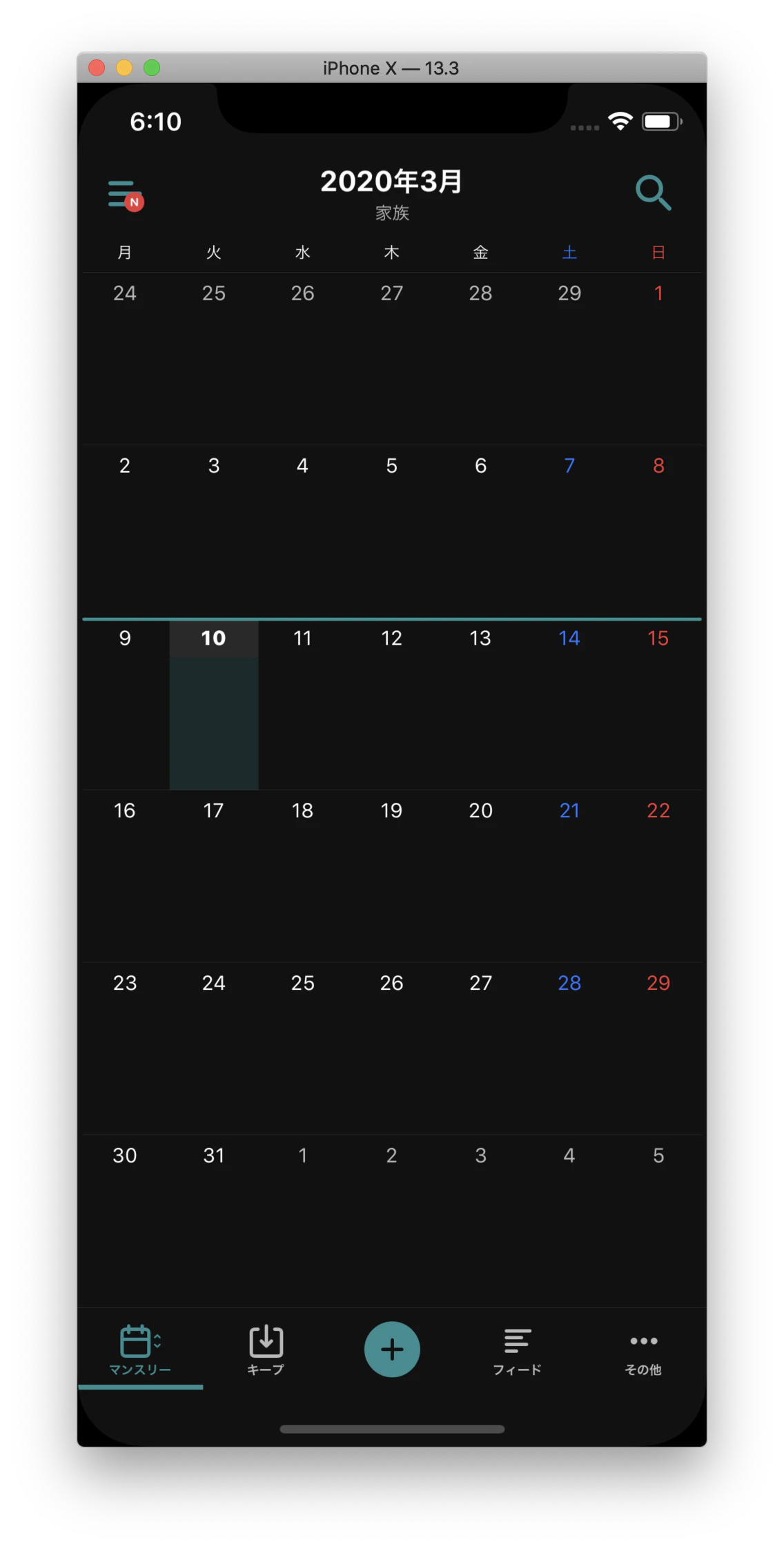
こう?(ベゼル表示オフ)
ではなくて、
こう?するってことですね!!(ベゼル表示をオン)
ベゼル表示は、シミュレーターのメニューからオンにできます?
Simulator > Window > Show Device Bezels関連


- 投稿日:2020-03-10T02:38:44+09:00
【翻訳】あなたの(多分)まだ知らない iOS パフォーマンスアドバイス(元アップルエンジニアから)
本記事はこの記事の日本語訳です。翻訳許可をいただいております。
以下翻訳:
もし Cocoa 開発やソフトウェアビジネスのブートストラップについての最新の記事を常にキャッチアップしたいなら、ぜひ Twitter で私をフォローするかメールリストを購読してください。
開発者として、パフォーマンスの良さは我々のユーザにワクワクと嬉しさを与えるのに評価しきれないほど貴重なものです。iOS ユーザの目は非常に高く、そのためもしあなたのアプリが動作がモサモサしたり、すぐにメモリプレッシャーでクラッシュしたりすると、彼らはあなたのアプリを削除するか、最悪悪いレビューまで残してしまうでしょう。
私はアップルに 6 年間を在籍し、その歳月を Cocoa フレームワークやファーストパーティーのアプリに費やしてきましいた。私が手掛けたものには Spotlight、iCloud、app extensions、そして最近は Files などがあります
そして私は 20% だけの時間を使って 80% のパフォーマンス向上が達成できるとても手軽なパターンがあることに気づきました。
さてここからこれらのパフォーマンスについてのアドバイスを書きますので、あなたのお役に立てたら幸いです。
1.
UILabelのコストはあなたの想像を超える
我々はラベルはメモリ利用量的にとても軽いと想像しがちです。何せ、彼らは単純にテキストの表示だけですので。しかし、
UILabelは実はビットマップとして保存されており、そのためメモリ利用が簡単に何メガバイトにも達してしまいますありがたいことに、
UILabelの実装は非常に賢いです、彼は必要最低限のことしかしません
- もしあなたのラベルはモノクロなら、
UILabelは自動的にCALayerContentsFormatの設定をkCAContentsFormatGray8Uint(1 バイト/ピクセル)にし、それ以外(例えば"?it’s party time"のテキスト、もしくはマルチカラーなNSAttributedStringを表示するラベル)ならkCAContentsFormatRGBA8Uint(4 バイト/ピクセル)にします。つまり、モノクロのラベルなら最大
width * height * contentScale^2 * (1 バイト/ピクセル)のバイト数を必要とするが、カラーのラベルはそれの 4 倍:つまりwidth * height * contentScale^2 * (4 バイト/ピクセル)が必要とします。例えば、iPhone 11 Pro Max に、
414 * 100のポイントサイズのラベルはこれだけのメモリ量が必要とします:
- 414 * 100 * 3^2 * 1 = 372.6kB(モノクロ)
- 414 * 100 * 3^2 * 4 = ~1.49MB(カラー)
編集:
UIKit エンジニアとの Twitter でのディスカッションの末、注意書きを一つ足すことにしました:
必ず先にメモリ計測しましょう、そしてあなたのパフォーマンスの問題は本当にラベルによるメモリプレッシャーが起因としたものだと断定できる場合のみ下記の変更を行ってください。
UIKit の @Inferis から:
例として:仮に将来 UILabel のバッキングストアの(再)利用最適化がアップデートされた場合、あなたの今行った最適化は物事を(潜在的にかなり)悪くしてるだけ。
一つのよくあるアンチパターンは
UITableView/UICollectionViewのセルが再利用キューに入った時,セルラベルのテキスト内容をそのままにしてセルラベルを生かしておくことです。セルがリサイクルされた時、ラベルのテキスト内容が変わる可能性が非常に高いです、そのためラベルを保存するのは非常に無駄です。メガバイトレベルのメモリを空けるためには:
- ラベルを隠して、ほんのたまにしか表示しない時はラベルの
textを nil 代入しましょう。UITableView/UICollectionViewのセルに表示してるラベルは、下記のメソッドでtextを nil 代入しましょう:tableView(_:didEndDisplaying:forRowAt:) collectionView(_:didEndDisplaying:forItemAt:)2. 常にシリアルキューを利用し、コンカレントキューは最後の手段として保留せよ
一つのよくあるアンチパターンは、UI に影響しないブロックを、メインキューからグローバルなコンカレントキューにディスパッチすることです。
例えば:
func textDidChange(_ notification: Notification) {
    let text = myTextView.text
    myLabel.text = text
    DispatchQueue.global(qos: .utility).async {
        self.processText(text)
    }
}
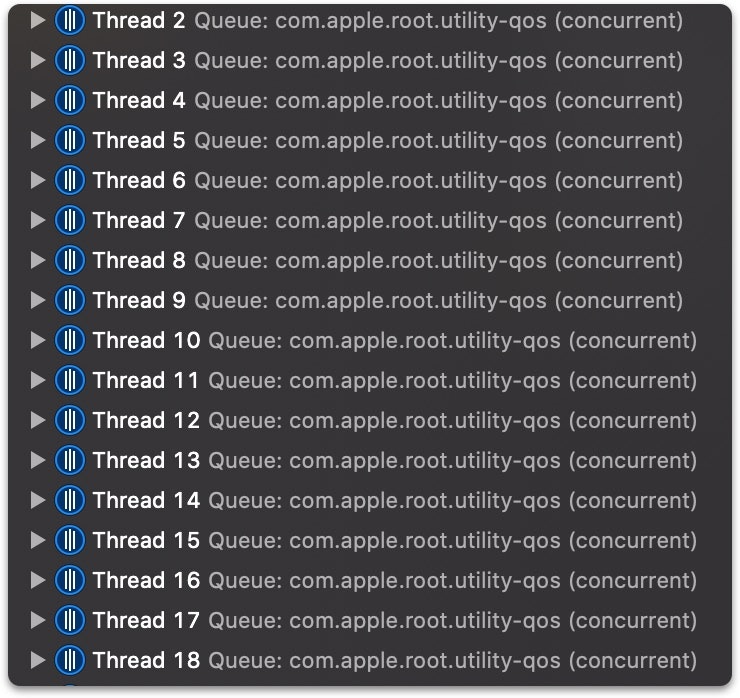
もしここでアプリを中断すると:
あなたがブロックをコンカレントキューに
dispatch_asyncした時、GCD はスレッドプールからアイドリングしているスレッドを探し、そのスレッドでブロックを動かそうとします。そしてもしアイドリングなスレッドが見つからなかった時、仕方ないのでその仕事のために新しいスレッドを作るしかありません。そのため、速いペースでブロックをコンカレントキューにディスパッチすると、速いペースで新しいスレッドを作らなくてはならないことになりかねないです。忘れないでください:
- スレッドの作成はただではありません。もしあなたが出したブロックの仕事量が少ない(< 1ms)なら、新しいスレッドの作成は非常に無駄です、なぜならそれには実行コンテキスト、CPU サイクル、そして dirty メモリ等のスイッチングが発生するからです。
- GCD は喜んであなたにスレッドを作成しちゃいます、結果的にスレッド爆発が起こります。
一般的には、常に数の限られたシリアルキューからスタートすべきで、それぞれのキューにあなたのアプリのサブコンポーネント(DB キュー、テキスト処理キュー、などなど…)を現すべきです。そして自分自身のシリアルキューを持つ小さいオブジェクトには、
dispatch_set_target_queueを使って先ほどのサブコンポーネントキューにターゲットセットすればいいです。あなたのボトルネックが追加の並列化で解決できる時のみ、あなたが作ったコンカレントキュー(
dispatch_get_global_queueではなく)を使い、そしてdispatch_applyの利用を考えましょう。
dispatch_get_global_queueについての注意:あなたが
dispatch_get_global_queueから取得したコンカレントキューは、システムへの QoS1 情報の転送が苦手であり、回避すべきです。libdispatch の Pierre Habouzit からの引用:
dispatch_get_global_queue()は実践上 dispatch API が提供してるものの中に最悪の部類の一つです、なぜならランタイムがどれだけ尽力しても、実行時にあなたのオペレーション/アクター/などなど…についての情報が足りないため、あなたがやろうとしてることを理解できず最適化もできない。libdispatch の効率化アドバイスについてのもっと詳しい情報は、ぜひこちらの文章をご確認ください。
3. そう見えるほど、コードが悪くないかもしれない
さてあなたができる限りのメモリ利用量の最適化をしてきました、しかしそれでもしばらくアプリを使うとメモリ利用量が上がったまま下がりません。
焦らないでください、一部のシステムコンポーネントはメモリワーニングをもらわない限りメモリを解放しないだけです。
例えば、
UICollectionViewは(iOS 13 から)-didReceiveMemoryWarningに反応し、メモリが足りなくなったら再利用キューのメモリをクリアしますメモリワーニングをシミュレーションするには:
- iOS Simulator の場合、メニューから
Simulate Memory Warningを選びます- 実機の場合、このプライベート API を呼び出します(App Store には提出しないように)
[[UIApplication sharedApplication] performSelector:@selector(_performMemoryWarning)];4.
dispatch_semaphore_tを使って非同期作業を待たないようにここには一つよくあるアンチパターンがあります:
let sem = DispatchSemaphore(value: 0)
makeAsyncCall {
    sem.signal()
}
sem.wait()
これの問題は
makeAsyncCallを呼び出したスレッドから、実際の処理が行われているスレッドに優先度の情報が伝えられず、優先順位の逆転に繋がることです。
- 例えばメインキューから
makeAsyncCallを呼び出し、QoS がQOS_CLASS_UTILITYの DB キューに作業をディスパッチしたとします。makeAsyncCallがメインキューからdispatch_asyncを呼び出したおかげで、実際の DB キューの QoS はQOS_CLASS_USER_INITIATEDに上げられます。- セマフォでメインキューをブロックすると言うのは、メインキューは(自身の QoS である
QOS_CLASS_USER_INTERACTIVEよりも順位が低い)QOS_CLASS_USER_INITIATEDの仕事が終わるまで待たなくてはいけず2、すなわち優先順位の逆転が発生してしまいます。
XPC3 についての補足です:もしあなたが既に XPC を利用しており(macOS アプリか、もしくは
[NSFileProviderService](https://developer.apple.com/documentation/foundation/nsfileproviderservice)を利用しているなら)、そして同期な呼び出しを行いたい場合は、セマフォを使うのではなく、代わりに下記のコードを使って同期プロキシにあなたのメッセージを送りましょう:-[NSXPCConnection synchronousRemoteObjectProxyWithErrorHandler:]5.
UIViewの tag を使わないようにこれは悪い実践であり、臭うコードを示します。そしてパフォーマンス的にも悪いです。
私は最近こんなコードと出会いました、そのコードは一つのビューをタップしたら、そのビューの小ビューの色をそれらの tag の値に応じて変更するものです。
UIKit は tag の実装に
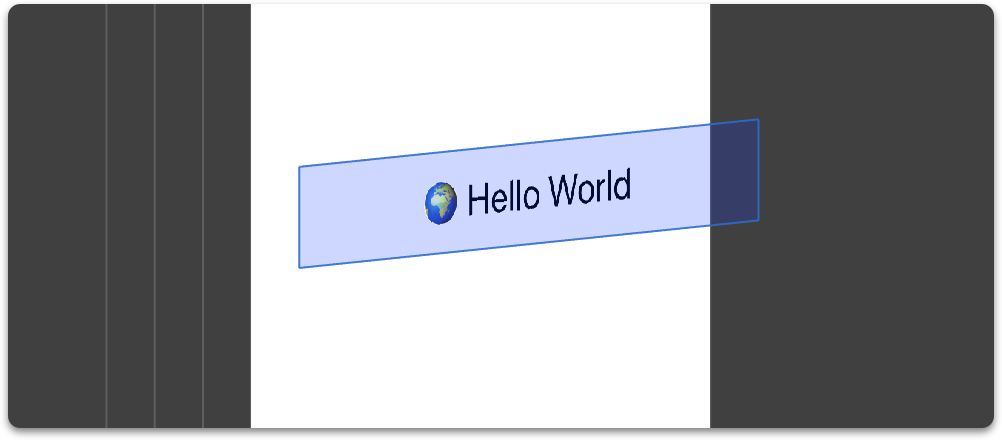
objc_get/setAssociatedObject()を使っています、それはつまりあなたが tag をゲット/セットする度に、実は辞書参照を行っており、実行中だと Instruments ではこのように表示されるのです:
編集:これはせいぜい微々たる最適化にすぎません。私が伝えたいことは:1)驚くべきことに、
-[UIView tag]は Objective-C の associated objects に依存しているのと、2)これはパフォーマンスに厳しいコードに多用する時だけインパクトを与えます。終わりに
あなたがこれらのアドバイスを読み終わったら、今日新しい知見を持ち帰れたと祈ります。いつもと同じ、必ずパフォーマンス調整する前に必ず計測してください。
何か質問?他のパフォーマンスアドバイスを共有したい?ぜひコメントで私に知らせてください!
追伸
ここで私の素敵な Mac ユーティリティを確認できます。
編集
UICollectionView/UITableViewを利用した時のラベルの nil 代入の内容について修正を入れてくれた Paul Hudson に感謝します。
訳者後書:私に本記事についての内容について問い合わせても、努力はしますが必ずしも答えられるわけではありませんのでご了承ください。英語で直接本文著者に問い合わせることをお勧めします。
Quality of Service。GCD が制御するキューの優先順位を表す型です。詳しくは公式資料をご参照ください。 ↩
原文が全部大文字になっているためちょっと微妙に紛らわしいように見えますが、よく見てください。Swift の構文に直すと、メインキューの QoS は
.userInteractiveであり、作られた DB キューの QoS は.utility→.userInitiatedです。Interactive と Initiated の違いです。 ↩サンドボックスをアクセスするなど、プロセス間のコミュニケーションを安全に行うための管理ライブラリーです。詳しくは公式資料をご参照ください。 ↩


- 投稿日:2020-03-10T00:07:04+09:00
新 App Store 審査ガイドライン 翻訳&差分ガイド 2020年3月号
はじめに
これは2020年3月4日付けで変更された App Store 審査ガイドラインの翻訳&差分ガイドです。
前回からの主な変更点は、プッシュ通知の広告利用や飽和カテゴリの更新などです。これまでプッシュ通知の広告利用は禁止されていましたが、条件付きで認める方針に変更されました。App Store で飽和しているカテゴリには、占いや出会い系が加わり、該当アプリの審査は厳しくなるようです。
multi-playerからmultiplayerへの変更など、軽微な変更は修正項目から除外しています。https://developer.apple.com/app-store/review/guidelines/
修正の撤回
1.4.4 と 5.1.5 について、改訂翌日に変更が無かったことにされているため、改訂当日に確認した方は注意が必要です。
急遽撤回されただけなのか、明示しない方針に変えたのか、真意は不明ですが、少なくとも文書上では 1.4.4 と 5.1.5 は変更無し、が正です。
本記事では「修正撤回項目」として記しておきます。2020年4月30日
事前の告知通り、2020年4月30日を期限としている対応事項がいくつかあります。
- UIWebView から WKWebView への移行 (既存アプリは2020年12月まで猶予有)
- Sign in with Apple の対応
- iOS 13 SDK の利用
WWDC 2019 で告知されていた、
- Adopt Launch Storyboards
- Support any size
- Support Split Screen Multitasking
の期限も同日です。
Adopt Launch Storyboards
Storyboard による起動画面への完全移行。
LaunchImage、古くはDefault.pngで定義してきた起動画面の「一枚画」対応はこれにて終幕です。Support any size
iOS アプリであれば、全ての iPhone 画面に対応。
iPadOS アプリであれば、全ての iPad 画面に対応。Support Split Screen Multitasking
この項目は、その後の方針に変化が見受けられました。
2020年1月の告知 では必須から推奨に変わっているため、画面分割の対応は必須ではない、が現状の認識です。新規項目
5.1.1 Data Collection and Storage
(ix) 規制の多い分野や機密情報に関わるアプリは法人提出が必須。
Apps that provide services in highly-regulated fields (such as banking and financial services, healthcare, and air travel) or that require sensitive user information should be submitted by a legal entity that provides the services, and not by an individual developer.
同等の内容は以前から別項目で散見されていたので、改めて明示しただけ。
5.6.1 App Store Reviews
コメントには敬意を持ち対応。個人情報や広告を含めることは不可。
App Store customer reviews can be an integral part of the app experience, so you should treat customers with respect when responding to their comments. Keep your responses targeted to the user’s comments and do not include personal information, spam, or marketing in your response.
レビュー促進には提供された API を使用。独自実装は不可。
Use the provided API to prompt users to review your app; this functionality allows customers to provide an App Store rating and review without the inconvenience of leaving your app, and we will disallow custom review prompts.
旧 1.1.7 が 5.6.1 に移行しただけ。これに伴い 1.1.7 は消滅。
修正項目
1.2 User Generated Content
ポルノやいじめのために使われているユーザ投稿型アプリは予告なく削除。ウェブベースの投稿はオプトイン形式で表示可。
Apps with user-generated content or services that end up being used primarily for pornographic content, Chatroulette-style experiences, objectification of real people (e.g. “hot-or-not” voting), making physical threats, or bullying do not belong on the App Store and may be removed without notice. If your app includes user-generated content from a web-based service, it may display incidental mature “NSFW” content, provided that the content is hidden by default and only displayed when the user turns it on via your website.
Chatroulette-style experiencesを追記。3.1 Payments
3.1.3(b) Multiplatform Services: マルチプラットフォーム展開のアプリは他所で購入したコンテンツの利用を許可。アプリ内購入を阻害するような施策は不可。
Apps that operate across multiple platforms may allow users to access content, subscriptions, or features they have acquired in your app on other platforms or your web site, including consumable items in multiplatform games, provided those items are also available as in-app purchases within the app. You must not directly or indirectly target iOS users to use a purchasing method other than in-app purchase, and your general communications about other purchasing methods must not discourage use of in-app purchase.
elsewhereからin your app on other platforms or your web siteに変更。4.2 Minimum Functionality
4.2.3(iii) 追加リソースをダウンロードする場合はダウンロードサイズを事前に開示。
If your app needs to download additional resources, disclose the size of the download and prompt users before doing so.
Existing apps must comply with this guideline in any update submitted after January 1, 2019.を削除。4.3 Spam
類似アプリの量産は不可。スパム行為は開発者登録を抹消。
Don’t create multiple Bundle IDs of the same app. If your app has different versions for specific locations, sports teams, universities, etc., consider submitting a single app and provide the variations using in-app purchase. Also avoid piling on to a category that is already saturated; the App Store has enough fart, burp, flashlight, fortune telling, dating, and Kama Sutra apps, etc. already. We will reject these apps unless they provide a unique, high-quality experience. Spamming the store may lead to your removal from the Developer Program.
fortune telling, datingを追記。
We will reject these apps unless they provide a unique, high-quality experience.を追記。占いや出会い系は、審査を厳しくする表明。
4.5 Apple Sites and Services
4.5.4 プッシュ通知に依存する機能は不可。機密情報の送信は不可。アプリで同意を得てオプトイン・アウトの手段を提供できれば広告の送信は可能。サービスの乱用は機能停止。
Push Notifications must not be required for the app to function, and should not be used to send sensitive personal or confidential information. Push Notifications should not be used for promotions or direct marketing purposes unless customers have explicitly opted in to receive them via consent language displayed in your app’s UI, and you provide a method in your app for a user to opt out from receiving such messages. Abuse of these services may result in revocation of your privileges.
プッシュ通知の広告利用を条件付きで認める方針に変更。
4.7 HTML5 Games, Bots, etc.
(6) デジタル商品やサービスの販売は不可。
does not offer digital goods or services for sale.
support digital commerceからoffer digital goods or services for saleに変更。4.8 Sign in with Apple
サードパーティログインを使用するアプリには Sing in with Apple が必須。
Apps that use a third-party or social login service (such as Facebook Login, Google Sign-In, Sign in with Twitter, Sign In with LinkedIn, Login with Amazon, or WeChat Login) to set up or authenticate the user’s primary account with the app must also offer Sign in with Apple as an equivalent option. A user’s primary account is the account they establish with your app for the purposes of identifying themselves, signing in, and accessing your features and associated services.
exclusively use a third-partyからuse a third-partyに変更。方針が変わったわけではなく、説明が明確になっただけな気がする。
5.2 Intellectual Property
5.2.1 Generally: 他者素材の無断使用や誤解を招く表現は不可。アプリは権利関係者から提供。
Don’t use protected third-party material such as trademarks, copyrighted works, or patented ideas in your app without permission, and don’t include misleading, false, or copycat representations, names, or metadata in your app bundle or developer name. Apps should be submitted by the person or legal entity that owns or has licensed the intellectual property and other relevant rights.
and is responsible for offering any services provided by the appを削除。「あらゆるサービス提供」は範囲が広すぎたため?
5.5 Mobile Device Management
モバイルデバイス管理 (MDM) サービスはアップルに申請が必要。サービス提供者は企業限定。使用前にユーザデータの用途説明を明示。いかなる目的でも第三者にデータを開示しないことをプライバシーポリシーに含める必要有。特定の条件でサードパーティの分析を許可。違反者は開発者登録を抹消。
Mobile Device Management Apps that offer Mobile Device Management (MDM) services must request this capability from Apple. Such apps may only be offered by commercial enterprises (such as business organizations, educational institutions, or government agencies), and in limited cases, companies using MDM for parental control services or device security. You must make a clear declaration of what user data will be collected and how it will be used on an app screen prior to any user action to purchase or otherwise use the service. MDM apps must not violate any applicable laws. Apps offering MDM services may not sell, use, or disclose to third parties any data for any purpose, and must commit to this in their privacy policy. In limited cases, third-party analytics may be permitted provided that the services only collect or transmit data about the performance of the developer’s MDM app, and not any data about the user, the user’s device, or other apps used on that device. Apps offering configuration profiles must also adhere to these requirements. Apps that do not comply with this guideline will be removed from the App Store and you may be removed from the Apple Developer Program.
後半は新規追加文。サードパーティの分析を条件付きで認める緩和策。
修正撤回項目
1.4.4
2020年3月4日 改訂当日
Apps used to commit or attempt to commit crimes of any kind by helping users evade law enforcement will be rejected. Apps may only display DUI checkpoints that are published by law enforcement agencies, and should never encourage drunk driving or other reckless behavior such as excessive speed.
2020年3月5日 以降
Apps may only display DUI checkpoints that are published by law enforcement agencies, and should never encourage drunk driving or other reckless behavior such as excessive speed.
内容
翌日に
Apps used to commit or attempt to commit crimes of any kind by helping users evade law enforcement will be rejected.が削除されました。最終的に 1.4.4 の項目は、前回の2019年9月改訂と同じ記載に落ち着いてます。
5.1.5 Location Services
2020年3月4日 改訂当日
Use Location services in your app only when it is directly relevant to the features and services provided by the app. You may use location-based APIs to provide emergency services only if you provide notice to your users in your app’s UI that such services may not work in all circumstances. Location-based APIs shouldn’t be used to provide autonomous control over vehicles, aircraft, and other devices, except for small devices such as lightweight drones and toys, or remote control car alarm systems, etc. Ensure that you notify and obtain consent before collecting, transmitting, or using location data. If your app uses location services, be sure to explain the purpose in your app; refer to the Human Interface Guidelines for best practices on doing so.
2020年3月5日 以降
Use Location services in your app only when it is directly relevant to the features and services provided by the app. Location-based APIs shouldn’t be used to provide emergency services or autonomous control over vehicles, aircraft, and other devices, except for small devices such as lightweight drones and toys, or remote control car alarm systems, etc. Ensure that you notify and obtain consent before collecting, transmitting, or using location data. If your app uses location services, be sure to explain the purpose in your app; refer to the Human Interface Guidelines for best practices on doing so.
内容
翌日に
You may use location-based APIs to provide emergency services only if you provide notice to your users in your app’s UI that such services may not work in all circumstances.が削除されました。最終的に 5.1.5 の項目は、前回の2019年9月改訂と同じ記載に落ち着いています。