20190324のlaravelに関する記事は8件です。

LaravelのSQL動作確認(Laravel学習メモ#3-2)

◆実行されるSQL文確認

User::where('name', '山田')->toSql();

◆実行されたSQLをログ保存

DB::enableQueryLog();
userList = User::where('name', '山田')->get();
foodList = Food::where('name', 'ラーメン')->get();
DB::disableQueryLog();
  • このエントリーをはてなブックマークに追加
  • Qiitaで続きを読む

LaravelのSQL動作確認方法(Laravel学習メモ#3-2)

◆実行されるSQL文確認

User::where('name', '山田')->toSql();

◆実行されたSQLを一気に確認

DB::enableQueryLog();//SQL保存有効
$userList = User::where('name', '山田')->get();
$foodList = Food::where('name', 'ラーメン')->get();

dd(DB::getQueryLog());//DB::enableQueryLog();以降に実行されたクエリ確認
DB::disableQueryLog();//SQL保存無効

実行された処理を保存したい場合などもDB::getQueryLog()は活躍しそう

  • このエントリーをはてなブックマークに追加
  • Qiitaで続きを読む

laravel Eloquentと少しModelについて個人的メモ(Laravel学習メモ#3-1)

◆Modelクラス

$guarded = ['id', 'created_at']; 編集不可のものを指定する

◆findメソッド

findでデータがない場合を考慮している処理を入れている場合はいいが、それが考慮されていない場合はfindOrFailを使う

try{
 findOrFail
}catch(ModelNotFoundException $e){}

◆where

汎用的なメソッドを作成するときにwhere('カラム名', 値)を使うが、それ以外は
whereカラム名(値)で検索したほうが可読性が上がるかもしれない 
例:whereName('山田')

◆create・save・insert

https://qiita.com/katsunory/items/87a73297f44a65f1474f

◆物理削除

delete()もしくはdestory() destoryはidで指定する

◆論理削除

マイグレーションファイルに

$table->softDeletes();

テーブルにdeleted_atが追加される。そのマイグレーションファイルのテーブルに対応したModelクラスに

use SoftDeletes;

を追加しておく。

こうしておくとdelete()・destroy()を使用した際に、自動的にdeleted_atカラムに
削除時間が登録されて、データを取得する際に、自動で含まれなくなる。
例 User::get();

取得方法
User::withTrashed()->get; 削除済みを含むすべてのデータ
User::onlyTrashed()->get();削除済みのみのデータ

◆リレーション

1対1 hasOne・belongsTo

  • hasOne
    つなげる元のModelクラスに
    hasOne(つなげ先のModel, 内部キー, 外部キー);

  • belongsTo
    つなげられるModelクラスに
    belongsTo(つなげ元のModel, 内部キー, 外部キー);

内部キーと外部キーは省略することも可能で、省略時
内部キーは「モデル名_id」、外部キーは「id」が適用される。

一対多 hasMany

hasManyは基本的にhasOneと指定方法は同じでデータの在り方が1対1なのか1対多の違いだけで、引数も同じ

  • このエントリーをはてなブックマークに追加
  • Qiitaで続きを読む

Laravel5.4以上でGD Library extension not available with this PHP installation.のエラーが出た時の対処法

環境

PHP:v7.0.31
Laravel:v5.5
IDE:cloud9

エラー内容

composer require intervention/image

も実行した。

config/app.php
//provider
'Intervention\Image\ImageServiceProvider',
//aliases
'Image' => 'Intervention\Image\Facades\Image',

この2つも追加した。

いざアップロードすると

Driver.php
GD Library extension not available with this PHP installation.

このエラーが出る。

なんと

実は、「Intervention/image」はPHP5.4以上で画像処理ライブラリのGDまたはImageMagickがインストールされている必要があるそうです。てことでGDをインストールします。

sudo apt-get update
sudo apt-get install php7.0-gd

以上2つのコマンドをターミナルでうち、apache再起動すれば動くと思います。

  • このエントリーをはてなブックマークに追加
  • Qiitaで続きを読む

LaravelでGD Library extension not available with this PHP installation.のエラーが出た時の対処法

環境

PHP:v7.0.31
Laravel:v5.5
IDE:cloud9

エラー内容

composer require intervention/image

も実行した。

config/app.php
//provider
Intervention\Image\ImageServiceProvider::class,
//aliases
'Image' => Intervention\Image\Facades\Image::class,

この2つも追加した。

app/http/Controllers/PhotosController.php
use Image;

も対象のコントローラのトップに追加してある。
しかしながら、以下

Driver.php
GD Library extension not available with this PHP installation.

このエラーが出る。

なんと

実は、「Intervention/image」はPHP5.4以上で画像処理ライブラリのGDまたはImageMagickがインストールされている必要があるそうです。てことでGDをインストールします。

sudo apt-get update
sudo apt-get install php7.0-gd

以上2つのコマンドをターミナルでうち、apache再起動すれば動くと思います。

  • このエントリーをはてなブックマークに追加
  • Qiitaで続きを読む

リレーションはメソッドで定義したはずが、プロパティアクセスで動作する謎を解明する(Laravel)

前提

Bookというモデルには、detail()というメソッドが定義してあるとする。この定義によりBookモデルとBookdetailモデルが、「bookdetail_idとid」を通して、1対1に結合(hasOne)していることになる。

<?php

namespace App;

use Illuminate\Database\Eloquent\Model;

class Book extends Model
{
  public function detail(){
    return $this->hasOne('\App\Bookdetail','id','bookdetail_id');
  }
}

下記は、Bookモデルからid=1であるもののbookdetail_idを通して、Bookdetailモデルからisbnを出力するコードである。

class TestController extends Controller
{
  public function test(){
    $book = \App\Book::find(1);
    echo $book->detail->isbn;
  }
}

疑問点

先ほどのBookモデルでは、detail()とメソッドとして定義したはずだ。しかし、このコードでは、->detailとプロパティアクセスの形になっている。どこにもメソッドとして実行する記述はない。いったい何が起こっているのだろう?

Laravelのコアファイルを深掘りする

それでは、Laravelのコアファイルを一つずつ辿っていきたい。
本記事の動作前提となるファイルは下記に用意してあるので、自分でサンプルデータを作るのが面倒な方は、適宜利用いただきたい。
https://github.com/3tomcha/qiita

->detailとはつまり何をしているのか

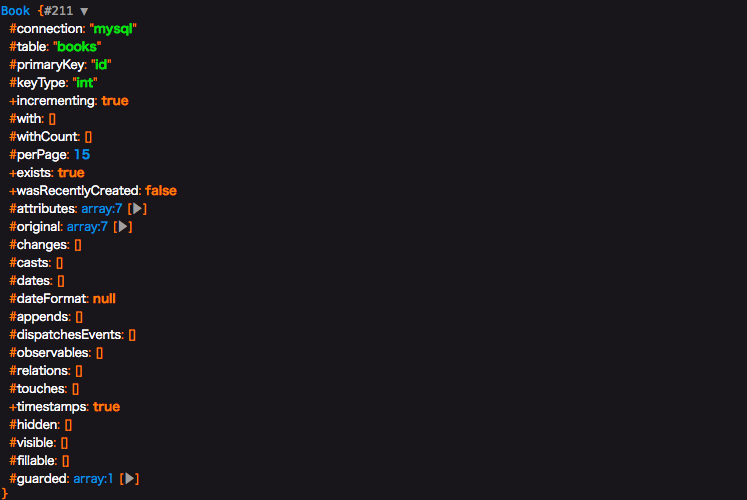
まずはアクセスされる側の$bookの型を調べて見よう。dd()を使って出力するとBook型とわかる。(これは大方の予想通りであろう)
つまり->detailの正体を知るには、\App\Bookを調べるのが良さそうだと検討がつく。

<?php

namespace App\Http\Controllers;

use Illuminate\Http\Request;

class TestController extends Controller
{
  public function test(){
    $book = \App\Book::find(1);
    dd($book);
    echo $book->detail->isbn;
  }
}

スクリーンショット 2019-03-24 12.09.19.png

さてApp\Bookをみてみると、直接関係ありそうな記述はない。よって、Illuminate\Database\Eloquent\Modelを辿ってみる。

<?php

namespace App;

use Illuminate\Database\Eloquent\Model;

class Book extends Model
{
  public function detail(){
    return $this->hasOne('\App\Bookdetail','id','bookdetail_id');
  }
}

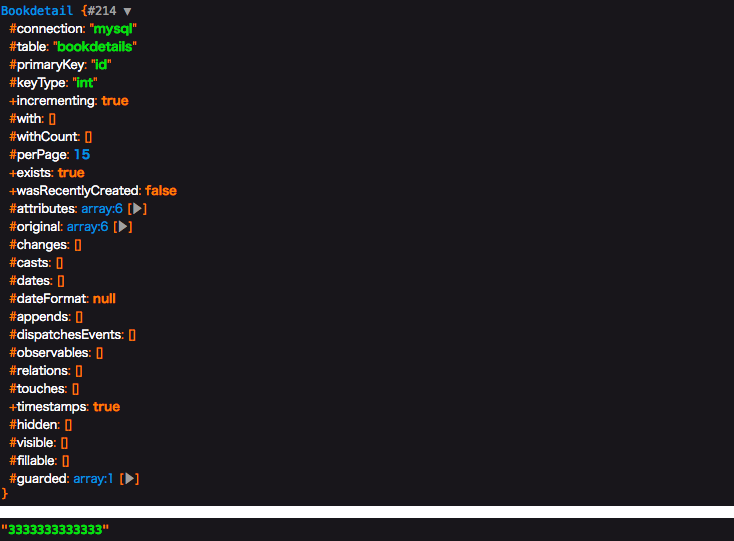
Illuminate\Database\Eloquent\Model をみると、気になる記述が見つかる。__getはマジックメソッドと呼ばれるもので、アクセスできないプロパティにアクセスした時に呼ばれるものだ。これが働いているのではと検討がつく。実際にdump()を使ってみると、__getは2回行われており、1回目はBookdetailオブジェクト、2回目は結果のisbnである"3333333333333"を返している。

    /**
     * Dynamically retrieve attributes on the model.
     *
     * @param  string  $key
     * @return mixed
     */
    public function __get($key)
    {
        return $this->getAttribute($key);
    }

スクリーンショット 2019-03-24 12.18.05.png

次に__getで行われている getAttribute()を辿って見よう。
Illuminate\Database\Eloquent\Concerns\HasAttrubute.php に定義されている。
今回は、hasOneというリレーションを定義しているため、最後の return $this->getRelationValue($key); が動いていそうだと検討を付けて、さらに進む。

    /**
     * Get an attribute from the model.
     *
     * @param  string  $key
     * @return mixed
     */
    public function getAttribute($key)
    {
        if (! $key) {
            return;
        }

        // If the attribute exists in the attribute array or has a "get" mutator we will
        // get the attribute's value. Otherwise, we will proceed as if the developers
        // are asking for a relationship's value. This covers both types of values.
        if (array_key_exists($key, $this->attributes) ||
            $this->hasGetMutator($key)) {
            return $this->getAttributeValue($key);
        }

        // Here we will determine if the model base class itself contains this given key
        // since we don't want to treat any of those methods as relationships because
        // they are all intended as helper methods and none of these are relations.
        if (method_exists(self::class, $key)) {
            return;
        }

        return $this->getRelationValue($key);
    }

getRelationValueは同じく Illuminate\Database\Eloquent\Concerns\HasAttrubute.php に定義されている。最下部にあるgetRelationshipFromMethod を辿って見よう。

/**
     * Get a relationship.
     *
     * @param  string  $key
     * @return mixed
     */
    public function getRelationValue($key)
    {
        // If the key already exists in the relationships array, it just means the
        // relationship has already been loaded, so we'll just return it out of
        // here because there is no need to query within the relations twice.
        if ($this->relationLoaded($key)) {
            return $this->relations[$key];
        }

        // If the "attribute" exists as a method on the model, we will just assume
        // it is a relationship and will load and return results from the query
        // and hydrate the relationship's value on the "relationships" array.
        if (method_exists($this, $key)) {
            return $this->getRelationshipFromMethod($key);
        }
    }

getRelationshipFromMethodは同じく Illuminate\Database\Eloquent\Concerns\HasAttrubute.php に定義されている。
ここで、今まで辿ってきたことに確信が持てるはずだ。$relation = $this->$method(); の記述によって、なぜ->detailとアクセスしたのに、detail()が動いているのだろうという疑問が解決された。

/**
     * Get a relationship value from a method.
     *
     * @param  string  $method
     * @return mixed
     *
     * @throws \LogicException
     */
    protected function getRelationshipFromMethod($method)
    {
        $relation = $this->$method();

        if (! $relation instanceof Relation) {
            throw new LogicException(sprintf(
                '%s::%s must return a relationship instance.', static::class, $method
            ));
        }

        return tap($relation->getResults(), function ($results) use ($method) {
            $this->setRelation($method, $results);
        });
    }

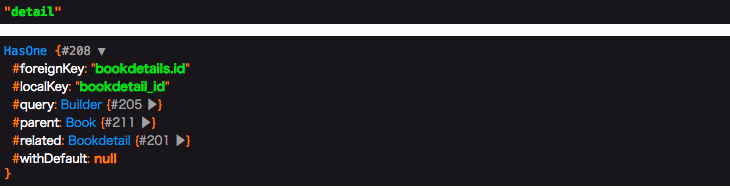
$methodと$relation をそれぞれdumpしてみると、予想通り$methodはdetailであり、$relationにはBookモデルのdetail()が行われた結果であるHasOneオブジェクトが入っていることがわかった。

スクリーンショット 2019-03-24 13.00.48.png

<?php

namespace App;

use Illuminate\Database\Eloquent\Model;

class Book extends Model
{
  public function detail(){
    return $this->hasOne('\App\Bookdetail','id','bookdetail_id');
  }
}

結論

プロパティアクセスの形でしか書いていないのに、モデルのメソッドが動く理由は、コアの処理の途中で$method()として実行しているため。

修正ご意見お待ちしています

  • このエントリーをはてなブックマークに追加
  • Qiitaで続きを読む

laradock で『laradock_mysql_1 docker-entrypoint.sh mysqld Exit 2』となる問題を解決

環境

OS:macOS Mojave 10.14.3
Docker:18.09.2
docker-compose:1.23.2
docker-machine:0.16.1
php:7.1.23
Laravel Framework:5.8.7
mysql:Ver 14.14 Distrib 5.7.25, for Linux (x86_64) using EditLine wrapper

事象

laradockで構築したmysqlを起動すると

$ docker-compose up -d php-fpm nginx mysql
Recreating laradock_mysql_1          ... done
Starting laradock_docker-in-docker_1 ... done
Starting laradock_workspace_1        ... done
Starting laradock_php-fpm_1          ... done
Starting laradock_nginx_1            ... done


$ docker-compose ps
           Name                          Command              State                      Ports                   
-----------------------------------------------------------------------------------------------------------------
laradock_docker-in-docker_1   dockerd-entrypoint.sh           Up       2375/tcp                                  
laradock_mysql_1              docker-entrypoint.sh mysqld     Exit 2                                             
laradock_nginx_1              /bin/bash /opt/startup.sh       Up       0.0.0.0:443->443/tcp, 0.0.0.0:8080->80/tcp
laradock_php-fpm_1            docker-php-entrypoint php-fpm   Up       9000/tcp                                  
laradock_workspace_1          /sbin/my_init                   Up       0.0.0.0:2222->22/tcp

となり起動にコケてしまう事象が発生しました。

解決方法

一旦dockerを止めます。

docker-compose stop

以下のファイルを変更します。

.env
### MYSQL #################################################

MYSQL_VERSION=latest #latestのまま
- MYSQL_DATABASE=default
+ MYSQL_DATABASE=laradock
- MYSQL_USER=root
+ MYSQL_USER=laradock
- MYSQL_PASSWORD=root
+ MYSQL_PASSWORD=secret
MYSQL_PORT=3306
MYSQL_ROOT_PASSWORD=root
MYSQL_ENTRYPOINT_INITDB=./mysql/docker-entrypoint-initdb.d

さらに、以下のディレクトリ配下のファイルをすべて削除します。
/Users/{USER NAME}/.laradock/data/mysql/

終わり

以上、対応後にdockerを起動すると

$ docker-compose up -d php-fpm nginx mysql
Starting laradock_docker-in-docker_1 ... done
Recreating laradock_mysql_1          ... done
Starting laradock_workspace_1        ... done
Starting laradock_php-fpm_1          ... done
Starting laradock_nginx_1            ... done


$ docker-compose ps
           Name                          Command              State                     Ports                   
----------------------------------------------------------------------------------------------------------------
laradock_docker-in-docker_1   dockerd-entrypoint.sh           Up      2375/tcp                                  
laradock_mysql_1              docker-entrypoint.sh mysqld     Up      0.0.0.0:3306->3306/tcp, 33060/tcp         
laradock_nginx_1              /bin/bash /opt/startup.sh       Up      0.0.0.0:443->443/tcp, 0.0.0.0:8080->80/tcp
laradock_php-fpm_1            docker-php-entrypoint php-fpm   Up      9000/tcp                                  
laradock_workspace_1          /sbin/my_init                   Up      0.0.0.0:2222->22/tcp  

mysqlのプロセスが確認できれば完了です。お疲れ様でした^^

  • このエントリーをはてなブックマークに追加
  • Qiitaで続きを読む

Laravel での「php artisan migrate」ができないとき、解決法

環境

ローカル環境にlravel環境を作っている

PHP 7.3.2
mysql 8.0.15
osx10.12
Laravel Framework 5.8.5

やろうとしたこと

users,password_resetsのテーブルを
 マイグレーションしようとしたらエラーが出ました。

users,password_resetsテーブルは、laravel newしたときに、作られています。

2014_10_12_00000000_create_users_table.rb
<?php

use Illuminate\Support\Facades\Schema;
use Illuminate\Database\Schema\Blueprint;
use Illuminate\Database\Migrations\Migration;

class CreateUsersTable extends Migration
{
    /**
     * Run the migrations.
     *
     * @return void
     */
    public function up()
    {
        Schema::create('users', function (Blueprint $table) {
            $table->bigIncrements('id');
            $table->string('name');
            $table->string('email')->unique();
            $table->timestamp('email_verified_at')->nullable();
            $table->string('password');
            $table->rememberToken();
            $table->timestamps();
        });
    }

    /**
     * Reverse the migrations.
     *
     * @return void
     */
    public function down()
    {
        Schema::dropIfExists('users');
    }
}

2014_10_12_00000000_create_password_resets_table..rb
<?php

use Illuminate\Support\Facades\Schema;
use Illuminate\Database\Schema\Blueprint;
use Illuminate\Database\Migrations\Migration;

class CreatePasswordResetsTable extends Migration
{
    /**
     * Run the migrations.
     *
     * @return void
     */
    public function up()
    {
        Schema::create('password_resets', function (Blueprint $table) {
            $table->string('email')->index();
            $table->string('token');
            $table->timestamp('created_at')->nullable();
        });
    }

    /**
     * Reverse the migrations.
     *
     * @return void
     */
    public function down()
    {
        Schema::dropIfExists('password_resets');
    }
}

エラーの内容

$ php artisan migrate

 Illuminate\Database\QueryException  : SQLSTATE[HY000] [2054] The server requested authentication method unknown to the client (SQL: select * from information_schema.tables where table_schema = forge and table_name = migrations)

スクリーンショット 2019-03-23 18.33.23.png

スクリーンショット 2019-03-23 19.24.43.png

エラーの結論

結局laravelとmysqlの接続ができてないこと
具体的に言うと
 laravelが指定したmysqlデータベース名、user名が
 自分のmysqlにないことです

解決法

データベースを作る

ここではmysqlでデータベースを作ります。

手順としては以下の通りです。

  • mysql8.0以降では、mysql5.6と少し違うので、注意してください

①mysqlインストールする
②mysqlでユーザー名、rootで入り、同時にpassword設定する
③ユーザーrootの中で
  ユーザー名forgeを作る(同時にパスワードを作る)
④ユーザーrootの中で
  ユーザー名forgeにデータベースを作る権限を与える。
⑤ユーザー名rootを抜ける
⑥ユーザー名forgeで入り、データベースforgeを作る。
⑦mysqlのユーザー承認方式を変える

mysqlについて知らない方は以下を参考してください
https://blog.codecamp.jp/what_is_mysql

①mysqlインストールする

mysqlインストール
$brew install mysql

mysqlを起動
$mysql.server start

②mysqlでユーザー名、rootで入り、同時にpassword設定する

$ mysql -uroot -p(パスワード設定するためにパスワードを書く)


 したいパスワード abcd1234

 $ mysql -uroot -pabacd1234

③ユーザーrootの中でユーザー名forgeを作る(同時にパスワードを作る)

rootユーザーは、なんでもできる権限のため、別にユーザーを作ります。

ユーザー名 forge
パスワード Mt@rvy5ii3

mysql> create user 'forge' identified by 'Mt@rvy5ii3';
Query OK, 0 rows affected (0.01 sec)

上が出た成功

*パスワードの注意

 LOW ポリシーは、パスワードの長さのみテストします。
パスワードは少なくとも 8 文字の長さでなければなりません。

MEDIUM ポリシーは、パスワードが最低 1 つの数値文字を含み、1 つの小文字および
大文字を含み、1 つの特殊文字 (英数字以外) を含む必要があるという条件を追加します。

STRONG ポリシーは、パスワードの 4 文字以上の部分文字列が、(辞書ファイルが指定された場合に)
辞書ファイル内の単語と一致してはならないという条件を追加します。

④ユーザーrootの中で

  ユーザー名forgeにデータベースを作る権限を与える。

grant all on forge. * to 'forge';

⑤ユーザー名rootを抜ける

qiita.rb
> exit;

⑥ユーザー名forgeで入り、データベースforgeを作る。

ターミナルからユーザーforgeに入る
$mysql -uforge -pMt@rvy5ii3;
 mysql -uユーザー名 -pパスワード

データベースforgeを作る。
$create database forge;

⑦mysqlのユーザー承認方式を変える

LaravelがMySQLに接続するために、
MySQL上のユーザ認証に指定された方式に変える。

alter user 'forge' identified with mysql_native_password by 'pMt@rvy5ii3';

laravelの設定

mysqlのユーザー名、パスワード、データベースの名前をlaravelに教える。

ディレクトリ直下にある.envファイルを開く

DB_DATABASE,DB_USERNAME,DB_PASSWORDを以下のように変える。

プロジェクト名/.env
DB_CONNECTION=mysql
DB_HOST=127.0.0.1
DB_PORT=3306
DB_DATABASE=forge(自分のデータベース)
DB_USERNAME=forge(自分のユーザ名)
DB_PASSWORD=pMt@rvy5ii3(自分のパスワード)

最後に

以下のようにmigrateできた完成

 $ php artisan migrate

Migration table created successfully.
Migrating: 2014_10_12_000000_create_users_table
Migrated:  2014_10_12_000000_create_users_table
Migrating: 2014_10_12_100000_create_password_resets_table
Migrated:  2014_10_12_100000_create_password_resets_table


参考文献

エラー解決のやり方
https://teratail.com/questions/154105

mysql8.0の変更点
https://www.sejuku.net/blog/82303#i

mysqlインストールした方
https://qiita.com/hkusu/items/cda3e8461e7a46ecf25d

mysqlのパスワードルール
https://qiita.com/hermannsw/items/b4da81201d69cefb080b

mysql8のmigrationのエラーについて
https://takakisan.com/laravel-mysql-8-migration-error-fix/

  • このエントリーをはてなブックマークに追加
  • Qiitaで続きを読む