- 投稿日:2019-03-24T23:53:17+09:00
【ツール】Gitで使う初歩的な用語の関係をまとめる
参考リンク
- http://engineer-memo.goodhead.work/pages/196
- http://www-creators.com
- https://laraweb.net/environment/3040/
- https://reasonable-code.com/git-origin/
- https://qiita.com/uasi/items/69368c17c79e99aaddbf
全体像
origincloneorigin/masterbranch,checkout,checkout -bpush origin/mastermerge masterfetch mastermerge origin/masterpull origin/master![]()
origin:リモートリポジトリのアドレスに対してにつけられている名称
自分の場合、originはgit@github.com:Hiroki-IT/Symfony2_Nyumon.gitであった$ git remote -v origin git@github.com:Hiroki-IT/Symfony2_Nyumon.git (fetch) origin git@github.com:Hiroki-IT/Symfony2_Nyumon.git (push)
clone:リモートリポジトリの状態をそのままローカルリポジトリにコピー
git clone git@github.com:Hiroki-IT/Symfony2_Nyumon.git #リモートリポジトリのアドレスを指定
origin/master:リモート追跡ブランチ(リモートリポジトリの
masterブランチの状態がコピーされたブランチ)に対してデフォルトでつけられている通称(※fetch masterの項目も参照)
追跡されているリモートリポジトリのmasterブランチは$ git branch -vvを用いて確認可能で、[origin/master]と表示されたブランチが追跡されているmasterブランチを表す$ git branch -vv 2019/Symfony2_Nyumon/feature/2 f17f68e Merge remote-tracking branch 'refs/remotes/origin/master' * 2019/Symfony2_Nyumon/master f17f68e Merge remote-tracking branch 'refs/remotes/origin/master' master f17f68e [origin/master] Merge remote-tracking branch 'refs/remotes/origin/master'
branch,checkout,checkout -b:$ git branch [ブランチ名] #指定のブランチを作成 $ git checkout [ブランチ名] #指定のブランチに移動 $ git checkout -b [ブランチ名] #指定のブランチを作成&指定のブランチに移動
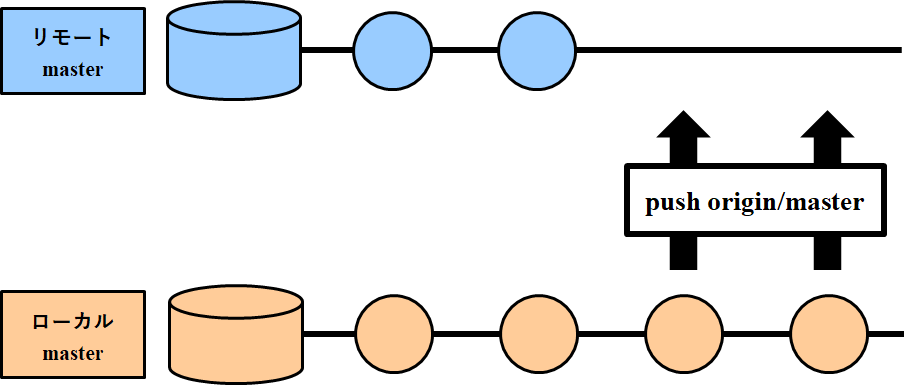
push origin/master:ローカルリポジトリにおける
masterブランチの状態を、リモートリポジトリのmasterブランチに反映
引数のorigin/masterは省略可能$ git push origin/master $ git push◇
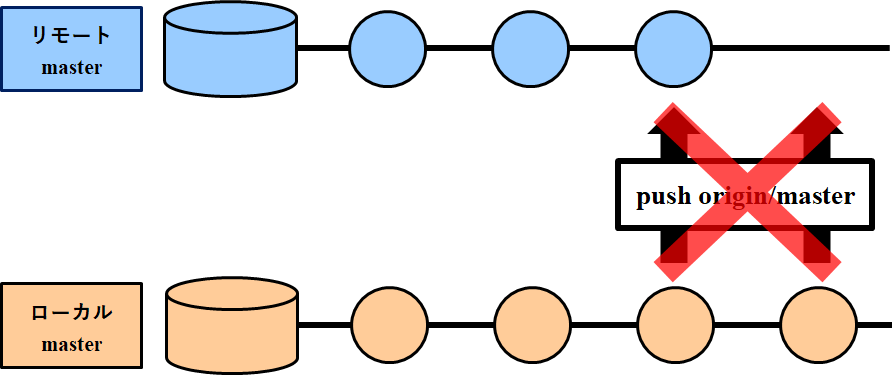
conflict
ローカルリポジトリにおけるmasterブランチからpushする前に、リモートリポジトリにおけるmasterブランチに新しい履歴が追加されているため、ブランチ間で整合性がとれなくなっている状態$ git push origin/master To github.com:Hiroki-IT/Symfony2_Nyumon.git ! [rejected] origin/master -> master (non-fast-forward) error: failed to push some refs to 'git@github.com:Hiroki-IT/Symfony2_Nyumon.git' hint: Updates were rejected because the tip of your current branch is behind hint: its remote counterpart. Integrate the remote changes (e.g. hint: 'git pull ...') before pushing again. hint: See the 'Note about fast-forwards' in 'git push --help' for details.
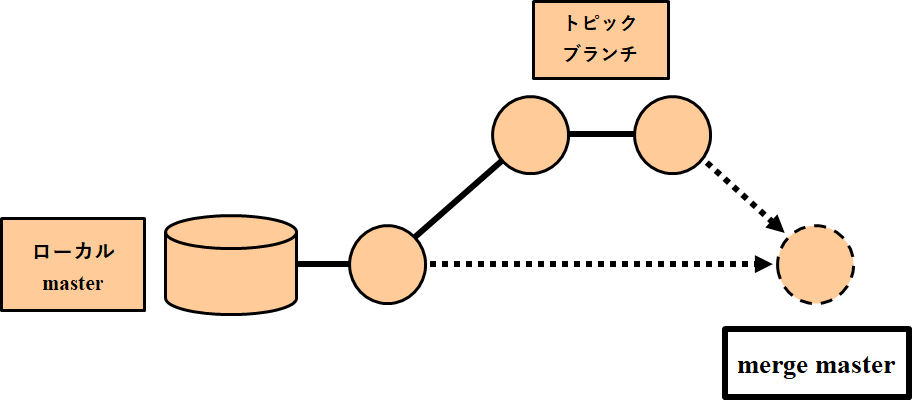
merge master:ローカルリポジトリにおけるトピックブランチの変更を、同リポジトリにおける
masterブランチに反映$ git checkout [ブランチ名] #トピックブランチに移動 $ git merge master
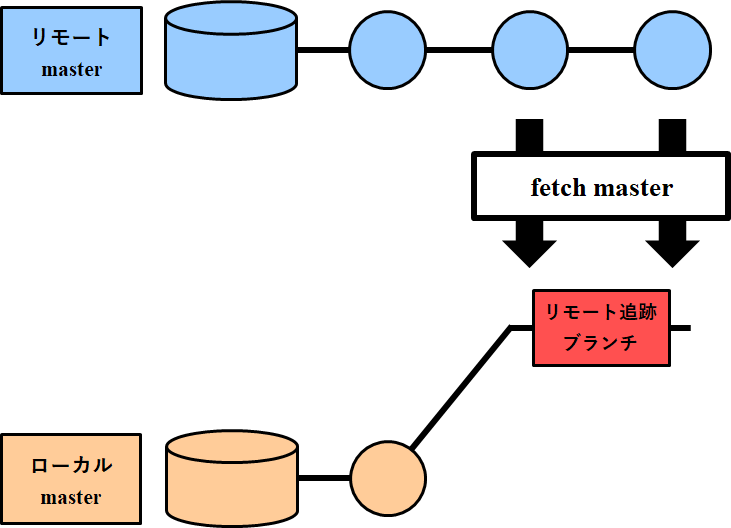
fetch master:リモートリポジトリにおける
masterブランチの変更を、ローカルリポジトリのorigin/masterブランチに反映$ git fetch master
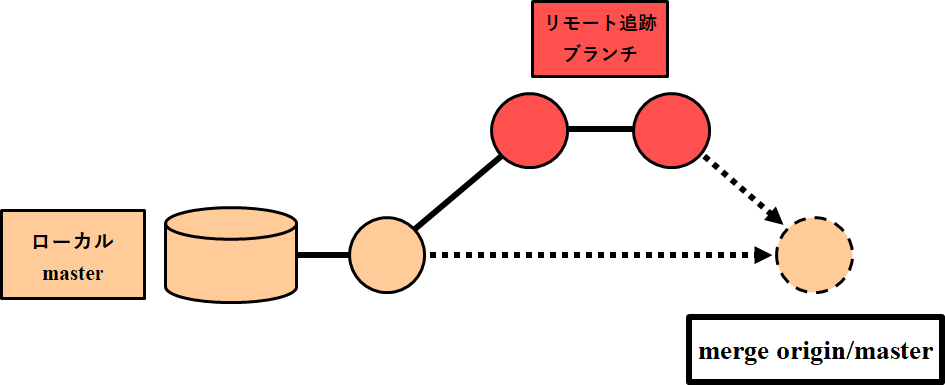
merge origin/master:ローカルリポジトリにおける
origin/masterブランチの変更を、同リポジトリにおけるmasterブランチに反映$ git fetch $ git merge origin/master
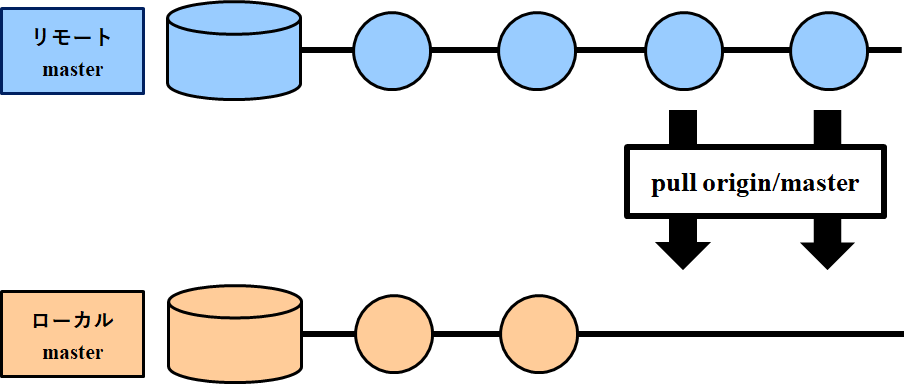
pull origin/master:リモートリポジトリにおける
masterブランチの変更を、ローカルリポジトリのorigin/masterブランチに反映(fetch)させ、その後masterブランチに反映(merge)$ git pull origin/master
- 投稿日:2019-03-24T23:53:17+09:00
【ツール】最近、Gitで使った用語の関係をまとめる
参考リンク
- http://engineer-memo.goodhead.work/pages/196
- http://www-creators.com
- https://laraweb.net/environment/3040/
- https://reasonable-code.com/git-origin/
- https://qiita.com/uasi/items/69368c17c79e99aaddbf
全体像
今回まとめた用語
◇origin
◇clone
◇origin/master
◇branch,checkout,checkout -b
◇push origin/master
◇merge master
◇fetch master,merge origin/master
◇pull origin/master
origin:リモートリポジトリのアドレスに対してにつけられている別称
自分の場合、originはgit@github.com:Hiroki-IT/Symfony2_Nyumon.gitであった$ git remote -v origin git@github.com:Hiroki-IT/Symfony2_Nyumon.git (fetch) origin git@github.com:Hiroki-IT/Symfony2_Nyumon.git (push)
clone:リモートリポジトリの状態をそのままローカルリポジトリにコピー
git clone git@github.com:Hiroki-IT/Symfony2_Nyumon.git #リモートリポジトリのアドレスを指定
origin/master:リモート追跡ブランチ(リモートリポジトリの
masterブランチの状態がコピーされたブランチ)に対してデフォルトでつけられている別称(※fetch masterの項目も参照)
追跡されているリモートリポジトリのmasterブランチは$ git branch -vvを用いて確認可能で、[origin/master]と表示されたブランチが追跡されているmasterブランチを表す$ git branch -vv 2019/Symfony2_Nyumon/feature/2 f17f68e Merge remote-tracking branch 'refs/remotes/origin/master' * 2019/Symfony2_Nyumon/master f17f68e Merge remote-tracking branch 'refs/remotes/origin/master' master f17f68e [origin/master] Merge remote-tracking branch 'refs/remotes/origin/master'
branch,checkout,checkout -b:$ git branch [ブランチ名] #指定のブランチを作成 $ git checkout [ブランチ名] #指定のブランチに移動 $ git checkout -b [ブランチ名] #指定のブランチを作成&指定のブランチに移動
push origin/master:ローカルリポジトリにおける
masterブランチの状態を、リモートリポジトリのmasterブランチに反映
引数のorigin/masterは省略可能$ git push origin/master $ git push◇
conflict
ローカルリポジトリにおけるmasterブランチからpushする前に、リモートリポジトリにおけるmasterブランチに新しい履歴が追加されているため、ブランチ間で整合性がとれなくなっている状態$ git push origin/master To github.com:Hiroki-IT/Symfony2_Nyumon.git ! [rejected] origin/master -> master (non-fast-forward) error: failed to push some refs to 'git@github.com:Hiroki-IT/Symfony2_Nyumon.git' hint: Updates were rejected because the tip of your current branch is behind hint: its remote counterpart. Integrate the remote changes (e.g. hint: 'git pull ...') before pushing again. hint: See the 'Note about fast-forwards' in 'git push --help' for details.
merge master:ローカルリポジトリにおけるトピックブランチの変更を、同リポジトリにおける
masterブランチに反映$ git checkout [ブランチ名] #トピックブランチに移動 $ git merge master
fetch master,merge origin/master:◇
fetch master:
リモートリポジトリにおけるmasterブランチの変更を、ローカルリポジトリのorigin/masterブランチに反映$ git fetch master◇
merge origin/master:
ローカルリポジトリにおけるorigin/masterブランチの変更を、同リポジトリにおけるmasterブランチに反映$ git fetch master $ git merge origin/master
pull origin/master:リモートリポジトリにおける
masterブランチの変更を、ローカルリポジトリのorigin/masterブランチに反映(fetch)させ、その後masterブランチに反映(merge)$ git pull origin/master
- 投稿日:2019-03-24T23:53:17+09:00
【ツール】最近、Gitで使った基本的コマンドと用語の関係をまとめる
参考リンク
- http://engineer-memo.goodhead.work/pages/196
- http://www-creators.com
- https://laraweb.net/environment/3040/
- https://reasonable-code.com/git-origin/
- https://qiita.com/uasi/items/69368c17c79e99aaddbf
全体像
今回まとめた用語
◇origin
◇clone
◇origin/master
◇branch,checkout,checkout -b
◇push origin/master
◇merge master
◇fetch master,merge origin/master
◇pull origin/master
origin:リモートリポジトリのアドレスに対してにつけられている別称
自分の場合、originはgit@github.com:Hiroki-IT/Symfony2_Nyumon.gitであった$ git remote -v origin git@github.com:Hiroki-IT/Symfony2_Nyumon.git (fetch) origin git@github.com:Hiroki-IT/Symfony2_Nyumon.git (push)
clone:リモートリポジトリの状態をそのままローカルリポジトリにコピー
git clone git@github.com:Hiroki-IT/Symfony2_Nyumon.git #リモートリポジトリのアドレスを指定
origin/master:リモート追跡ブランチ(リモートリポジトリの
masterブランチの状態がコピーされたブランチ)に対してデフォルトでつけられている別称(※fetch masterの項目も参照)
追跡されているリモートリポジトリのmasterブランチは$ git branch -vvを用いて確認可能で、[origin/master]と表示されたブランチが追跡されているmasterブランチを表す$ git branch -vv 2019/Symfony2_Nyumon/feature/2 f17f68e Merge remote-tracking branch 'refs/remotes/origin/master' * 2019/Symfony2_Nyumon/master f17f68e Merge remote-tracking branch 'refs/remotes/origin/master' master f17f68e [origin/master] Merge remote-tracking branch 'refs/remotes/origin/master'
branch,checkout,checkout -b:$ git branch [ブランチ名] #指定のブランチを作成 $ git checkout [ブランチ名] #指定のブランチに移動 $ git checkout -b [ブランチ名] #指定のブランチを作成&指定のブランチに移動
push origin/master:ローカルリポジトリにおける
masterブランチの状態を、リモートリポジトリのmasterブランチに反映
引数のorigin/masterは省略可能$ git push origin/master $ git push◇
conflict
ローカルリポジトリにおけるmasterブランチからpushする前に、リモートリポジトリにおけるmasterブランチに新しい履歴が追加されているため、ブランチ間で整合性がとれなくなっている状態$ git push origin/master To github.com:Hiroki-IT/Symfony2_Nyumon.git ! [rejected] origin/master -> master (non-fast-forward) error: failed to push some refs to 'git@github.com:Hiroki-IT/Symfony2_Nyumon.git' hint: Updates were rejected because the tip of your current branch is behind hint: its remote counterpart. Integrate the remote changes (e.g. hint: 'git pull ...') before pushing again. hint: See the 'Note about fast-forwards' in 'git push --help' for details.
merge master:ローカルリポジトリにおけるトピックブランチの変更を、同リポジトリにおける
masterブランチに反映$ git checkout [ブランチ名] #トピックブランチに移動 $ git merge master
fetch master,merge origin/master:◇
fetch master:
リモートリポジトリにおけるmasterブランチの変更を、ローカルリポジトリのorigin/masterブランチに反映$ git fetch master◇
merge origin/master:
ローカルリポジトリにおけるorigin/masterブランチの変更を、同リポジトリにおけるmasterブランチに反映$ git fetch master $ git merge origin/master
pull origin/master:リモートリポジトリにおける
masterブランチの変更を、ローカルリポジトリのorigin/masterブランチに反映(fetch)させ、その後masterブランチに反映(merge)$ git pull origin/master
- 投稿日:2019-03-24T23:53:17+09:00
【ツール】最近、Gitで使った基本的操作と用語の関係をまとめる
引用リンク
- http://engineer-memo.goodhead.work/pages/196
- http://www-creators.com
- https://laraweb.net/environment/3040/
- https://reasonable-code.com/git-origin/
- https://qiita.com/uasi/items/69368c17c79e99aaddbf
- https://stackoverflow.com/questions/11384928/change-git-repository-directory-location
- https://www.kaeruspoon.net/articles/1078
全体像
今回まとめた用語
◇origin
◇clone
◇origin/master
◇branch,checkout,checkout -b
◇push origin master
◇merge master
◇fetch master,merge origin master
◇pull origin master
◇ ローカルリポジトリのディレクトリの変更
origin:リモートリポジトリのアドレスに対してにつけられている別称
自分の場合、originはgit@github.com:Hiroki-IT/Symfony2_Nyumon.gitであった$ git remote -v origin git@github.com:Hiroki-IT/Symfony2_Nyumon.git (fetch) origin git@github.com:Hiroki-IT/Symfony2_Nyumon.git (push)
clone:リモートリポジトリの状態をそのままローカルリポジトリにコピー
git clone git@github.com:Hiroki-IT/Symfony2_Nyumon.git #リモートリポジトリのアドレスを指定
origin/master:リモート追跡ブランチ(リモートリポジトリの
masterブランチの状態がコピーされたブランチ)に対してデフォルトでつけられている別称y
ローカルリポジトリの全てのブランチの表示する$ git branch --allから、リモート追跡ブランチ(remotes/[xxx]/[xxx])を確認可能$ git branch --all 2019/Symfony2_Nyumon/master remotes/origin/master
branch,checkout,checkout -b:$ git branch [ブランチ名] #指定のブランチを作成 $ git checkout [ブランチ名] #指定のブランチに移動 $ git checkout -b [ブランチ名] #指定のブランチを作成&指定のブランチに移動
push:◇
push origin masterローカルリポジトリにおける
masterブランチの状態を、リモートリポジトリのmasterブランチに反映
引数のorigin masterは省略可能$ git push origin master $ git push◇
conflictローカルリポジトリにおける
masterブランチからpushする前に、リモートリポジトリにおけるmasterブランチに新しい履歴が追加されているため、ブランチ間で整合性がとれなくなっている状態$ git push origin master To github.com:Hiroki-IT/Symfony2_Nyumon.git ! [rejected] origin/master -> master (non-fast-forward) error: failed to push some refs to 'git@github.com:Hiroki-IT/Symfony2_Nyumon.git' hint: Updates were rejected because the tip of your current branch is behind hint: its remote counterpart. Integrate the remote changes (e.g. hint: 'git pull ...') before pushing again. hint: See the 'Note about fast-forwards' in 'git push --help' for details.
fetch:◇
fetch masterリモートリポジトリにおける
masterブランチの変更を、ローカルリポジトリのorigin/masterブランチに反映$ git fetch master
もし他人が2019/symfony2_Nyumon/feature/2というブランチをリモートリポジトリで作成した場合、$ git fetchした後に$ git branch --allで全てのブランチを確認すると、新しいブランチを追跡し始めたことを確認可能$ git fetch master $ git branch --all 2019/Symfony2_Nyumon/master remotes/origin/master remotes/origin/2019/Symfony2_Nyumon/feature/2
merge:◇
merge masterローカルリポジトリにおけるトピックブランチの変更を、同リポジトリにおける
masterブランチに反映$ git checkout [ブランチ名] #トピックブランチに移動 $ git merge master◇
merge origin masterローカルリポジトリにおける
origin/masterブランチの変更を、同リポジトリにおけるmasterブランチに反映$ git fetch master $ git merge origin master
pull:◇
pull origin masterリモートリポジトリにおける
masterブランチの変更を、ローカルリポジトリのorigin/masterブランチに反映(fetch)させ、その後masterブランチに反映(merge)$ git pull origin master◇
pull --set-upstream origin masterブランチに初めて
pushする時、pushの引数を$ git push --set-upstream origin 2019/Symfony2_Nyumon/masterとする。
リモートブランチに履歴がないため、最初のpushを最上流の履歴としてとして設定する必要があるらしい。(勉強不足)ローカルリポジトリのディレクトリの変更
ローカルリポジトリを、
.gitを含んだまま別のディレクトリに移動するだけ
GitHubに影響はない
- 投稿日:2019-03-24T22:15:07+09:00
[Git] Githubのパスワードを変えてからpushできなくなったときの対処法
状況
Githubのパスワードを更新したら,pushできなくなってしまいました.
~/repository> git push origin HEAD remote: Invalid username or password. fatal: Authentication failed for 'https://github.com/user-name/repository-name.git'解決法
-uもしくは--set-upstreamオプションで,ユーザ名とパスワードを入れ直すことができます.$ git push -u origin HEAD もしくは $ git push --set-upstream origin HEAD Username for 'https://github.com': Password for 'https://test@example.com@github.com':参考:git push
- 投稿日:2019-03-24T17:31:31+09:00
Ubuntu 18.04 で git の interactive.singleKey を有効にする
探すの面倒だったので忘れる前にメモ
困ったこと
地味に重要なこの設定 :
$ git config --global interactive.singlekey trueこれだけでは Ubuntu では動かない。かなしい。
結論
libterm-readkey-perl をインストールしよう
$ sudo apt-get install libterm-readkey-perl調査中のメモ
といっても man を読むだけ
$ man git-config ... interactive.singleKey In interactive commands, allow the user to provide one-letter input with a single key (i.e., without hitting enter). Currently this is used by the --patch mode of git-add(1), git-checkout(1), git-commit(1), git-reset(1), and git-stash(1). Note that this setting is silently ignored if portable keystroke input is not available; requires the Perl module Term::ReadKey. ...なにやら
Perl module Term::ReadKeyなるモジュールが必要らしい。
- と言われても apt のパッケージが分からない
- 検索すればすぐに出てくるので心配無用
- libterm-readkey-perl_2.38-1_amd64.deb Debian 10 Download
- > Term::ReadKey is a compiled perl module dedicated to providing simple control
ということで物は試し
$ sudo apt-get install libterm-readkey-perl Reading package lists... Done Building dependency tree Reading state information... Done ... ... Unpacking libterm-readkey-perl (2.37-1build1) ... Setting up libterm-readkey-perl (2.37-1build1) ... Processing triggers for man-db (2.8.3-2ubuntu0.1) ...適当なリポジトリのディレクトリで意図通りに動作することを確認
$ git add -pおわり。
いかがでしたでしょうか
- 投稿日:2019-03-24T10:29:10+09:00
VSCodeでの`GitLens: Open Changes (with difftool)`実行時のエラーへの対処
Issue
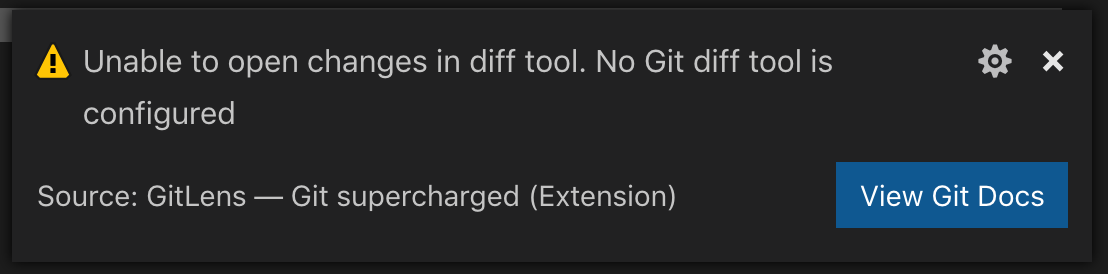
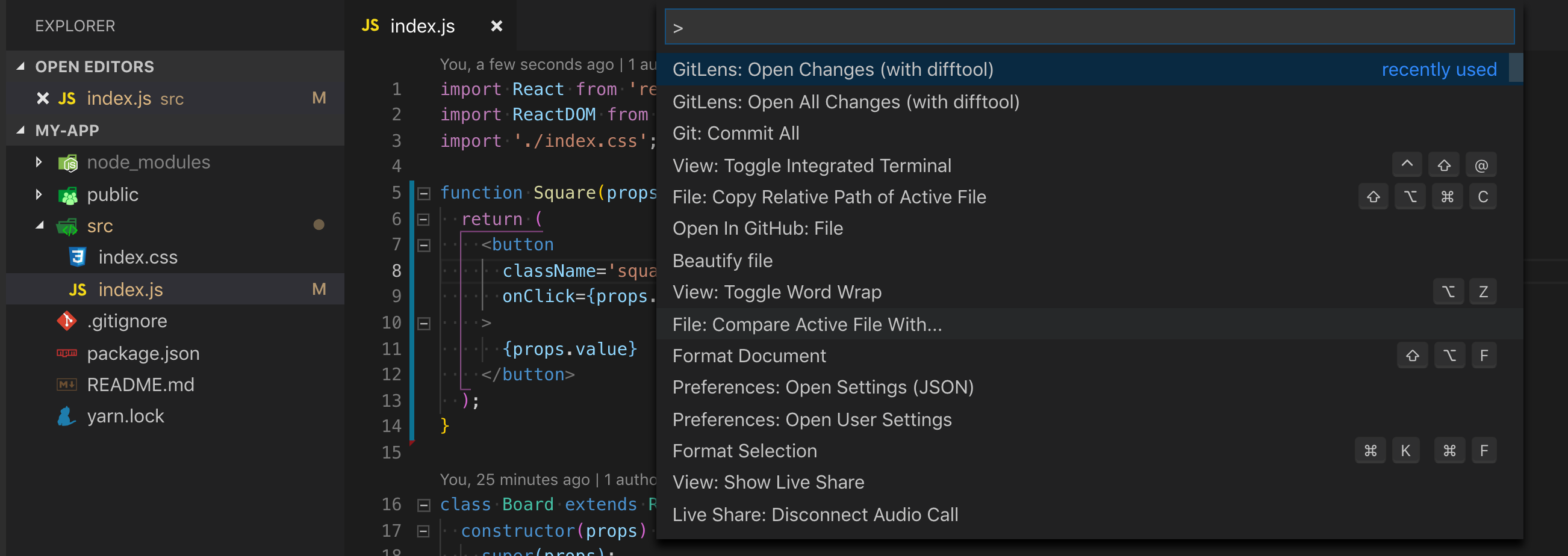
GitLens: Open Changes (with difftool)実行時に以下のエラーが出て、diff画面が開けない。Unable to open changes in diff tool. No Git diff tool is configured
View Git Docsのリンクは以下。
https://git-scm.com/docs/git-config#git-config-difftoolSoltuion
以下を
~/.gitconfigに追加[diff] tool = default-difftool [difftool "default-difftool"] cmd = code --wait --diff $LOCAL $REMOTEref) https://code.visualstudio.com/docs/editor/versioncontrol#_vs-code-as-git-diff-tool
Result
↓
GitLens: Open Changes (with difftool)を実行
PS
git-difftoolについて以下が参考になった。https://girigiribauer.com/archives/20161227/
[diff] tool = vimdiff [difftool] prompt = falseこれらの設定は git-diff 用ではなく git-difftool 用です。 それぞれお間違えなく。
- 投稿日:2019-03-24T09:10:24+09:00
clocでgit管理下にあるファイルだけを対象とする
clocコマンドを単に実行すると
vendor/bundleやnode_modulesなどgit管理下に無いファイルも集計してしまいます。$ ls .DS_Store .dependabot/ .rubocop.yml Procfile bin/ db/ public/ .bundle/ .editorconfig Gemfile README.md config/ lib/ test/ .byebug_history .git/ Gemfile.lock Rakefile config.ru log/ tmp/ .circleci/ .gitignore Guardfile app/ coverage/ package.json vendor/ $ cloc . 13862 text files. 10857 unique files. 4951 files ignored. github.com/AlDanial/cloc v 1.80 T=34.00 s (265.3 files/s, 51360.0 lines/s) ----------------------------------------------------------------------------------- Language files blank comment code ----------------------------------------------------------------------------------- Ruby 6813 122342 178929 629290 JavaScript 97 30244 22803 213124 C 342 12727 12804 60348 Markdown 323 20352 0 51256 ... ----------------------------------------------------------------------------------- SUM: 9021 228601 250093 1267480 -----------------------------------------------------------------------------------clocでは
vcsオプションがあり、git配下にあるファイルのみを対象とすることができます。$ cloc --vcs=git 169 text files. 163 unique files. 36 files ignored. github.com/AlDanial/cloc v 1.80 T=0.35 s (439.0 files/s, 10178.5 lines/s) ------------------------------------------------------------------------------- Language files blank comment code ------------------------------------------------------------------------------- Ruby 89 310 388 1590 Haml 38 3 2 315 Sass 8 39 21 250 YAML 10 52 105 220 HTML 3 15 3 182 Markdown 1 15 0 28 JSON 1 0 0 5 JavaScript 3 3 26 4 CSS 1 0 15 0 CoffeeScript 1 0 3 0 ------------------------------------------------------------------------------- SUM: 155 437 563 2594 -------------------------------------------------------------------------------clocのオプションを設定するよりはgitのサブコマンドをエイリアスで定義する方が楽チンです。
# ~/.gitconfig [alias] cloc = !cloc $(git ls-files)
$ cloc --vcs=gitと同じ結果が出る。$ git cloc 169 text files. 163 unique files. 36 files ignored. github.com/AlDanial/cloc v 1.80 T=0.10 s (1558.7 files/s, 36142.7 lines/s) ------------------------------------------------------------------------------- Language files blank comment code ------------------------------------------------------------------------------- Ruby 89 310 388 1590 Haml 38 3 2 315 ... ------------------------------------------------------------------------------- SUM: 155 437 563 2594 -------------------------------------------------------------------------------
- 投稿日:2019-03-24T06:52:28+09:00
MacでGitツールSourceTreeによるローカルリポジトリの作成
はじめに
Gitの概念を学ぶために、svnではTortoiseSVNのようにツールを用いて簡単に動作確認するものがないか探したていたところ、@nnahitoさんの記事でSourceTreeというツールがあることを知りました。
今回はローカルリポジトリの作成を試してみたので、SourceTreeを用いてローカルリポジトリの作成方法をまとめます。gitを学習するために以下の記事も参考にさせていただきました。
https://naichilab.blogspot.com/2014/01/gitsourcetreegit.html?m=1環境
macOS Mojave(バージョン10.14.1)
Sourcetree(バージョン3.1.1_213)ローカルリポジトリ作成
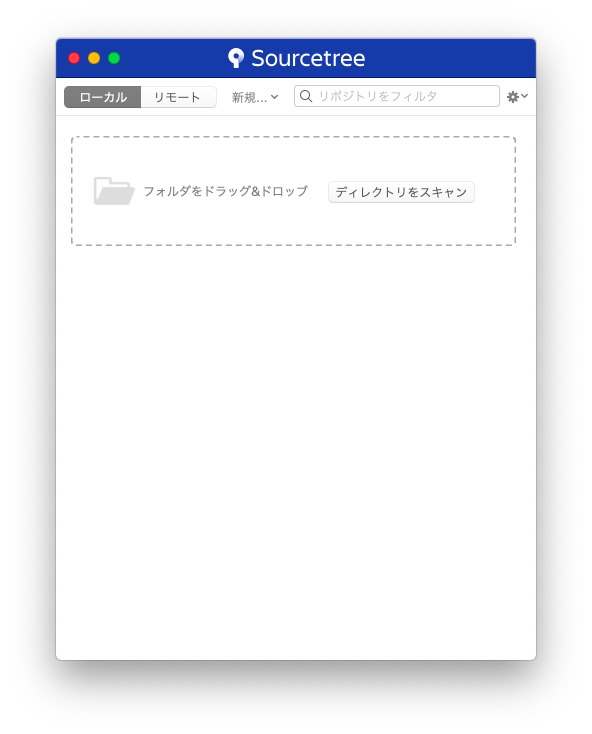
1. SourceTreeを起動して新規をクリック。
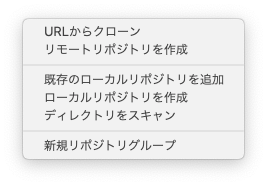
2. ローカルリポジトリを作成をクリック
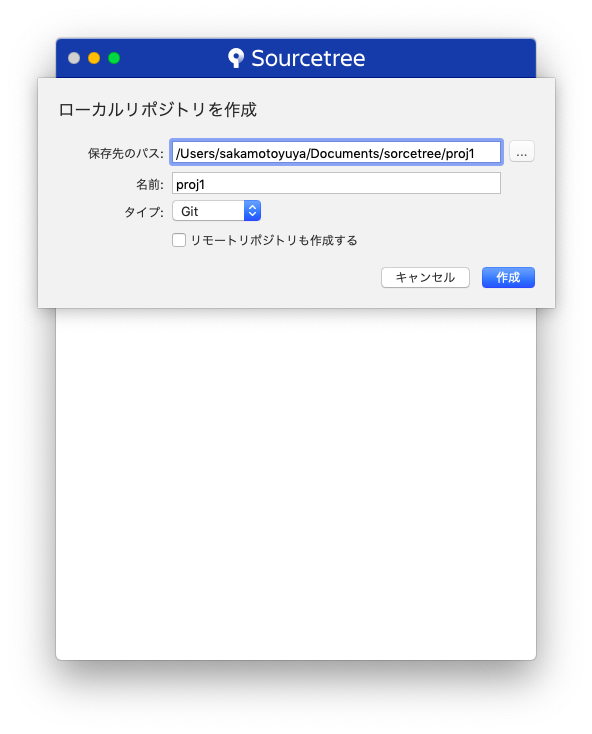
3. 保存先のパスを指定して作成をクリック
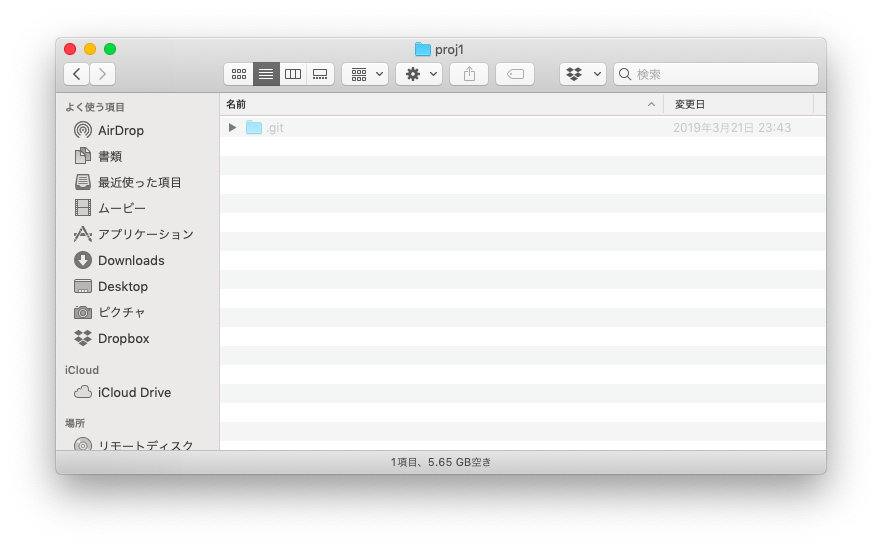
4. .gitフォルダが作成されたら完了です。