- 投稿日:2019-08-22T23:16:03+09:00
【Swift】PasoriのreadWithoutEncryptionByメソッドがreleaseビルドで動作しなかった話。
発生事象
以下のメソッドでICカードの諸々の情報を取得することができます。
(NSString *)readWithoutEncryptionBy:(felica_card_t)card今回発生したのは、、
Debugビルドだと、値を取得することが出来るのに、、
releaseビルドだと、NULLが返却されて、読取り直後に落ちてしまうという事象です。
解決策
こうしたら直った。
↓↓↓↓↓↓↓↓↓↓↓↓↓↓↓↓↓↓↓↓↓↓↓↓↓↓↓↓↓↓↓↓↓↓↓↓↓↓↓↓↓↓↓↓↓↓↓↓解説
GCC_OPTIMIZATION_LEVEL
という、コンパイル時の最適化レベルを最低レベルに設定することで、上記の事象は解決しました。
※ちなみに、その次のFastというレベルでもNGでした。参考文献
- 投稿日:2019-08-22T21:53:30+09:00
[Swift 5]CodableでJSON内の日付データをDate型に変換するときの拡張。ミリ秒付きISO8601など
Codable(Decodable)とJSONDecoderを使ってJSONファイルを構造体(Struct)に変換するとき、
{ "updatedAt":"2019-08-14T04:04:30+09:00", }といった文字列がJSONに含まれているとします。
ResponseStructure.swiftstruct ResponseStructure: Decodable { let updatedAt: Date }というstructを用意して、
JSONDecoderでデコードすれば…
SampleReposotory.swiftlet decoder = JSONDecoder() do { let response = try decoder.decode(ResponseStructure.self, from: data) print(response) } catch let error { print(error) }きちんと自動でDate型に変換してくれます。
しかし、
{ "updatedAt":"2019-08-14T04:04:30.000+09:00", }といった例えばミリ秒付きの日付には対応していないので、拡張して対応する必要があります。
DateFormatterを拡張する
DateFormatter+.swiftextension DateFormatter { /// ミリ秒付きのiso8601フォーマット e.g. 2019-08-22T09:30:15.000+0900 static let iso8601Full: DateFormatter = { let formatter = DateFormatter() formatter.dateFormat = "yyyy-MM-dd'T'HH:mm:ss.SSSZZZZZ" formatter.calendar = Calendar(identifier: .iso8601) formatter.timeZone = TimeZone(secondsFromGMT: 0) formatter.locale = Locale(identifier: "en_US_POSIX") return formatter }() }extensionでDateFormatterを拡張して、
SampleReposotory.swiftlet decoder = JSONDecoder() do { let response = try decoder.decode(ResponseStructure.self, from: data) decoder.dateDecodingStrategy = .formatted(.iso8601Full) // 追加 print(response) } catch let error { print(error) }JSONDecoderの
dateDecodingStrategyプロパティで.formatted(.iso8601Full)と指定すればOKです。拡張のもう一例("20190822093015"みたいな形式)
20190822093015のような日付8桁、時間6桁の場合のフォーマット例です。DateFormatter+.swiftextension DateFormatter { /// 日付8桁・時間6桁のフォーマット e.g. 20190822093015 static let yyyyMMddHHmmss: DateFormatter = { let formatter = DateFormatter() formatter.dateFormat = "yyyyMMddHHmmss" formatter.calendar = Calendar(identifier: .iso8601) formatter.timeZone = TimeZone(secondsFromGMT: 0) formatter.locale = Locale(identifier: "en_US_POSIX") return formatter }() }ここでいう
yyyyMMddHHmmssの意味は、
yyyy = 年
MM = 月
dd = 日
HH = 時
mm = 分
ss = 秒
になります。ソースコード
コード全文はGitHubに置いてあります。
参考
https://useyourloaf.com/blog/swift-codable-with-custom-dates/
- 投稿日:2019-08-22T21:46:20+09:00
[Swift 5]画面を縦スクロールした時にNavigationBarを隠したり出したり(UIScrollViewDelegate)
縦スクロールされたとき、NavigationBarをスッと隠すアニメーション、かっこいいですよね。
コンテンツ表示を広くとれるのでユーザーにとっても嬉しい挙動だと思います。UITableView等のUIScrollViewを親に持っているViewを使っている場合は以下のように書くだけで簡単に作用します。
delegateは設定してあると思いますが、確認しておきましょう。※詳しくは後述ViewController.swiftfinal class ViewController: UIViewController { // スクロールでNavigationBarを隠す func scrollViewDidScroll(_ scrollView: UIScrollView) { let isBarHidden = scrollView.panGestureRecognizer.translation(in: scrollView).y < 0 navigationController?.setNavigationBarHidden(isBarHidden, animated: true) } }ただし、ScrollViewを使用していない、UIStackViewやUILabel、UIButtonなどだけで構成された画面の場合はもう一手間必要です。
UIScrollViewDelegateに適合する必要がありますので、以下のように書きましょう。ViewController.swiftfinal class ViewController: UIViewController { // 省略 } extension ViewController: UIScrollViewDelegate { // スクロールでNavigationBarを隠す func scrollViewDidScroll(_ scrollView: UIScrollView) { let isBarHidden = scrollView.panGestureRecognizer.translation(in: scrollView).y < 0 navigationController?.setNavigationBarHidden(isBarHidden, animated: true) } }追記:delegateの追加の必要な場合もある
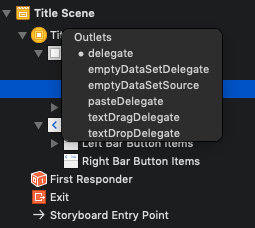
例えば、単一のUITextViewで構成されたViewControllerの場合は、delegateを繋いでおく必要がありますのでご注意を。
StoryboardでUITextViewからViewControllerへcontrolボタンを押しながらドラッグし、Outletsのdelegateを選べばOKです。
以上です。
参考
- 投稿日:2019-08-22T20:32:58+09:00
Swift で NSCache を ジェネリクスに(Swift5.0.1版)
Swift で NSCache を Generics にして便利に
上記の記事を参考にキャッシュのジェネリクスを書いたところ、
Swift5.0.1だと動かなかったのと、
NSCacheとインターフェイスが違うのが個人的には好きじゃなかったので、下記のように書き換えてみました。GenericCache//KeyTypeがT, ObjectTypeがU class GenericCache<T, U> { private var cache = NSCache<AnyObject, AnyObject>() var delegate: NSCacheDelegate? { get { return self.cache.delegate } set { self.cache.delegate = newValue } } var name: String { get { return self.cache.name } set { self.cache.name = newValue } } func object(forKey: T) -> U? { let forKey = forKey as AnyObject return self.cache.object(forKey: forKey) as? U } func setObject(_ obj: U, forKey key: T) { let obj = obj as AnyObject let key = key as AnyObject self.cache.setObject(obj, forKey: key) } func setObject(_ obj: U, forKey key: T, cost g: Int) { let obj = obj as AnyObject let key = key as AnyObject self.cache.setObject(obj, forKey: key, cost: g) } func removeObject(forKey: AnyObject) { self.cache.removeObject(forKey: forKey) } func removeAllObjects() { self.cache.removeAllObjects() } var totalCostLimit: Int { get { return self.cache.totalCostLimit } set { self.cache.totalCostLimit = newValue } } var countLimit: Int { get { return self.cache.countLimit } set { self.cache.countLimit = newValue } } var evictsObjectsWithDiscardedContent: Bool { get { return self.cache.evictsObjectsWithDiscardedContent } set { self.cache.evictsObjectsWithDiscardedContent = newValue } } }呼び出し例//インスタンス化 let cache = GenericCache<String, UIImage>() cache.countLimit = 1000 //キャッシュする処理 let key = "cat" let image = UIImage(url: url) //そういうurlがあるとして cache.setObject(image, forKey: key) //取り出し let catImage = cache.object(forKey: key) //UIImage?が返る本で読んで知識としては知っていたもののなかなか実装に使えなかった、
ジェネリクスをはじめて使えたので嬉しかったです。あと
「All paths through this function will call itself」というワーニングが、
delegateのGetterとevictsObjectsWithDiscardedContentのSetterで出ます。
かといってGetterとSetterを定義しないと怒られるので、仕方ないですね。
⇒2019/08/23追記
人から指摘されて気づきましたが、self「.cache」が抜けていました。。。
今は修正しています
- 投稿日:2019-08-22T19:19:33+09:00
それまで実行できてたのに突然AppDelegateでsignal SIGBRT(& terminaing... NSException... call in stack)[Swift][実機]
概要
今まで実行できてたプロジェクトが再起動とかした途端
AppDelegateでsignal SIGBRTterminaing... NSException... call in stackが出てしまってクラッシュになってしまった
ググって出てきた
・xcodeを再起動
・Build FolderをClean
・Derived Dataを削除
をすべてやったもののうまくいかず参考
・IBDesignableのRending Errorで困り果てたので状況別の解決策[Swift] - Qiita
対策
思いつきで実機でインストールされてたプロジェクトのアプリを消してもう一度やってみたところ実行できた
原因
詳細はわからんのですが
再起動してから実行したプロジェクトはバージョンがそれまでと変わっており
・実機側ではそれまでとは別で新しくアプリがインストールされていた
・xcodeのバグでうまくいかなかった状態のものが実機側に残っている
・#概要でやった対策が実機のアプリ側で反映されず、ただ起動し直した感じになってしまった?というようなことが原因かなと考えました
もしわかる方いればご意見ください
- 投稿日:2019-08-22T19:19:33+09:00
突然AppDelegateでsignal SIGBRT(& terminating with uncaught exception of type NSException & First throw call stack)[Swift][実機]
概要
今まで実行できてたプロジェクトが再起動とかした途端
AppDelegateでsignal SIGBRTと*** First throw call stack: ... libc++abi.dylib: terminating with uncaught exception of type NSException (lldb)が出てしまってクラッシュになってしまった
ググって出てきた
・xcodeを再起動
・Build FolderをClean
・Derived Dataを削除
をすべてやったもののうまくいかず参考
・IBDesignableのRending Errorで困り果てたので状況別の解決策[Swift] - Qiita
対策
思いつきで実機でインストールされてたプロジェクトのアプリを消してもう一度やってみたところ実行できた
原因
詳細はわからんのですが
再起動してから実行したプロジェクトはバージョンがそれまでと変わっており
・実機側ではそれまでとは別で新しくアプリがインストールされていた
・xcodeのバグでうまくいかなかった状態のものが実機側に残っている
・#概要でやった対策が実機のアプリ側で反映されず、ただ起動し直した感じになってしまった?というようなことが原因かなと考えました
もしわかる方いればご意見ください
- 投稿日:2019-08-22T17:58:08+09:00
NSTextAttachmentで追加したイメージの色を変える時にハマった
UILabelにイメージを表示して色を変える記事は星の数ほどある。
大体、以下のような感じで実現できる。
* UIImage を.withRenderingMode(.alwaysTemplate) して生成
* NSTextAttachmentのimageにセットする
* NSAttributedString(attachment:) をNSMutableAttributedStringにappendする
* NSMutableAttributedStringにaddAttribute(_,value:range:)してNSAttributedString.Key.foregroundColorをキーとしてUIColorをセットするこんなの
let image = UIImage(named: "foo")! let attributedString = NSMutableAttributedString(string:"") let templateImage = image.withRenderingMode(.alwaysTemplate) let textAttachment = NSTextAttachment() textAttachment.image = templateImage textAttachment.bounds = CGRect(x: 0, y: 0, width: 20, height: 20) let attrString = NSAttributedString(attachment: textAttachment) attributedString.append(attrString) attributedString.addAttribute( NSAttributedString.Key.foregroundColor, value: UIColor.green, range: NSRange(location: 0, length: attributedString.length)) label.attributedText = attributedStringしかし、もう何度も書いてるはずのこのコードに2時間くらいハマった。
- Xcode10.1
- Swift4.2
問題
セットしたUIColorが全く反映されない。
原因
NSMutableAttributedStringの先頭が文字列の場合は問題ないのだが、
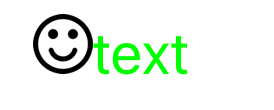
なんと先頭がNSTextAttachmentから始まる場合にaddAttributeしてもイメージにUIColorが適用されないということがわかった。NSMutableAttributedStringの内容が
"?text"だと問題あり、
"text?"だと問題ない。問題あり
問題なし
対策
NSMutableAttributedStringの先頭に文字列(スペース)を入れて回避する。
let image = UIImage(named: "foo")! let attributedString = NSMutableAttributedString(string:"") // <- ここに入れてもOK let templateImage = image.withRenderingMode(.alwaysTemplate) let textAttachment = NSTextAttachment() textAttachment.image = templateImage textAttachment.bounds = CGRect(x: 0, y: 0, width: 20, height: 20) let attrString = NSAttributedString(attachment: textAttachment) attributedString.append(attrString) attributedString.insert(NSAttributedString(string: " "), at: 0) // <- これ attributedString.addAttribute( NSAttributedString.Key.foregroundColor, value: UIColor.green, range: NSRange(location: 0, length: attributedString.length)) label.attributedText = attributedStringこれで一件落着、と思いきやこれでもまだ罠がある。
先頭に文字列を入れることで先頭の文字列分後退するし、イメージのみの場合と比べてbaselineが少し上になる。
密にレイアウトしているアプリだと上が切れたり下に変なスペースが生まれたりするし、
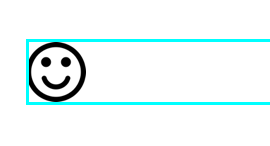
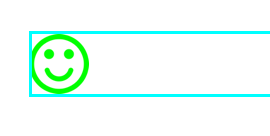
大体、 コード的に非常に気持ち悪い。先頭がイメージ
先頭が文字列
問題は回避されるが、先頭にスペース(文字列)ができるのとbaselineが微妙に上に。
対策の対策
頑張ってbaselineを合わせたとしても先頭にスペースは頂けない。
またAttributedStringの処理に依存してレイアウトするのも後々痛い目を見そう。
ちょっと泥臭いがイメージ自体に色をオーバレイさせる方法にした。class HogeView { func fuga() { let image = UIImage(named: "foo")! let attributedString = NSMutableAttributedString(string:"") let templateImage = image.withRenderingMode(.alwaysTemplate) let textAttachment = NSTextAttachment() textAttachment.image = templateImage.overray(with: .red) textAttachment.bounds = CGRect(x: 0, y: 0, width: 20, height: 20) let attrString = NSAttributedString(attachment: textAttachment) attributedString.append(attrString) label.attributedText = attributedString } } extension UIImage { func overray(with fillColor: UIColor) -> UIImage { // using scale correctly preserves retina images UIGraphicsBeginImageContextWithOptions(size, false, scale) let context: CGContext! = UIGraphicsGetCurrentContext() assert(context != nil) // correctly rotate image context.translateBy(x: 0, y: size.height) context.scaleBy(x: 1.0, y: -1.0) let rect = CGRect(x: 0.0, y: 0.0, width: size.width, height: size.height) // draw tint color context.setBlendMode(.normal) fillColor.setFill() context.fill(rect) // mask by alpha values of original image context.setBlendMode(.destinationIn) context.draw(self.cgImage!, in: rect) let image = UIGraphicsGetImageFromCurrentImageContext() UIGraphicsEndImageContext() return image! } }結果
感想
文章の先頭にアイコンとか何らかのイメージ置いたりするケースは結構ありそうなもんだが。。