- 投稿日:2019-07-19T23:17:48+09:00
AppDelegateでのPUSH通知の受信処理
はじめに
iOSでPUSH通知を受信する時のAppDelegateのメソッドをまとめておきます。
環境
- Xcode : 10.2.1
- ios : 12.3.1
AppDelegateでのPUSH通知の種類
iosアプリがPUSH通知を受信する種類は以下の3つがあります。
以下ではそれぞれを説明します。
- アプリが起動していない時にPUSH通知を受信した場合
- アプリが起動している時にPUSH通知を受信した場合
- バックグランドPUSH通知を受信した場合
アプリが起動していない時にPUSH通知を受信した場合
アプリが起動していない時にPUSH通知を受信した場合は、通知センター等に通知されます。この通知をタップするとアプリが起動されます。アプリが起動される時には、AppDelegateの以下のメソッドが呼ばれます。
userNotificationCenter(_:didReceive:withCompletionHandler:)アプリが起動している時にPUSH通知を受信した場合
アプリが起動している時(Foreground)は、AppDelegateの以下のメッセージが呼ばれます。通知センターには表示されません。
userNotificationCenter(_:willPresent:withCompletionHandler:)バックグランドPUSH通知を受信した場合
画面にPUSH通知表示せず、アプリが起動していない状態でも、PUSH通知を受信した時に30秒間だけアプリを起動して処理を実行できるバックグランド通知があります。通知メッセージには
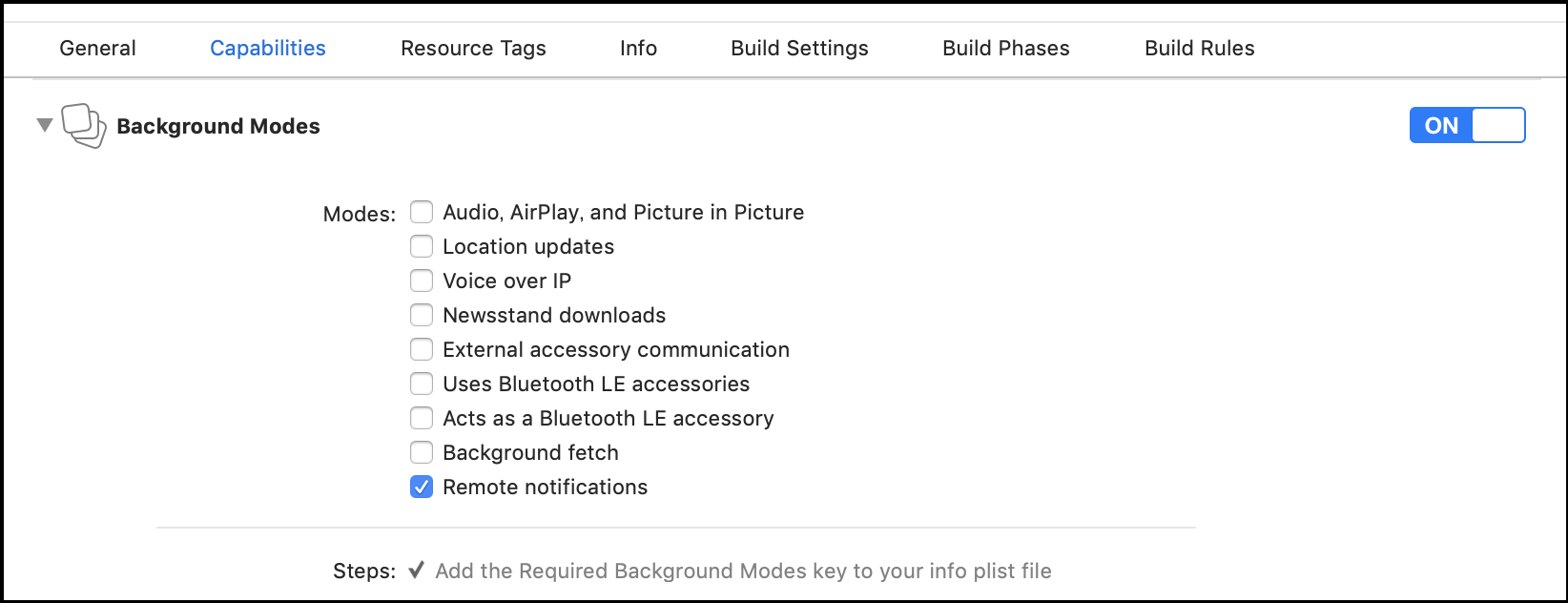
content-availableを入れます。サーバ側からのPUSH通知に関しては、以前の記事を参照ください。バックグランドPUSH通知を受信するためには、Xcodeのプロジェクトで、以下のようにCapabilityでRemote Notificationsにチェックを入れます。これによって、バックグランドPUSH通知を受信することができます。
バックグランド通知を受信した場合は、AppDelegateの以下のメソッドが呼ばれます。
application(_:didReceiveRemoteNotification:fetchCompletionHandler:)参考文献

- 投稿日:2019-07-19T20:02:08+09:00
iOS 13からのダークモード対応のコツ
iOS 13からのダークモード対応について、具体的な実装方法、注意点、現行バージョンと並行開発するコツなどをまとめてみました。
定義済みのダイナミックシステムカラーについて
これまで色の指定は
UIColor.whiteのように静的な色を使っていましたが、iOS 13からはライト・ダークのモードに応じて変化するダイナミックカラーという仕組みが導入されました。システムで定義されたダイナミックカラーを
UIColorから利用することができます。label,systemBackgroundのように用途に応じた名前で定義されるものはセマンティックカラーとも呼ばれます。システムと同じ色を使うのが適当なケースではこれらを利用しましょう。ダークモードかどうかを判定する
ダークモードかどうかは
UITraitCollectionのプロパティuserInterfaceStyleで判定できます。UIViewやUIViewControllerはtraitCollectionプロパティからUITraitCollectionのインスタンスにアクセスできます。また、以下のようなエクステンションを書いておくと便利だと思います。 availability の判定をあちこちに書かずに済ませるためにも有効です。
extension UITraitCollection {

    public static var isDarkMode: Bool {
        if #available(iOS 13, *), current.userInterfaceStyle == .dark {
            return true
        }
        return false
    }

}
ただし、以下の項目で説明しますが、実際にこのコードを利用するシーンはあまりないと思います。
ダイナミックカラーを生成する
ビューの生成時などにダークモードかどうかを判定して静的な色をセットしても、アプリ動作中にモードが切り替わったときに追随できなくなってしまいます。
モード切り替え時に追随できるようにするにはダイナミックカラーを利用します。
UIColorにクロージャーを渡して、クロージャーの中でモードごとの色を返すようにすることで、動的な色を作れるイニシャライザが新たに導入されました。UIColorが直接利用できる場面ではこれを使うのがいいでしょう。let dynamicColor = UIColor { (traitCollection: UITraitCollection) -> UIColor in if traitCollection.userInterfaceStyle == .dark { return .black } else { return .white } }こちらも以下のようなメソッドを
UIColorのエクステンションに書いておくと便利です。/// ライト/ダーク用の色を受け取ってDynamic Colorを作って返す public class func dynamicColor(light: UIColor, dark: UIColor) -> UIColor { if #available(iOS 13, *) { return UIColor { (traitCollection) -> UIColor in if traitCollection.userInterfaceStyle == .dark { return dark } else { return light } } } return light }カスタムのセマンティックカラーを定義する
アプリ独自のカラーセットをセマンティックカラーとして
UIColorのエクステンションに定義して、実際に色を指定する箇所ではこちらを利用するのがいいと思います。ダークモード導入以前からこのように定義しているアプリも多いのではないでしょうか。ダイナミックカラーを返すようにすることで、モード切り替え時も自動的に色が置き換わるようになります。
/// 背景色
public static var background: UIColor {
    return dynamicColor(
        light: .white
        dark: .black
    )
}

/// メインのテキストの色
public static var text: UIColor {
    return dynamicColor(
        light: UIColor(hex: 0x212121),
        dark: UIColor(hex: 0xF5F5F5)
    )
}
※
init(hex:)も独自のエクステンションです。deployment targetがiOS 11以上であればAsset CatalogでColor Setを定義することができます(画像はMacアプリの例ですがiOSも同様です)。右ペインのAppearacesから「Any, Dark」を選択するとダークモード用の色を定義できます。
Supporting Dark Mode in Your Interface よりStoryboardから指定したり、コードから
init(named:)で指定すればダイナミックカラーとして利用できます。ダイナミックカラーを直接使えないケース
色指定に
CGColorを使わないといけないケースや、withAlphaComponent(_:)でalphaをかけているケースなどは、ダイナミックカラーを直接利用できないので注意が必要です。このようなケースでは、モード切り替え時に呼ばれるメソッドの中で色の指定をしておくことで、適切にアップデートできます。モード切り替え時に呼ばれるメソッドは以下の通りです。
UIView
traitCollectionDidChange(_:)layoutSubviews()draw(_:)updateConstraints()tintColorDidChange()UIViewController
traitCollectionDidChange(_:)updateViewConstraints()viewWillLayoutSubviews()viewDidLayoutSubviews()UIPresentationController
traitCollectionDidChange(_:)containerViewWillLayoutSubviews()containerViewDidLayoutSubviews()
CGColorで色を指定する例override func traitCollectionDidChange(_ previousTraitCollection: UITraitCollection?) { super.traitCollectionDidChange(previousTraitCollection) textLabel.layer.borderColor = UIColor.border.cgColor }現行バージョン向けと並行開発する
iOS 13のリリースまでまだ時間がありますので、それまでに新規の画面開発や既存画面の大幅な改修などが入ることもあると思います。その場合、今のうちにダークモード対応のことを考慮しておきたいので、現行バージョンのXcode 10用ブランチとiOS 13対応をしているXcode 11用ブランチで同一のコードが動く状態にしました。
例えば上に挙げたdynamic colorを返すメソッドは、以下のように
#if swift(>=5.1)を挟むことによってどちらの環境でもビルドして動作させることができます。public class func dynamicColor(light: UIColor, dark: UIColor) -> UIColor { #if swift(>=5.1) if #available(iOS 13, *) { return UIColor { (traitCollection) -> UIColor in if traitCollection.userInterfaceStyle == .dark { return dark } else { return light } } } #endif return light }参考リンク

- 投稿日:2019-07-19T19:19:35+09:00
【備忘録】Swift4.0以降で音を鳴らす
音を鳴らしたいだけ
ある教材でアプリ開発を学んでいたら、音を鳴らすところがうまくいかない。そりゃそうだ。その教材、Swift3.0なんだもの。まぁ、私が過去に書いた4.2を引っ張ってきてぶち込んだから問題なくできたけど。。。こんな感じで今後も「音を鳴らすだけ」のためにわざわざ過去のProject開いて確認するのめんどいな、、と思ってここに書いておく。
こんな感じ
ViewController.swiftimport UIKit import AVFoundation class ViewController: UIViewController { var audioPlayer: AVAudioPlayer! @IBAction func btn(_ sender: UIButton) { playSound(name: "yourFileName") } override func viewDidLoad() { super.viewDidLoad() } } extension ViewController: AVAudioPlayerDelegate{ func playSound(name: String){ guard let path = Bundle.main.path(forResource: name, ofType: "mp3") else { print("I cannot find any music file...") return } do{ audioPlayer = try AVAudioPlayer(contentsOf: URL(fileURLWithPath: path)) audioPlayer.delegate = self audioPlayer.play() } catch { } } }yourFileName.mp3っていうファイルを入れておくと、ボタンを押した時にそれが流れる。
- 投稿日:2019-07-19T16:37:29+09:00
Xcode11 Beta4 で Carthage の Build Failed を回避する
Xcode11 Beta4 で Carthage の Build Failed を回避する
Xcode11 Beta4 で Carthage で framework をビルドすると失敗しました。
回避策が本家Carthage の issues にありました。感謝です。
「Xcode 11.0 Beta 4がSwiftを含むフレームワーク(ビットコード付き)のアーカイブに失敗する」
そうです。
回避策
xcconfigファイルを用意する
この例でのファイル名は
workaround.xcconfig
ファイルの内容は
LD_VERIFY_BITCODE=NO
だそうです。
ビルド時にフルパス指定するので任意の場所に作成します。
お好きな方法で作成してください。
以下はターミナルで作成する例です。$ echo LD_VERIFY_BITCODE=NO > workaround.xcconfig
ターミナルでこのファイルを指定しつつ、いつものbuild、またはupdateコマンドを実行
ビルド失敗したということは既にcheckout済みですのでbuildの例を以下に示してみます。
通常はupdateコマンドでよろしいかと思います。
workaround.xcconfigはフルパス指定しないとうまくいきませんでした。
パスはみなさんそれぞれですので読み替えてください。$ XCODE_XCCONFIG_FILE=/Users/SomeUser/SomeDirectory/Project/workaround.xcconfig carthage build --platform iOS
リンク
Carthage の issues
参考記事
xcconfigで快適なBuild Settingsライフを
https://qiita.com/hirothings/items/7f6943db609ff88c10be超効率化外伝: xcconfigの便利なところ&設定例
https://qiita.com/rotors123/items/1affd9a286505536e809
- 投稿日:2019-07-19T08:21:17+09:00
Xcode 11 beta 3 → beta 4 での変更点
はじめに
Xcode 11 beta 4が公開されたので、SwiftUI Tutorialsで確認できたbeta 3→beta 4での変更点について、以下にまとめていきます。
(文末にbeta 2→beta 3での変更点も記載しています。)beta 3 → beta 4 での変更点
本記事内で触れていない変更点などもありますので、詳細を知りたい場合は公式のリリースノートを参照してみてください。
- iOS & iPadOS 13 Beta 4 Release NotesBindableObjectの仕様変更
The BindableObject protocol’s requirement is now willChange instead of didChange, and should now be sent before the object changes rather than after it changes. This change allows for improved coalescing of change notifications. (51580731)
didChangeがwillChangeに変更されました。
仕様自体もオブジェクトが変更された後ではなく、変更される前に送信されるようになり、変更通知の統合が改善されたようです。Landmarks/Models/UserData.swift
 final class UserData: BindableObject {
-    let didChange = PassthroughSubject<UserData, Never>()
+    let willChange = PassthroughSubject<Void, Never>()

     var showFavoritesOnly = false {
-        didSet {
-            didChange.send(self)
+        willSet {
+            willChange.send()
         }
     }

     var landmarks = landmarkData {
-        didSet {
-            didChange.send(self)
+        willSet {
+            willChange.send()
         }
     }
 }
Textの仕様変更
The color(:) modifier for Text is renamed foregroundColor(:) for consistency with the more general foregroundColor(_:) view modifier. (50391847)
colorがforegroundColorに変名されました。Landmarks/CategoryRow.swift
  Text(landmark.name)
-     .color(.primary)
+     .foregroundColor(.primary)
      .font(.caption)
Collectionの仕様変更
The identified(by:) method on the Collection protocol is deprecated in favor of dedicated init(
selection:rowContent:) and init(
identified(by:)メソッドがdeprecatedに変更され、ForEach(_:id:)またはList(_:id:)の利用が推奨となりました。Landmarks/Home.swift
- ForEach(categories.keys.sorted().identified(by: \.self)) { key in
+ ForEach(categories.keys.sorted(), id: \.self) { key in
      CategoryRow(categoryName: key, items: self.categories[key]!)
  }
  .listRowInsets(EdgeInsets())
DatePickerの仕様変更
'init(_:minimumDate:maximumDate:displayedComponents:)' is deprecated: DatePicker labels are now required
labelを引数に取らない初期化メソッドがdeprecatedになりました。
Landmarks/Profiles/ProfileEditor.swift
  DatePicker(
-     $profile.goalDate,
+     "Goal Date",
+     selection: $profile.goalDate,
      minimumDate: Calendar.current.date(byAdding: .year, value: -1, to: profile.goalDate),
      maximumDate: Calendar.current.date(byAdding: .year, value: 1, to: profile.goalDate),
      displayedComponents: .date)
なお、beta 4のSwiftUI Tutorialでは、仕様変更の対応以外に次のリファクタリングも行われていました。
+ var dateRange: ClosedRange<Date> {
+     let min = Calendar.current.date(byAdding: .year, value: -1, to: profile.goalDate)!
+     let max = Calendar.current.date(byAdding: .year, value: 1, to: profile.goalDate)!
+     return min...max
+ }

  DatePicker(
-     $profile.goalDate,
-     minimumDate: Calendar.current.date(byAdding: .year, value: -1, to: profile.goalDate),
-     maximumDate: Calendar.current.date(byAdding: .year, value: 1, to: profile.goalDate),
+     "Goal Date",
+     selection: $profile.goalDate,
+     in: dateRange,
      displayedComponents: .date)
AnyTransitionの仕様変更
Cannot invoke 'scale' with no arguments
scaleがメソッドからプロパティに変更されました。Landmarks/HikeView.swift
-        let removal = AnyTransition.scale()
+        let removal = AnyTransition.scale
presentation(_:), Sheet, Modal, PresentationLink
Added improved presentation modifiers: sheet(isPresented:onDismiss:content:), actionSheet(isPresented:content:), and alert(isPresented:content:) — along with isPresented in the environment — replace the existing presentation(_:), Sheet, Modal, and PresentationLink types. (52075730)
presentation(_:), Sheet, Modal, PresentationLinkがdeprecatedになりました。
併せて、これらの機能に相当する機能がViewのメソッドとして追加されています。
- sheet(isPresented:onDismiss:content:)
- actionSheet(isPresented:content:)
- alert(isPresented:content:)
SwiftUI Tutorialsでは
PresentationLinkが利用されていましたが、sheet(isPresented:onDismiss:content:)に変更されていました。Landmarks/Home.swift
+ @State var showingProfile = false
+
+ var profileButton: some View {
+     Button(action: { self.showingProfile.toggle() }) {
+         Image(systemName: "person.crop.circle")
+             .imageScale(.large)
+             .accessibility(label: Text("User Profile"))
+             .padding()
+     }
+ }
+
  var body: some View {
      NavigationView {
          List {
              FeaturedLandmarks(landmarks: featured)
                  .scaledToFill()
                  .frame(height: 200)
                  .clipped()
                  .listRowInsets(EdgeInsets())

              ForEach(categories.keys.sorted(), id: \.self) { key in
                  CategoryRow(categoryName: key, items: self.categories[key]!)
              }
              .listRowInsets(EdgeInsets())

              NavigationLink(destination: LandmarkList()) {
                  Text("See All")
              }
          }
          .navigationBarTitle(Text("Featured"))
-         .navigationBarItems(trailing:
-             PresentationLink(destination: ProfileHost()) {
-                 Image(systemName: "person.crop.circle")
-                     .imageScale(.large)
-                     .accessibility(label: Text("User Profile"))
-                     .padding()
-             }
-         )
+         .navigationBarItems(trailing: profileButton)
+         .sheet(isPresented: $showingProfile) {
+             ProfileHost()
+         }
      }
  }
Animationの仕様変更
Updated the APIs for creating animations. The basic animations are now named after the curve type — such as linear and easeInOut. The interpolation-based spring(mass:stiffness:damping:initialVelocity:) animation is now interpolatingSpring(mass:stiffness:damping:initialVelocity:), and fluidSpring(stiffness:dampingFraction:blendDuration:timestep:idleThreshold:) is now spring(response:dampingFraction:blendDuration:) or interactiveSpring(response:dampingFraction:blendDuration:), depending on whether or not the animation is driven interactively. (50280375)
spring(mass:stiffness:damping:initialVelocity:), fluidSpring(stiffness:dampingFraction:blendDuration:timestep:idleThreshold:)がdeprecatedになりました。
併せて、これらのメソッドに相当するメソッドが新たに追加されています。
- interpolatingSpring(mass:stiffness:damping:initialVelocity:)
- spring(response:dampingFraction:blendDuration:)
- interactiveSpring(response:dampingFraction:blendDuration:)
Landmarks/Supporting View/GraphCapsule.swift
  var animation: Animation {
-     Animation.spring(initialVelocity: 5)
+     Animation.spring(dampingFraction: 0.5)
        .speed(2)
        .delay(0.03 * Double(index))
  }
その他の変更点
- リファクタリング
- LandmarkListへの遷移元(Home.swift)でNavigationViewが生成されているため、LandmarkListではNavigationViewが削除されました。
Landmarks/LandmarkList.swift
  var body: some View {
-     NavigationView {
-         List {
-             Toggle(isOn: $userData.showFavoritesOnly) {
-                 Text("Show Favorites Only")
-             }
-
-             ForEach(userData.landmarks) { landmark in
-                 if !self.userData.showFavoritesOnly || landmark.isFavorite {
-                     NavigationLink(
-                         destination: LandmarkDetail(landmark: landmark)
-                             .environmentObject(self.userData)
-                     ) {
-                         LandmarkRow(landmark: landmark)
-                     }
+     List {
+         Toggle(isOn: $userData.showFavoritesOnly) {
+             Text("Show Favorites Only")
+         }
+
+         ForEach(userData.landmarks) { landmark in
+             if !self.userData.showFavoritesOnly || landmark.isFavorite {
+                 NavigationLink(
+                     destination: LandmarkDetail(landmark: landmark)
+                 ) {
+                     LandmarkRow(landmark: landmark)
                  }
              }
          }
-         .navigationBarTitle(Text("Landmarks"), displayMode: .large)
      }
+     .navigationBarTitle(Text("Landmarks"), displayMode: .large)
  }
beta 2 → beta 3 での変更点
画面遷移に関する構造体の仕様変更
構造体名が
XXXButtonからXXXLinkに変更されました。
SwiftUI Tutorials では以下の2つが利用されており、名前が変更されています。
beta 2 beta 3 NavigationButton NavigationLink PresentationButton PresentationLink Landmarks/Home.swift
-     NavigationButton(destination: LandmarkList()) {
+     NavigationLink(destination: LandmarkList()) {
          Text("See All")
      }
  }
  .navigationBarTitle(Text("Featured"))
  .navigationBarItems(trailing:
-     PresentationButton(destination: ProfileHost()) {
+     PresentationLink(destination: ProfileHost()) {
          Image(systemName: "person.crop.circle")
              .imageScale(.large)
              .accessibility(label: Text("User Profile"))
ScrollViewの仕様変更
beta 3ではAxis.SetとshowsIndicatorsの組合せで振る舞いを指定するように仕様変更されているのですが、beta 2では指定できていたBounceの指定や細かい組合せが実現できないように見えます。
このため、beta 4でまた仕様の追加・変更があるかもしれません。
beta 2のScrollViewのinit仕様public init(isScrollEnabled: Bool = true, alwaysBounceHorizontal: Bool = false, alwaysBounceVertical: Bool = false, showsHorizontalIndicator: Bool = true, showsVerticalIndicator: Bool = true, content: () -> Content)
beta 3のScrollViewのinit仕様public init(_ axes: Axis.Set = .vertical, showsIndicators: Bool = true, content: () -> Content)Landmarks/CategoryRow.swift
- ScrollView(showsHorizontalIndicator: false) {
+ ScrollView(.horizontal, showsIndicators: false) {
      HStack(alignment: .top, spacing: 0) {
          ForEach(self.items.identified(by: \.name)) { landmark in
TextFieldの仕様変更
beta 2での初期化方法がdeprecatedに変更され、beta 3では新たな初期化方法が追加されました。Landmarks/Profiles/ProfileEditor.swift
  HStack {
      Text("Username").bold()
      Divider()
-     TextField($profile.username)
+     TextField("Username", text: $profile.username)
  }
UIWindowの仕様変更
SwiftUI Tutorialsで利用されていた初期化方法が、
beta2とbeta3では異なりました。
beta 2では、UIViewから継承したinitが利用されていましたが、beta3ではUIWindowとして定義されているinitが利用されており、より良い方法に変更されたようです。Landmarks/SceneDelegate.swift
- let window = UIWindow(frame: UIScreen.main.bounds)
- window.rootViewController = UIHostingController(rootView: CategoryHome().environmentObject(UserData()))
- self.window = window
- window.makeKeyAndVisible()
+ if let windowScene = scene as? UIWindowScene {
+     let window = UIWindow(windowScene: windowScene)
+     window.rootViewController = UIHostingController(rootView: CategoryHome().environmentObject(UserData()))
+     self.window = window
+     window.makeKeyAndVisible()
+ }
最後に
上記内容は、SwiftUI Tutorialsの変更点を元に調査を行い変更点をまとめました。
最新のbeta(現時点ではXcode 11.0 beta3 - Xcode 11.0 beta 4)の詳細な変更点につきましては、以下のApple公式サイトで確認することが可能ですので、興味がある方は確認してみてください。
https://developer.apple.com/documentation/swiftui?changes=latest_beta

- 投稿日:2019-07-19T08:21:17+09:00
SwiftUI(Xcode 11) beta 3 → beta 4 での変更点
はじめに
Xcode 11 beta 4が公開されたので、SwiftUI Tutorialsで確認できたSwiftUIのbeta 3→beta 4での変更点について、以下にまとめていきます。
(文末にbeta 2→beta 3での変更点も記載しています。)beta 3 → beta 4 での変更点
本記事内で触れていない変更点などもありますので、詳細を知りたい場合は公式のリリースノートを参照してみてください。
- iOS & iPadOS 13 Beta 4 Release NotesBindableObjectの仕様変更
The BindableObject protocol’s requirement is now willChange instead of didChange, and should now be sent before the object changes rather than after it changes. This change allows for improved coalescing of change notifications. (51580731)
didChangeがwillChangeに変更されました。
仕様自体もオブジェクトが変更された後ではなく、変更される前に送信されるようになり、変更通知の統合が改善されたようです。Landmarks/Models/UserData.swift
 final class UserData: BindableObject {
-    let didChange = PassthroughSubject<UserData, Never>()
+    let willChange = PassthroughSubject<Void, Never>()

     var showFavoritesOnly = false {
-        didSet {
-            didChange.send(self)
+        willSet {
+            willChange.send()
         }
     }

     var landmarks = landmarkData {
-        didSet {
-            didChange.send(self)
+        willSet {
+            willChange.send()
         }
     }
 }
Textの仕様変更
The color(:) modifier for Text is renamed foregroundColor(:) for consistency with the more general foregroundColor(_:) view modifier. (50391847)
colorがforegroundColorに変名されました。Landmarks/CategoryRow.swift
  Text(landmark.name)
-     .color(.primary)
+     .foregroundColor(.primary)
      .font(.caption)
Collectionの仕様変更
The identified(by:) method on the Collection protocol is deprecated in favor of dedicated init(
identified(by:)メソッドがdeprecatedに変更され、ForEach(_:id:)またはList(_:id:)の利用が推奨となりました。Landmarks/Home.swift
- ForEach(categories.keys.sorted().identified(by: \.self)) { key in
+ ForEach(categories.keys.sorted(), id: \.self) { key in
      CategoryRow(categoryName: key, items: self.categories[key]!)
  }
  .listRowInsets(EdgeInsets())
DatePickerの仕様変更
'init(_:minimumDate:maximumDate:displayedComponents:)' is deprecated: DatePicker labels are now required
labelを引数に取らない初期化メソッドがdeprecatedになりました。
Landmarks/Profiles/ProfileEditor.swift
  DatePicker(
-     $profile.goalDate,
+     "Goal Date",
+     selection: $profile.goalDate,
      minimumDate: Calendar.current.date(byAdding: .year, value: -1, to: profile.goalDate),
      maximumDate: Calendar.current.date(byAdding: .year, value: 1, to: profile.goalDate),
      displayedComponents: .date)
なお、beta 4のSwiftUI Tutorialでは、仕様変更の対応以外に次のリファクタリングも行われていました。
+ var dateRange: ClosedRange<Date> {
+     let min = Calendar.current.date(byAdding: .year, value: -1, to: profile.goalDate)!
+     let max = Calendar.current.date(byAdding: .year, value: 1, to: profile.goalDate)!
+     return min...max
+ }

  DatePicker(
-     $profile.goalDate,
-     minimumDate: Calendar.current.date(byAdding: .year, value: -1, to: profile.goalDate),
-     maximumDate: Calendar.current.date(byAdding: .year, value: 1, to: profile.goalDate),
+     "Goal Date",
+     selection: $profile.goalDate,
+     in: dateRange,
      displayedComponents: .date)
AnyTransitionの仕様変更
Cannot invoke 'scale' with no arguments
scaleがメソッドからプロパティに変更されました。Landmarks/HikeView.swift
-        let removal = AnyTransition.scale()
+        let removal = AnyTransition.scale
presentation(_:), Sheet, Modal, PresentationLink
Added improved presentation modifiers: sheet(isPresented:onDismiss:content:), actionSheet(isPresented:content:), and alert(isPresented:content:) — along with isPresented in the environment — replace the existing presentation(_:), Sheet, Modal, and PresentationLink types. (52075730)
presentation(_:), Sheet, Modal, PresentationLinkがdeprecatedになりました。
併せて、これらの機能に相当する機能がViewのメソッドとして追加されています。
- sheet(isPresented:onDismiss:content:)
- actionSheet(isPresented:content:)
- alert(isPresented:content:)
SwiftUI Tutorialsでは
PresentationLinkが利用されていましたが、sheet(isPresented:onDismiss:content:)に変更されていました。Landmarks/Home.swift
+ @State var showingProfile = false
+
+ var profileButton: some View {
+     Button(action: { self.showingProfile.toggle() }) {
+         Image(systemName: "person.crop.circle")
+             .imageScale(.large)
+             .accessibility(label: Text("User Profile"))
+             .padding()
+     }
+ }
+
  var body: some View {
      NavigationView {
          List {
              FeaturedLandmarks(landmarks: featured)
                  .scaledToFill()
                  .frame(height: 200)
                  .clipped()
                  .listRowInsets(EdgeInsets())

              ForEach(categories.keys.sorted(), id: \.self) { key in
                  CategoryRow(categoryName: key, items: self.categories[key]!)
              }
              .listRowInsets(EdgeInsets())

              NavigationLink(destination: LandmarkList()) {
                  Text("See All")
              }
          }
          .navigationBarTitle(Text("Featured"))
-         .navigationBarItems(trailing:
-             PresentationLink(destination: ProfileHost()) {
-                 Image(systemName: "person.crop.circle")
-                     .imageScale(.large)
-                     .accessibility(label: Text("User Profile"))
-                     .padding()
-             }
-         )
+         .navigationBarItems(trailing: profileButton)
+         .sheet(isPresented: $showingProfile) {
+             ProfileHost()
+         }
      }
  }
Animationの仕様変更
Updated the APIs for creating animations. The basic animations are now named after the curve type — such as linear and easeInOut. The interpolation-based spring(mass:stiffness:damping:initialVelocity:) animation is now interpolatingSpring(mass:stiffness:damping:initialVelocity:), and fluidSpring(stiffness:dampingFraction:blendDuration:timestep:idleThreshold:) is now spring(response:dampingFraction:blendDuration:) or interactiveSpring(response:dampingFraction:blendDuration:), depending on whether or not the animation is driven interactively. (50280375)
spring(mass:stiffness:damping:initialVelocity:), fluidSpring(stiffness:dampingFraction:blendDuration:timestep:idleThreshold:)がdeprecatedになりました。
併せて、これらのメソッドに相当するメソッドが新たに追加されています。
- interpolatingSpring(mass:stiffness:damping:initialVelocity:)
- spring(response:dampingFraction:blendDuration:)
- interactiveSpring(response:dampingFraction:blendDuration:)
Landmarks/Supporting View/GraphCapsule.swift
  var animation: Animation {
-     Animation.spring(initialVelocity: 5)
+     Animation.spring(dampingFraction: 0.5)
        .speed(2)
        .delay(0.03 * Double(index))
  }
その他の変更点
- リファクタリング
- LandmarkListへの遷移元(Home.swift)でNavigationViewが生成されているため、LandmarkListではNavigationViewが削除されました。
Landmarks/LandmarkList.swift
  var body: some View {
-     NavigationView {
-         List {
-             Toggle(isOn: $userData.showFavoritesOnly) {
-                 Text("Show Favorites Only")
-             }
-
-             ForEach(userData.landmarks) { landmark in
-                 if !self.userData.showFavoritesOnly || landmark.isFavorite {
-                     NavigationLink(
-                         destination: LandmarkDetail(landmark: landmark)
-                             .environmentObject(self.userData)
-                     ) {
-                         LandmarkRow(landmark: landmark)
-                     }
+     List {
+         Toggle(isOn: $userData.showFavoritesOnly) {
+             Text("Show Favorites Only")
+         }
+
+         ForEach(userData.landmarks) { landmark in
+             if !self.userData.showFavoritesOnly || landmark.isFavorite {
+                 NavigationLink(
+                     destination: LandmarkDetail(landmark: landmark)
+                 ) {
+                     LandmarkRow(landmark: landmark)
                  }
              }
          }
-         .navigationBarTitle(Text("Landmarks"), displayMode: .large)
      }
+     .navigationBarTitle(Text("Landmarks"), displayMode: .large)
  }
beta 2 → beta 3 での変更点
画面遷移に関する構造体の仕様変更
構造体名が
XXXButtonからXXXLinkに変更されました。
SwiftUI Tutorials では以下の2つが利用されており、名前が変更されています。
beta 2 beta 3 NavigationButton NavigationLink PresentationButton PresentationLink Landmarks/Home.swift
-     NavigationButton(destination: LandmarkList()) {
+     NavigationLink(destination: LandmarkList()) {
          Text("See All")
      }
  }
  .navigationBarTitle(Text("Featured"))
  .navigationBarItems(trailing:
-     PresentationButton(destination: ProfileHost()) {
+     PresentationLink(destination: ProfileHost()) {
          Image(systemName: "person.crop.circle")
              .imageScale(.large)
              .accessibility(label: Text("User Profile"))
ScrollViewの仕様変更
beta 3ではAxis.SetとshowsIndicatorsの組合せで振る舞いを指定するように仕様変更されているのですが、beta 2では指定できていたBounceの指定や細かい組合せが実現できないように見えます。
このため、beta 4でまた仕様の追加・変更があるかもしれません。
beta 2のScrollViewのinit仕様public init(isScrollEnabled: Bool = true, alwaysBounceHorizontal: Bool = false, alwaysBounceVertical: Bool = false, showsHorizontalIndicator: Bool = true, showsVerticalIndicator: Bool = true, content: () -> Content)
beta 3のScrollViewのinit仕様public init(_ axes: Axis.Set = .vertical, showsIndicators: Bool = true, content: () -> Content)Landmarks/CategoryRow.swift
- ScrollView(showsHorizontalIndicator: false) {
+ ScrollView(.horizontal, showsIndicators: false) {
      HStack(alignment: .top, spacing: 0) {
          ForEach(self.items.identified(by: \.name)) { landmark in
TextFieldの仕様変更
beta 2での初期化方法がdeprecatedに変更され、beta 3では新たな初期化方法が追加されました。Landmarks/Profiles/ProfileEditor.swift
  HStack {
      Text("Username").bold()
      Divider()
-     TextField($profile.username)
+     TextField("Username", text: $profile.username)
  }
UIWindowの仕様変更
SwiftUI Tutorialsで利用されていた初期化方法が、
beta2とbeta3では異なりました。
beta 2では、UIViewから継承したinitが利用されていましたが、beta3ではUIWindowとして定義されているinitが利用されており、より良い方法に変更されたようです。Landmarks/SceneDelegate.swift
- let window = UIWindow(frame: UIScreen.main.bounds)
- window.rootViewController = UIHostingController(rootView: CategoryHome().environmentObject(UserData()))
- self.window = window
- window.makeKeyAndVisible()
+ if let windowScene = scene as? UIWindowScene {
+     let window = UIWindow(windowScene: windowScene)
+     window.rootViewController = UIHostingController(rootView: CategoryHome().environmentObject(UserData()))
+     self.window = window
+     window.makeKeyAndVisible()
+ }
最後に
上記内容は、SwiftUI Tutorialsの変更点を元に調査を行い変更点をまとめました。
最新のbeta(現時点ではXcode 11.0 beta3 - Xcode 11.0 beta 4)の詳細な変更点につきましては、以下のApple公式サイトで確認することが可能ですので、興味がある方は確認してみてください。
https://developer.apple.com/documentation/swiftui?changes=latest_beta
- 投稿日:2019-07-19T08:21:17+09:00
SwiftUI - Xcode 11 beta 4 での変更点
はじめに
Xcode 11 beta 4が公開されたので、SwiftUI Tutorialsで確認できたSwiftUIのbeta 3→beta 4での変更点について、以下にまとめていきます。
(文末にbeta 2→beta 3での変更点も記載しています。)beta 3 → beta 4 での変更点
本記事内で触れていない変更点などもありますので、詳細を知りたい場合は公式のリリースノートを参照してみてください。
- iOS & iPadOS 13 Beta 4 Release NotesBindableObjectの仕様変更
The BindableObject protocol’s requirement is now willChange instead of didChange, and should now be sent before the object changes rather than after it changes. This change allows for improved coalescing of change notifications. (51580731)
didChangeがwillChangeに変更されました。
仕様自体もオブジェクトが変更された後ではなく、変更される前に送信されるようになり、変更通知の統合が改善されたようです。Landmarks/Models/UserData.swift
 final class UserData: BindableObject {
-    let didChange = PassthroughSubject<UserData, Never>()
+    let willChange = PassthroughSubject<Void, Never>()

     var showFavoritesOnly = false {
-        didSet {
-            didChange.send(self)
+        willSet {
+            willChange.send()
         }
     }

     var landmarks = landmarkData {
-        didSet {
-            didChange.send(self)
+        willSet {
+            willChange.send()
         }
     }
 }
Textの仕様変更
The color(:) modifier for Text is renamed foregroundColor(:) for consistency with the more general foregroundColor(_:) view modifier. (50391847)
colorがforegroundColorに変名されました。Landmarks/CategoryRow.swift
  Text(landmark.name)
-     .color(.primary)
+     .foregroundColor(.primary)
      .font(.caption)
Collectionの仕様変更
The identified(by:) method on the Collection protocol is deprecated in favor of dedicated init(
identified(by:)メソッドがdeprecatedに変更され、ForEach(_:id:)またはList(_:id:)の利用が推奨となりました。Landmarks/Home.swift
- ForEach(categories.keys.sorted().identified(by: \.self)) { key in
+ ForEach(categories.keys.sorted(), id: \.self) { key in
      CategoryRow(categoryName: key, items: self.categories[key]!)
  }
  .listRowInsets(EdgeInsets())
DatePickerの仕様変更
'init(_:minimumDate:maximumDate:displayedComponents:)' is deprecated: DatePicker labels are now required
labelを引数に取らない初期化メソッドがdeprecatedになりました。
Landmarks/Profiles/ProfileEditor.swift
  DatePicker(
-     $profile.goalDate,
+     "Goal Date",
+     selection: $profile.goalDate,
      minimumDate: Calendar.current.date(byAdding: .year, value: -1, to: profile.goalDate),
      maximumDate: Calendar.current.date(byAdding: .year, value: 1, to: profile.goalDate),
      displayedComponents: .date)
なお、beta 4のSwiftUI Tutorialでは、仕様変更の対応以外に次のリファクタリングも行われていました。
+ var dateRange: ClosedRange<Date> {
+     let min = Calendar.current.date(byAdding: .year, value: -1, to: profile.goalDate)!
+     let max = Calendar.current.date(byAdding: .year, value: 1, to: profile.goalDate)!
+     return min...max
+ }

  DatePicker(
-     $profile.goalDate,
-     minimumDate: Calendar.current.date(byAdding: .year, value: -1, to: profile.goalDate),
-     maximumDate: Calendar.current.date(byAdding: .year, value: 1, to: profile.goalDate),
+     "Goal Date",
+     selection: $profile.goalDate,
+     in: dateRange,
      displayedComponents: .date)
AnyTransitionの仕様変更
Cannot invoke 'scale' with no arguments
scaleがメソッドからプロパティに変更されました。Landmarks/HikeView.swift
-        let removal = AnyTransition.scale()
+        let removal = AnyTransition.scale
presentation(_:), Sheet, Modal, PresentationLink
Added improved presentation modifiers: sheet(isPresented:onDismiss:content:), actionSheet(isPresented:content:), and alert(isPresented:content:) — along with isPresented in the environment — replace the existing presentation(_:), Sheet, Modal, and PresentationLink types. (52075730)
presentation(_:), Sheet, Modal, PresentationLinkがdeprecatedになりました。
併せて、これらの機能に相当する機能がViewのメソッドとして追加されています。
- sheet(isPresented:onDismiss:content:)
- actionSheet(isPresented:content:)
- alert(isPresented:content:)
SwiftUI Tutorialsでは
PresentationLinkが利用されていましたが、sheet(isPresented:onDismiss:content:)に変更されていました。Landmarks/Home.swift
+ @State var showingProfile = false
+
+ var profileButton: some View {
+     Button(action: { self.showingProfile.toggle() }) {
+         Image(systemName: "person.crop.circle")
+             .imageScale(.large)
+             .accessibility(label: Text("User Profile"))
+             .padding()
+     }
+ }
+
  var body: some View {
      NavigationView {
          List {
              FeaturedLandmarks(landmarks: featured)
                  .scaledToFill()
                  .frame(height: 200)
                  .clipped()
                  .listRowInsets(EdgeInsets())

              ForEach(categories.keys.sorted(), id: \.self) { key in
                  CategoryRow(categoryName: key, items: self.categories[key]!)
              }
              .listRowInsets(EdgeInsets())

              NavigationLink(destination: LandmarkList()) {
                  Text("See All")
              }
          }
          .navigationBarTitle(Text("Featured"))
-         .navigationBarItems(trailing:
-             PresentationLink(destination: ProfileHost()) {
-                 Image(systemName: "person.crop.circle")
-                     .imageScale(.large)
-                     .accessibility(label: Text("User Profile"))
-                     .padding()
-             }
-         )
+         .navigationBarItems(trailing: profileButton)
+         .sheet(isPresented: $showingProfile) {
+             ProfileHost()
+         }
      }
  }
Animationの仕様変更
Updated the APIs for creating animations. The basic animations are now named after the curve type — such as linear and easeInOut. The interpolation-based spring(mass:stiffness:damping:initialVelocity:) animation is now interpolatingSpring(mass:stiffness:damping:initialVelocity:), and fluidSpring(stiffness:dampingFraction:blendDuration:timestep:idleThreshold:) is now spring(response:dampingFraction:blendDuration:) or interactiveSpring(response:dampingFraction:blendDuration:), depending on whether or not the animation is driven interactively. (50280375)
spring(mass:stiffness:damping:initialVelocity:), fluidSpring(stiffness:dampingFraction:blendDuration:timestep:idleThreshold:)がdeprecatedになりました。
併せて、これらのメソッドに相当するメソッドが新たに追加されています。
- interpolatingSpring(mass:stiffness:damping:initialVelocity:)
- spring(response:dampingFraction:blendDuration:)
- interactiveSpring(response:dampingFraction:blendDuration:)
Landmarks/Supporting View/GraphCapsule.swift
  var animation: Animation {
-     Animation.spring(initialVelocity: 5)
+     Animation.spring(dampingFraction: 0.5)
        .speed(2)
        .delay(0.03 * Double(index))
  }
その他の変更点
- リファクタリング
- LandmarkListへの遷移元(Home.swift)でNavigationViewが生成されているため、LandmarkListではNavigationViewが削除されました。
Landmarks/LandmarkList.swift
  var body: some View {
-     NavigationView {
-         List {
-             Toggle(isOn: $userData.showFavoritesOnly) {
-                 Text("Show Favorites Only")
-             }
-
-             ForEach(userData.landmarks) { landmark in
-                 if !self.userData.showFavoritesOnly || landmark.isFavorite {
-                     NavigationLink(
-                         destination: LandmarkDetail(landmark: landmark)
-                             .environmentObject(self.userData)
-                     ) {
-                         LandmarkRow(landmark: landmark)
-                     }
+     List {
+         Toggle(isOn: $userData.showFavoritesOnly) {
+             Text("Show Favorites Only")
+         }
+
+         ForEach(userData.landmarks) { landmark in
+             if !self.userData.showFavoritesOnly || landmark.isFavorite {
+                 NavigationLink(
+                     destination: LandmarkDetail(landmark: landmark)
+                 ) {
+                     LandmarkRow(landmark: landmark)
                  }
              }
          }
-         .navigationBarTitle(Text("Landmarks"), displayMode: .large)
      }
+     .navigationBarTitle(Text("Landmarks"), displayMode: .large)
  }
beta 2 → beta 3 での変更点
画面遷移に関する構造体の仕様変更
構造体名が
XXXButtonからXXXLinkに変更されました。
SwiftUI Tutorials では以下の2つが利用されており、名前が変更されています。
beta 2 beta 3 NavigationButton NavigationLink PresentationButtonPresentationLink※ PresentationLinkは
beta4でdeprecatedになりました。Landmarks/Home.swift
-     NavigationButton(destination: LandmarkList()) {
+     NavigationLink(destination: LandmarkList()) {
          Text("See All")
      }
  }
  .navigationBarTitle(Text("Featured"))
  .navigationBarItems(trailing:
-     PresentationButton(destination: ProfileHost()) {
+     PresentationLink(destination: ProfileHost()) {
          Image(systemName: "person.crop.circle")
              .imageScale(.large)
              .accessibility(label: Text("User Profile"))
ScrollViewの仕様変更
beta 3ではAxis.SetとshowsIndicatorsの組合せで振る舞いを指定するように仕様変更されているのですが、beta 2では指定できていたBounceの指定や細かい組合せが実現できないように見えます。
beta 2のScrollViewのinit仕様public init(isScrollEnabled: Bool = true, alwaysBounceHorizontal: Bool = false, alwaysBounceVertical: Bool = false, showsHorizontalIndicator: Bool = true, showsVerticalIndicator: Bool = true, content: () -> Content)
beta 3のScrollViewのinit仕様public init(_ axes: Axis.Set = .vertical, showsIndicators: Bool = true, content: () -> Content)Landmarks/CategoryRow.swift
- ScrollView(showsHorizontalIndicator: false) {
+ ScrollView(.horizontal, showsIndicators: false) {
      HStack(alignment: .top, spacing: 0) {
          ForEach(self.items.identified(by: \.name)) { landmark in
TextFieldの仕様変更
beta 2での初期化方法がdeprecatedに変更され、beta 3では新たな初期化方法が追加されました。Landmarks/Profiles/ProfileEditor.swift
  HStack {
      Text("Username").bold()
      Divider()
-     TextField($profile.username)
+     TextField("Username", text: $profile.username)
  }
UIWindowの仕様変更
SwiftUI Tutorialsで利用されていた初期化方法が、
beta2とbeta3では異なりました。
beta 2では、UIViewから継承したinitが利用されていましたが、beta3ではUIWindowとして定義されているinitが利用されており、より良い方法に変更されたようです。Landmarks/SceneDelegate.swift
- let window = UIWindow(frame: UIScreen.main.bounds)
- window.rootViewController = UIHostingController(rootView: CategoryHome().environmentObject(UserData()))
- self.window = window
- window.makeKeyAndVisible()
+ if let windowScene = scene as? UIWindowScene {
+     let window = UIWindow(windowScene: windowScene)
+     window.rootViewController = UIHostingController(rootView: CategoryHome().environmentObject(UserData()))
+     self.window = window
+     window.makeKeyAndVisible()
+ }
最後に
上記内容は、SwiftUI Tutorialsの変更点を元に調査を行い変更点をまとめました。
最新のbeta(現時点ではXcode 11.0 beta3 - Xcode 11.0 beta 4)の詳細な変更点につきましては、以下のApple公式サイトで確認することが可能ですので、興味がある方は確認してみてください。
https://developer.apple.com/documentation/swiftui?changes=latest_beta