- 投稿日:2019-05-07T21:03:37+09:00
create-react-app で 絶対パス(absolute path) をwebpack に頼らず設定する #react
ReactでAbsolute Pathを設定するときに以前と変わっていたので共有も含めて更新!
過去
.envファイルを作って以下のように定義していた.envNODE_PATH=src現在
jsconfig.json{ "compilerOptions": { "baseUrl": "src" }, "include": ["src"] }これまで通り開発しようとしたらすぐに分からず1~2時間ほどハマっていた(汗)
しっかりと公式ドキュメント見ていくべきだった。。
参照先: https://facebook.github.io/create-react-app/docs/importing-a-component#absolute-imports


- 投稿日:2019-05-07T19:16:38+09:00
IE11にてBlueprintのPopoverの背景色がおかしくなる問題の対処
はじめに
タイトルの通り、Popoverのcontentの背景色がなぜか真っ白になったり・ツラついたりする現象に遭遇したので、対処方法を共有します。
原因
IE11とPopoverが展開するcontainerのスタイルの指定が相性が悪いため。
デフォルトでは、containerにはtransform: translate3d(xxx, xxx, xxx)なスタイルが適用されています。対処方法
Popoverコンポーネントのmodifiers propsに以下のようなオブジェクトを渡すことにより、この問題を回避できます。
※IE11の場合のみ、falseにするという条件分岐を入れてもいいかと思いますconst hoge = { computeStyle: { gpuAcceleration: false } }参考
https://popper.js.org/popper-documentation.html#modifiers..computeStyle.gpuAcceleration
- 投稿日:2019-05-07T15:32:57+09:00
React 開発環境構築
はじめに
この記事では、Reactの開発環境構築手順について、説明していきたいと思います。
構築の流れとして
- Node.jsのインストール
- パッケージマネージャーYarnのインストール
- creat-react-appのインストール
- 構築した環境でHello Worldを表示させてみる
1. Node.jsのインストール
まずは、下記のURLをクリックします。
https://nodejs.org/ja/URLを開くとLTS版と最新版とあります。
簡単に説明すると、LTS版(Long Time Supportの略)は長期的サポートが受けれるもの
一方、最新版はサポート期間が短いが、最新の物を利用できるものです。この記事ではLTS版をダウンロードして進めていきます。
nodeをダウンロードして、インストールできたら、ターミナルで下記のコマンドを入力して、Nodeがインストールしているかを確認します。Nodeのバージョンが表示されていれば大丈夫です。
$ node -v
v10.15.3
2. Yarnをインストール
nodeのパッケージマネージャであるYarnをインストールしていきます。
npmというパッケージマネージャがNodeをインストールした時点でありますが、npmよりもYarnの方がより高速で信頼度の高いものになっているので、Yarnをインストールしていきます。
Yarnをインストールする場合は、ターミナルで下記のコマンドを実行してください。$npm install --global yarn /usr/local/bin/yarn -> /usr/local/lib/node_modules/yarn/bin/yarn.js /usr/local/bin/yarnpkg -> /usr/local/lib/node_modules/yarn/bin/yarn.js + yarn@1.15.2 updated 1 package in 1.698sYarnがインストールされているかは下記のコマンドを実行して、バージョンが表示されていれば大丈夫です。
$yarn --version
1.15.2
3. creat-react-appのインストール
従来のreactを用いた開発では、Babelやwebpackなど様々なパッケージをマニュアルでインストールする必要がったため、ものすごく手間がかかっていました。ですが、creat-react-appをインストールすることで、これらの問題が解消でき、簡単に必要なパッケージをインストールすることができます。
下記のコマンドを実行することでインストールできます。$yarn global add creat-react-app4. 構築した環境でHello Worldを表示させてみる
ターミナルから下記のコマンドを実行して、アプリケーションを作成します。
作成する場所は任意で構いません。$create-react-app helloworld下記のようなメッセージが表示されていればOKです。
Initialized a git repository.

Success! Created helloworld at /Users/******/helloworld
作成したプロジェクト配下に移動し、下記のstartコマンドを実行します。
$cd helloworld
$yarn start
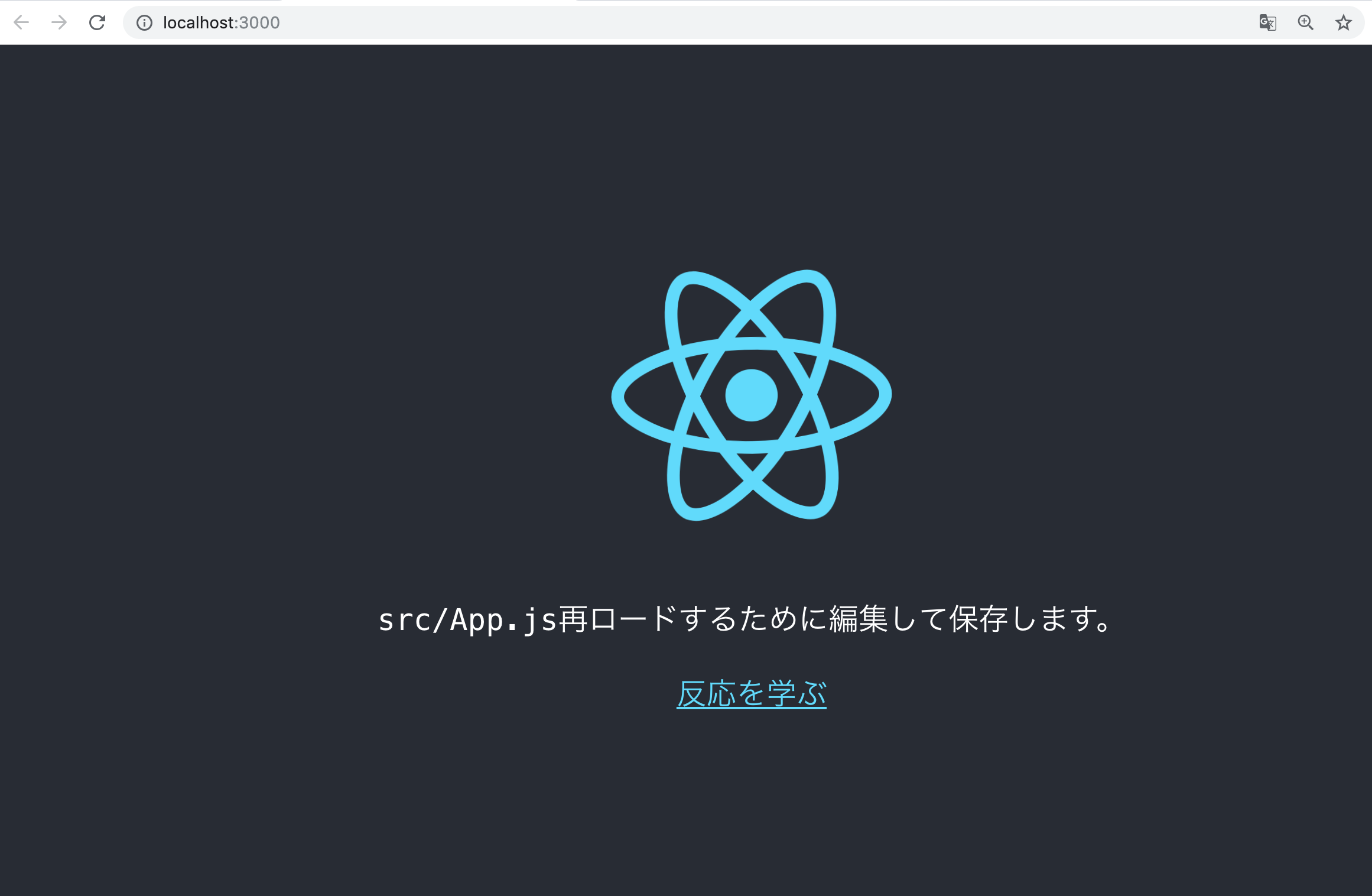
実行後、ブラウザが起動し、以下の画面が表示されていればOKです。
ここまでできたら、helloworld/src配下にあるApp.jsを開きましょう。
App.jsを開くと以下のようなコードが書かれていると思います。import React from 'react'; import logo from './logo.svg'; import './App.css'; function App() { return ( <div className="App"> <header className="App-header"> <img src={logo} className="App-logo" alt="logo" /> <p> Edit <code>src/App.js</code> and save to reload. </p> <a className="App-link" href="https://reactjs.org" target="_blank" rel="noopener noreferrer" > Learn React </a> </header> </div> ); } export default App;App.jsの内容を全て消して、以下のようにソースを書いてみましょう。
import React from 'react';

class App extends React.Component{
  render()
  {
    return (
    <div>
      <h1>Hello World</h1>
    </div>
    );
  }
}

export default App;
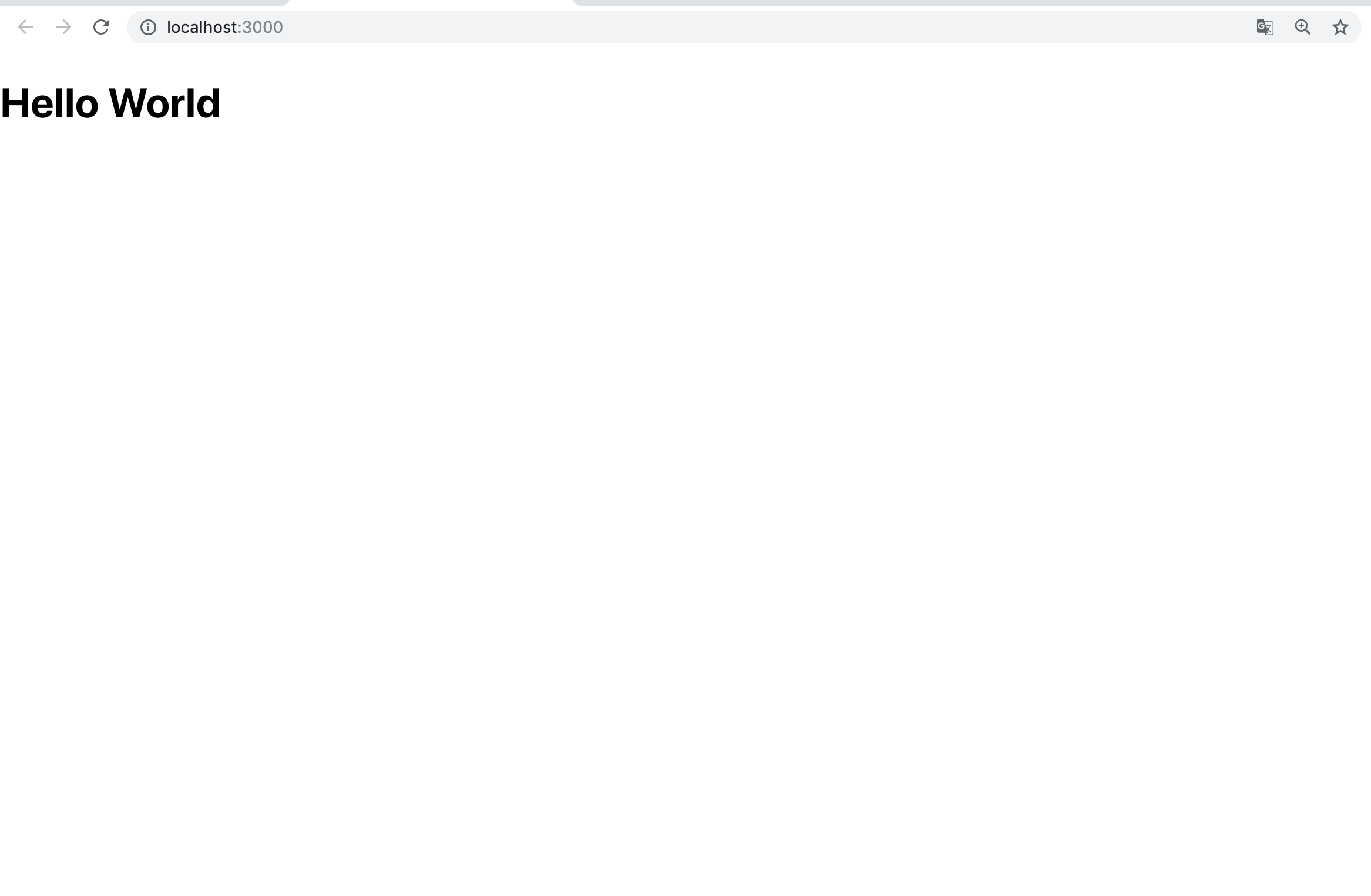
修正してブラウザに以下のように表示されていればOKです。
- 投稿日:2019-05-07T00:07:08+09:00
Jest(v24.6 )の公式ドキュメント読んで基本を勉強してみた
Jestの公式ドキュメントの(自分的には)基本の部分を読んで勉強した内容を投稿させていただきます
私が個人的に勉強した部分を書いていくだけなので、詳細に説明しているというわけでもなく、網羅的にやったというわけでもなく、本当にただの私のブログですので、注意してください。
間違いなどありましたら、ご指摘お願いしますまた、この記事中で私が試してみたコードは全て こちら にあります
Introduction
Getting Started
https://jestjs.io/docs/en/getting-started
jestのInstall
yarn add -D jest
# または
npm i -D yarn
2つの数を追加する関数のテストを書いてみる
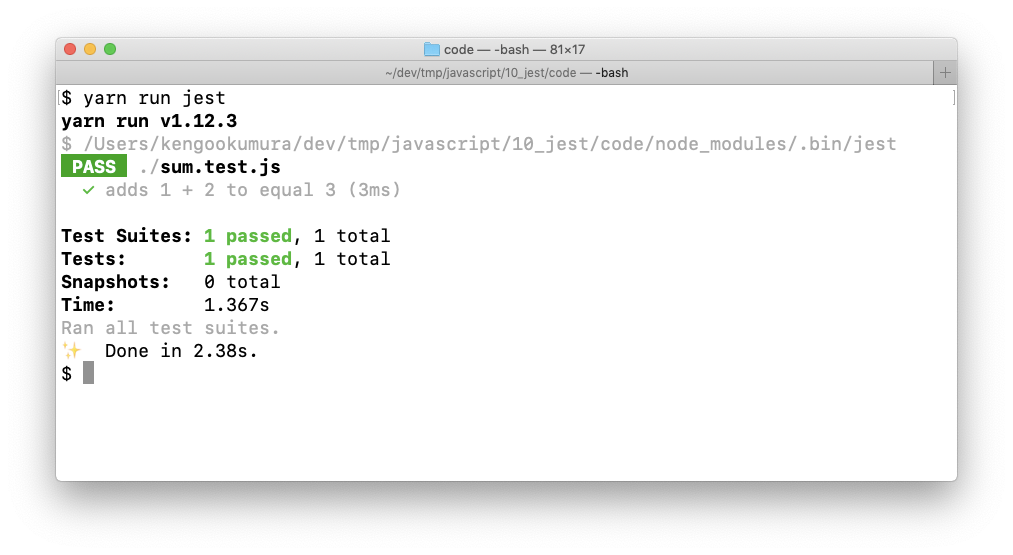
sum.jsfunction sum(a, b) { return a + b; } module.exports = sum;sum.test.jsconst sum = require("./sum"); test("adds 1 + 2 to equal 3", () => { expect(sum(1, 2)).toBe(3); });この状態で、
yarn run jestまたは、
npx jestとする、
jestを使ったテストができました
または、以下のように
package.jsonにnpm scriptを追加して実行してもOKpackage.json{ "scripts": { "test": "jest" } }Running from command line
設定ファイルとしてconfig.jsonを使用し、実行後にネイティブOSの通知を表示しながら、my-testに一致するファイルに対してJestを実行する方法は次のとおりです。
jest my-test --notify --config=config.jsonAdditional Configuration
以下のコマンドで基本設定ファイルを生成できる
yarn run jest --initUsing Babel
babelを使う設定
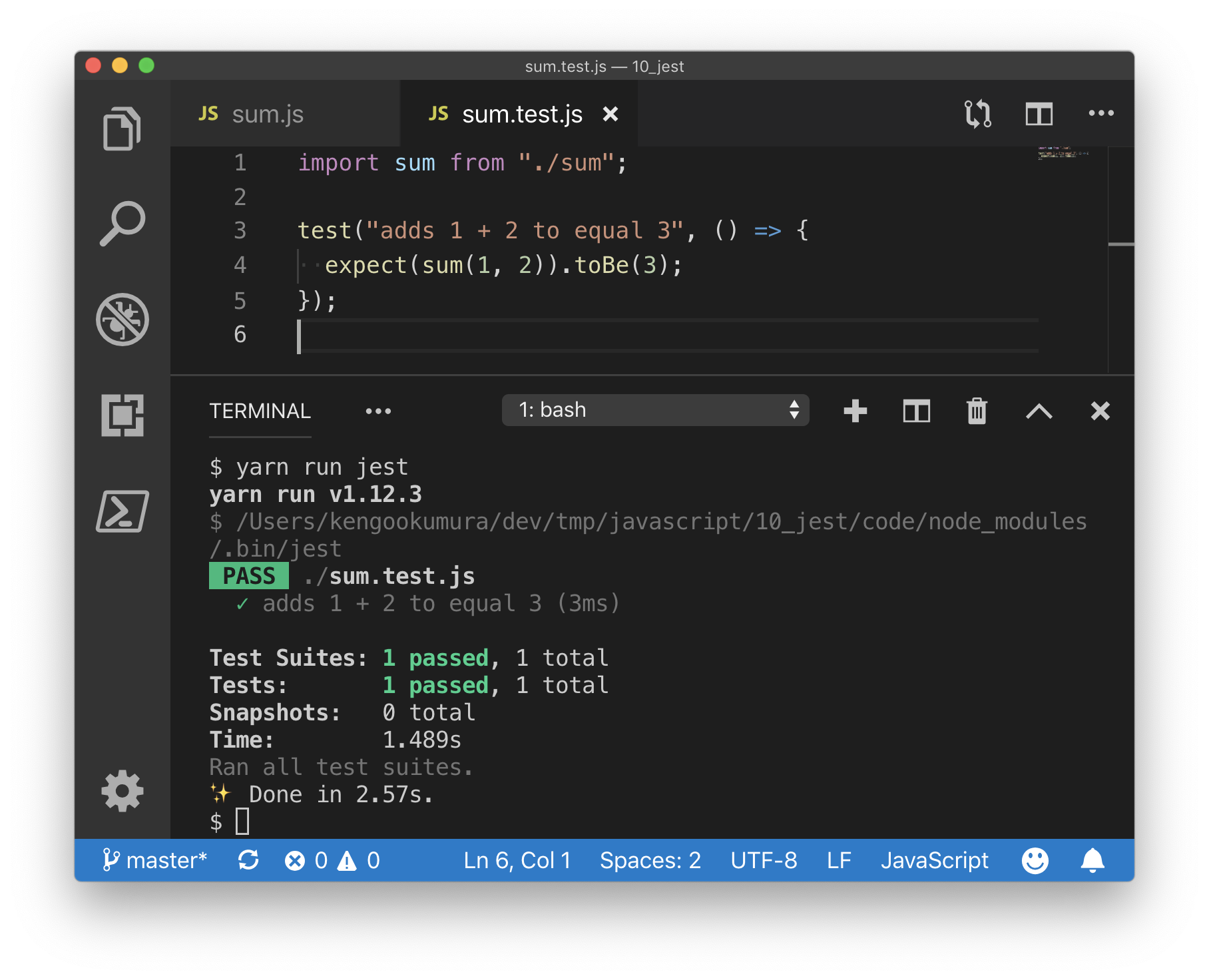
yarn add -D babel-jest @babel/core @babel/preset-env.babelrc{ "presets": [ [ "@babel/preset-env", { "targets": { "node": "current" } } ] ] }sum.jsfunction sum(a, b) { return a + b; } - module.exports = sum; + export default sum;sum.test.js- const sum = require("./sum"); + import sum from "./sum"; test("adds 1 + 2 to equal 3", () => { expect(sum(1, 2)).toBe(3); });
babelを使用して、import、exportを使っていても問題なくテストができました。
Using Matchers
https://jestjs.io/docs/en/using-matchers
Common Matchers
test("two plus two is four", () => {
  // expect(2 + 2)と.toBe(4)で等しいことをテストしてくれます
  expect(2 + 2).toBe(4);
});

test("object assignment", () => {
  const data = { one: 1 };
  data["two"] = 2;
  // オブジェクトの値を確認したい場合は、toBeの代わりにtoEqualを使用する
  expect(data).toEqual({ one: 1, two: 2 });
});

test("numbers is not zero", () => {
  // 反対をテストすることもできます
  expect(2 + 1).not.toBe(0);
});
Truthiness
テストでは、
undefined、null、およびfalseを区別する必要がある場合がありますが、これらを異なる方法で扱いたくない場合があります。 Jestにはあなたが欲しいものについてあなたが明確になることを可能にするヘルパーが含まれています。
- toBeNull ->
nullにのみ一致- toBeUndefined ->
undefined- toBeDefined ->
toBeUndefinedの反対- toBeTruthy -> ifで
trueと見なすものすべてに一致する- toBeFalsy -> ifで
falseと見なすものすべてに一致するtest("null", () => { const n = null; expect(n).toBeNull(); expect(n).toBeDefined(); expect(n).not.toBeUndefined(); expect(n).not.toBeTruthy(); expect(n).toBeFalsy(); }); test("zero", () => { const z = 0; expect(z).not.toBeNull(); expect(z).toBeDefined(); expect(z).not.toBeUndefined(); expect(z).not.toBeTruthy(); expect(z).toBeFalsy(); });Numbers
test("two plus two", () => {
  const value = 2 + 2;
  expect(value).toBeGreaterThan(3);
  expect(value).toBeGreaterThanOrEqual(3.5);
  expect(value).toBeLessThan(5);
  expect(value).toBeLessThanOrEqual(4.5);

  // 等しいか確認
  expect(value).toBe(4);
  expect(value).toEqual(4);
});

test("adding floating point numbers", () => {
  const value = 0.1 + 0.2;
  //expect(value).toBe(0.3); <- 丸め誤差が原因でうまくテストできない
  expect(value).toBeCloseTo(0.3); // This works.
});
Strings
// toMatchを使って文字列を正規表現と照合することができる

test("there is no I in team", () => {
  expect("team").not.toMatch(/I/);
});

test('but there is a "stop" in Christoph', () => {
  expect("Christoph").toMatch(/stop/);
});
Arrays and iterables
// toContainを使用して、配列または反復可能オブジェクトに特定の項目が含まれているかどうかを確認できる

const shoppingList = [
  "diapers",
  "kleenex",
  "trash bags",
  "paper towels",
  "beer"
];

test("the shopping list has beer on it", () => {
  expect(shoppingList).toContain("beer");
  expect(new Set(shoppingList)).toContain("beer");
});
Exceptions
// 特定の関数が呼び出されたときにエラーをスローすることをテストしたい場合は、toThrowを使用する

function compileAndroidCode() {
  throw new Error("you are using the wrong JDK");
}

test("compiling android goes as expected", () => {
  expect(compileAndroidCode).toThrow();
  expect(compileAndroidCode).toThrow(Error);

  // 正確なエラーメッセージや正規表現を使うこともできます
  expect(compileAndroidCode).toThrow("you are using the wrong JDK");
  expect(compileAndroidCode).toThrow(/JDK/);
});
Testing Asynchronous Code
https://jestjs.io/docs/en/asynchronous
Callbacks
function fetchData(callback) {
  // 非同期処理を実行 -> しかし1秒待ってくれずにテストが終了してしまうので、このテストはうまくいかない
  setTimeout(() => callback("peanut butter"), 1000);
}

test("the data is peanut butter", () => {
  function callback(data) {
    // コールバック関数の引数の文字列が「peanut butter」かテスト
    expect(data).toBe("peanut butter");
  }

  fetchData(callback);
});
このテストを想定通りに動かすには、テストを空の引数を持つ関数に入れる代わりに、
doneという単一の引数を使用する。テストを終了する前に、Jestはdoneコールバックが呼び出されるまで待機しますfunction fetchData(callback) { setTimeout(() => callback("peanut butter"), 1000); } test("the data is peanut butter", done => { function callback(data) { expect(data).toBe("peanut butter"); done(); } fetchData(callback); });Promises
function fetchData() {
  return new Promise(resolve => {
    setTimeout(() => resolve("peanut butter"), 1000);
  });
}

function fetchDataErr() {
  return new Promise((resolve, reject) => {
    setTimeout(() => reject("error"), 1000);
  });
}

test("the data is peanut butter", () => {
  // 必ずreturnしましょう、でないと、promiseの解決を待たずにテストが終了してしまう
  return fetchData().then(data => {
    expect(data).toBe("peanut butter");
  });
});

test("the fetch fails with an error", () => {
  // アサーションが1回行われることを確認しないと、間違ってresolveが実行されてしまった場合に
  // catchに処理が到達せず、テストになりません
  expect.assertions(1);
  // 必ずreturnしましょう、でないと、promiseの解決を待たずにテストが終了してしまう
  return fetchDataErr().catch(e => expect(e).toMatch("error"));
});

test("the data is peanut butter", () => {
  // resolvesマッチャーを使うことで、同じようにテストしてくれます
  return expect(fetchData()).resolves.toBe("peanut butter");
});

test("the fetch fails with an error", () => {
  // rejectsマッチャーを使うことで、同じようにテストしてくれます
  return expect(fetchDataErr()).rejects.toMatch("error");
});
Async/Await
// async, awaitを使って、同じようにテストすることもできます

test("the data is peanut butter", async () => {
  expect.assertions(1);
  const data = await fetchData();
  expect(data).toBe("peanut butter");
});

test("the fetch fails with an error", async () => {
  expect.assertions(1);
  try {
    await fetchDataErr();
  } catch (e) {
    expect(e).toMatch("error");
  }
});

// resolves, rejectsマッチャーでも同じようにテストできます

test("the data is peanut butter", async () => {
  await expect(fetchData()).resolves.toBe("peanut butter");
});

test("the fetch fails with an error", async () => {
  await expect(fetchDataErr()).rejects.toMatch("error");
});
Setup and Teardown
https://jestjs.io/docs/en/setup-teardown
テストを実行する前、テストの実行後に実行してくれる関数
// 各テストの実行前に実行される関数
beforeEach(() => {
  console.log("beforeEach");
});

// 各テストの実行後に実行される関数
afterEach(() => {
  console.log("afterEach");
});

// ファイルの先頭で一回だけ実行される関数
beforeAll(() => {
  console.log("beforeAll");
});

// ファイルの最後で一回だけ実行される関数
afterAll(() => {
  console.log("afterAll");
});

test("city database has Vienna", () => {
  expect(true).toBeTruthy();
});

test("city database has San Juan", () => {
  expect(true).toBeTruthy();
});

// コンソールの出力↓
// beforeAll
// beforeEach
// afterEach
// beforeEach
// afterEach
// afterAll
// ファイルの先頭で一回だけ実行される関数 beforeAll(() => { // promiseが返る処理の場合はreturnしないといけない return new Promise(resolve => { setTimeout(() => { console.log("beforeAll"); resolve(); }, 1000); }); }); // ファイルの最後で一回だけ実行される関数 afterAll(() => { // promiseが返る処理の場合はreturnしないといけない return new Promise(resolve => { setTimeout(() => { console.log("afterAll"); resolve(); }, 1000); }); });Scoping
describeブロックを使用してテストをまとめてグループ化することもできます。記述ブロック内にある場合、前後のブロックはその記述ブロック内のテストにのみ適用されます。
beforeAll(() => console.log("1 - beforeAll"));
afterAll(() => console.log("1 - afterAll"));
beforeEach(() => console.log("1 - beforeEach"));
afterEach(() => console.log("1 - afterEach"));
test("", () => console.log("1 - test"));
describe("Scoped / Nested block", () => {
  beforeAll(() => console.log("2 - beforeAll"));
  afterAll(() => console.log("2 - afterAll"));
  beforeEach(() => console.log("2 - beforeEach"));
  afterEach(() => console.log("2 - afterEach"));
  test("", () => console.log("2 - test"));
});

// 1 - beforeAll
// 1 - beforeEach
// 1 - test
// 1 - afterEach
// 2 - beforeAll
// 1 - beforeEach
// 2 - beforeEach
// 2 - test
// 2 - afterEach
// 1 - afterEach
// 2 - afterAll
// 1 - afterAll
Mock Functions
https://jestjs.io/docs/en/mock-functions
Using a mock function
function forEach(items, callback) {
  for (let index = 0; index < items.length; index++) {
    callback(items[index]);
  }
}

test("using a mock function sample", () => {
  const mockCallback = jest.fn(x => 42 + x);
  forEach([0, 1], mockCallback);

  // モック関数が2回呼び出されたか
  expect(mockCallback.mock.calls.length).toBe(2);

  // 関数の最初の呼び出しの最初の引数が0か
  expect(mockCallback.mock.calls[0][0]).toBe(0);

  // 関数への2番目の呼び出しの最初の引数は1か
  expect(mockCallback.mock.calls[1][0]).toBe(1);

  // 関数への最初の呼び出しの戻り値は42か
  expect(mockCallback.mock.results[0].value).toBe(42);
});
Mock Return Values
テスト中にモック関数を使ってコードにテスト値を挿入することもできます。
test("mock return values sample", () => {
  const myMock = jest.fn();
  console.log(myMock()); // undefined

  myMock
    .mockReturnValueOnce(10)
    .mockReturnValueOnce("x")
    .mockReturnValue(true);

  console.log(myMock(), myMock(), myMock(), myMock()); // 10 'x' true true
});
Mocking Modules
users.jsimport axios from "axios"; class Users { static all() { return axios.get("/users.json").then(resp => resp.data); } } export default Users;↑の
axios.getをモックします
.getに対してmockResolvedValueを指定して、データを返すようにする↓users.test.jsimport axios from "axios"; import Users from "./users"; jest.mock("axios"); test("should fetch users", () => { const users = [{ name: "Bob" }]; const resp = { data: users }; axios.get.mockResolvedValue(resp); return Users.all().then(data => expect(data).toEqual(users)); });Mock Implementations
戻り値を指定してモック関数の実装を完全に置き換える機能
test("mock implementations sample 1", () => {
  const myMockFn = jest.fn(cb => cb(null, true));

  myMockFn((err, val) => console.log(val));
});
mockImplementationメソッドは、他のモジュールから作成されたモック関数のデフォルト実装を定義する必要がある場合に便利です。
foo.jsmodule.exports = function() { // some implementation; };test("mock implementations sample 2", () => { jest.mock("./foo"); const foo = require("./foo"); foo.mockImplementation(() => 42); console.log(foo()); // 42 });
複数呼び出しで異なる結果とする場合
test("mock implementations sample 3", () => {
  const myMockFn = jest
    .fn()
    .mockImplementationOnce(cb => cb(null, true))
    .mockImplementationOnce(cb => cb(null, false));

  myMockFn((err, val) => console.log(val)); // true

  myMockFn((err, val) => console.log(val)); // false
});
mockImplementationOnceで定義された実装を使い果たした後は、デフォルトが実行される
通常チェーン化されたメソッドがある(したがって常にこれを返す必要がある)場合は、すべてのモックにも存在する
.mockReturnThis()関数の形でこれを単純化するためのおすすめのAPIがあります。const myObj = { myMethod: jest.fn().mockReturnThis(), }; // ↑と同じ意味 const otherObj = { myMethod: jest.fn(function() { return this; }), };↓
thisが返ってきていることが確認できましたtest("mock implementations sample 5", () => { const myObj = { myMethod: jest.fn().mockReturnThis() }; console.log(myObj.myMethod() === myObj); // true });Mock Names
テストでの出力時に表示されるモック関数名を指定でき、エラーが見やすくなる
  const myMockFn = jest
    .fn()
    .mockReturnValue("default")
    .mockImplementation(scalar => 42 + scalar)
    .mockName("add42");
Custom Matchers
test("custom matchers sample 1", () => {
  const mockFunc = jest.fn();
  mockFunc();
  expect(mockFunc).toBeCalled(); // モック関数が少なくとも一度呼び出されました

  let [arg1, arg2] = [1, 2];
  mockFunc(arg1, arg2);
  expect(mockFunc).toBeCalledWith(arg1, arg2); // 指定された引数を使用して、モック関数が少なくとも1回呼び出されました

  expect(mockFunc).lastCalledWith(arg1, arg2); // モック関数への最後の呼び出しは指定された引数で呼ばれました

  expect(mockFunc).toMatchSnapshot(); // すべての呼び出しとモックの名前はスナップショットとして書き込まれます
});
以下のように書いても↑のようにテストしてくれます
test("custom matchers sample 2", () => {
  const mockFunc = jest.fn().mockName("sampleFunc");
  mockFunc();
  expect(mockFunc.mock.calls.length).toBeGreaterThan(0); // モック関数が少なくとも一度呼び出されました

  let [arg1, arg2] = [1, 2];
  mockFunc(arg1, arg2);
  expect(mockFunc.mock.calls).toContainEqual([arg1, arg2]); // 指定された引数を使用して、モック関数が少なくとも1回呼び出されました

  // モック関数への最後の呼び出しは指定された引数で呼ばれました
  expect(mockFunc.mock.calls[mockFunc.mock.calls.length - 1]).toEqual([
    arg1,
    arg2
  ]);

  expect(mockFunc.mock.calls[mockFunc.mock.calls.length - 1][0]).toBe(1); // モック関数への最後の呼び出しの最初の引数は `1`でした

  expect(mockFunc.getMockName()).toBe("sampleFunc"); // モックネーム
});
Snapshot Testing
https://jestjs.io/docs/en/snapshot-testing
スナップショットテストは、UIが予期せずに変更されないようにしたい場合に非常に便利なツールです。
Snapshot Testing with Jest
- Reactコンポーネントをテストする例
Link.react.jsimport React from "react"; const STATUS = { HOVERED: "hovered", NORMAL: "normal" }; export default class Link extends React.Component { constructor() { super(); this.state = { class: STATUS.NORMAL }; this._onMouseEnter = this._onMouseEnter.bind(this); this._onMouseLeave = this._onMouseLeave.bind(this); } _onMouseEnter() { this.setState({ class: STATUS.HOVERED }); } _onMouseLeave() { this.setState({ class: STATUS.NORMAL }); } render() { return ( <a className={this.state.class} href={this.props.page || "#"} onMouseEnter={this._onMouseEnter} onMouseLeave={this._onMouseLeave} > {this.props.children} </a> ); } }Link.test.jsimport React from "react"; import Link from "./Link.react"; import renderer from "react-test-renderer"; it("renders correctly", () => { const tree = renderer .create(<Link page="http://www.facebook.com">Facebook</Link>) .toJSON(); expect(tree).toMatchSnapshot(); });yarn add -D react react-test-renderer @babel/preset-react.babelrc{ "presets": [ "@babel/preset-env", "@babel/preset-react" ] }yarn run jest↑を実行すると、
./__snapshots__/Link.test.js.snapが自動生成され、以下のようなファイルになっています// Jest Snapshot v1, https://goo.gl/fbAQLP exports[`renders correctly 1`] = ` <a className="normal" href="http://www.facebook.com" onMouseEnter={[Function]} onMouseLeave={[Function]} > Facebook </a> `;スナップショットが一致しない場合、テストが失敗し、バグが発見しやすくなります。
Updating Snapshots
意図的にテストの内容を変更した場合
  import React from "react";
  import Link from "./Link.react";
  import renderer from "react-test-renderer";

  it("renders correctly", () => {
    const tree = renderer
-     .create(<Link page="http://www.facebook.com">Facebook</Link>)
+     .create(<Link page="http://www.instagram.com">Instagram</Link>)
      .toJSON();
    expect(tree).toMatchSnapshot();
  });
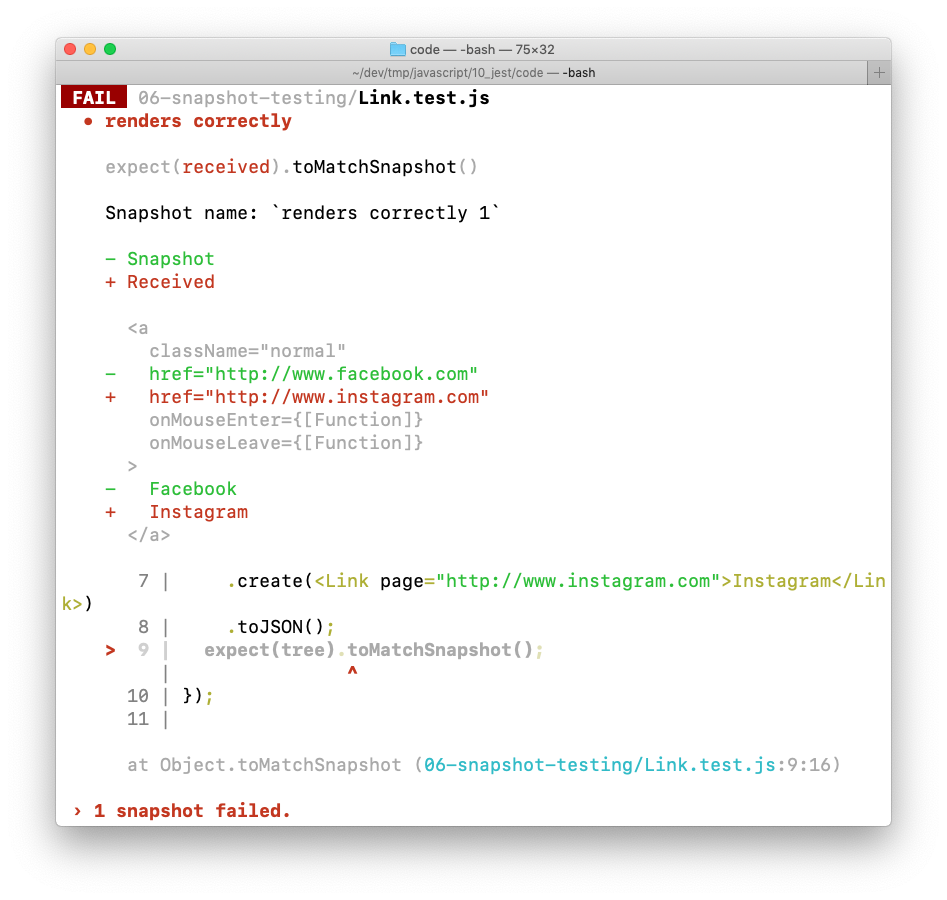
スナップショットが一致しなくなったためテストが通らなくなりました
変更が意図的なものであった場合はスナップショットを更新したらOK
yarn run jest --updateSnapshot #または、-uInteractive Snapshot Mode
失敗したスナップショットは、監視モードでインタラクティブに更新することもできます。
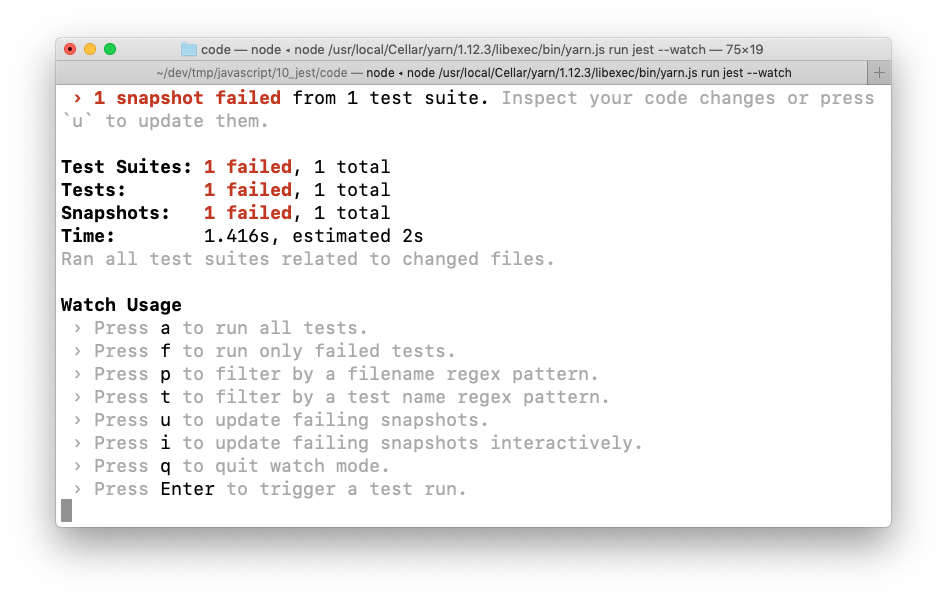
yarn run jest --watch
uを押すと、失敗したスナップショットを更新してくれるようでしたInline Snapshots
スナップショット値が自動的にソースコードに書き戻されることを除けば、インラインスナップショットは外部スナップショット(.snapファイル)と同じように動作します。 つまり、正しい値が書き込まれたことを確認するために外部ファイルに切り替える必要なしに、自動的に生成されたスナップショットの利点を享受することができます。
yarn add prettier
- 引数を付けずに
.toMatchInlineSnapshot()を呼び出してテストを作成it("renders correctly by prettier", () => { const tree = renderer .create(<Link page="https://prettier.io">Prettier</Link>) .toJSON(); expect(tree).toMatchInlineSnapshot(); });
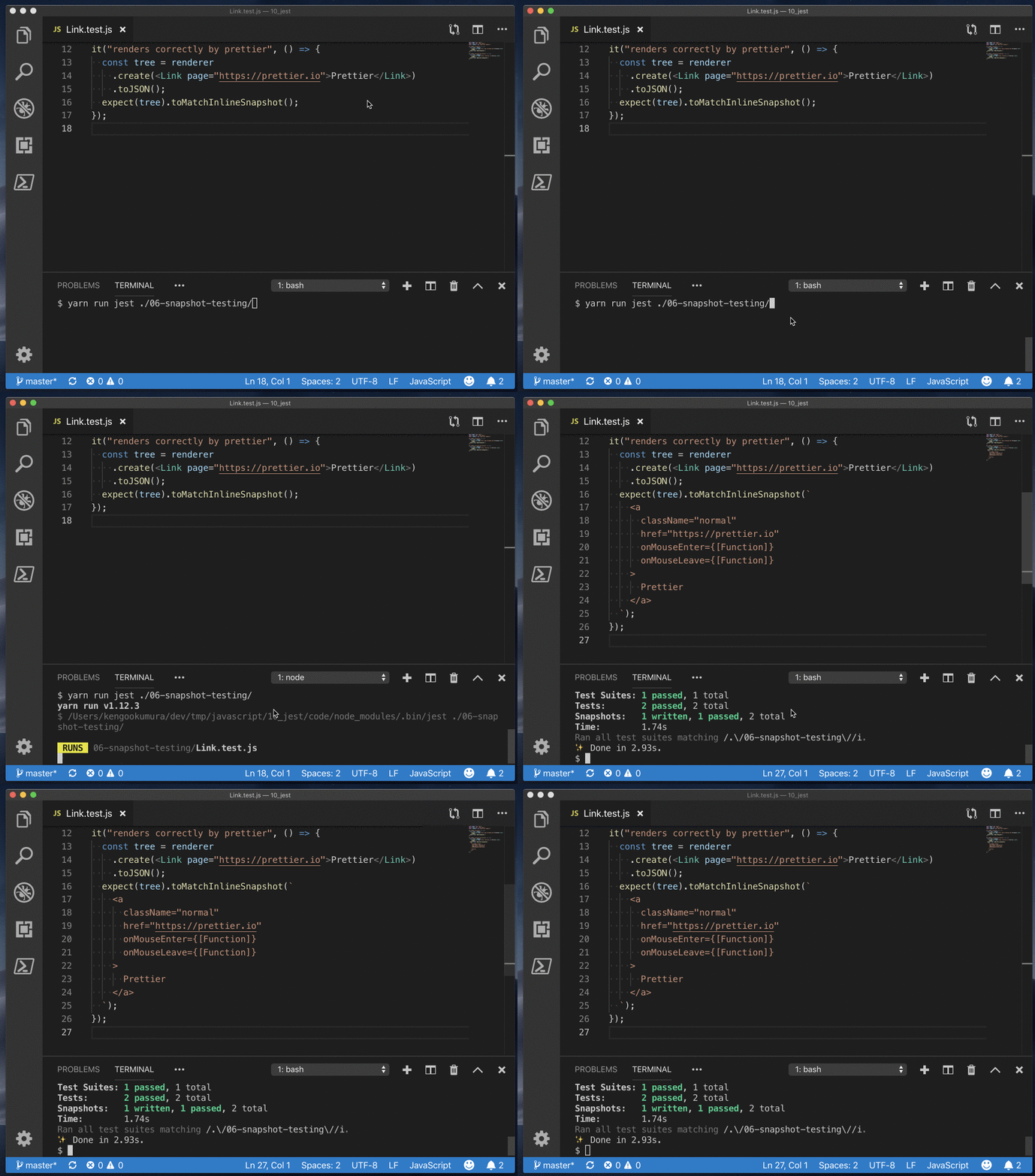
- ↑の状態で、
yarn run jestを実行すると、
スナップショットのファイルを作るのではなく、インラインで展開してくれたのを確認できました。
An Async Example
https://jestjs.io/docs/en/tutorial-async
JestでBabelサポートを有効にする必要があります -> https://jestjs.io/docs/en/getting-started#using-babel
user.jsimport request from "./request"; export function getUserName(userID) { return request("/users/" + userID).then(user => user.name); }request.jsconst http = require("http"); export default function request(url) { return new Promise(resolve => { // このモジュールを__mocks__/request.jsでモックします http.get({ path: url }, response => { let data = ""; response.on("data", _data => (data += _data)); response.on("end", () => resolve(data)); }); }); }↑
request.jsをモックします
__mocks__フォルダにモックのファイルを置く__mocks__/request.jsconst users = { 4: { name: "Mark" }, 5: { name: "Paul" } }; export default function request(url) { return new Promise((resolve, reject) => { const userID = parseInt(url.substr("/users/".length), 10); process.nextTick(() => users[userID] ? resolve(users[userID]) : reject({ error: "User with " + userID + " not found." }) ); }); }__tests__/user-test.jsjest.mock("../request"); import * as user from "../user"; // promiseが返る場合はreturnする必要がある it("works with promises", () => { expect.assertions(1); return user.getUserName(4).then(data => expect(data).toEqual("Mark")); });
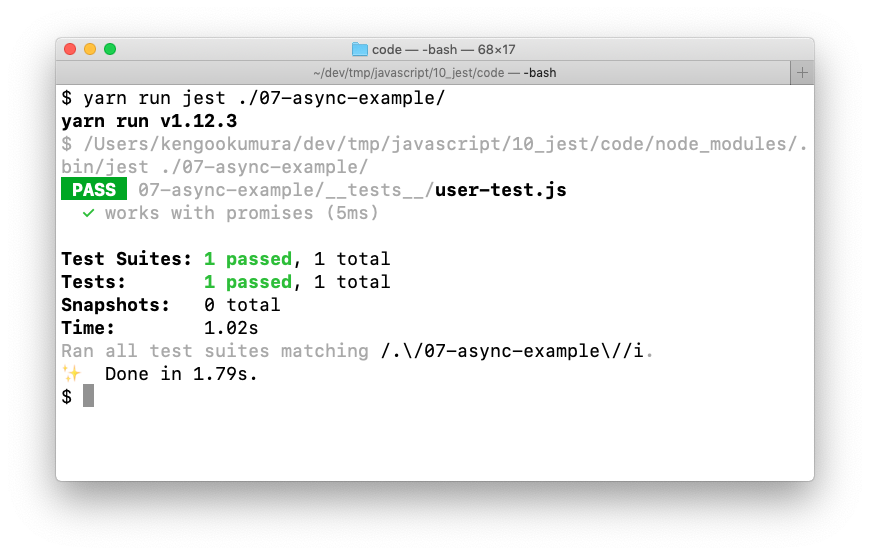
__mocks__/request.jsを使用して、テストがうまく実行されたことを確認できました
.resolves
.resolvesマッチャーを使った例it("works with resolves", () => { expect.assertions(1); return expect(user.getUserName(5)).resolves.toEqual("Paul"); });
async/awaitを使った例it("works with async/await", async () => { expect.assertions(1); const data = await user.getUserName(4); expect(data).toEqual("Mark"); }); it("works with async/await and resolves", async () => { expect.assertions(1); await expect(user.getUserName(5)).resolves.toEqual("Paul"); });Error handling
test("tests error with promises", () => {
  expect.assertions(1);
  return user.getUserName(2).catch(e =>
    expect(e).toEqual({
      error: "User with 2 not found."
    })
  );
});

it("tests error with async/await", async () => {
  expect.assertions(1);
  try {
    await user.getUserName(1);
  } catch (e) {
    expect(e).toEqual({
      error: "User with 1 not found."
    });
  }
});
.rejectsit("tests error with rejects", () => { expect.assertions(1); return expect(user.getUserName(3)).rejects.toEqual({ error: "User with 3 not found." }); }); it("tests error with async/await and rejects", async () => { expect.assertions(1); await expect(user.getUserName(3)).rejects.toEqual({ error: "User with 3 not found." }); });Timer Mocks
https://jestjs.io/docs/en/timer-mocks
setTimeout、setIntervalの時間の経過をコントロールしてテストすることが可能
timerGame.js"use strict"; function timerGame(callback) { console.log("Ready....go!"); setTimeout(() => { console.log("Times up -- stop!"); callback && callback(); }, 1000); } module.exports = timerGame;__tests__/timerGame-test.js"use strict"; jest.useFakeTimers(); test("waits 1 second before ending the game", () => { const timerGame = require("../timerGame"); timerGame(); // setTimeoutが期待通りに実行されているかテスト expect(setTimeout).toHaveBeenCalledTimes(1); expect(setTimeout).toHaveBeenLastCalledWith(expect.any(Function), 1000); });ここではjest.useFakeTimers();を呼び出して偽のタイマーを有効にします。 これはsetTimeoutと他のタイマー関数をモック関数で模擬します。 1つのファイルまたはディスクリプションブロック内で複数のテストを実行する場合は、jest.useFakeTimers(); 各テストの前に手動で、またはbeforeEachなどのセットアップ機能を使用して呼び出すことができます。 そうしないと、内部使用状況カウンターがリセットされません。
Run All Timers
timerGame.jsは↑と同じtest("calls the callback after 1 second", () => { const timerGame = require("../timerGame"); const callback = jest.fn(); timerGame(callback); // この時点では、コールバックはまだ呼び出されていない expect(callback).not.toBeCalled(); // すべてのタイマーが実行されるまで早送り jest.runAllTimers(); // callbackが呼び出されている expect(callback).toBeCalled(); expect(callback).toHaveBeenCalledTimes(1); });Run Pending Timers
再帰的にタイマー処理をする場合
infiniteTimerGame.js"use strict"; function infiniteTimerGame(callback) { console.log("Ready....go!"); setTimeout(() => { console.log("Times up! 10 seconds before the next game starts..."); callback && callback(); setTimeout(() => { infiniteTimerGame(callback); }, 10000); }, 1000); } module.exports = infiniteTimerGame;__tests__/infiniteTimerGame-test.js"use strict"; jest.useFakeTimers(); describe("infiniteTimerGame", () => { test("schedules a 10-second timer after 1 second", () => { const infiniteTimerGame = require("../infiniteTimerGame"); const callback = jest.fn(); infiniteTimerGame(callback); // モック関数が呼び出されたことを確認 expect(setTimeout).toHaveBeenCalledTimes(1); expect(setTimeout).toHaveBeenLastCalledWith(expect.any(Function), 1000); // 現在保留中のタイマーだけを早送りして使い尽くす jest.runOnlyPendingTimers(); // この時点で、1秒タイマーがコールバックを起動している expect(callback).toBeCalled(); // 新しいタイマーが作成されている expect(setTimeout).toHaveBeenCalledTimes(2); expect(setTimeout).toHaveBeenLastCalledWith(expect.any(Function), 10000); }); });Advance Timers by Time
it("calls the callback after 1 second via advanceTimersByTime", () => {
  const timerGame = require("../timerGame");
  const callback = jest.fn();

  timerGame(callback);

  expect(callback).not.toBeCalled();

  // タイマーを1秒進める
  jest.advanceTimersByTime(1000);

  // コールバックが呼び出されている確認
  expect(callback).toBeCalled();
  expect(callback).toHaveBeenCalledTimes(1);
});
Manual Mocks
https://jestjs.io/docs/en/manual-mocks
Mocking user modules
user.jsというファイルを作成し、それを__mocks__ディレクトリに配置すると、モックとして定義できます※テストでそのモジュールが必要な場合は、明示的に
jest.mock('./ moduleName')を呼び出すES6 Class Mocks
https://jestjs.io/docs/en/es6-class-mocks
Jestを使用して、テストしたいファイルにインポートされているES6クラスをモックすることができます
An ES6 Class Example
sound-player.jsexport default class SoundPlayer { constructor() { this.foo = "bar"; } playSoundFile(fileName) { console.log("Playing sound file " + fileName); } }sound-player-consumer.jsimport SoundPlayer from "./sound-player"; export default class SoundPlayerConsumer { constructor() { this.soundPlayer = new SoundPlayer(); } playSomethingCool() { const coolSoundFileName = "song.mp3"; this.soundPlayer.playSoundFile(coolSoundFileName); } }↑をモックにしていきます
ES6クラスのモックを作成する4つの方法
1. Automatic mock
import SoundPlayer from "./sound-player";
import SoundPlayerConsumer from "./sound-player-consumer";
jest.mock("./sound-player"); // モック作成

beforeEach(() => {
  // すべてのインスタンスをクリア
  SoundPlayer.mockClear();
});

it("We can check if the consumer called the class constructor", () => {
  const soundPlayerConsumer = new SoundPlayerConsumer();
  expect(SoundPlayer).toHaveBeenCalledTimes(1);
});

it("We can check if the consumer called a method on the class instance", () => {
  // mockClear()が機能しているため、まだ関数が実行されていないことを確認できる
  expect(SoundPlayer).not.toHaveBeenCalled();

  const soundPlayerConsumer = new SoundPlayerConsumer();
  // constructor が再度呼び出されている
  expect(SoundPlayer).toHaveBeenCalledTimes(1);

  const coolSoundFileName = "song.mp3";
  soundPlayerConsumer.playSomethingCool();

  const mockSoundPlayerInstance = SoundPlayer.mock.instances[0];
  const mockPlaySoundFile = mockSoundPlayerInstance.playSoundFile;
  expect(mockPlaySoundFile.mock.calls[0][0]).toEqual(coolSoundFileName);
  // ↑と同じ内容
  expect(mockPlaySoundFile).toHaveBeenCalledWith(coolSoundFileName);
  expect(mockPlaySoundFile).toHaveBeenCalledTimes(1);
});
2. Manual mock
モックの実装をmocksフォルダーに保存して手動モックを作成する
__mocks__/sound-player.jsexport const mockPlaySoundFile = jest.fn(); const mock = jest.fn().mockImplementation(() => { return { playSoundFile: mockPlaySoundFile }; }); export default mock;import SoundPlayer, { mockPlaySoundFile } from "./sound-player"; import SoundPlayerConsumer from "./sound-player-consumer"; jest.mock("./sound-player"); // モック作成 beforeEach(() => { // すべてのインスタンスをクリア SoundPlayer.mockClear(); mockPlaySoundFile.mockClear(); }); it("We can check if the consumer called the class constructor", () => { const soundPlayerConsumer = new SoundPlayerConsumer(); expect(SoundPlayer).toHaveBeenCalledTimes(1); }); it("We can check if the consumer called a method on the class instance", () => { const soundPlayerConsumer = new SoundPlayerConsumer(); const coolSoundFileName = "song.mp3"; soundPlayerConsumer.playSomethingCool(); expect(mockPlaySoundFile).toHaveBeenCalledWith(coolSoundFileName); });3. Calling
jest.mock()with the module factory parameterモジュールファクトリパラメータを使って
jest.mock()を呼び出すimport SoundPlayer from "./sound-player"; import SoundPlayerConsumer from "./sound-player-consumer"; const mockPlaySoundFile = jest.fn(); jest.mock("./sound-player", () => { return jest.fn().mockImplementation(() => { return { playSoundFile: mockPlaySoundFile }; }); }); it("We can check if the consumer called a method on the class instance", () => { const soundPlayerConsumer = new SoundPlayerConsumer(); const coolSoundFileName = "song.mp3"; soundPlayerConsumer.playSomethingCool(); expect(mockPlaySoundFile).toHaveBeenCalledWith(coolSoundFileName); });4. Replacing the mock using
mockImplementation()ormockImplementationOnce()既存のモックで
mockImplementation()を呼び出すことによって、単一のテストまたはすべてのテストの実装を変更するために、上記のモックをすべて置き換えることができます。import SoundPlayer from "./sound-player"; import SoundPlayerConsumer from "./sound-player-consumer"; jest.mock("./sound-player"); describe("When SoundPlayer throws an error", () => { beforeAll(() => { SoundPlayer.mockImplementation(() => { return { playSoundFile: () => { throw new Error("Test error"); } }; }); }); it("Should throw an error when calling playSomethingCool", () => { const soundPlayerConsumer = new SoundPlayerConsumer(); expect(() => soundPlayerConsumer.playSomethingCool()).toThrow(); }); });Globals
テストファイルで、Jestはこれらの各メソッドとオブジェクトをグローバル環境に配置します。使用するために何かを要求したりインポートしたりする必要はありません。
- afterAll(fn, timeout)
- afterEach(fn, timeout)
- beforeAll(fn, timeout)
- beforeEach(fn, timeout)
- describe(name, fn)
- describe.each(table)(name, fn, timeout)
- describe.only(name, fn)
- describe.only.each(table)(name, fn)
- describe.skip(name, fn)
- describe.skip.each(table)(name, fn)
- test(name, fn, timeout)
- test.each(table)(name, fn, timeout)
- test.only(name, fn, timeout)
- test.only.each(table)(name, fn)
- test.skip(name, fn)
- test.skip.each(table)(name, fn)
- test.todo(name)
afterAll(fn, timeout)このファイル内のすべてのテストが完了した後に実行される関数
afterAll(() => {
  console.log("afterAll");
});

test("test 1", () => {
  console.log("test 1");
});

test("test 2", () => {
  console.log("test 2");
});

// 出力
//  test 1
//  test 2
//  afterAll
afterEach(fn, timeout)このファイルの各テストが完了した後に実行される関数
afterEach(() => {
  console.log("afterEach");
});

test("test 1", () => {
  console.log("test 1");
});

test("test 2", () => {
  console.log("test 2");
});

// 出力
//  test 1
//  afterEach
//  test 2
//  afterEach
beforeAll(fn, timeout)このファイルのテストが実行される前に実行する関数
beforeAll(() => {
  console.log("beforeAll");
});

test("test 1", () => {
  console.log("test 1");
});

test("test 2", () => {
  console.log("test 2");
});

// 出力
//  beforeAll
//  test 1
//  test 2
beforeEach(fn, timeout)このファイルの各テストが実行前に実行される関数
beforeEach(() => {
  console.log("beforeEach");
});

test("test 1", () => {
  console.log("test 1");
});

test("test 2", () => {
  console.log("test 2");
});

// 出力
//  beforeEach
//  test 1
//  beforeEach
//  test 2
describe(name, fn)いくつかの関連テストをまとめたブロックを作成する
const myBeverage = {
  delicious: true,
  sour: false
};

describe("my beverage", () => {
  test("is delicious", () => {
    expect(myBeverage.delicious).toBeTruthy();
  });

  test("is not sour", () => {
    expect(myBeverage.sour).toBeFalsy();
  });
});
describe.each(table)(name, fn, timeout)データセットを渡すことで、複数テストを行える。
例えば足し算するだけのテストを、値だけ変えてテストしてくれることができる
describe.each([[1, 1, 2], [1, 2, 3], [2, 1, 3]])(
  ".add(%i, %i)",
  (a, b, expected) => {
    test(`returns ${expected}`, () => {
      expect(a + b).toBe(expected);
    });

    test(`returned value not be greater than ${expected}`, () => {
      expect(a + b).not.toBeGreaterThan(expected);
    });

    test(`returned value not be less than ${expected}`, () => {
      expect(a + b).not.toBeLessThan(expected);
    });
  }
);
describe.only(name, fn)describeブロックを1つだけ実行したい場合は、describe.onlyを使用する
describe.only("my beverage", () => {
  test("is delicious", () => {
    expect(true).toBeTruthy();
  });

  test("is not sour", () => {
    expect(false).toBeFalsy();
  });
});

describe("my other beverage", () => {
  // ... will be skipped
});
describe.only.each(table)(name, fn)データセットを渡すことで、複数テストを行い、かつdescribeブロックを1つだけ実行したい場合に使う
describe.only.each([[1, 1, 2], [1, 2, 3], [2, 1, 3]])(
  ".add(%i, %i)",
  (a, b, expected) => {
    test(`returns ${expected}`, () => {
      expect(a + b).toBe(expected);
    });
  }
);

test("will not be ran", () => {
  expect(1 / 0).toBe(Infinity);
});
describe.skip(name, fn)特定のブロックをスキップしたい場合に使う
describe("my beverage", () => {
  test("is delicious", () => {
    expect(true).toBeTruthy();
  });

  test("is not sour", () => {
    expect(false).toBeFalsy();
  });
});

describe.skip("my other beverage", () => {
  // ... will be skipped
});
describe.skip.each(table)(name, fn)一連のデータセットのテストをスキップしたい場合に使う
describe.skip.each([[1, 1, 2], [1, 2, 3], [2, 1, 3]])(
  ".add(%i, %i)",
  (a, b, expected) => {
    test(`returns ${expected}`, () => {
      expect(a + b).toBe(expected); // will not be ran
    });
  }
);

test("will be ran", () => {
  expect(1 / 0).toBe(Infinity);
});
test(name, fn, timeout)テストを実行する
test("test", () => {
  expect(1 - 1).toBe(0);
});

// エイリアスのitを使ってもOK
it("it", () => {
  expect(1 - 1).toBe(0);
});
test.each(table)(name, fn, timeout)データセットを渡すことで、複数テストを行える。
test.each([[1, 1, 2], [1, 2, 3], [2, 1, 3]])(
  ".add(%i, %i)",
  (a, b, expected) => {
    expect(a + b).toBe(expected);
  }
);
test.only(name, fn, timeout)テストを1つだけ実行したい場合に使う
test.only("it is raining", () => {
  expect(1).toBeGreaterThan(0);
});

test("it is not snowing", () => {
  expect(0).toBe(0);
});
test.only.each(table)(name, fn)データセットを渡すことで、複数テストを行い、テストを1つだけ実行したい場合に使う
test.only.each([[1, 1, 2], [1, 2, 3], [2, 1, 3]])(
  ".add(%i, %i)",
  (a, b, expected) => {
    expect(a + b).toBe(expected);
  }
);

test("will not be ran", () => {
  expect(1 / 0).toBe(Infinity);
});
test.skip(name, fn)テストをスキップしたいときに使う
test("it is raining", () => {
  expect(1).toBeGreaterThan(0);
});

test.skip("it is not snowing", () => {
  expect(1).toBe(0);
});
test.skip.each(table)(name, fn)一連のデータセットのテストをスキップしたい場合に使う
test.skip.each([[1, 1, 2], [1, 2, 3], [2, 1, 3]])(
  ".add(%i, %i)",
  (a, b, expected) => {
    expect(a + b).toBe(expected); // will not be ran
  }
);

test("will be ran", () => {
  expect(1 / 0).toBe(Infinity);
});
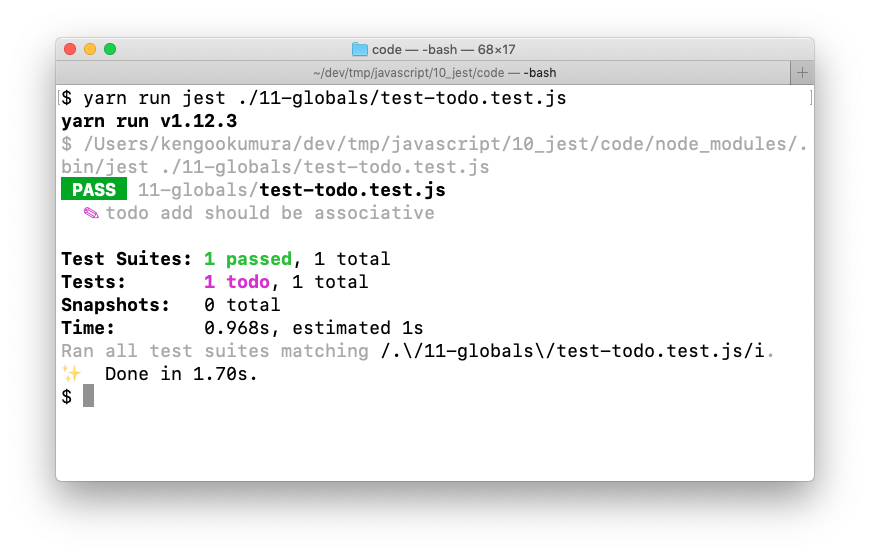
test.todo(name)テストを書く予定がある場合は、test.toを使用してください。 これらのテストは最後のサマリー出力で強調表示されるので、まだいくつのテストが必要であるかがわかります。
test.todo("add should be associative");
Expect
https://jestjs.io/docs/en/expect
expect(value)値をテストするたびに、expect関数を使用する。値について何かをアサートするためにマッチャー関数と共にexpectを使用する。
it("test", () => {
  expect(1 + 2).toBe(3);
});
expect.extend(matchers)マッチャーを自作できる。
toBeWithinRangeを自作した例↓expect.extend({ toBeWithinRange(received, floor, ceiling) { const pass = received >= floor && received <= ceiling; if (pass) { return { message: () => `expected ${received} not to be within range ${floor} - ${ceiling}`, pass: true }; } else { return { message: () => `expected ${received} to be within range ${floor} - ${ceiling}`, pass: false }; } } }); test("numeric ranges", () => { expect(100).toBeWithinRange(90, 110); expect(101).not.toBeWithinRange(0, 100); expect({ apples: 6, bananas: 3 }).toEqual({ apples: expect.toBeWithinRange(1, 10), bananas: expect.not.toBeWithinRange(11, 20) }); });
expect.anything()nullまたは未定義以外のものにマッチする。
toEqualまたはtoBeCalledWithでリテラル値の代わりに使うことができるモック関数がnull以外の引数で呼び出されることを確認したい場合は、次のようにする
test("map calls its argument with a non-null argument", () => {
  const mock = jest.fn();
  [1].map(x => mock(x));
  expect(mock).toBeCalledWith(expect.anything());
});
expect.any(constructor)
toEqualまたはtoBeCalledWithでリテラル値の代わりに使うことができるモック関数が番号付きで呼び出されていることを確認したい場合は、次のようにする
function randocall(fn) {
  return fn(Math.floor(Math.random() * 6 + 1));
}

test("randocall calls its callback with a number", () => {
  const mock = jest.fn();
  randocall(mock);
  expect(mock).toBeCalledWith(expect.any(Number));
});
expect.arrayContaining(array)配列内の全ての要素を含む配列と一致する
describe("Beware of a misunderstanding! A sequence of dice rolls", () => {
  const expected = [1, 2, 3, 4, 5, 6];
  it("matches even with an unexpected number 7", () => {
    expect([4, 1, 6, 7, 3, 5, 2, 5, 4, 6]).toEqual(
      expect.arrayContaining(expected) // 1, 2, 3, 4, 5, 6が含まれているので一致
    );
  });
  it("does not match without an expected number 2", () => {
    expect([4, 1, 6, 7, 3, 5, 7, 5, 4, 6]).not.toEqual(
      expect.arrayContaining(expected) // 2が含まれていないので一致しない
    );
  });
});
expect.assertions(number)テスト中に一定数のアサーションが呼び出されることを確認する
test("assertions sample", () => {
  expect.assertions(2);
  expect(true).toBeTruthy();
  expect(false).toBeFalsy();
});
expect.hasAssertions()テスト中に少なくとも1つのアサーションが呼び出されることを確認する
test("hasAssertions sample", () => {
  expect.hasAssertions();
  expect(true).toBeTruthy();
  expect(false).toBeFalsy();
});
expect.not.arrayContaining(array)配列内の値が一致していないことを確認する
test("not arrayContaining sample", () => {
  expect(["Alice", "Bob", "Eve"]).toEqual(
    expect.not.arrayContaining(["Samantha"])
  );
});
expect.not.objectContaining(object)期待されるプロパティに再帰的にマッチしないかを確認する
test("not objectContaining sample", () => {
  expect({ bar: "baz" }).toEqual(expect.not.objectContaining({ foo: "bar" }));
});
expect.not.stringContaining(string)文字列を一致しないか確認する
test("not stringContaining sample", () => {
  expect("How are you?").toEqual(expect.not.stringContaining("Hello world!"));
});
expect.not.stringMatching(string | regexp)受け取った値が文字列ではない、または期待される文字列または正規表現と一致しないか確認する
test("not stringMatching sample", () => {
  expect("How are you?").toEqual(expect.not.stringMatching(/Hello world!/));
});
expect.objectContaining(object)期待されるプロパティに再帰的にマッチするかを確認する
test("objectContaining sample", () => {
  expect({ bar: "baz", foo: "foo" }).toEqual(
    expect.objectContaining({ bar: "baz" })
  );
});
expect.stringContaining(string)文字列を含む文字列であるか確認する
test("stringContaining sample", () => {
  expect("How are you?").toEqual(expect.stringContaining("you"));
});
expect.stringMatching(string | regexp)文字列または正規表現に一致する文字列かを確認する
test("stringMatching sample", () => {
  expect("Roberto").toEqual(expect.stringMatching(/^[BR]ob/));
});
.not反対をテストする
test("not sample", () => {
  expect("abc").not.toBe("def");
});
.resolvesPromiseのresolveを確認する場合
test("resolves to lemon", () => {
  return expect(Promise.resolve("lemon")).resolves.toBe("lemon");
});

test("resolves to lemon", async () => {
  await expect(Promise.resolve("lemon")).resolves.toBe("lemon");
  await expect(Promise.resolve("lemon")).resolves.not.toBe("octopus");
});
.rejectsPromiseのrejectを確認する場合
test("rejects to octopus", () => {
  return expect(Promise.reject(new Error("octopus"))).rejects.toThrow(
    "octopus"
  );
});

test("rejects to octopus", async () => {
  await expect(Promise.reject(new Error("octopus"))).rejects.toThrow("octopus");
});
.toBe(value)プリミティブ値などを確認する
const can = {
  name: "pamplemousse",
  ounces: 12
};

describe("the can", () => {
  test("has 12 ounces", () => {
    expect(can.ounces).toBe(12);
  });

  test("has a sophisticated name", () => {
    expect(can.name).toBe("pamplemousse");
  });
});
.toHaveBeenCalled()モック関数が呼び出されたことを確認
function drinkAll(callback, flavour) {
  if (flavour !== "octopus") {
    callback(flavour);
  }
}

describe("drinkAll", () => {
  test("drinks something lemon-flavoured", () => {
    const drink = jest.fn();
    drinkAll(drink, "lemon");
    expect(drink).toHaveBeenCalled();
  });

  test("does not drink something octopus-flavoured", () => {
    const drink = jest.fn();
    drinkAll(drink, "octopus");
    expect(drink).not.toHaveBeenCalled();
  });
});
.toHaveBeenCalledTimes(number)モック関数が正確な数呼び出されたことを確認
test("toHaveBeenCalledTimes sample", () => {
  const drink = jest.fn();
  ["lemon", "octopus"].map(drink);
  expect(drink).toHaveBeenCalledTimes(2);
});
.toHaveBeenCalledWith(arg1, arg2, ...)モック関数が特定の引数で呼び出されたことを確認
test("toHaveBeenCalledWith sample", () => {
  const drink = jest.fn();
  ["lemon", "octopus"].map(drink);
  expect(drink).toHaveBeenCalledWith("lemon", 0, ["lemon", "octopus"]);
});
.toHaveBeenLastCalledWith(arg1, arg2, ...)モック関数が最後に呼び出された時の引数を確認
test("toHaveBeenLastCalledWith sample", () => {
  const drink = jest.fn();
  ["lemon", "octopus"].map(drink);
  expect(drink).toHaveBeenLastCalledWith("octopus", 1, ["lemon", "octopus"]);
});
.toHaveBeenNthCalledWith(nthCall, arg1, arg2, ....)モック関数のn番目に呼び出された時の引数を確認
test("toHaveBeenNthCalledWith sample", () => {
  const drink = jest.fn();
  ["lemon", "octopus"].map(drink);
  expect(drink).toHaveBeenNthCalledWith(1, "lemon", 0, ["lemon", "octopus"]);
  expect(drink).toHaveBeenNthCalledWith(2, "octopus", 1, ["lemon", "octopus"]);
});
.toHaveReturned()モック関数が少なくとも1回正常に戻った(つまり、エラーをスローしなかった)ことを確認
test("toHaveReturned sample", () => {
  const drink = jest.fn(() => true);
  drink();
  expect(drink).toHaveReturned();
});
.toHaveReturnedTimes(number)モック関数が正常に戻った正確な回数を確認
test("toHaveReturnedTimes sample", () => {
  const drink = jest.fn(() => true);
  drink();
  drink();
  expect(drink).toHaveReturnedTimes(2);
});
.toHaveReturnedWith(value)モック関数が特定の値を返すか確認
test("toHaveReturnedWith sample", () => {
  const beverage = { name: "La Croix" };
  const drink = jest.fn(beverage => beverage.name);

  drink(beverage);

  expect(drink).toHaveReturnedWith("La Croix");
});
.toHaveLastReturnedWith(value)モック関数が最後に返した値が特定の値か確認
test("toHaveLastReturnedWith sample", () => {
  const beverage1 = { name: "La Croix (Lemon)" };
  const beverage2 = { name: "La Croix (Orange)" };
  const drink = jest.fn(beverage => beverage.name);

  drink(beverage1);
  drink(beverage2);

  expect(drink).toHaveLastReturnedWith("La Croix (Orange)");
});
.toHaveNthReturnedWith(nthCall, value)モック関数がn番目に返した値が特定の値か確認
test("toHaveNthReturnedWith sample", () => {
  const beverage1 = { name: "La Croix (Lemon)" };
  const beverage2 = { name: "La Croix (Orange)" };
  const drink = jest.fn(beverage => beverage.name);

  drink(beverage1);
  drink(beverage2);

  expect(drink).toHaveNthReturnedWith(1, "La Croix (Lemon)");
  expect(drink).toHaveNthReturnedWith(2, "La Croix (Orange)");
});
.toBeCloseTo(number, numDigits?)浮動小数点数を確認
test("toBeCloseTo sample", () => {
  // expect(0.2 + 0.1).toBe(0.3); // 0.3ではなく、0.30000000000000004でテストがうまくいかない
  expect(0.2 + 0.1).toBeCloseTo(0.3, 5);
});
.toBeDefined()未定義でないことを確認
test("toBeDefined sample", () => {
  function fetchNewFlavorIdea() {
    return true; // もし何も返さなければテストは失敗する
  }
  expect(fetchNewFlavorIdea()).toBeDefined();
});
.toBeFalsy()falseと評価されるか確認する
test("toBeFalsy sample", () => {
  expect(0).toBeFalsy();
  expect("").toBeFalsy();
  expect(false).toBeFalsy();
});
.toBeGreaterThan(number)超えるか確認
test("toBeGreaterThan sample", () => {
  expect(11).toBeGreaterThan(10);
});
.toBeGreaterThanOrEqual(number)以上か確認
test("toBeGreaterThanOrEqual sample", () => {
  expect(10).toBeGreaterThanOrEqual(10);
  expect(11).toBeGreaterThanOrEqual(10);
});
.toBeLessThan(number)未満か確認
test("toBeLessThan sample", () => {
  expect(9).toBeLessThan(10);
});
.toBeLessThanOrEqual(number)以下か
test("toBeLessThanOrEqual sample", () => {
  expect(9).toBeLessThanOrEqual(10);
  expect(10).toBeLessThanOrEqual(10);
});
.toBeInstanceOf(Class)オブジェクトがクラスのインスタンスであることを確認
test("toBeInstanceOf sample", () => {
  class A {}
  expect(new A()).toBeInstanceOf(A);
  expect(() => {}).toBeInstanceOf(Function);
});
.toBeNull()nullか確認
test("toBeNull sample", () => {
  expect(null).toBeNull();
});
.toBeTruthy()trueと評価されるか
test("toBeTruthy sample", () => {
  expect(1).toBeTruthy();
  expect("a").toBeTruthy();
  expect(true).toBeTruthy();
});
.toBeUndefined()undefindeか確認
test("toBeUndefined sample", () => {
  expect({}.hoge).toBeUndefined();
});
.toBeNaN()NaNか確認
test("toBeNaN sample", () => {
  expect("a" / "b").toBeNaN();
});
.toContain(item)項目が配列内にあるか確認
test("toContain sample", () => {
  expect([1, 2, 3]).toContain(2);
});
.toContainEqual(item)特定の構造と値を持つ項目が配列に含まれていることを確認
test("toContainEqual sample", () => {
  expect([
    { delicious: true, sour: false },
    { hoge: false, fuga: false }
  ]).toContainEqual({ delicious: true, sour: false });
});
.toEqual(value)オブジェクトインスタンスのすべてのプロパティを再帰的に比較
test("toEqual sample", () => {
  expect({ flavor: "grapefruit", ounces: 12 }).toEqual({
    flavor: "grapefruit",
    ounces: 12
  });
});
.toHaveLength(number)
.lengthプロパティが特定の数値か確認test("toHaveLength sample", () => { expect([1, 2, 3]).toHaveLength(3); expect("abc").toHaveLength(3); expect("").not.toHaveLength(5); });
.toMatch(regexpOrString)文字列が正規表現と一致するか確認
test("toMatch sample", () => {
  expect("abcgrapefruitxyz").toMatch(/grapefruit/);
  expect("abcgrapefruitxyz").toMatch(new RegExp("grapefruit"));
});
.toMatchObject(object)オブジェクトのプロパティを確認
test("toMatchObject sample", () => {
  const houseForSale = {
    bath: true,
    bedrooms: 4,
    kitchen: {
      amenities: ["oven", "stove", "washer"],
      area: 20,
      wallColor: "white"
    }
  };
  const desiredHouse = {
    bath: true,
    kitchen: {
      amenities: ["oven", "stove", "washer"],
      wallColor: expect.stringMatching(/white|yellow/)
    }
  };
  expect(houseForSale).toMatchObject(desiredHouse);
});
.toHaveProperty(keyPath, value?)指定の
keyPathがオブジェクトに存在するか確認test("toHaveProperty sample", () => { const houseForSale = { bath: true, bedrooms: 4, kitchen: { amenities: ["oven", "stove", "washer"], area: 20, wallColor: "white", "nice.oven": true }, "ceiling.height": 2 }; expect(houseForSale).toHaveProperty("bath"); expect(houseForSale).toHaveProperty("bedrooms", 4); expect(houseForSale).not.toHaveProperty("pool"); expect(houseForSale).toHaveProperty("kitchen.area", 20); expect(houseForSale).toHaveProperty("kitchen.amenities", [ "oven", "stove", "washer" ]); });
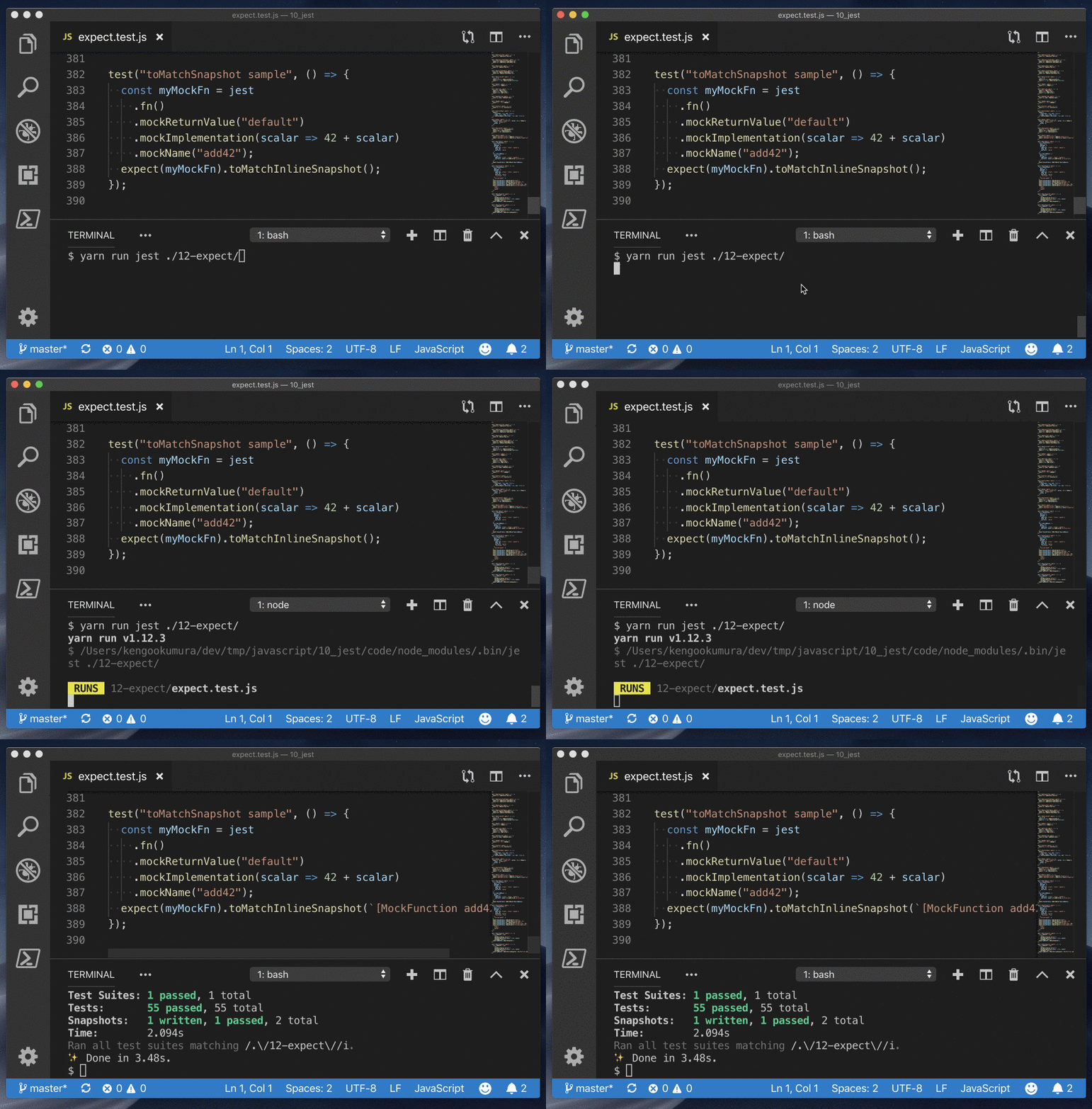
.toMatchSnapshot(propertyMatchers?, hint?)スナップショットが一致している確認
test("toMatchSnapshot sample", () => {
  const myMockFn = jest
    .fn()
    .mockReturnValue("default")
    .mockImplementation(scalar => 42 + scalar)
    .mockName("add42");
  expect(myMockFn).toMatchSnapshot();
});
.toMatchInlineSnapshot(propertyMatchers?, inlineSnapshot)
__snapshots__フォルダ内ではなく、インラインにスナップショットを書き込んで一致を確認
.toStrictEqual(value)オブジェクトの構造と型が同じであることをテストします。
test("toStrictEqual sample", () => {
  class LaCroix {
    constructor(flavor) {
      this.flavor = flavor;
    }
  }
  expect(new LaCroix("lemon")).toEqual({ flavor: "lemon" });
  expect(new LaCroix("lemon")).not.toStrictEqual({ flavor: "lemon" });
});
.toThrow(error?)関数が呼び出されたときにスローされることをテストする
test("toThrow sample", () => {
  expect(() => {
    throw new Error();
  }).toThrow();
});
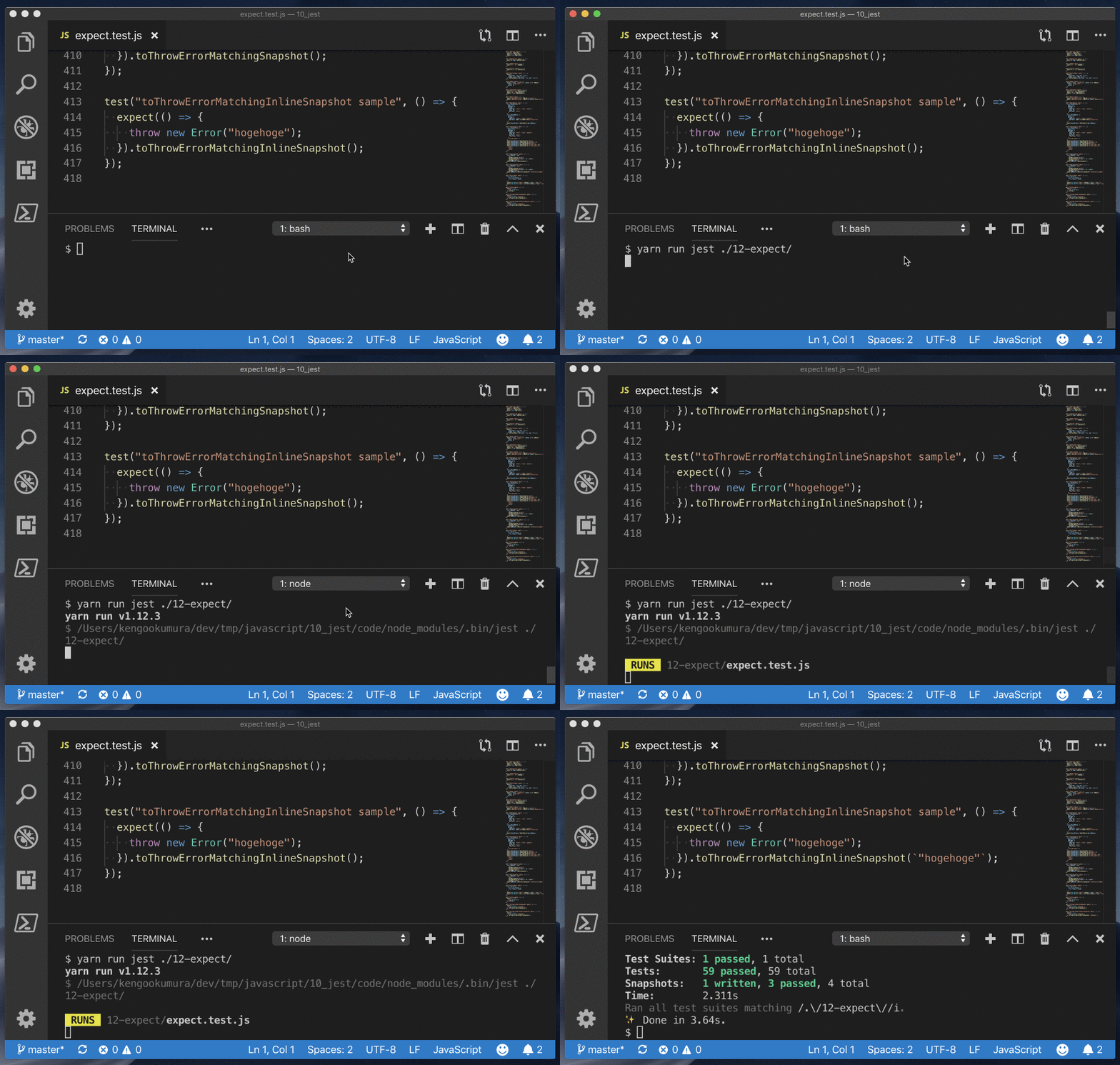
.toThrowErrorMatchingSnapshot(hint?)エラーをスナップショットで確認
test("toThrowErrorMatchingSnapshot sample", () => {
  expect(() => {
    throw new Error("hogehoge");
  }).toThrowErrorMatchingSnapshot();
});
.toThrowErrorMatchingInlineSnapshot(inlineSnapshot)エラーをインラインスナップショットで確認
Mock Functions
https://jestjs.io/docs/en/mock-function-api
jest.fn()でモック関数を作成できる
mockFn.getMockName()モック名文字列を返す
  const a = jest.fn();
  console.log(a.getMockName()); // "jest.fn()"
  const b = jest.fn().mockName("hoge");
  console.log(b.getMockName()); // "hoge"
mockFn.mock.callsこのモック関数に対して行われたすべての呼び出しの呼び出し引数を含む配列
  const c = jest.fn();
  c("a", 1);
  c("b", 2);
  console.log(c.mock.calls); // [ [ 'a', 1 ], [ 'b', 2 ] ]
mockFn.mock.resultsこのモック関数に対して行われたすべての呼び出しの結果を含む配列
  const d = jest.fn(x => x + 1);
  d(1);
  d(2);
  console.log(d.mock.results); // [ { type: 'return', value: 2 }, { type: 'return', value: 3 } ]
mockFn.mock.instancesnewを使用してこのモック関数からインスタンス化されたすべてのオブジェクトインスタンスを含む配列
  const e = jest.fn();
  const mock1 = new e();
  const mock2 = new e();
  console.log(e.mock.instances[0] === mock1); // true
  console.log(e.mock.instances[1] === mock2); // true
mockFn.mockClear()mockFn.mock.callsおよびmockFn.mock.instances配列に格納されているすべての情報をリセットします
  const f = jest.fn();
  console.log(f.mock.calls); // []
  f(1, 2, 3);
  console.log(f.mock.calls); // [ [ 1, 2, 3 ] ]
  f.mockClear();
  console.log(f.mock.calls); // []
mockFn.mockImplementation(fn)const h = jest.fn().mockImplementation(scalar => 42 + scalar); // or: jest.fn(scalar => 42 + scalar); console.log(h(0) === 42); // true console.log(h(1) === 43); // true console.log(h.mock.calls[0][0] === 0); // true console.log(h.mock.calls[1][0] === 1); // true
mockFn.mockImplementationOnce(fn)複数の関数呼び出しが異なる結果を生み出すように連鎖することができる
  const i = jest
    .fn()
    .mockImplementationOnce(cb => cb(null, true))
    .mockImplementationOnce(cb => cb(null, false));
  i((err, val) => console.log(val)); // true
  i((err, val) => console.log(val)); // false
mockFn.mockName(value)モック関数を示す文字列を設定する
  const j = jest.fn().mockName("fuga");
  console.log(j.getMockName()); // "fuga"
mockFn.mockReturnThis()↓と同じ意味
  jest.fn(function() {
    return this;
  });
mockFn.mockReturnValue(value)モック関数の返り値を設定できる
  const k = jest.fn();
  k.mockReturnValue(42);
  console.log(k()); // 42
  k.mockReturnValue(43);
  console.log(k()); // 43
mockFn.mockReturnValueOnce(value)モック関数の1回のみの返り値を設定できる
  const l = jest
    .fn()
    .mockReturnValue("default")
    .mockReturnValueOnce("first call")
    .mockReturnValueOnce("second call");

  // 'first call', 'second call', 'default', 'default'
  console.log(l(), l(), l(), l());
mockFn.mockResolvedValue(value)↓と同じ意味
jest.fn().mockImplementation(() => Promise.resolve(value));
mockFn.mockResolvedValueOnce(value)↓と同じ意味
jest.fn().mockImplementationOnce(() => Promise.resolve(value));
mockFn.mockRejectedValue(value)↓と同じ意味
jest.fn().mockImplementation(() => Promise.reject(value));
mockFn.mockRejectedValueOnce(value)↓と同じ意味
jest.fn().mockImplementationOnce(() => Promise.reject(value));
test("async test", async () => {
  const m = jest.fn().mockResolvedValue(43);
  console.log(await m()); // 43

  const n = jest
    .fn()
    .mockResolvedValue("default")
    .mockResolvedValueOnce("first call")
    .mockResolvedValueOnce("second call");
  console.log(await n()); // first call
  console.log(await n()); // second call
  console.log(await n()); // default
  console.log(await n()); // default

  const o = jest.fn().mockRejectedValue(new Error("Async error"));
  try {
    await o();
  } catch (e) {
    console.log(e.message); // Async error
  }

  const p = jest
    .fn()
    .mockResolvedValueOnce("first call")
    .mockRejectedValueOnce(new Error("Async error"));
  try {
    console.log(await p()); // first call
    await p();
  } catch (e) {
    console.log(e.message); // Async error
  }
});
読んでいただいてありがとうございましたm(_ _)m

- 投稿日:2019-05-07T00:07:08+09:00
Jest(v24.6)の公式ドキュメント読んで基本を勉強してみた
Jestの公式ドキュメントの(自分的には)基本の部分を読んで勉強した内容を投稿させていただきます
私が個人的に勉強した部分を書いていくだけなので、詳細に説明しているというわけでもなく、網羅的にやったというわけでもなく、本当にただの私のブログですので、注意してください。
間違いなどありましたら、ご指摘お願いしますまた、この記事中で私が試してみたコードは全て こちら にあります
Introduction
Getting Started
https://jestjs.io/docs/en/getting-started
jestのInstall
yarn add -D jest
# または
npm i -D yarn
2つの数を追加する関数のテストを書いてみる
sum.jsfunction sum(a, b) { return a + b; } module.exports = sum;sum.test.jsconst sum = require("./sum"); test("adds 1 + 2 to equal 3", () => { expect(sum(1, 2)).toBe(3); });この状態で、
yarn run jestまたは、
npx jestとする、
jestを使ったテストができました
または、以下のように
package.jsonにnpm scriptを追加して実行してもOKpackage.json{ "scripts": { "test": "jest" } }Running from command line
設定ファイルとしてconfig.jsonを使用し、実行後にネイティブOSの通知を表示しながら、my-testに一致するファイルに対してJestを実行する方法は次のとおりです。
jest my-test --notify --config=config.jsonAdditional Configuration
以下のコマンドで基本設定ファイルを生成できる
yarn run jest --initUsing Babel
babelを使う設定
yarn add -D babel-jest @babel/core @babel/preset-env.babelrc{ "presets": [ [ "@babel/preset-env", { "targets": { "node": "current" } } ] ] }sum.jsfunction sum(a, b) { return a + b; } - module.exports = sum; + export default sum;sum.test.js- const sum = require("./sum"); + import sum from "./sum"; test("adds 1 + 2 to equal 3", () => { expect(sum(1, 2)).toBe(3); });
babelを使用して、import、exportを使っていても問題なくテストができました。
Using Matchers
https://jestjs.io/docs/en/using-matchers
Common Matchers
test("two plus two is four", () => {
  // expect(2 + 2)と.toBe(4)で等しいことをテストしてくれます
  expect(2 + 2).toBe(4);
});

test("object assignment", () => {
  const data = { one: 1 };
  data["two"] = 2;
  // オブジェクトの値を確認したい場合は、toBeの代わりにtoEqualを使用する
  expect(data).toEqual({ one: 1, two: 2 });
});

test("numbers is not zero", () => {
  // 反対をテストすることもできます
  expect(2 + 1).not.toBe(0);
});
Truthiness
テストでは、
undefined、null、およびfalseを区別する必要がある場合がありますが、これらを異なる方法で扱いたくない場合があります。 Jestにはあなたが欲しいものについてあなたが明確になることを可能にするヘルパーが含まれています。
- toBeNull ->
nullにのみ一致- toBeUndefined ->
undefined- toBeDefined ->
toBeUndefinedの反対- toBeTruthy -> ifで
trueと見なすものすべてに一致する- toBeFalsy -> ifで
falseと見なすものすべてに一致するtest("null", () => { const n = null; expect(n).toBeNull(); expect(n).toBeDefined(); expect(n).not.toBeUndefined(); expect(n).not.toBeTruthy(); expect(n).toBeFalsy(); }); test("zero", () => { const z = 0; expect(z).not.toBeNull(); expect(z).toBeDefined(); expect(z).not.toBeUndefined(); expect(z).not.toBeTruthy(); expect(z).toBeFalsy(); });Numbers
test("two plus two", () => {
  const value = 2 + 2;
  expect(value).toBeGreaterThan(3);
  expect(value).toBeGreaterThanOrEqual(3.5);
  expect(value).toBeLessThan(5);
  expect(value).toBeLessThanOrEqual(4.5);

  // 等しいか確認
  expect(value).toBe(4);
  expect(value).toEqual(4);
});

test("adding floating point numbers", () => {
  const value = 0.1 + 0.2;
  //expect(value).toBe(0.3); <- 丸め誤差が原因でうまくテストできない
  expect(value).toBeCloseTo(0.3); // This works.
});
Strings
// toMatchを使って文字列を正規表現と照合することができる

test("there is no I in team", () => {
  expect("team").not.toMatch(/I/);
});

test('but there is a "stop" in Christoph', () => {
  expect("Christoph").toMatch(/stop/);
});
Arrays and iterables
// toContainを使用して、配列または反復可能オブジェクトに特定の項目が含まれているかどうかを確認できる

const shoppingList = [
  "diapers",
  "kleenex",
  "trash bags",
  "paper towels",
  "beer"
];

test("the shopping list has beer on it", () => {
  expect(shoppingList).toContain("beer");
  expect(new Set(shoppingList)).toContain("beer");
});
Exceptions
// 特定の関数が呼び出されたときにエラーをスローすることをテストしたい場合は、toThrowを使用する

function compileAndroidCode() {
  throw new Error("you are using the wrong JDK");
}

test("compiling android goes as expected", () => {
  expect(compileAndroidCode).toThrow();
  expect(compileAndroidCode).toThrow(Error);

  // 正確なエラーメッセージや正規表現を使うこともできます
  expect(compileAndroidCode).toThrow("you are using the wrong JDK");
  expect(compileAndroidCode).toThrow(/JDK/);
});
Testing Asynchronous Code
https://jestjs.io/docs/en/asynchronous
Callbacks
function fetchData(callback) {
  // 非同期処理を実行 -> しかし1秒待ってくれずにテストが終了してしまうので、このテストはうまくいかない
  setTimeout(() => callback("peanut butter"), 1000);
}

test("the data is peanut butter", () => {
  function callback(data) {
    // コールバック関数の引数の文字列が「peanut butter」かテスト
    expect(data).toBe("peanut butter");
  }

  fetchData(callback);
});
このテストを想定通りに動かすには、テストを空の引数を持つ関数に入れる代わりに、
doneという単一の引数を使用する。テストを終了する前に、Jestはdoneコールバックが呼び出されるまで待機しますfunction fetchData(callback) { setTimeout(() => callback("peanut butter"), 1000); } test("the data is peanut butter", done => { function callback(data) { expect(data).toBe("peanut butter"); done(); } fetchData(callback); });Promises
function fetchData() {
  return new Promise(resolve => {
    setTimeout(() => resolve("peanut butter"), 1000);
  });
}

function fetchDataErr() {
  return new Promise((resolve, reject) => {
    setTimeout(() => reject("error"), 1000);
  });
}

test("the data is peanut butter", () => {
  // 必ずreturnしましょう、でないと、promiseの解決を待たずにテストが終了してしまう
  return fetchData().then(data => {
    expect(data).toBe("peanut butter");
  });
});

test("the fetch fails with an error", () => {
  // アサーションが1回行われることを確認しないと、間違ってresolveが実行されてしまった場合に
  // catchに処理が到達せず、テストになりません
  expect.assertions(1);
  // 必ずreturnしましょう、でないと、promiseの解決を待たずにテストが終了してしまう
  return fetchDataErr().catch(e => expect(e).toMatch("error"));
});

test("the data is peanut butter", () => {
  // resolvesマッチャーを使うことで、同じようにテストしてくれます
  return expect(fetchData()).resolves.toBe("peanut butter");
});

test("the fetch fails with an error", () => {
  // rejectsマッチャーを使うことで、同じようにテストしてくれます
  return expect(fetchDataErr()).rejects.toMatch("error");
});
Async/Await
// async, awaitを使って、同じようにテストすることもできます

test("the data is peanut butter", async () => {
  expect.assertions(1);
  const data = await fetchData();
  expect(data).toBe("peanut butter");
});

test("the fetch fails with an error", async () => {
  expect.assertions(1);
  try {
    await fetchDataErr();
  } catch (e) {
    expect(e).toMatch("error");
  }
});

// resolves, rejectsマッチャーでも同じようにテストできます

test("the data is peanut butter", async () => {
  await expect(fetchData()).resolves.toBe("peanut butter");
});

test("the fetch fails with an error", async () => {
  await expect(fetchDataErr()).rejects.toMatch("error");
});
Setup and Teardown
https://jestjs.io/docs/en/setup-teardown
テストを実行する前、テストの実行後に実行してくれる関数
// 各テストの実行前に実行される関数
beforeEach(() => {
  console.log("beforeEach");
});

// 各テストの実行後に実行される関数
afterEach(() => {
  console.log("afterEach");
});

// ファイルの先頭で一回だけ実行される関数
beforeAll(() => {
  console.log("beforeAll");
});

// ファイルの最後で一回だけ実行される関数
afterAll(() => {
  console.log("afterAll");
});

test("city database has Vienna", () => {
  expect(true).toBeTruthy();
});

test("city database has San Juan", () => {
  expect(true).toBeTruthy();
});

// コンソールの出力↓
// beforeAll
// beforeEach
// afterEach
// beforeEach
// afterEach
// afterAll
// ファイルの先頭で一回だけ実行される関数 beforeAll(() => { // promiseが返る処理の場合はreturnしないといけない return new Promise(resolve => { setTimeout(() => { console.log("beforeAll"); resolve(); }, 1000); }); }); // ファイルの最後で一回だけ実行される関数 afterAll(() => { // promiseが返る処理の場合はreturnしないといけない return new Promise(resolve => { setTimeout(() => { console.log("afterAll"); resolve(); }, 1000); }); });Scoping
describeブロックを使用してテストをまとめてグループ化することもできます。記述ブロック内にある場合、前後のブロックはその記述ブロック内のテストにのみ適用されます。
beforeAll(() => console.log("1 - beforeAll"));
afterAll(() => console.log("1 - afterAll"));
beforeEach(() => console.log("1 - beforeEach"));
afterEach(() => console.log("1 - afterEach"));
test("", () => console.log("1 - test"));
describe("Scoped / Nested block", () => {
  beforeAll(() => console.log("2 - beforeAll"));
  afterAll(() => console.log("2 - afterAll"));
  beforeEach(() => console.log("2 - beforeEach"));
  afterEach(() => console.log("2 - afterEach"));
  test("", () => console.log("2 - test"));
});

// 1 - beforeAll
// 1 - beforeEach
// 1 - test
// 1 - afterEach
// 2 - beforeAll
// 1 - beforeEach
// 2 - beforeEach
// 2 - test
// 2 - afterEach
// 1 - afterEach
// 2 - afterAll
// 1 - afterAll
Mock Functions
https://jestjs.io/docs/en/mock-functions
Using a mock function
function forEach(items, callback) {
  for (let index = 0; index < items.length; index++) {
    callback(items[index]);
  }
}

test("using a mock function sample", () => {
  const mockCallback = jest.fn(x => 42 + x);
  forEach([0, 1], mockCallback);

  // モック関数が2回呼び出されたか
  expect(mockCallback.mock.calls.length).toBe(2);

  // 関数の最初の呼び出しの最初の引数が0か
  expect(mockCallback.mock.calls[0][0]).toBe(0);

  // 関数への2番目の呼び出しの最初の引数は1か
  expect(mockCallback.mock.calls[1][0]).toBe(1);

  // 関数への最初の呼び出しの戻り値は42か
  expect(mockCallback.mock.results[0].value).toBe(42);
});
Mock Return Values
テスト中にモック関数を使ってコードにテスト値を挿入することもできます。
test("mock return values sample", () => {
  const myMock = jest.fn();
  console.log(myMock()); // undefined

  myMock
    .mockReturnValueOnce(10)
    .mockReturnValueOnce("x")
    .mockReturnValue(true);

  console.log(myMock(), myMock(), myMock(), myMock()); // 10 'x' true true
});
Mocking Modules
users.jsimport axios from "axios"; class Users { static all() { return axios.get("/users.json").then(resp => resp.data); } } export default Users;↑の
axios.getをモックします
.getに対してmockResolvedValueを指定して、データを返すようにする↓users.test.jsimport axios from "axios"; import Users from "./users"; jest.mock("axios"); test("should fetch users", () => { const users = [{ name: "Bob" }]; const resp = { data: users }; axios.get.mockResolvedValue(resp); return Users.all().then(data => expect(data).toEqual(users)); });Mock Implementations
戻り値を指定してモック関数の実装を完全に置き換える機能
test("mock implementations sample 1", () => {
  const myMockFn = jest.fn(cb => cb(null, true));

  myMockFn((err, val) => console.log(val));
});
mockImplementationメソッドは、他のモジュールから作成されたモック関数のデフォルト実装を定義する必要がある場合に便利です。
foo.jsmodule.exports = function() { // some implementation; };test("mock implementations sample 2", () => { jest.mock("./foo"); const foo = require("./foo"); foo.mockImplementation(() => 42); console.log(foo()); // 42 });
複数呼び出しで異なる結果とする場合
test("mock implementations sample 3", () => {
  const myMockFn = jest
    .fn()
    .mockImplementationOnce(cb => cb(null, true))
    .mockImplementationOnce(cb => cb(null, false));

  myMockFn((err, val) => console.log(val)); // true

  myMockFn((err, val) => console.log(val)); // false
});
mockImplementationOnceで定義された実装を使い果たした後は、デフォルトが実行される
通常チェーン化されたメソッドがある(したがって常にこれを返す必要がある)場合は、すべてのモックにも存在する
.mockReturnThis()関数の形でこれを単純化するためのおすすめのAPIがあります。const myObj = { myMethod: jest.fn().mockReturnThis(), }; // ↑と同じ意味 const otherObj = { myMethod: jest.fn(function() { return this; }), };↓
thisが返ってきていることが確認できましたtest("mock implementations sample 5", () => { const myObj = { myMethod: jest.fn().mockReturnThis() }; console.log(myObj.myMethod() === myObj); // true });Mock Names
テストでの出力時に表示されるモック関数名を指定でき、エラーが見やすくなる
  const myMockFn = jest
    .fn()
    .mockReturnValue("default")
    .mockImplementation(scalar => 42 + scalar)
    .mockName("add42");
Custom Matchers
test("custom matchers sample 1", () => {
  const mockFunc = jest.fn();
  mockFunc();
  expect(mockFunc).toBeCalled(); // モック関数が少なくとも一度呼び出されました

  let [arg1, arg2] = [1, 2];
  mockFunc(arg1, arg2);
  expect(mockFunc).toBeCalledWith(arg1, arg2); // 指定された引数を使用して、モック関数が少なくとも1回呼び出されました

  expect(mockFunc).lastCalledWith(arg1, arg2); // モック関数への最後の呼び出しは指定された引数で呼ばれました

  expect(mockFunc).toMatchSnapshot(); // すべての呼び出しとモックの名前はスナップショットとして書き込まれます
});
以下のように書いても↑のようにテストしてくれます
test("custom matchers sample 2", () => {
  const mockFunc = jest.fn().mockName("sampleFunc");
  mockFunc();
  expect(mockFunc.mock.calls.length).toBeGreaterThan(0); // モック関数が少なくとも一度呼び出されました

  let [arg1, arg2] = [1, 2];
  mockFunc(arg1, arg2);
  expect(mockFunc.mock.calls).toContainEqual([arg1, arg2]); // 指定された引数を使用して、モック関数が少なくとも1回呼び出されました

  // モック関数への最後の呼び出しは指定された引数で呼ばれました
  expect(mockFunc.mock.calls[mockFunc.mock.calls.length - 1]).toEqual([
    arg1,
    arg2
  ]);

  expect(mockFunc.mock.calls[mockFunc.mock.calls.length - 1][0]).toBe(1); // モック関数への最後の呼び出しの最初の引数は `1`でした

  expect(mockFunc.getMockName()).toBe("sampleFunc"); // モックネーム
});
Snapshot Testing
https://jestjs.io/docs/en/snapshot-testing
スナップショットテストは、UIが予期せずに変更されないようにしたい場合に非常に便利なツールです。
Snapshot Testing with Jest
- Reactコンポーネントをテストする例
Link.react.jsimport React from "react"; const STATUS = { HOVERED: "hovered", NORMAL: "normal" }; export default class Link extends React.Component { constructor() { super(); this.state = { class: STATUS.NORMAL }; this._onMouseEnter = this._onMouseEnter.bind(this); this._onMouseLeave = this._onMouseLeave.bind(this); } _onMouseEnter() { this.setState({ class: STATUS.HOVERED }); } _onMouseLeave() { this.setState({ class: STATUS.NORMAL }); } render() { return ( <a className={this.state.class} href={this.props.page || "#"} onMouseEnter={this._onMouseEnter} onMouseLeave={this._onMouseLeave} > {this.props.children} </a> ); } }Link.test.jsimport React from "react"; import Link from "./Link.react"; import renderer from "react-test-renderer"; it("renders correctly", () => { const tree = renderer .create(<Link page="http://www.facebook.com">Facebook</Link>) .toJSON(); expect(tree).toMatchSnapshot(); });yarn add -D react react-test-renderer @babel/preset-react.babelrc{ "presets": [ "@babel/preset-env", "@babel/preset-react" ] }yarn run jest↑を実行すると、
./__snapshots__/Link.test.js.snapが自動生成され、以下のようなファイルになっています// Jest Snapshot v1, https://goo.gl/fbAQLP exports[`renders correctly 1`] = ` <a className="normal" href="http://www.facebook.com" onMouseEnter={[Function]} onMouseLeave={[Function]} > Facebook </a> `;スナップショットが一致しない場合、テストが失敗し、バグが発見しやすくなります。
Updating Snapshots
意図的にテストの内容を変更した場合
  import React from "react";
  import Link from "./Link.react";
  import renderer from "react-test-renderer";

  it("renders correctly", () => {
    const tree = renderer
-     .create(<Link page="http://www.facebook.com">Facebook</Link>)
+     .create(<Link page="http://www.instagram.com">Instagram</Link>)
      .toJSON();
    expect(tree).toMatchSnapshot();
  });
スナップショットが一致しなくなったためテストが通らなくなりました
変更が意図的なものであった場合はスナップショットを更新したらOK
yarn run jest --updateSnapshot #または、-uInteractive Snapshot Mode
失敗したスナップショットは、監視モードでインタラクティブに更新することもできます。
yarn run jest --watch
uを押すと、失敗したスナップショットを更新してくれるようでしたInline Snapshots
スナップショット値が自動的にソースコードに書き戻されることを除けば、インラインスナップショットは外部スナップショット(.snapファイル)と同じように動作します。 つまり、正しい値が書き込まれたことを確認するために外部ファイルに切り替える必要なしに、自動的に生成されたスナップショットの利点を享受することができます。
yarn add prettier
- 引数を付けずに
.toMatchInlineSnapshot()を呼び出してテストを作成it("renders correctly by prettier", () => { const tree = renderer .create(<Link page="https://prettier.io">Prettier</Link>) .toJSON(); expect(tree).toMatchInlineSnapshot(); });
- ↑の状態で、
yarn run jestを実行すると、
スナップショットのファイルを作るのではなく、インラインで展開してくれたのを確認できました。
An Async Example
https://jestjs.io/docs/en/tutorial-async
JestでBabelサポートを有効にする必要があります -> https://jestjs.io/docs/en/getting-started#using-babel
user.jsimport request from "./request"; export function getUserName(userID) { return request("/users/" + userID).then(user => user.name); }request.jsconst http = require("http"); export default function request(url) { return new Promise(resolve => { // このモジュールを__mocks__/request.jsでモックします http.get({ path: url }, response => { let data = ""; response.on("data", _data => (data += _data)); response.on("end", () => resolve(data)); }); }); }↑
request.jsをモックします
__mocks__フォルダにモックのファイルを置く__mocks__/request.jsconst users = { 4: { name: "Mark" }, 5: { name: "Paul" } }; export default function request(url) { return new Promise((resolve, reject) => { const userID = parseInt(url.substr("/users/".length), 10); process.nextTick(() => users[userID] ? resolve(users[userID]) : reject({ error: "User with " + userID + " not found." }) ); }); }__tests__/user-test.jsjest.mock("../request"); import * as user from "../user"; // promiseが返る場合はreturnする必要がある it("works with promises", () => { expect.assertions(1); return user.getUserName(4).then(data => expect(data).toEqual("Mark")); });
__mocks__/request.jsを使用して、テストがうまく実行されたことを確認できました
.resolves
.resolvesマッチャーを使った例it("works with resolves", () => { expect.assertions(1); return expect(user.getUserName(5)).resolves.toEqual("Paul"); });
async/awaitを使った例it("works with async/await", async () => { expect.assertions(1); const data = await user.getUserName(4); expect(data).toEqual("Mark"); }); it("works with async/await and resolves", async () => { expect.assertions(1); await expect(user.getUserName(5)).resolves.toEqual("Paul"); });Error handling
test("tests error with promises", () => {
  expect.assertions(1);
  return user.getUserName(2).catch(e =>
    expect(e).toEqual({
      error: "User with 2 not found."
    })
  );
});

it("tests error with async/await", async () => {
  expect.assertions(1);
  try {
    await user.getUserName(1);
  } catch (e) {
    expect(e).toEqual({
      error: "User with 1 not found."
    });
  }
});
.rejectsit("tests error with rejects", () => { expect.assertions(1); return expect(user.getUserName(3)).rejects.toEqual({ error: "User with 3 not found." }); }); it("tests error with async/await and rejects", async () => { expect.assertions(1); await expect(user.getUserName(3)).rejects.toEqual({ error: "User with 3 not found." }); });Timer Mocks
https://jestjs.io/docs/en/timer-mocks
setTimeout、setIntervalの時間の経過をコントロールしてテストすることが可能
timerGame.js"use strict"; function timerGame(callback) { console.log("Ready....go!"); setTimeout(() => { console.log("Times up -- stop!"); callback && callback(); }, 1000); } module.exports = timerGame;__tests__/timerGame-test.js"use strict"; jest.useFakeTimers(); test("waits 1 second before ending the game", () => { const timerGame = require("../timerGame"); timerGame(); // setTimeoutが期待通りに実行されているかテスト expect(setTimeout).toHaveBeenCalledTimes(1); expect(setTimeout).toHaveBeenLastCalledWith(expect.any(Function), 1000); });ここではjest.useFakeTimers();を呼び出して偽のタイマーを有効にします。 これはsetTimeoutと他のタイマー関数をモック関数で模擬します。 1つのファイルまたはディスクリプションブロック内で複数のテストを実行する場合は、jest.useFakeTimers(); 各テストの前に手動で、またはbeforeEachなどのセットアップ機能を使用して呼び出すことができます。 そうしないと、内部使用状況カウンターがリセットされません。
Run All Timers
timerGame.jsは↑と同じtest("calls the callback after 1 second", () => { const timerGame = require("../timerGame"); const callback = jest.fn(); timerGame(callback); // この時点では、コールバックはまだ呼び出されていない expect(callback).not.toBeCalled(); // すべてのタイマーが実行されるまで早送り jest.runAllTimers(); // callbackが呼び出されている expect(callback).toBeCalled(); expect(callback).toHaveBeenCalledTimes(1); });Run Pending Timers
再帰的にタイマー処理をする場合
infiniteTimerGame.js"use strict"; function infiniteTimerGame(callback) { console.log("Ready....go!"); setTimeout(() => { console.log("Times up! 10 seconds before the next game starts..."); callback && callback(); setTimeout(() => { infiniteTimerGame(callback); }, 10000); }, 1000); } module.exports = infiniteTimerGame;__tests__/infiniteTimerGame-test.js"use strict"; jest.useFakeTimers(); describe("infiniteTimerGame", () => { test("schedules a 10-second timer after 1 second", () => { const infiniteTimerGame = require("../infiniteTimerGame"); const callback = jest.fn(); infiniteTimerGame(callback); // モック関数が呼び出されたことを確認 expect(setTimeout).toHaveBeenCalledTimes(1); expect(setTimeout).toHaveBeenLastCalledWith(expect.any(Function), 1000); // 現在保留中のタイマーだけを早送りして使い尽くす jest.runOnlyPendingTimers(); // この時点で、1秒タイマーがコールバックを起動している expect(callback).toBeCalled(); // 新しいタイマーが作成されている expect(setTimeout).toHaveBeenCalledTimes(2); expect(setTimeout).toHaveBeenLastCalledWith(expect.any(Function), 10000); }); });Advance Timers by Time
it("calls the callback after 1 second via advanceTimersByTime", () => { const timerGame = require("../timerGame"); const callback = jest.fn(); timerGame(callback); expect(callback).not.toBeCalled(); // タイマーを1秒進める jest.advanceTimersByTime(1000); // コールバックが呼び出されている確認 expect(callback).toBeCalled(); expect(callback).toHaveBeenCalledTimes(1); });Manual Mocks
https://jestjs.io/docs/en/manual-mocks
Mocking user modules
user.jsというファイルを作成し、それを__mocks__ディレクトリに配置すると、モックとして定義できます※テストでそのモジュールが必要な場合は、明示的に
jest.mock('./ moduleName')を呼び出すES6 Class Mocks
https://jestjs.io/docs/en/es6-class-mocks
Jestを使用して、テストしたいファイルにインポートされているES6クラスをモックすることができます
An ES6 Class Example
sound-player.jsexport default class SoundPlayer { constructor() { this.foo = "bar"; } playSoundFile(fileName) { console.log("Playing sound file " + fileName); } }sound-player-consumer.jsimport SoundPlayer from "./sound-player"; export default class SoundPlayerConsumer { constructor() { this.soundPlayer = new SoundPlayer(); } playSomethingCool() { const coolSoundFileName = "song.mp3"; this.soundPlayer.playSoundFile(coolSoundFileName); } }↑をモックにしていきます
ES6クラスのモックを作成する4つの方法
1. Automatic mock
import SoundPlayer from "./sound-player"; import SoundPlayerConsumer from "./sound-player-consumer"; jest.mock("./sound-player"); // モック作成 beforeEach(() => { // すべてのインスタンスをクリア SoundPlayer.mockClear(); }); it("We can check if the consumer called the class constructor", () => { const soundPlayerConsumer = new SoundPlayerConsumer(); expect(SoundPlayer).toHaveBeenCalledTimes(1); }); it("We can check if the consumer called a method on the class instance", () => { // mockClear()が機能しているため、まだ関数が実行されていないことを確認できる expect(SoundPlayer).not.toHaveBeenCalled(); const soundPlayerConsumer = new SoundPlayerConsumer(); // constructor が再度呼び出されている expect(SoundPlayer).toHaveBeenCalledTimes(1); const coolSoundFileName = "song.mp3"; soundPlayerConsumer.playSomethingCool(); const mockSoundPlayerInstance = SoundPlayer.mock.instances[0]; const mockPlaySoundFile = mockSoundPlayerInstance.playSoundFile; expect(mockPlaySoundFile.mock.calls[0][0]).toEqual(coolSoundFileName); // ↑と同じ内容 expect(mockPlaySoundFile).toHaveBeenCalledWith(coolSoundFileName); expect(mockPlaySoundFile).toHaveBeenCalledTimes(1); });2. Manual mock
モックの実装をmocksフォルダーに保存して手動モックを作成する
__mocks__/sound-player.jsexport const mockPlaySoundFile = jest.fn(); const mock = jest.fn().mockImplementation(() => { return { playSoundFile: mockPlaySoundFile }; }); export default mock;import SoundPlayer, { mockPlaySoundFile } from "./sound-player"; import SoundPlayerConsumer from "./sound-player-consumer"; jest.mock("./sound-player"); // モック作成 beforeEach(() => { // すべてのインスタンスをクリア SoundPlayer.mockClear(); mockPlaySoundFile.mockClear(); }); it("We can check if the consumer called the class constructor", () => { const soundPlayerConsumer = new SoundPlayerConsumer(); expect(SoundPlayer).toHaveBeenCalledTimes(1); }); it("We can check if the consumer called a method on the class instance", () => { const soundPlayerConsumer = new SoundPlayerConsumer(); const coolSoundFileName = "song.mp3"; soundPlayerConsumer.playSomethingCool(); expect(mockPlaySoundFile).toHaveBeenCalledWith(coolSoundFileName); });3. Calling
jest.mock()with the module factory parameterモジュールファクトリパラメータを使って
jest.mock()を呼び出すimport SoundPlayer from "./sound-player"; import SoundPlayerConsumer from "./sound-player-consumer"; const mockPlaySoundFile = jest.fn(); jest.mock("./sound-player", () => { return jest.fn().mockImplementation(() => { return { playSoundFile: mockPlaySoundFile }; }); }); it("We can check if the consumer called a method on the class instance", () => { const soundPlayerConsumer = new SoundPlayerConsumer(); const coolSoundFileName = "song.mp3"; soundPlayerConsumer.playSomethingCool(); expect(mockPlaySoundFile).toHaveBeenCalledWith(coolSoundFileName); });4. Replacing the mock using
mockImplementation()ormockImplementationOnce()既存のモックで
mockImplementation()を呼び出すことによって、単一のテストまたはすべてのテストの実装を変更するために、上記のモックをすべて置き換えることができます。import SoundPlayer from "./sound-player"; import SoundPlayerConsumer from "./sound-player-consumer"; jest.mock("./sound-player"); describe("When SoundPlayer throws an error", () => { beforeAll(() => { SoundPlayer.mockImplementation(() => { return { playSoundFile: () => { throw new Error("Test error"); } }; }); }); it("Should throw an error when calling playSomethingCool", () => { const soundPlayerConsumer = new SoundPlayerConsumer(); expect(() => soundPlayerConsumer.playSomethingCool()).toThrow(); }); });Globals
テストファイルで、Jestはこれらの各メソッドとオブジェクトをグローバル環境に配置します。使用するために何かを要求したりインポートしたりする必要はありません。
- afterAll(fn, timeout)
- afterEach(fn, timeout)
- beforeAll(fn, timeout)
- beforeEach(fn, timeout)
- describe(name, fn)
- describe.each(table)(name, fn, timeout)
- describe.only(name, fn)
- describe.only.each(table)(name, fn)
- describe.skip(name, fn)
- describe.skip.each(table)(name, fn)
- test(name, fn, timeout)
- test.each(table)(name, fn, timeout)
- test.only(name, fn, timeout)
- test.only.each(table)(name, fn)
- test.skip(name, fn)
- test.skip.each(table)(name, fn)
- test.todo(name)
afterAll(fn, timeout)このファイル内のすべてのテストが完了した後に実行される関数
afterAll(() => { console.log("afterAll"); }); test("test 1", () => { console.log("test 1"); }); test("test 2", () => { console.log("test 2"); }); // 出力 // test 1 // test 2 // afterAll
afterEach(fn, timeout)このファイルの各テストが完了した後に実行される関数
afterEach(() => { console.log("afterEach"); }); test("test 1", () => { console.log("test 1"); }); test("test 2", () => { console.log("test 2"); }); // 出力 // test 1 // afterEach // test 2 // afterEach
beforeAll(fn, timeout)このファイルのテストが実行される前に実行する関数
beforeAll(() => { console.log("beforeAll"); }); test("test 1", () => { console.log("test 1"); }); test("test 2", () => { console.log("test 2"); }); // 出力 // beforeAll // test 1 // test 2
beforeEach(fn, timeout)このファイルの各テストが実行前に実行される関数
beforeEach(() => { console.log("beforeEach"); }); test("test 1", () => { console.log("test 1"); }); test("test 2", () => { console.log("test 2"); }); // 出力 // beforeEach // test 1 // beforeEach // test 2
describe(name, fn)いくつかの関連テストをまとめたブロックを作成する
const myBeverage = { delicious: true, sour: false }; describe("my beverage", () => { test("is delicious", () => { expect(myBeverage.delicious).toBeTruthy(); }); test("is not sour", () => { expect(myBeverage.sour).toBeFalsy(); }); });
describe.each(table)(name, fn, timeout)データセットを渡すことで、複数テストを行える。
例えば足し算するだけのテストを、値だけ変えてテストしてくれることができる
describe.each([[1, 1, 2], [1, 2, 3], [2, 1, 3]])( ".add(%i, %i)", (a, b, expected) => { test(`returns ${expected}`, () => { expect(a + b).toBe(expected); }); test(`returned value not be greater than ${expected}`, () => { expect(a + b).not.toBeGreaterThan(expected); }); test(`returned value not be less than ${expected}`, () => { expect(a + b).not.toBeLessThan(expected); }); } );
describe.only(name, fn)describeブロックを1つだけ実行したい場合は、describe.onlyを使用する
describe.only("my beverage", () => { test("is delicious", () => { expect(true).toBeTruthy(); }); test("is not sour", () => { expect(false).toBeFalsy(); }); }); describe("my other beverage", () => { // ... will be skipped });
describe.only.each(table)(name, fn)データセットを渡すことで、複数テストを行い、かつdescribeブロックを1つだけ実行したい場合に使う
describe.only.each([[1, 1, 2], [1, 2, 3], [2, 1, 3]])( ".add(%i, %i)", (a, b, expected) => { test(`returns ${expected}`, () => { expect(a + b).toBe(expected); }); } ); test("will not be ran", () => { expect(1 / 0).toBe(Infinity); });
describe.skip(name, fn)特定のブロックをスキップしたい場合に使う
describe("my beverage", () => { test("is delicious", () => { expect(true).toBeTruthy(); }); test("is not sour", () => { expect(false).toBeFalsy(); }); }); describe.skip("my other beverage", () => { // ... will be skipped });
describe.skip.each(table)(name, fn)一連のデータセットのテストをスキップしたい場合に使う
describe.skip.each([[1, 1, 2], [1, 2, 3], [2, 1, 3]])( ".add(%i, %i)", (a, b, expected) => { test(`returns ${expected}`, () => { expect(a + b).toBe(expected); // will not be ran }); } ); test("will be ran", () => { expect(1 / 0).toBe(Infinity); });
test(name, fn, timeout)テストを実行する
test("test", () => { expect(1 - 1).toBe(0); }); // エイリアスのitを使ってもOK it("it", () => { expect(1 - 1).toBe(0); });
test.each(table)(name, fn, timeout)データセットを渡すことで、複数テストを行える。
test.each([[1, 1, 2], [1, 2, 3], [2, 1, 3]])( ".add(%i, %i)", (a, b, expected) => { expect(a + b).toBe(expected); } );
test.only(name, fn, timeout)テストを1つだけ実行したい場合に使う
test.only("it is raining", () => { expect(1).toBeGreaterThan(0); }); test("it is not snowing", () => { expect(0).toBe(0); });
test.only.each(table)(name, fn)データセットを渡すことで、複数テストを行い、テストを1つだけ実行したい場合に使う
test.only.each([[1, 1, 2], [1, 2, 3], [2, 1, 3]])( ".add(%i, %i)", (a, b, expected) => { expect(a + b).toBe(expected); } ); test("will not be ran", () => { expect(1 / 0).toBe(Infinity); });
test.skip(name, fn)テストをスキップしたいときに使う
test("it is raining", () => { expect(1).toBeGreaterThan(0); }); test.skip("it is not snowing", () => { expect(1).toBe(0); });
test.skip.each(table)(name, fn)一連のデータセットのテストをスキップしたい場合に使う
test.skip.each([[1, 1, 2], [1, 2, 3], [2, 1, 3]])( ".add(%i, %i)", (a, b, expected) => { expect(a + b).toBe(expected); // will not be ran } ); test("will be ran", () => { expect(1 / 0).toBe(Infinity); });
test.todo(name)テストを書く予定がある場合は、test.toを使用してください。 これらのテストは最後のサマリー出力で強調表示されるので、まだいくつのテストが必要であるかがわかります。
test.todo("add should be associative");
Expect
https://jestjs.io/docs/en/expect
expect(value)値をテストするたびに、expect関数を使用する。値について何かをアサートするためにマッチャー関数と共にexpectを使用する。
it("test", () => { expect(1 + 2).toBe(3); });
expect.extend(matchers)マッチャーを自作できる。
toBeWithinRangeを自作した例↓expect.extend({ toBeWithinRange(received, floor, ceiling) { const pass = received >= floor && received <= ceiling; if (pass) { return { message: () => `expected ${received} not to be within range ${floor} - ${ceiling}`, pass: true }; } else { return { message: () => `expected ${received} to be within range ${floor} - ${ceiling}`, pass: false }; } } }); test("numeric ranges", () => { expect(100).toBeWithinRange(90, 110); expect(101).not.toBeWithinRange(0, 100); expect({ apples: 6, bananas: 3 }).toEqual({ apples: expect.toBeWithinRange(1, 10), bananas: expect.not.toBeWithinRange(11, 20) }); });
expect.anything()nullまたは未定義以外のものにマッチする。
toEqualまたはtoBeCalledWithでリテラル値の代わりに使うことができるモック関数がnull以外の引数で呼び出されることを確認したい場合は、次のようにする
test("map calls its argument with a non-null argument", () => { const mock = jest.fn(); [1].map(x => mock(x)); expect(mock).toBeCalledWith(expect.anything()); });
expect.any(constructor)
toEqualまたはtoBeCalledWithでリテラル値の代わりに使うことができるモック関数が番号付きで呼び出されていることを確認したい場合は、次のようにする
function randocall(fn) { return fn(Math.floor(Math.random() * 6 + 1)); } test("randocall calls its callback with a number", () => { const mock = jest.fn(); randocall(mock); expect(mock).toBeCalledWith(expect.any(Number)); });
expect.arrayContaining(array)配列内の全ての要素を含む配列と一致する
describe("Beware of a misunderstanding! A sequence of dice rolls", () => { const expected = [1, 2, 3, 4, 5, 6]; it("matches even with an unexpected number 7", () => { expect([4, 1, 6, 7, 3, 5, 2, 5, 4, 6]).toEqual( expect.arrayContaining(expected) // 1, 2, 3, 4, 5, 6が含まれているので一致 ); }); it("does not match without an expected number 2", () => { expect([4, 1, 6, 7, 3, 5, 7, 5, 4, 6]).not.toEqual( expect.arrayContaining(expected) // 2が含まれていないので一致しない ); }); });
expect.assertions(number)テスト中に一定数のアサーションが呼び出されることを確認する
test("assertions sample", () => { expect.assertions(2); expect(true).toBeTruthy(); expect(false).toBeFalsy(); });
expect.hasAssertions()テスト中に少なくとも1つのアサーションが呼び出されることを確認する
test("hasAssertions sample", () => { expect.hasAssertions(); expect(true).toBeTruthy(); expect(false).toBeFalsy(); });
expect.not.arrayContaining(array)配列内の値が一致していないことを確認する
test("not arrayContaining sample", () => { expect(["Alice", "Bob", "Eve"]).toEqual( expect.not.arrayContaining(["Samantha"]) ); });
expect.not.objectContaining(object)期待されるプロパティに再帰的にマッチしないかを確認する
test("not objectContaining sample", () => { expect({ bar: "baz" }).toEqual(expect.not.objectContaining({ foo: "bar" })); });
expect.not.stringContaining(string)文字列を一致しないか確認する
test("not stringContaining sample", () => { expect("How are you?").toEqual(expect.not.stringContaining("Hello world!")); });
expect.not.stringMatching(string | regexp)受け取った値が文字列ではない、または期待される文字列または正規表現と一致しないか確認する
test("not stringMatching sample", () => { expect("How are you?").toEqual(expect.not.stringMatching(/Hello world!/)); });
expect.objectContaining(object)期待されるプロパティに再帰的にマッチするかを確認する
test("objectContaining sample", () => { expect({ bar: "baz", foo: "foo" }).toEqual( expect.objectContaining({ bar: "baz" }) ); });
expect.stringContaining(string)文字列を含む文字列であるか確認する
test("stringContaining sample", () => { expect("How are you?").toEqual(expect.stringContaining("you")); });
expect.stringMatching(string | regexp)文字列または正規表現に一致する文字列かを確認する
test("stringMatching sample", () => { expect("Roberto").toEqual(expect.stringMatching(/^[BR]ob/)); });
.not反対をテストする
test("not sample", () => { expect("abc").not.toBe("def"); });
.resolvesPromiseのresolveを確認する場合
test("resolves to lemon", () => { return expect(Promise.resolve("lemon")).resolves.toBe("lemon"); }); test("resolves to lemon", async () => { await expect(Promise.resolve("lemon")).resolves.toBe("lemon"); await expect(Promise.resolve("lemon")).resolves.not.toBe("octopus"); });
.rejectsPromiseのrejectを確認する場合
test("rejects to octopus", () => { return expect(Promise.reject(new Error("octopus"))).rejects.toThrow( "octopus" ); }); test("rejects to octopus", async () => { await expect(Promise.reject(new Error("octopus"))).rejects.toThrow("octopus"); });
.toBe(value)プリミティブ値などを確認する
const can = { name: "pamplemousse", ounces: 12 }; describe("the can", () => { test("has 12 ounces", () => { expect(can.ounces).toBe(12); }); test("has a sophisticated name", () => { expect(can.name).toBe("pamplemousse"); }); });
.toHaveBeenCalled()モック関数が呼び出されたことを確認
function drinkAll(callback, flavour) { if (flavour !== "octopus") { callback(flavour); } } describe("drinkAll", () => { test("drinks something lemon-flavoured", () => { const drink = jest.fn(); drinkAll(drink, "lemon"); expect(drink).toHaveBeenCalled(); }); test("does not drink something octopus-flavoured", () => { const drink = jest.fn(); drinkAll(drink, "octopus"); expect(drink).not.toHaveBeenCalled(); }); });
.toHaveBeenCalledTimes(number)モック関数が正確な数呼び出されたことを確認
test("toHaveBeenCalledTimes sample", () => { const drink = jest.fn(); ["lemon", "octopus"].map(drink); expect(drink).toHaveBeenCalledTimes(2); });
.toHaveBeenCalledWith(arg1, arg2, ...)モック関数が特定の引数で呼び出されたことを確認
test("toHaveBeenCalledWith sample", () => { const drink = jest.fn(); ["lemon", "octopus"].map(drink); expect(drink).toHaveBeenCalledWith("lemon", 0, ["lemon", "octopus"]); });
.toHaveBeenLastCalledWith(arg1, arg2, ...)モック関数が最後に呼び出された時の引数を確認
test("toHaveBeenLastCalledWith sample", () => { const drink = jest.fn(); ["lemon", "octopus"].map(drink); expect(drink).toHaveBeenLastCalledWith("octopus", 1, ["lemon", "octopus"]); });
.toHaveBeenNthCalledWith(nthCall, arg1, arg2, ....)モック関数のn番目に呼び出された時の引数を確認
test("toHaveBeenNthCalledWith sample", () => { const drink = jest.fn(); ["lemon", "octopus"].map(drink); expect(drink).toHaveBeenNthCalledWith(1, "lemon", 0, ["lemon", "octopus"]); expect(drink).toHaveBeenNthCalledWith(2, "octopus", 1, ["lemon", "octopus"]); });
.toHaveReturned()モック関数が少なくとも1回正常に戻った(つまり、エラーをスローしなかった)ことを確認
test("toHaveReturned sample", () => { const drink = jest.fn(() => true); drink(); expect(drink).toHaveReturned(); });
.toHaveReturnedTimes(number)モック関数が正常に戻った正確な回数を確認
test("toHaveReturnedTimes sample", () => { const drink = jest.fn(() => true); drink(); drink(); expect(drink).toHaveReturnedTimes(2); });
.toHaveReturnedWith(value)モック関数が特定の値を返すか確認
test("toHaveReturnedWith sample", () => { const beverage = { name: "La Croix" }; const drink = jest.fn(beverage => beverage.name); drink(beverage); expect(drink).toHaveReturnedWith("La Croix"); });
.toHaveLastReturnedWith(value)モック関数が最後に返した値が特定の値か確認
test("toHaveLastReturnedWith sample", () => { const beverage1 = { name: "La Croix (Lemon)" }; const beverage2 = { name: "La Croix (Orange)" }; const drink = jest.fn(beverage => beverage.name); drink(beverage1); drink(beverage2); expect(drink).toHaveLastReturnedWith("La Croix (Orange)"); });
.toHaveNthReturnedWith(nthCall, value)モック関数がn番目に返した値が特定の値か確認
test("toHaveNthReturnedWith sample", () => { const beverage1 = { name: "La Croix (Lemon)" }; const beverage2 = { name: "La Croix (Orange)" }; const drink = jest.fn(beverage => beverage.name); drink(beverage1); drink(beverage2); expect(drink).toHaveNthReturnedWith(1, "La Croix (Lemon)"); expect(drink).toHaveNthReturnedWith(2, "La Croix (Orange)"); });
.toBeCloseTo(number, numDigits?)浮動小数点数を確認
test("toBeCloseTo sample", () => { // expect(0.2 + 0.1).toBe(0.3); // 0.3ではなく、0.30000000000000004でテストがうまくいかない expect(0.2 + 0.1).toBeCloseTo(0.3, 5); });
.toBeDefined()未定義でないことを確認
test("toBeDefined sample", () => { function fetchNewFlavorIdea() { return true; // もし何も返さなければテストは失敗する } expect(fetchNewFlavorIdea()).toBeDefined(); });
.toBeFalsy()falseと評価されるか確認する
test("toBeFalsy sample", () => { expect(0).toBeFalsy(); expect("").toBeFalsy(); expect(false).toBeFalsy(); });
.toBeGreaterThan(number)超えるか確認
test("toBeGreaterThan sample", () => { expect(11).toBeGreaterThan(10); });
.toBeGreaterThanOrEqual(number)以上か確認
test("toBeGreaterThanOrEqual sample", () => { expect(10).toBeGreaterThanOrEqual(10); expect(11).toBeGreaterThanOrEqual(10); });
.toBeLessThan(number)未満か確認
test("toBeLessThan sample", () => { expect(9).toBeLessThan(10); });
.toBeLessThanOrEqual(number)以下か
test("toBeLessThanOrEqual sample", () => { expect(9).toBeLessThanOrEqual(10); expect(10).toBeLessThanOrEqual(10); });
.toBeInstanceOf(Class)オブジェクトがクラスのインスタンスであることを確認
test("toBeInstanceOf sample", () => { class A {} expect(new A()).toBeInstanceOf(A); expect(() => {}).toBeInstanceOf(Function); });
.toBeNull()nullか確認
test("toBeNull sample", () => { expect(null).toBeNull(); });
.toBeTruthy()trueと評価されるか
test("toBeTruthy sample", () => { expect(1).toBeTruthy(); expect("a").toBeTruthy(); expect(true).toBeTruthy(); });
.toBeUndefined()undefindeか確認
test("toBeUndefined sample", () => { expect({}.hoge).toBeUndefined(); });
.toBeNaN()NaNか確認
test("toBeNaN sample", () => { expect("a" / "b").toBeNaN(); });
.toContain(item)項目が配列内にあるか確認
test("toContain sample", () => { expect([1, 2, 3]).toContain(2); });
.toContainEqual(item)特定の構造と値を持つ項目が配列に含まれていることを確認
test("toContainEqual sample", () => { expect([ { delicious: true, sour: false }, { hoge: false, fuga: false } ]).toContainEqual({ delicious: true, sour: false }); });
.toEqual(value)オブジェクトインスタンスのすべてのプロパティを再帰的に比較
test("toEqual sample", () => { expect({ flavor: "grapefruit", ounces: 12 }).toEqual({ flavor: "grapefruit", ounces: 12 }); });
.toHaveLength(number)
.lengthプロパティが特定の数値か確認test("toHaveLength sample", () => { expect([1, 2, 3]).toHaveLength(3); expect("abc").toHaveLength(3); expect("").not.toHaveLength(5); });
.toMatch(regexpOrString)文字列が正規表現と一致するか確認
test("toMatch sample", () => { expect("abcgrapefruitxyz").toMatch(/grapefruit/); expect("abcgrapefruitxyz").toMatch(new RegExp("grapefruit")); });
.toMatchObject(object)オブジェクトのプロパティを確認
test("toMatchObject sample", () => { const houseForSale = { bath: true, bedrooms: 4, kitchen: { amenities: ["oven", "stove", "washer"], area: 20, wallColor: "white" } }; const desiredHouse = { bath: true, kitchen: { amenities: ["oven", "stove", "washer"], wallColor: expect.stringMatching(/white|yellow/) } }; expect(houseForSale).toMatchObject(desiredHouse); });
.toHaveProperty(keyPath, value?)指定の
keyPathがオブジェクトに存在するか確認test("toHaveProperty sample", () => { const houseForSale = { bath: true, bedrooms: 4, kitchen: { amenities: ["oven", "stove", "washer"], area: 20, wallColor: "white", "nice.oven": true }, "ceiling.height": 2 }; expect(houseForSale).toHaveProperty("bath"); expect(houseForSale).toHaveProperty("bedrooms", 4); expect(houseForSale).not.toHaveProperty("pool"); expect(houseForSale).toHaveProperty("kitchen.area", 20); expect(houseForSale).toHaveProperty("kitchen.amenities", [ "oven", "stove", "washer" ]); });
.toMatchSnapshot(propertyMatchers?, hint?)スナップショットが一致している確認
test("toMatchSnapshot sample", () => { const myMockFn = jest .fn() .mockReturnValue("default") .mockImplementation(scalar => 42 + scalar) .mockName("add42"); expect(myMockFn).toMatchSnapshot(); });
.toMatchInlineSnapshot(propertyMatchers?, inlineSnapshot)
__snapshots__フォルダ内ではなく、インラインにスナップショットを書き込んで一致を確認
.toStrictEqual(value)オブジェクトの構造と型が同じであることをテストします。
test("toStrictEqual sample", () => { class LaCroix { constructor(flavor) { this.flavor = flavor; } } expect(new LaCroix("lemon")).toEqual({ flavor: "lemon" }); expect(new LaCroix("lemon")).not.toStrictEqual({ flavor: "lemon" }); });
.toThrow(error?)関数が呼び出されたときにスローされることをテストする
test("toThrow sample", () => { expect(() => { throw new Error(); }).toThrow(); });
.toThrowErrorMatchingSnapshot(hint?)エラーをスナップショットで確認
test("toThrowErrorMatchingSnapshot sample", () => { expect(() => { throw new Error("hogehoge"); }).toThrowErrorMatchingSnapshot(); });
.toThrowErrorMatchingInlineSnapshot(inlineSnapshot)エラーをインラインスナップショットで確認
Mock Functions
https://jestjs.io/docs/en/mock-function-api
jest.fn()でモック関数を作成できる
mockFn.getMockName()モック名文字列を返す
const a = jest.fn(); console.log(a.getMockName()); // "jest.fn()" const b = jest.fn().mockName("hoge"); console.log(b.getMockName()); // "hoge"
mockFn.mock.callsこのモック関数に対して行われたすべての呼び出しの呼び出し引数を含む配列
const c = jest.fn(); c("a", 1); c("b", 2); console.log(c.mock.calls); // [ [ 'a', 1 ], [ 'b', 2 ] ]
mockFn.mock.resultsこのモック関数に対して行われたすべての呼び出しの結果を含む配列
const d = jest.fn(x => x + 1); d(1); d(2); console.log(d.mock.results); // [ { type: 'return', value: 2 }, { type: 'return', value: 3 } ]
mockFn.mock.instancesnewを使用してこのモック関数からインスタンス化されたすべてのオブジェクトインスタンスを含む配列
const e = jest.fn(); const mock1 = new e(); const mock2 = new e(); console.log(e.mock.instances[0] === mock1); // true console.log(e.mock.instances[1] === mock2); // true
mockFn.mockClear()mockFn.mock.callsおよびmockFn.mock.instances配列に格納されているすべての情報をリセットします
const f = jest.fn(); console.log(f.mock.calls); // [] f(1, 2, 3); console.log(f.mock.calls); // [ [ 1, 2, 3 ] ] f.mockClear(); console.log(f.mock.calls); // []
mockFn.mockImplementation(fn)const h = jest.fn().mockImplementation(scalar => 42 + scalar); // or: jest.fn(scalar => 42 + scalar); console.log(h(0) === 42); // true console.log(h(1) === 43); // true console.log(h.mock.calls[0][0] === 0); // true console.log(h.mock.calls[1][0] === 1); // true
mockFn.mockImplementationOnce(fn)複数の関数呼び出しが異なる結果を生み出すように連鎖することができる
const i = jest .fn() .mockImplementationOnce(cb => cb(null, true)) .mockImplementationOnce(cb => cb(null, false)); i((err, val) => console.log(val)); // true i((err, val) => console.log(val)); // false
mockFn.mockName(value)モック関数を示す文字列を設定する
const j = jest.fn().mockName("fuga"); console.log(j.getMockName()); // "fuga"
mockFn.mockReturnThis()↓と同じ意味
jest.fn(function() { return this; });
mockFn.mockReturnValue(value)モック関数の返り値を設定できる
const k = jest.fn(); k.mockReturnValue(42); console.log(k()); // 42 k.mockReturnValue(43); console.log(k()); // 43
mockFn.mockReturnValueOnce(value)モック関数の1回のみの返り値を設定できる
const l = jest .fn() .mockReturnValue("default") .mockReturnValueOnce("first call") .mockReturnValueOnce("second call"); // 'first call', 'second call', 'default', 'default' console.log(l(), l(), l(), l());
mockFn.mockResolvedValue(value)↓と同じ意味
jest.fn().mockImplementation(() => Promise.resolve(value));
mockFn.mockResolvedValueOnce(value)↓と同じ意味
jest.fn().mockImplementationOnce(() => Promise.resolve(value));
mockFn.mockRejectedValue(value)↓と同じ意味
jest.fn().mockImplementation(() => Promise.reject(value));
mockFn.mockRejectedValueOnce(value)↓と同じ意味
jest.fn().mockImplementationOnce(() => Promise.reject(value));
test("async test", async () => { const m = jest.fn().mockResolvedValue(43); console.log(await m()); // 43 const n = jest .fn() .mockResolvedValue("default") .mockResolvedValueOnce("first call") .mockResolvedValueOnce("second call"); console.log(await n()); // first call console.log(await n()); // second call console.log(await n()); // default console.log(await n()); // default const o = jest.fn().mockRejectedValue(new Error("Async error")); try { await o(); } catch (e) { console.log(e.message); // Async error } const p = jest .fn() .mockResolvedValueOnce("first call") .mockRejectedValueOnce(new Error("Async error")); try { console.log(await p()); // first call await p(); } catch (e) { console.log(e.message); // Async error } });
読んでいただいてありがとうございましたm(_ _)m