- 投稿日:2020-01-07T19:02:19+09:00
Linuxサーバからリモートリポジトリにpush & リモートリポジトリからローカルPCにclone
目標
- linuxサーバ上で運用されているrailsアプリのソースコードをGitlab.comのリモートリポジトリにプッシュする。
- リモートリポジトリからローカルPCのローカルリポジトリにクローンする。
環境
- linux(GCE, Debian)
- Gitlab.com
- Mac(OSX 10.15.2)
準備:git install (linuxサーバ、ローカルPCにGitをインストール)
下記サイトなどを参考にしてください。
https://git-scm.com/book/ja/v2/%E4%BD%BF%E3%81%84%E5%A7%8B%E3%82%81%E3%82%8B-Git%E3%81%AE%E3%82%A4%E3%83%B3%E3%82%B9%E3%83%88%E3%83%BC%E3%83%AB1. linuxの操作
git config(USER_NAMEとEMAILは環境による)
ターミナルgit config --list git config --global user.name "USER_NAME" git config --global user.email "EMAIL"ファイル権限(USERNAMEとUSERGROUPは環境による)
権限を間違えるとgit push時に権限エラーになります。
ターミナルsudo chown -R USERNAME:USERGROUP ./ sudo find ./ -type d -exec chmod 755 {} + sudo find ./ -type f -exec chmod 644 {} +SSH鍵(gitlab_rsaは好きな名前をつける)
- 秘密鍵は~/.ssh/に置いてください。
- .pubの内容をGitlab.comのユーザーのssh鍵に貼り付けてください。
ターミナルssh-keygen -t rsa -f gitlab_rsa mv ./gitlab_rsa ~/.ssh/ mv ./gitlab_rsa.pub ~/.ssh/ cat gitlab_rsa.pub =>.pubの内容をGitlab.comに貼り付け eval $(ssh-agent -s) ssh-add ~/.ssh/gitlab_rsa ssh -T git@gitlab.comgit init ~ git pushまで(:repoは環境による)
gitコマンドの詳細の説明は省略します。
サーバのローカルリポジトリを初期化+初期コミットして、リモートリポジトリにプッシュしています。ターミナルgit init vi .gitignore =>rails用のテンプレートから持ってくるとラク git add . git commit . git remote add origin git@gitlab.com:repo git push origin master2. ローカルPC操作
プロジェクト用ディレクトリ作成(好きな名前のディレクトリを作成する)
ターミナルmkdir GitlabSSH鍵(gitlab_rsa_userは好きな名前をつける)
- 秘密鍵は~/.ssh/に置いてください。
- .pubの内容をGitlab.comのユーザーのssh鍵に貼り付けてください。
ターミナルssh-keygen -t rsa -f gitlab_rsa_user mv gitlab_rsa_user ~/.ssh/ mv gitlab_rsa_user.pub ~/.ssh/ cat gitlab_rsa_user.pub =>Gitlabに貼り付け eval $(ssh-agent -s) ssh-add ~/.ssh/gitlab_rsa_user ssh -T git@gitlab.comgit config(USERNAMEとEMAILは環境による)
リモートリポジトリからローカルPCのローカルリポジトリにクローンしています。
ターミナルgit config --global user.name "USERNAME" git config --global user.email EMAILgit clone(/repo.gitは環境による)
ターミナルgit clone https://gitlab.com/repo.gitbundle ~ rails sまで
ローカルPCにクローンしてきたディレクトリでbundleとrails sが実行可能か確認する。
サーバ環境と同じrubyバージョン、railsバージョンで実行すると環境依存のエラーを回避できる。
rbenvを使用するとプロジェクトディレクトリ毎にrubyバージョンを指定できるのでラク。
windowsでrbenvを使用する場合は、wslを有効化してubuntuターミナル上で作業する。
参考:
https://qiita.com/chimame/items/8130aa2c07a152a865b1エラーが出たらエラーメッセージを読んで不足するファイルをサーバから直接持ってくる。
(.gitignoreで指定したファイルはgit管理から外れるため。)ターミナルbundle rails s

- 投稿日:2020-01-07T17:28:59+09:00
Git(Sourcetree)とGitHubを連携する
Git(Sourcetree)とGitHubを触り始めてあと数ヶ月で一年になるのですが、あまりに理解できておらずどハマり(して作成していたSwift file たちを全消去)したので、これを機に少しは理解してみようと体当たりで挑んだ忘備録です。
目的は、ローカルで既に開発が進んでいる状態のところにGitHub(新規)と連携すること。
そしてターミナルを使わず、できるかぎりSourcetreeでそれを実行すること、です。GitもGitHubも初期の場合
- 管理したいディレクトリをSourcetreeに入れる/GitHubのリポジトリ(READMEも)を作成しておく ※README は後からでも作成可能
- Sourcetreeで「設定」→「リモート」→GitHubの名前(ここでは
githubとする), SSH(HTTP) を入力し、連携- (管理したいディレクトリが空の状態でない場合は) Sourcetreeにコミットがある状態かつ
masterブランチ (以下master)も出ていない状態と思われるが、その状態から「プル」を押しブランチの更新を押す(出てくるまでに数回押さないといけない場合もあり)と、masterが読み込まれ表示される。(ここでInitial commitができる)- コミットがある場合は
masterとGitHubのmaster(以下github/master) ブランチがあることを確認してコミットし、プッシュする- GitHubの「code」タブページを更新し、Sourcetreeでコミット&プッシュした内容が反映されているか確認する
- Sourcetree内で
masterとgithub/masterが横並び状態になっていると思うので、その状態でmasterからdevelopブランチ(以下develop)を切る- (変更等せず)
developをプッシュしてgithubの「code」タブページの「branch」を確認すると、developができていると思うので出来ていたらdevelopをデフォルト設定にしたい場合はここでする。 ※変更してmasterと同じでなくなった場合は考えて調整する- 最終的に、
develop,masterとgithub/develop,github/masterが一列に横並びになればOK
Gitで既に開発を進めていて新たにGitHub(新規)と連携させる場合
※結果だけ知りたい場合は下の方から読んでください※
developとmasterが横並びでない状態の場合【developとmasterを先に横並びにして連携する】
developとmasterを同じ状態にしてgithubと連携。
連携反映のためブランチを適当に切り替えていると、github/masterが出てきた。
が、繋がっていない。
masterにgithub/masterをマージさせて解決させようと思ったが
と言われて出来なかったのでターミナルで行うことに。
git statusで状況確認。
xcode は全くいじっていないのだが、リモート設定でgithubを連携させた際にこの変更がでた(
UserInterfaceState.xcuserstateは何かアクションがあると変更されてしまうらしい。UserInterfaceState.xcuserstateは.gitignoreに後ほど書き足すことにする。)(2つ前の画像のコミットされていない変更はこれのことである)。コミットしないと変更できないのかなと思い(あとで気がついたがスタッシュするか、ファイル破棄してもよかった)、
git addを実行。
しかし更に怒られ、言われるがままgit add .を実行。git statusで確認。問題なさそうだったのでgit merge --allow-unrelated-histories github/masterを実行。すると、「先ほど、
git add .で実行して変更したのでできません✋」のような内容のメッセージが出たので一旦ターミナルを終了し、developはどうなるか試してみた。developをプッシュすると、それはgitにもgithubにも認知され、develop,masterと線が繋がった状態で表示された。
気を取り直してもう一度ターミナルを開きgit merge --allow-unrelated-histories github/masterを試みてみると、viモードが開き、繋げられた。
Sourcetreeで見てみるとこのような形に。。。
masterがgithub/masterに統合されてしまったようである。
developはまだXcodeが入ったディレクトリを保有していたので、それならプッシュしてマージしちゃえば万事解決!と勇んでgithubに行った結果、、
だがしかし、先ほどの失敗でわかったことがある。
git merge --allow-unrelated-histories XXXは「今のブランチにXXXをマージする」っぽい!←
ということで、branch: master, XXX: develop にしてターミナルでgit merge --allow-unrelated-histories XXXを実行。
なんとか繋がった!!?
githubを見に行くと、master(github/master)にちゃんとXcode が入ったディレクトリがありました!成功!!ということで、最初
developとmasterは同じ状態: 横並びであったので、全てのブランチを同じ状態にするためにmasterやdevelopをマージしたりプッシュしたりポチポチ(masterにgithub/masterをマージ→developにmasterをマージ→developをプッシュ) して同状態にする。
(ここはきっと
git rebaseとか使うともっと一瞬で綺麗になるんだろうなとも思いつつ..)
長かった.... Orz |||||
git merge --allow-unrelated-histories XXXこのコマンドは「現ブランチとXXXをXXXで完全に置き換える」もので、コンフリクトの解消とは少し違うのだなと再認識。”関係ない履歴”と言われているところから気付けよ?ということは、リモートを繋げる際にどうしても
masterやdevelopを同状態にしたくない場合は新たにブランチを作成して、まずそこで繋げてからdevelopなり他のブランチなりをマージするようにすれば安全に連携できるのでは??
ということで↓【developとmasterを横並びにしない状態で連携する】
masterとdevelopを同状態にせずにgithubと連携する方法を探ってみた。
developと同状態のブランチ(以下toConnectBranch)を連携用に作っておく。
githubとのリモート設定を行うととりあえず線が切れているので、まずtoConnectBranchを用いてgiuhub/masterをgit merge --allow-unrelated-histories XXX(XXX: github/master) で実行して繋げる。
ブランチの状態を確認するためSourcetreeで既存ブランチを切り替えているとmaster以外のブランチに切り替えられない事態に(エラーの内容のスクショは取り忘れ)。
またUserInterfaceState.xcuserstateに変更がかかったのでとりあえずmasterにコミット。
上の画像の状態になったののとSourcetree上ではブランチの切り替えが出来なかったが何故かターミナル上ではブランチの切り替えができたので(Sourcetreeがバグってたのか?? )
git rebaseを使う時がついに来たなと思いターミナルでgit rebase -i YYYを実行。
これは成功したので
git rebaseを行う前に一旦Sourcetreeで確認してみると、他のブランチに切り替えられるようになっていたのでmasterにtoConnectBranchをSourcetree上でマージ。
うまく行ったようなので、ここで初めて
developをプッシュ。github/developができる。※そしてプルリクも出来上がる(
github/masterがmaster,developより下にいるため) ので、developをプッシュする前にmasterをプッシュした方が手間も省け、見やすくもなりそう。
結局
masterとdevelopは横並びになったのでdevelopからではなくmasterからブランチ切っておくのが正解か??【developとmasterを横並びにしない part2】
先ほどのは結局
developとmasterが同状態になってしまったので、今回はmasterからtoConnectBranchを作成して行ってみる。
toConnectBranchにgithub/masterをマージした結果。
masterとtoConnectBranchは同状態であったのでmasterにtoConnectBranchをマージする。
成功したのでUserInterfaceState.xcuserstateの変更をコミットしてプッシュ。
元々
developがmasterより上にいたのでdevelopにmasterをマージ。
UserInterfaceState.xcuserstateがコンフリクトを起こしたので相手(master)側で解決。
developをプッシュ。
Xcodeもgithubのリポジトリ内もちゃんとなってました!!
github上でデフォルトブランチをdevelop(github/develop)に変更するのも大丈夫でした!
長かった!!!?結論
ローカル(Git)で作業していてそれに新規のリモートリポジトリ(GitHub)を連携させる場合は、
- Sourcetree内で完結はできない(ターミナル使う)
git merge --allow-unrelated-histories XXXを使う- 連携用のブランチを作って実行したほうが綺麗に見える
UserInterfaceState.xcuserstateはファイル破棄しても問題なさそう(.gitignoreファイルに書けばいちいち出てこない)の4点が重点かつ新規ローカルと新規リモートリポジトリを連携する際と異なる点と思われました!
知識も経験もまだまだとても浅いので、もっといいやり方あるよ!とか解釈おかしいよ!といった点があれば是非教えてください?♂️
環境
macOS: Catalina ver 10.15.2
Xcode: ver 11.3 (11C29) *SwiftUI 使用
Sourcetree: ver 3.2.1 (225)


- 投稿日:2020-01-07T16:16:06+09:00
Dockerfile内におけるGitの秘密鍵のこと
背景
開発環境での作業時、Docker使ってプライベートリポジトリcloneした時に、秘密鍵見れちゃうのがとても気になって。とりあえず色々調べてみたのでその結果を書いてみる。
参考サイト
やったこと
以下の2つの対応をしてみた。
1. マルチステージビルド
何故?
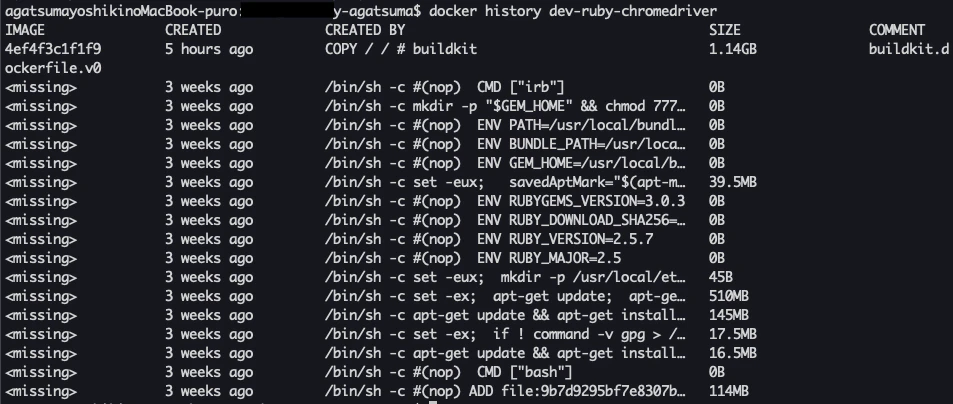
docker history で不要なステージが表示されないようにするため
やり方、方法
as で中間成果物を保存して、最後にそこからコピーすることで、中間成果物の内容が見れない模様
# syntax = docker/dockerfile:experimental
FROM ruby:2.5 as intermediate

# 処理諸々
[・・・]

# マルチステージビルド
FROM ruby:2.5
COPY --from=intermediate / /
注意点
COPY前までに行った作業(ex. bundle install)で何かしらディレクトリに変更があった場合、対象ディレクトリをしっかりCOPYする必要がある。
↓
最初、/root /root のみを対象にしていたのだが、bundle install で /usr/local/bundle にインストールされるので、COPY対象外で、gemがないよと怒られた。確認
2. BuildKitの利用
何故?
~/.ssh/id_rsaなどの秘密鍵をコンテナ内に残さないようにするためやり方、方法
--mount=type=secret,id=ssh,target=/root/.ssh/id_rsa git cloneオプションをつけてgit cloneする# Git ARG SSH_PRIVATE_KEY RUN mkdir /root/.ssh/ RUN touch /root/.ssh/id_rsa RUN echo "${SSH_PRIVATE_KEY}" > /root/.ssh/id_rsa RUN touch /root/.ssh/known_hosts RUN ssh-keyscan -t rsa github.com >> /root/.ssh/known_hosts RUN chmod 600 /root/.ssh/* # プロジェクトclone WORKDIR /root/ RUN --mount=type=secret,id=ssh,target=/root/.ssh/id_rsa RUN git clone [プロジェクト] RUN rm /root/.ssh/id_rsa #→ rm しないと残ったままっぽい ↓ $ docker build -t yaga0429/ruby-chromedriver --build-arg SSH_PRIVATE_KEY="$(cat ~/.ssh/id_rsa)" --no-cache
- 確認

まとめ
ECRとかでimageをプライベートに管理してたりすると、あんま気にならないのかな。
その辺はいまいちわからんけど、なんとなくスッキリしたのでオーケー。
まぁやってみたので忘れないうちに。
- 投稿日:2020-01-07T16:05:23+09:00
Gitコマンド備忘録
Gitコマンド備忘録
gitのコマンド忘れては調べての繰り返しでいい加減めんどい。
ここに調べに来る←覚えろよミスった系
addの取り消し
git reset HEAD^ステージング状態を戻すイメージが正確
commit後メッセージ修正
git commit --amend -m "メッセージ"上記の場合だとメッセージのみ変更してcommitしなおす
作業中
変更内容を同期したい
git pull (ブランチ名)リモートのmasterとローカルのmasterの同期はブランチ名(master)いらない
空気を読んでくれて日本人みたいブランチ切り替えたい
git checkout (ブランチ名)マスターで作業しちゃダメ!!めっちゃ怒られるから!
- 投稿日:2020-01-07T14:27:06+09:00
git lab にあがっているブランチのソースを取得する方法
git status で変更がないことを確認
git fetch
git checkout -b [ブランチ名] origin/[ブランチ名]
例:git checkout -b feature_11_04 origin/feature_11_04
- 投稿日:2020-01-07T13:50:32+09:00
Goの内部パッケージ関係をコミットごとに可視化する
使用したプログラム: bxcodec/go-clean-arch概要
- Goの内部パッケージの関係が複雑なプログラムは理解するのが大変
- 可視化したい
- せっかくだからコミットごとに可視化してアニメーションにしてみる
準備
コード
やったこと
- コミットログを取得
- コミットごとにコマンドを実行
- Goの内部パッケージ関係をdotファリルに出力し、gifを作成
- コミットごとのgifのサイズを揃えて、アニメーションを作成
1. コミットログを取得
git log --pretty=onelineで取得できる。
pythonでかくとres = subprocess.check_output(["git", "-C", path_dir, "log", "--pretty=oneline"])コミットのハッシュ値だけを取得したい(ハッシュ値+コメントになっている)。空白で区切って一番最初のハッシュ値だけを取得してリストにした。
2. コミットごとにコマンド実行
コミットごとにresetしてコマンドを実行した(reset以外にいい方法がある??)。
for commit in log_list:
    subprocess.call(["git", "-C", path_dir, "reset", "--hard", commit]) |
    command(path_dir)
コマンドを実行するときはプログラムのあるディレクトリのパスを使用する。
3. Goの内部パッケージ関係をdotファリルに出力し、gifを作成
3.1. dotファイル作成
ここが一番難しい。
parser というとても便利なパッケージがあり、ファイル内でimportしているパッケージを取得してくれる。これをファイルごとからパッケージごとにまとめれば良い。困ったこと
- ファイルごと --> パッケージごと
parserはファイルのパッケージ名も取得してくれるが、別のディレクトリに同じパッケージ名があると区別できない。ディレクトリを保存したが、もっと簡単な方法がありそう- 外部パッケージの区別
内部パッケージ(自分で作ったもの)だけを対象にしたかったがどうやって区別すればいいか??「githubってあれば外部」みたいにしたが、あまりいい方法ではなさそう。3.2. dotファイルからgifファイル作成
graphvizを使用する。
dot -T gif sample.dot -o sample.gif4. コミットごとのgifのサイズを揃えて、アニメーションを作成
4.1. gifのサイズを揃える
アニメーションにするときファイルごとのサイズが違うと大きいサイズは切れてしまう。
mogrify -resize (width)x(height)! *.gif
指定するサイズはいい感じのを選ぶ。4.2. アニメーション作成
ImageMagickを使用する。
convert -delay 5 -loop 0 *.gif animation.gif参考にしたサイト
- Gitディレクトリ外からgitコマンドを実行する
- Pythonでsubprocessを使ってコマンドを実行する方法
- package parser
- 画像の拡大・縮小
- アニメーションGIF ImageMagick編
- st34-satoshi/for-each-commit
- st34-satoshi/call-graph
これから
コミットごとにグラフの表示位置がバラバラになってしまいアニメーションにしたとき見にくい。どうにか揃えたい。

- 投稿日:2020-01-07T05:38:09+09:00
serverが起動せず"Usage: rails new APP_PATH [options]..."となってしまう場合の解決法[Ruby on Rails]
経緯
私がRailsの環境を構築する際「Rails s」でサーバーが起動しなかったが解決に至ったためここに記載したいと思う。
投稿に至った経緯は以下の通り。
Web上で私と同じように悩んでいる方が多く、またほとんどの記事において解決に至っていなかったため。
該当する記事がそうないように感じたため。
同じ状況に陥っている同志の助けになりたいと考えたため。
陥った状況
- 前提として使用OSは Windows10
- コマンドプロンプトで
rails sを実行すると「Usage: rails new APP_PATH [options] ...(以下省略)」が表示されてサーバが起動できていない。- Ruby、SQLite、Ruby on Railsはインストールされている。
rails new プロジェクト名を実行済み ( 新しいrailsプロジェクトを生成するコマンド )cd プロジェクト名を実行済み ( プロジェクトのrootに移動するコマンド )詳細な状況
- 本来は
rails sを実行した際、下記のようになればよい。C:¥Users¥leone> rails s => Booting Puma => Rails 5.2.4.1 application starting in development => Run `rails server -h` for more startup options *** SIGUSR2 not implemented, signal based restart unavailable! *** SIGUSR1 not implemented, signal based restart unavailable! *** SIGHUP not implemented, signal based logs reopening unavailable! Puma starting in single mode... * Version 3.12.2 (ruby 2.6.4-p104), codename: Llamas in Pajamas * Min threads: 5, max threads: 5 * Environment: development * Listening on tcp://localhost:3000 Use Ctrl-C to stop
- しかし問題の状態では下記のようになってしまう。
C:¥Users¥leone> rails s
Usage:
  rails new APP_PATH [options]

Options:
      [--skip-namespace], [--no-skip-namespace]            # Skip namespace (affects only isolated applications)
  -r, [--ruby=PATH]                                        # Path to the Ruby binary of your choice
                                                           # Default: C:/Ruby26-x64/bin/ruby.exe
  -m, [--template=TEMPLATE]                                # Path to some application template (can be a filesystem path or URL)
  -d, [--database=DATABASE]                                # Preconfigure for selected database (options: mysql/postgresql/sqlite3/oracle/frontbase/ibm_db/sqlserver/jdbcmysql/jdbcsqlite3/jdbcpostgresql/jdbc)
                                                           # Default: sqlite3
      [--skip-yarn], [--no-skip-yarn]                      # Don't use Yarn for managing JavaScript dependencies
      [--skip-gemfile], [--no-skip-gemfile]                # Don't create a Gemfile
  -G, [--skip-git], [--no-skip-git]                        # Skip .gitignore file
      [--skip-keeps], [--no-skip-keeps]                    # Skip source control .keep files
  -M, [--skip-action-mailer], [--no-skip-action-mailer]    # Skip Action Mailer files
  -O, [--skip-active-record], [--no-skip-active-record]    # Skip Active Record files
      [--skip-active-storage], [--no-skip-active-storage]  # Skip Active Storage files
  -P, [--skip-puma], [--no-skip-puma]                      # Skip Puma related files
  -C, [--skip-action-cable], [--no-skip-action-cable]      # Skip Action Cable files
  -S, [--skip-sprockets], [--no-skip-sprockets]            # Skip Sprockets files
      [--skip-spring], [--no-skip-spring]                  # Don't install Spring application preloader
      [--skip-listen], [--no-skip-listen]                  # Don't generate configuration that depends on the listen gem
      [--skip-coffee], [--no-skip-coffee]                  # Don't use CoffeeScript
  -J, [--skip-javascript], [--no-skip-javascript]          # Skip JavaScript files
      [--skip-turbolinks], [--no-skip-turbolinks]          # Skip turbolinks gem
  -T, [--skip-test], [--no-skip-test]                      # Skip test files
      [--skip-system-test], [--no-skip-system-test]        # Skip system test files
      [--skip-bootsnap], [--no-skip-bootsnap]              # Skip bootsnap gem
      [--dev], [--no-dev]                                  # Setup the application with Gemfile pointing to your Rails checkout
      [--edge], [--no-edge]                                # Setup the application with Gemfile pointing to Rails repository
      [--rc=RC]                                            # Path to file containing extra configuration options for rails command
      [--no-rc], [--no-no-rc]                              # Skip loading of extra configuration options from .railsrc file
      [--api], [--no-api]                                  # Preconfigure smaller stack for API only apps
  -B, [--skip-bundle], [--no-skip-bundle]                  # Don't run bundle install
      [--webpack=WEBPACK]                                  # Preconfigure for app-like JavaScript with Webpack (options: react/vue/angular/elm/stimulus)

Runtime options:
  -f, [--force]                    # Overwrite files that already exist
  -p, [--pretend], [--no-pretend]  # Run but do not make any changes
  -q, [--quiet], [--no-quiet]      # Suppress status output
  -s, [--skip], [--no-skip]        # Skip files that already exist

Rails options:
  -h, [--help], [--no-help]        # Show this help message and quit
  -v, [--version], [--no-version]  # Show Rails version number and quit

Description:
    The 'rails new' command creates a new Rails application with a default
    directory structure and configuration at the path you specify.

    You can specify extra command-line arguments to be used every time
    'rails new' runs in the .railsrc configuration file in your home directory.

    Note that the arguments specified in the .railsrc file don't affect the
    defaults values shown above in this help message.

Example:
    rails new ~/Code/Ruby/weblog

    This generates a skeletal Rails installation in ~/Code/Ruby/weblog.
原因
"Usage: rails new APP_PATH [options]"が表れるということは考えられることはアプリケーションがないことが原因と考えられますが、前提として
rails new プロジェクト名、cd プロジェクト名は実行されているはずです。そこから察するに、実行はされたが何らかが原因で生成されたプロジェクトが認識されてないのではないかと考えました。ではなぜ認識されないのか考えたところ、予想として
rails new プロジェクト名で生成されるファイルが足りないのではないかと考えたため、私はプロジェクトとして生成されたディレクトリ内を確認したのです。すると予想は的中し明らかにファイルが足りなかったのでした。下記は本来、プロジェクト生成時に生成されるはずのファイル、またはその処理
C:¥Users¥leone> rails new アプリケーション名
      create
      create  README.md
      create  Rakefile
      create  .ruby-version
      create  config.ru
      create  .gitignore
      create  Gemfile
         run  git init from "."
Initialized empty Git repository in C:/Users/leone/アプリケーション名/.git/
      create  package.json
      create  app
      create  app/assets/config/manifest.js
      create  app/assets/javascripts/application.js
      create  app/assets/javascripts/cable.js
      create  app/assets/stylesheets/application.css
      create  app/channels/application_cable/channel.rb
      create  app/channels/application_cable/connection.rb
      create  app/controllers/application_controller.rb
      create  app/helpers/application_helper.rb
      create  app/jobs/application_job.rb
      create  app/mailers/application_mailer.rb
      create  app/models/application_record.rb
      create  app/views/layouts/application.html.erb
      create  app/views/layouts/mailer.html.erb
      create  app/views/layouts/mailer.text.erb
      create  app/assets/images/.keep
      create  app/assets/javascripts/channels
      create  app/assets/javascripts/channels/.keep
      create  app/controllers/concerns/.keep
      create  app/models/concerns/.keep
      create  bin
      create  bin/bundle
      create  bin/rails
      create  bin/rake
      create  bin/setup
      create  bin/update
      create  bin/yarn
      create  config
      create  config/routes.rb
      create  config/application.rb
      create  config/environment.rb
      create  config/cable.yml
      create  config/puma.rb
      create  config/storage.yml
      create  config/environments
      create  config/environments/development.rb
      create  config/environments/production.rb
      create  config/environments/test.rb
      create  config/initializers
      create  config/initializers/application_controller_renderer.rb
      create  config/initializers/assets.rb
      create  config/initializers/backtrace_silencers.rb
      create  config/initializers/content_security_policy.rb
      create  config/initializers/cookies_serializer.rb
      create  config/initializers/cors.rb
      create  config/initializers/filter_parameter_logging.rb
      create  config/initializers/inflections.rb
      create  config/initializers/mime_types.rb
      create  config/initializers/new_framework_defaults_5_2.rb
      create  config/initializers/wrap_parameters.rb
      create  config/locales
      create  config/locales/en.yml
      create  config/master.key
      append  .gitignore
      create  config/boot.rb
      create  config/database.yml
      create  db
      create  db/seeds.rb
      create  lib
      create  lib/tasks
      create  lib/tasks/.keep
      create  lib/assets
      create  lib/assets/.keep
      create  log
      create  log/.keep
      create  public
      create  public/404.html
      create  public/422.html
      create  public/500.html
      create  public/apple-touch-icon-precomposed.png
      create  public/apple-touch-icon.png
      create  public/favicon.ico
      create  public/robots.txt
      create  tmp
      create  tmp/.keep
      create  tmp/pids
      create  tmp/pids/.keep
      create  tmp/cache
      create  tmp/cache/assets
      create  vendor
      create  vendor/.keep
      create  test/fixtures
      create  test/fixtures/.keep
      create  test/fixtures/files
      create  test/fixtures/files/.keep
      create  test/controllers
      create  test/controllers/.keep
      create  test/mailers
      create  test/mailers/.keep
      create  test/models
      create  test/models/.keep
      create  test/helpers
      create  test/helpers/.keep
      create  test/integration
      create  test/integration/.keep
      create  test/test_helper.rb
      create  test/system
      create  test/system/.keep
      create  test/application_system_test_case.rb
      create  storage
      create  storage/.keep
      create  tmp/storage
      create  tmp/storage/.keep
      remove  config/initializers/cors.rb
      remove  config/initializers/new_framework_defaults_5_2.rb
         run  bundle install
Fetching gem metadata from https://rubygems.org/.............
Fetching gem metadata from https://rubygems.org/.
Resolving dependencies....
Using rake 13.0.1
Using concurrent-ruby 1.1.5
Using i18n 1.7.0
Using minitest 5.13.0
Using thread_safe 0.3.6
Using tzinfo 1.2.6
Using activesupport 5.2.4.1
Using builder 3.2.4
Using erubi 1.9.0
Using mini_portile2 2.4.0
Using nokogiri 1.10.7 (x64-mingw32)
Using rails-dom-testing 2.0.3
Using crass 1.0.5
Using loofah 2.4.0
Using rails-html-sanitizer 1.3.0
Using actionview 5.2.4.1
Using rack 2.0.8
Using rack-test 1.1.0
Using actionpack 5.2.4.1
Using nio4r 2.5.2
Using websocket-extensions 0.1.4
Using websocket-driver 0.7.1
Using actioncable 5.2.4.1
Using globalid 0.4.2
Using activejob 5.2.4.1
Using mini_mime 1.0.2
Using mail 2.7.1
Using actionmailer 5.2.4.1
Using activemodel 5.2.4.1
Using arel 9.0.0
Using activerecord 5.2.4.1
Using mimemagic 0.3.3
Using marcel 0.3.3
Using activestorage 5.2.4.1
Using public_suffix 4.0.3
Using addressable 2.7.0
Using io-like 0.3.0
Using archive-zip 0.12.0
Using bindex 0.8.1
Using msgpack 1.3.1 (x64-mingw32)
Using bootsnap 1.4.5
Using bundler 1.17.2
Using byebug 11.0.1
Using regexp_parser 1.6.0
Using xpath 3.2.0
Using capybara 3.30.0
Using childprocess 3.0.0
Using chromedriver-helper 2.1.1
Using coffee-script-source 1.12.2
Using execjs 2.7.0
Using coffee-script 2.4.1
Using method_source 0.9.2
Using thor 1.0.1
Using railties 5.2.4.1
Using coffee-rails 4.2.2
Using duktape 2.3.0.0
Using ffi 1.11.3 (x64-mingw32)
Using jbuilder 2.9.1
Using puma 3.12.2
Using sprockets 3.7.2
Using sprockets-rails 3.2.1
Using rails 5.2.4.1
Using rb-fsevent 0.10.3
Using rb-inotify 0.10.1
Using rubyzip 2.0.0
Using sass-listen 4.0.0
Using sass 3.7.4
Using tilt 2.0.10
Using sass-rails 5.1.0
Using selenium-webdriver 3.142.7
Using sqlite3 1.4.2
Using turbolinks-source 5.2.0
Using turbolinks 5.2.1
Using tzinfo-data 1.2019.3
Using uglifier 4.2.0
Using web-console 3.7.0
Bundle complete! 16 Gemfile dependencies, 76 gems now installed.
Use `bundle info [gemname]` to see where a bundled gem is installed.
下記は陥った状況
C:¥Users¥leone> rails new アプリケーション名
      create
      create  README.md
      create  Rakefile
      create  .ruby-version
      create  config.ru
      create  .gitignore
      create  Gemfile
  //ここらで終わっていた。
ではなぜこのようなことが起こるのか。
それはgitがインストールされていない、または上手くインストールされていないためです。
既にしている場合は、gitbashしかgitコマンド使用の許可がされていない。つまりはpathが通っていないことが原因ということになります。解決方法
Gitをインストールする
既にインストールしてある場合は再インストール、またはpathを設定し直す。
pathを設定し直すのが早くC:\Program Files\Git\cmdをpathに追加。
再インストールする際は、インストール前にアンインストールを行う。アンインストール手順
デスクトップ > スタート > 設定 > ホーム > アプリ > Git version〇〇を選択 > アンインストールGitインストール手順
Gitのインストール方法は検索して該当したサイトを参考にインストールして構いませんが、下記に記す部分は注意してほしい。
https://proengineer.internous.co.jp/content/columnfeature/6893(こちらのサイトを参考にするとよい)Gitインストール時の注意点
上記の画面に進んだら画像のように真ん中を選んでください。これはbash以外のシェルでもgitコマンドを使えるようにするためです。もし上を選んでインストールしてしまったら環境変数からpathを追加することをおすすめしますが、pathの概念がわからなければ再インストールしても問題はありません。
最後に
私はこのような方法で解決に至ったのですが、皆さんはどうだったでしょうか。当投稿でお力添え出来たら幸いです。
解決出来た、または役に立ったという方がいればグッドボタンを押して頂けると励みになります。

- 投稿日:2020-01-07T05:38:09+09:00
[Ruby on Rails] serverが起動せず"Usage: rails new APP_PATH [options]..."となってしまう場合の解決法
経緯
私がRailsの環境を構築する際「Rails s」でサーバーが起動しない問題に陥ったが解決に至ったためここにその方法を記載したいと思う。
投稿に至った経緯は以下の通り。
Web上で私と同じように悩んでいる方が多く、またほとんどの記事において解決に至っていなかったため。
該当する記事がそうないように感じたため。
同じ状況に陥っている同志の助けになりたいと考えたため。
陥った状況
- 前提として使用OSは Windows10
- コマンドプロンプトで
rails sを実行すると「Usage: rails new APP_PATH [options] ...(以下省略)」が表示されてサーバが起動できていない。- Ruby、SQLite、Ruby on Railsはインストールされている。
rails new プロジェクト名を実行済み ( 新しいrailsプロジェクトを生成するコマンド )cd プロジェクト名を実行済み ( プロジェクトのrootに移動するコマンド )詳細な状況
- 本来は
rails sを実行した際、下記のようになればよい。C:¥Users¥leone> rails s => Booting Puma => Rails 5.2.4.1 application starting in development => Run `rails server -h` for more startup options *** SIGUSR2 not implemented, signal based restart unavailable! *** SIGUSR1 not implemented, signal based restart unavailable! *** SIGHUP not implemented, signal based logs reopening unavailable! Puma starting in single mode... * Version 3.12.2 (ruby 2.6.4-p104), codename: Llamas in Pajamas * Min threads: 5, max threads: 5 * Environment: development * Listening on tcp://localhost:3000 Use Ctrl-C to stop
- しかし問題の状態では下記のようになってしまう。
C:¥Users¥leone> rails s
Usage:
  rails new APP_PATH [options]

Options:
      [--skip-namespace], [--no-skip-namespace]            # Skip namespace (affects only isolated applications)
  -r, [--ruby=PATH]                                        # Path to the Ruby binary of your choice
                                                           # Default: C:/Ruby26-x64/bin/ruby.exe
  -m, [--template=TEMPLATE]                                # Path to some application template (can be a filesystem path or URL)
  -d, [--database=DATABASE]                                # Preconfigure for selected database (options: mysql/postgresql/sqlite3/oracle/frontbase/ibm_db/sqlserver/jdbcmysql/jdbcsqlite3/jdbcpostgresql/jdbc)
                                                           # Default: sqlite3
      [--skip-yarn], [--no-skip-yarn]                      # Don't use Yarn for managing JavaScript dependencies
      [--skip-gemfile], [--no-skip-gemfile]                # Don't create a Gemfile
  -G, [--skip-git], [--no-skip-git]                        # Skip .gitignore file
      [--skip-keeps], [--no-skip-keeps]                    # Skip source control .keep files
  -M, [--skip-action-mailer], [--no-skip-action-mailer]    # Skip Action Mailer files
  -O, [--skip-active-record], [--no-skip-active-record]    # Skip Active Record files
      [--skip-active-storage], [--no-skip-active-storage]  # Skip Active Storage files
  -P, [--skip-puma], [--no-skip-puma]                      # Skip Puma related files
  -C, [--skip-action-cable], [--no-skip-action-cable]      # Skip Action Cable files
  -S, [--skip-sprockets], [--no-skip-sprockets]            # Skip Sprockets files
      [--skip-spring], [--no-skip-spring]                  # Don't install Spring application preloader
      [--skip-listen], [--no-skip-listen]                  # Don't generate configuration that depends on the listen gem
      [--skip-coffee], [--no-skip-coffee]                  # Don't use CoffeeScript
  -J, [--skip-javascript], [--no-skip-javascript]          # Skip JavaScript files
      [--skip-turbolinks], [--no-skip-turbolinks]          # Skip turbolinks gem
  -T, [--skip-test], [--no-skip-test]                      # Skip test files
      [--skip-system-test], [--no-skip-system-test]        # Skip system test files
      [--skip-bootsnap], [--no-skip-bootsnap]              # Skip bootsnap gem
      [--dev], [--no-dev]                                  # Setup the application with Gemfile pointing to your Rails checkout
      [--edge], [--no-edge]                                # Setup the application with Gemfile pointing to Rails repository
      [--rc=RC]                                            # Path to file containing extra configuration options for rails command
      [--no-rc], [--no-no-rc]                              # Skip loading of extra configuration options from .railsrc file
      [--api], [--no-api]                                  # Preconfigure smaller stack for API only apps
  -B, [--skip-bundle], [--no-skip-bundle]                  # Don't run bundle install
      [--webpack=WEBPACK]                                  # Preconfigure for app-like JavaScript with Webpack (options: react/vue/angular/elm/stimulus)

Runtime options:
  -f, [--force]                    # Overwrite files that already exist
  -p, [--pretend], [--no-pretend]  # Run but do not make any changes
  -q, [--quiet], [--no-quiet]      # Suppress status output
  -s, [--skip], [--no-skip]        # Skip files that already exist

Rails options:
  -h, [--help], [--no-help]        # Show this help message and quit
  -v, [--version], [--no-version]  # Show Rails version number and quit

Description:
    The 'rails new' command creates a new Rails application with a default
    directory structure and configuration at the path you specify.

    You can specify extra command-line arguments to be used every time
    'rails new' runs in the .railsrc configuration file in your home directory.

    Note that the arguments specified in the .railsrc file don't affect the
    defaults values shown above in this help message.

Example:
    rails new ~/Code/Ruby/weblog

    This generates a skeletal Rails installation in ~/Code/Ruby/weblog.
原因
"Usage: rails new APP_PATH [options]"が表れるということはプロジェクトがないことが原因と考えられますが、前提として
rails new プロジェクト名、cd プロジェクト名は実行されているはずです。そこから察するに、実行はされたが何らかが原因で生成されたプロジェクトが認識されてないのではないかと考えました。ではなぜ認識されないのか考えたところ、予想として
rails new プロジェクト名で生成されるファイルが足りないのではないかと考えたため、私はプロジェクトとして生成されたディレクトリ内を確認したのです。すると予想は的中し明らかにファイルが足りなかったのでした。下記は本来、プロジェクト生成時に生成されるはずのファイル、またはその処理
C:¥Users¥leone> rails new アプリケーション名
      create
      create  README.md
      create  Rakefile
      create  .ruby-version
      create  config.ru
      create  .gitignore
      create  Gemfile
         run  git init from "."
Initialized empty Git repository in C:/Users/leone/アプリケーション名/.git/
      create  package.json
      create  app
      create  app/assets/config/manifest.js
      create  app/assets/javascripts/application.js
      create  app/assets/javascripts/cable.js
      create  app/assets/stylesheets/application.css
      create  app/channels/application_cable/channel.rb
      create  app/channels/application_cable/connection.rb
      create  app/controllers/application_controller.rb
      create  app/helpers/application_helper.rb
      create  app/jobs/application_job.rb
      create  app/mailers/application_mailer.rb
      create  app/models/application_record.rb
      create  app/views/layouts/application.html.erb
      create  app/views/layouts/mailer.html.erb
      create  app/views/layouts/mailer.text.erb
      create  app/assets/images/.keep
      create  app/assets/javascripts/channels
      create  app/assets/javascripts/channels/.keep
      create  app/controllers/concerns/.keep
      create  app/models/concerns/.keep
      create  bin
      create  bin/bundle
      create  bin/rails
      create  bin/rake
      create  bin/setup
      create  bin/update
      create  bin/yarn
      create  config
      create  config/routes.rb
      create  config/application.rb
      create  config/environment.rb
      create  config/cable.yml
      create  config/puma.rb
      create  config/storage.yml
      create  config/environments
      create  config/environments/development.rb
      create  config/environments/production.rb
      create  config/environments/test.rb
      create  config/initializers
      create  config/initializers/application_controller_renderer.rb
      create  config/initializers/assets.rb
      create  config/initializers/backtrace_silencers.rb
      create  config/initializers/content_security_policy.rb
      create  config/initializers/cookies_serializer.rb
      create  config/initializers/cors.rb
      create  config/initializers/filter_parameter_logging.rb
      create  config/initializers/inflections.rb
      create  config/initializers/mime_types.rb
      create  config/initializers/new_framework_defaults_5_2.rb
      create  config/initializers/wrap_parameters.rb
      create  config/locales
      create  config/locales/en.yml
      create  config/master.key
      append  .gitignore
      create  config/boot.rb
      create  config/database.yml
      create  db
      create  db/seeds.rb
      create  lib
      create  lib/tasks
      create  lib/tasks/.keep
      create  lib/assets
      create  lib/assets/.keep
      create  log
      create  log/.keep
      create  public
      create  public/404.html
      create  public/422.html
      create  public/500.html
      create  public/apple-touch-icon-precomposed.png
      create  public/apple-touch-icon.png
      create  public/favicon.ico
      create  public/robots.txt
      create  tmp
      create  tmp/.keep
      create  tmp/pids
      create  tmp/pids/.keep
      create  tmp/cache
      create  tmp/cache/assets
      create  vendor
      create  vendor/.keep
      create  test/fixtures
      create  test/fixtures/.keep
      create  test/fixtures/files
      create  test/fixtures/files/.keep
      create  test/controllers
      create  test/controllers/.keep
      create  test/mailers
      create  test/mailers/.keep
      create  test/models
      create  test/models/.keep
      create  test/helpers
      create  test/helpers/.keep
      create  test/integration
      create  test/integration/.keep
      create  test/test_helper.rb
      create  test/system
      create  test/system/.keep
      create  test/application_system_test_case.rb
      create  storage
      create  storage/.keep
      create  tmp/storage
      create  tmp/storage/.keep
      remove  config/initializers/cors.rb
      remove  config/initializers/new_framework_defaults_5_2.rb
         run  bundle install
Fetching gem metadata from https://rubygems.org/.............
Fetching gem metadata from https://rubygems.org/.
Resolving dependencies....
Using rake 13.0.1
Using concurrent-ruby 1.1.5
Using i18n 1.7.0
Using minitest 5.13.0
Using thread_safe 0.3.6
Using tzinfo 1.2.6
Using activesupport 5.2.4.1
Using builder 3.2.4
Using erubi 1.9.0
Using mini_portile2 2.4.0
Using nokogiri 1.10.7 (x64-mingw32)
Using rails-dom-testing 2.0.3
Using crass 1.0.5
Using loofah 2.4.0
Using rails-html-sanitizer 1.3.0
Using actionview 5.2.4.1
Using rack 2.0.8
Using rack-test 1.1.0
Using actionpack 5.2.4.1
Using nio4r 2.5.2
Using websocket-extensions 0.1.4
Using websocket-driver 0.7.1
Using actioncable 5.2.4.1
Using globalid 0.4.2
Using activejob 5.2.4.1
Using mini_mime 1.0.2
Using mail 2.7.1
Using actionmailer 5.2.4.1
Using activemodel 5.2.4.1
Using arel 9.0.0
Using activerecord 5.2.4.1
Using mimemagic 0.3.3
Using marcel 0.3.3
Using activestorage 5.2.4.1
Using public_suffix 4.0.3
Using addressable 2.7.0
Using io-like 0.3.0
Using archive-zip 0.12.0
Using bindex 0.8.1
Using msgpack 1.3.1 (x64-mingw32)
Using bootsnap 1.4.5
Using bundler 1.17.2
Using byebug 11.0.1
Using regexp_parser 1.6.0
Using xpath 3.2.0
Using capybara 3.30.0
Using childprocess 3.0.0
Using chromedriver-helper 2.1.1
Using coffee-script-source 1.12.2
Using execjs 2.7.0
Using coffee-script 2.4.1
Using method_source 0.9.2
Using thor 1.0.1
Using railties 5.2.4.1
Using coffee-rails 4.2.2
Using duktape 2.3.0.0
Using ffi 1.11.3 (x64-mingw32)
Using jbuilder 2.9.1
Using puma 3.12.2
Using sprockets 3.7.2
Using sprockets-rails 3.2.1
Using rails 5.2.4.1
Using rb-fsevent 0.10.3
Using rb-inotify 0.10.1
Using rubyzip 2.0.0
Using sass-listen 4.0.0
Using sass 3.7.4
Using tilt 2.0.10
Using sass-rails 5.1.0
Using selenium-webdriver 3.142.7
Using sqlite3 1.4.2
Using turbolinks-source 5.2.0
Using turbolinks 5.2.1
Using tzinfo-data 1.2019.3
Using uglifier 4.2.0
Using web-console 3.7.0
Bundle complete! 16 Gemfile dependencies, 76 gems now installed.
Use `bundle info [gemname]` to see where a bundled gem is installed.
下記は陥った状況
C:¥Users¥leone> rails new アプリケーション名
      create
      create  README.md
      create  Rakefile
      create  .ruby-version
      create  config.ru
      create  .gitignore
      create  Gemfile
  //ここらで終わっていた。
ではなぜこのようなことが起こるのか。
それはgitがインストールされていない、または上手くインストールされていないためです。
既にインストールしている場合は、gitbashしかgitコマンド使用の許可がされていない。つまりはpathが通っていないことが原因ということになります。解決方法
Gitをインストールする
既にインストールしてある場合は再インストール、またはpathを設定し直す。
pathを設定し直すのが早くC:\Program Files\Git\cmdをpathに追加。
再インストールする際は、インストール前にアンインストールを行う。アンインストール手順
デスクトップ > スタート > 設定 > ホーム > アプリ > Git version〇〇を選択 > アンインストールGitインストール手順
Gitのインストール方法は検索して該当したサイトを参考にインストールして構いませんが、下記に記す部分は注意してほしい。
サイトは、こちらのサイトがオススメです。
https://proengineer.internous.co.jp/content/columnfeature/6893Gitインストール時の注意点
上記の画面に進んだら画像のように真ん中を選んでください。これはbash以外のシェルでもgitコマンドを使えるようにするためです。もし上を選んでインストールしてしまったら環境変数からpathを追加することをおすすめしますが、pathの概念がわからなければ再インストールしても問題はありません。
最後に
私はこのような方法で解決に至ったのですが、皆さんはどうだったでしょうか。当投稿でお力添え出来たら幸いです。
解決出来た、または役に立ったという方がいればグッドボタン