- 投稿日:2019-08-04T19:12:52+09:00
goでmklを使ってみる
Goからmklを呼び出してみたいと思い試行錯誤したので記録しておきます。
環境はmacOS Mojaveです。TL;DR;
- Step1: mklをインストール
- Step2:
/opt/intel/mkl/bin/pkgconfig/*.pcファイルを修正- Step3: 環境変数
PKG_CONFIG_PATHを設定- Step4: cgoで呼び出すコードを書く
- Step5:
go build詳細
Step1: mklをインストール
Intelのページからmklをダウンロード・インストールします。
ダウンロードにはユーザー登録が必要でした。Step2:
/opt/intel/mkl/bin/pkgconfig/*.pcファイルを修正私がインストールした環境ではデフォルト値が間違っていました。
以下のように修正しました。diff /opt/intel/mkl/bin/pkgconfig/mkl-static-lp64-iomp.pc /opt/intel/mkl/bin/pkgconfig/mkl-static-lp64-iomp.pc.back 14c14 < prefix=/opt/intel/compilers_and_libraries_2019.4.233/mac/mkl --- > prefix=/opt/intel/compilers_and_libraries_2019.4.233/mac/mkl/bin/pkgconfig/mklStep3: 環境変数
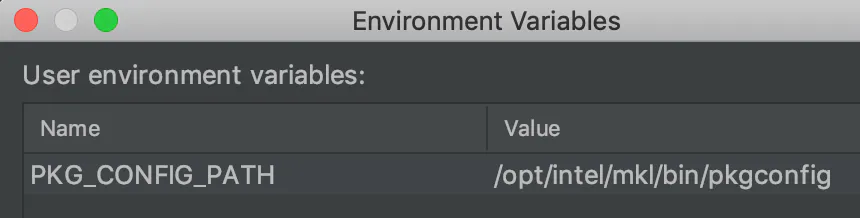
PKG_CONFIG_PATHを設定cgoでは内部で
pkg-configを実行するため設定ファイルの在りかを教えてあげる必要がありそうです。
私はGoLandを使っているので以下のようにビルド設定しました。
Step4: cgoで呼び出すコードを書く
cgoで呼び出しましょう。今回は練習としてblasに含まれているasumを呼び出しました。
コード例
package main

import (
    // #cgo pkg-config: mkl-static-lp64-iomp
    // #include "mkl.h"
    "C"
    "fmt"
)

func main() {
    n := 10
    vec := make([]float32, n)
    for i := 0; i < n; i++ {
        vec[i] = float32(i) + 1.0
    }

    result := C.cblas_sasum((C.int)(n), (*C.float)(&vec[0]), 1)
    fmt.Printf("result=%v", result)
}
Step5:
go buildビルドして実行できるようになっているはずです。
感想
package-configの設定が間違っていたところでハマりました。
参考文献

- 投稿日:2019-08-04T17:44:44+09:00
Hacker RankのKangarooをGoで解いてみた
最近、HackerRankというサイトでアルゴリズムの問題を解いています。
Kangarooという問題を簡単なものですが、いい感じで解けたので解答例を共有います。問題
カンガルーが2匹いる。
- 1匹目はx1の位置からスタートして、1回のジャンプでv1メートル移動する
- 2匹目はx2の位置からスタートして、1回のジャンプでv2メートル移動する
カンガルーが同じ位置に止まるかどうかを判定する関数kangarooを完成させよう。入力には、x1,v1,x2,v2が与えられて、0以上10000以下の整数。
出力は"YES"か"NO"の2種類。用意されている関数はこちら。
main.go// Complete the kangaroo function below. func kangaroo(x1 int32, v1 int32, x2 int32, v2 int32) string { }私の解答
main.gofunc kangaroo(x1 int32, v1 int32, x2 int32, v2 int32) string { if (v1-v2) != 0 && (x2-x1)/(v1-v2) > 0 && (x2-x1)%(v1-v2) == 0 { return "YES" } return "NO" }解説
方程式として考えると以下のようになる。
v1*X + x1 = v2*X + x2
を満たす0以上の整数Xは存在するのか。上の方程式を変形すると
X= (x2-x1)/(v1-v2) で0より大きく
Xは整数なので、 (x2-x1) mod (v1-v2) = 0となるはず。
この2つの条件を式にすると
(v1-v2) != 0 && (x2-x1)/(v1-v2) > 0 && (x2-x1)%(v1-v2) == 0
となる。以上です。また楽しく解けた問題があったら書いていきます。
- 投稿日:2019-08-04T16:11:14+09:00
isucon8の問題をGo言語で練習する
前提としては下記、既にVirtualBoxやVargrantがインストールされてること。
- macOS 10.14
- VirtualBox 5.2
- Vargrant 2.1.5
環境構築はmatsuuさんが公開しているものの1台構成の奴を利用させていただきました。
https://github.com/matsuu/vagrant-isucon/tree/master/isucon8-qualifier-standalone$ git clone git@github.com:matsuu/vagrant-isucon.git $ cd vagrant-isucon/isucon8-qualifier-standalone今回はブラウザからも確認したいので先にコメントアウトを外してIPアドレスを割り振る。
  config.vm.network "private_network", ip: "192.168.33.10" # 外す
  # config.vm.network "private_network", type: "dhcp" # コメントアウトする
仮想マシン(CentOS7)を起動する。
# 起動
$ vagrant up
# Provisioningが完了したらログインできる
$ vagrant ssh
ベンチマークの初期設定
ビルド
$ sudo -i -u isucon
$ cd torb/bench
$ make deps
$ make
初期データ生成
$ ./bin/gen-initial-dataset # ../db/isucon8q-initial-dataset.sql.gz ができるデータベースの初期化
$ mysql -uroot
mysql> CREATE USER isucon@'%' IDENTIFIED BY 'isucon';
mysql> GRANT ALL on torb.* TO isucon@'%';
mysql> CREATE USER isucon@'localhost' IDENTIFIED BY 'isucon'; # 既にできてるため失敗する?JJ
mysql> GRANT ALL on torb.* TO isucon@'localhost';
$ ./db/init.sh参照実装をPerlからGoに切り替える
$ sudo systemctl stop    torb.perl
$ sudo systemctl disable torb.perl
$ sudo systemctl start   torb.go
$ sudo systemctl enable  torb.go
Perl → Go に切り変わったかは下記のコマンドで確認できる
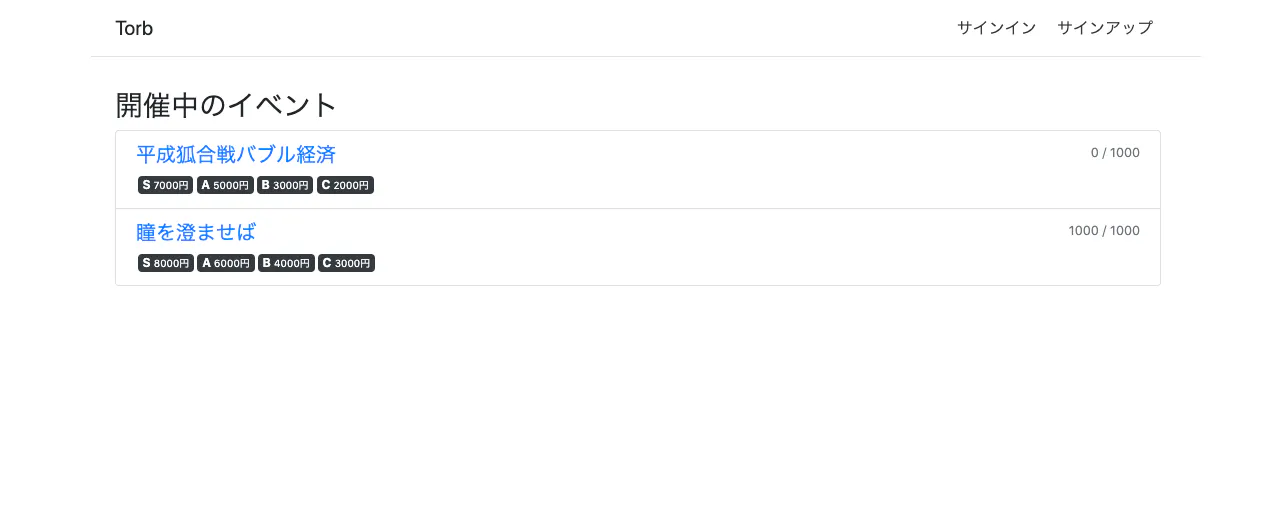
$ ps -aux | grep torbブラウザでアプリケーションが起動しているかを確認するためにVagrantファイルで設定したIPアドレスを開く
例 http://192.168.33.10
試しにテンプレートを修正してみる
$ cd ~/torb/webapp/goviews/index.tmpl- <h3>開催中のイベント</h3> + <h3>MY 開催中のイベント</h3>ファイルを変更したらビルドとサービスをリスタートする
$ make
$ sudo systemctl restart torb.go
ベンチマークを動かす
$ cd ~/torb/bench
$ bin/bench -remotes=127.0.0.1 -output result.json
$ jq . < result.json { "job_id": "", "ip_addrs": "127.0.0.1", "pass": false, "score": 0, "message": "負荷走行中のバリデーションに失敗しました。2019-08-04 07:04:05.514821172 +0000 UTC m=+39.621374291 [Fatal]レポートに予約id:148865の行が存在しません (GET /admin/api/reports/events/10/sales )", "error": [ "2019-08-04 07:03:47.655257471 +0000 UTC m=+21.761810599 リクエストがタイムアウトしました (GET /api/users/1633 )", "2019-08-04 07:03:50.973739693 +0000 UTC m=+25.080292821 リクエストがタイムアウトしました (GET /api/users/1823 )", "2019-08-04 07:03:56.994053625 +0000 UTC m=+31.100606768 リクエストがタイムアウトしました (POST /admin/api/events/20/actions/edit )", "2019-08-04 07:03:57.547523616 +0000 UTC m=+31.654076758 リクエストがタイムアウトしました (GET /api/users/3235 )", "2019-08-04 07:04:05.514821172 +0000 UTC m=+39.621374291 [Fatal]レポートに予約id:148865の行が存在しません (GET /admin/api/reports/events/10/sales )" ], "log": [ "08/04 07:03:38 レスポンスが遅いため負荷レベルを上げられませんでした。/api/users/1633", "08/04 07:03:39 レスポンスが遅いため負荷レベルを上げられませんでした。/api/events/10", "08/04 07:03:40 レスポンスが遅いため負荷レベルを上げられませんでした。/", "08/04 07:03:41 レスポンスが遅いため負荷レベルを上げられませんでした。/api/events/11/actions/reserve", "08/04 07:03:42 レスポンスが遅いため負荷レベルを上げられませんでした。/api/events/10", "08/04 07:03:43 レスポンスが遅いため負荷レベルを上げられませんでした。/", "08/04 07:03:44 レスポンスが遅いため負荷レベルを上げられませんでした。/", "08/04 07:03:45 レスポンスが遅いため負荷レベルを上げられませんでした。/", "08/04 07:03:46 レスポンスが遅いため負荷レベルを上げられませんでした。/", "08/04 07:03:47 エラーが発生したため負荷レベルを上げられませんでした。2019-08-04 07:03:47.655257471 +0000 UTC m=+21.761810599 リクエストがタイムアウトしました (GET /api/users/1633 )", "08/04 07:03:48 エラーが発生したため負荷レベルを上げられませんでした。2019-08-04 07:03:47.655257471 +0000 UTC m=+21.761810599 リクエストがタイムアウトしました (GET /api/users/1633 )", "08/04 07:03:49 エラーが発生したため負荷レベルを上げられませんでした。2019-08-04 07:03:47.655257471 +0000 UTC m=+21.761810599 リクエストがタイムアウトしました (GET /api/users/1633 )", "08/04 07:03:50 エラーが発生したため負荷レベルを上げられませんでした。2019-08-04 07:03:47.655257471 +0000 UTC m=+21.761810599 リクエストがタイムアウトしました (GET /api/users/1633 )", "08/04 07:03:51 エラーが発生したため負荷レベルを上げられませんでした。2019-08-04 07:03:50.973739693 +0000 UTC m=+25.080292821 リクエストがタイムアウトしました (GET /api/users/1823 )", "08/04 07:03:52 エラーが発生したため負荷レベルを上げられませんでした。2019-08-04 07:03:50.973739693 +0000 UTC m=+25.080292821 リクエストがタイムアウトしました (GET /api/users/1823 )", "08/04 07:03:53 エラーが発生したため負荷レベルを上げられませんでした。2019-08-04 07:03:50.973739693 +0000 UTC m=+25.080292821 リクエストがタイムアウトしました (GET /api/users/1823 )", "08/04 07:03:54 エラーが発生したため負荷レベルを上げられませんでした。2019-08-04 07:03:50.973739693 +0000 UTC m=+25.080292821 リクエストがタイムアウトしました (GET /api/users/1823 )", "08/04 07:03:55 エラーが発生したため負荷レベルを上げられませんでした。2019-08-04 07:03:50.973739693 +0000 UTC m=+25.080292821 リクエストがタイムアウトしました (GET /api/users/1823 )", "08/04 07:03:56 レスポンスが遅いため負荷レベルを上げられませんでした。/api/events/11/actions/reserve", "08/04 07:03:57 エラーが発生したため負荷レベルを上げられませんでした。2019-08-04 07:03:57.547523616 +0000 UTC m=+31.654076758 リクエストがタイムアウトしました (GET /api/users/3235 )", "08/04 07:03:58 エラーが発生したため負荷レベルを上げられませんでした。2019-08-04 07:03:57.547523616 +0000 UTC m=+31.654076758 リクエストがタイムアウトしました (GET /api/users/3235 )", "08/04 07:03:59 エラーが発生したため負荷レベルを上げられませんでした。2019-08-04 07:03:57.547523616 +0000 UTC m=+31.654076758 リクエストがタイムアウトしました (GET /api/users/3235 )", "08/04 07:04:00 エラーが発生したため負荷レベルを上げられませんでした。2019-08-04 07:03:57.547523616 +0000 UTC m=+31.654076758 リクエストがタイムアウトしました (GET /api/users/3235 )", "08/04 07:04:01 エラーが発生したため負荷レベルを上げられませんでした。2019-08-04 07:03:57.547523616 +0000 UTC m=+31.654076758 リクエストがタイムアウトしました (GET /api/users/3235 )", "08/04 07:04:02 レスポンスが遅いため負荷レベルを上げられませんでした。/api/events/10/sheets/B/170/reservation", "08/04 07:04:03 レスポンスが遅いため負荷レベルを上げられませんでした。/api/events/11/actions/reserve", "08/04 07:04:04 レスポンスが遅いため負荷レベルを上げられませんでした。/admin/api/reports/sales" ], "load_level": 0, "start_time": "2019-08-04T07:03:26.048397335Z", "end_time": "2019-08-04T07:04:05.514877674Z" }まとめ
とりあえずはwebapp/go配下のファイルを修正してビルド → サービスのりスタートをすれば修正出来ることを確認できた。
ローカルから修正できるようにマウントするなどの準備ができればもっと早く修正を加えることができるのでそこが課題。(参考)
ISUCON8 予選問題
ISUCON予選突破の鍵は過去問を解くことなので無料で試せるようにした(Vagrant+Ansible)

- 投稿日:2019-08-04T14:40:51+09:00
ApexとTerraformとGoでAWS上に構築したCD Pipelineのステータスをslackに通知
はじめに
こんにちわ。Wano株式会社エンジニアのnariと申します。
Terraform記事第三弾ということで、今回はAWS上のPipelineのモニタリング機構に関して記事にしたいと思います。何を作ったか
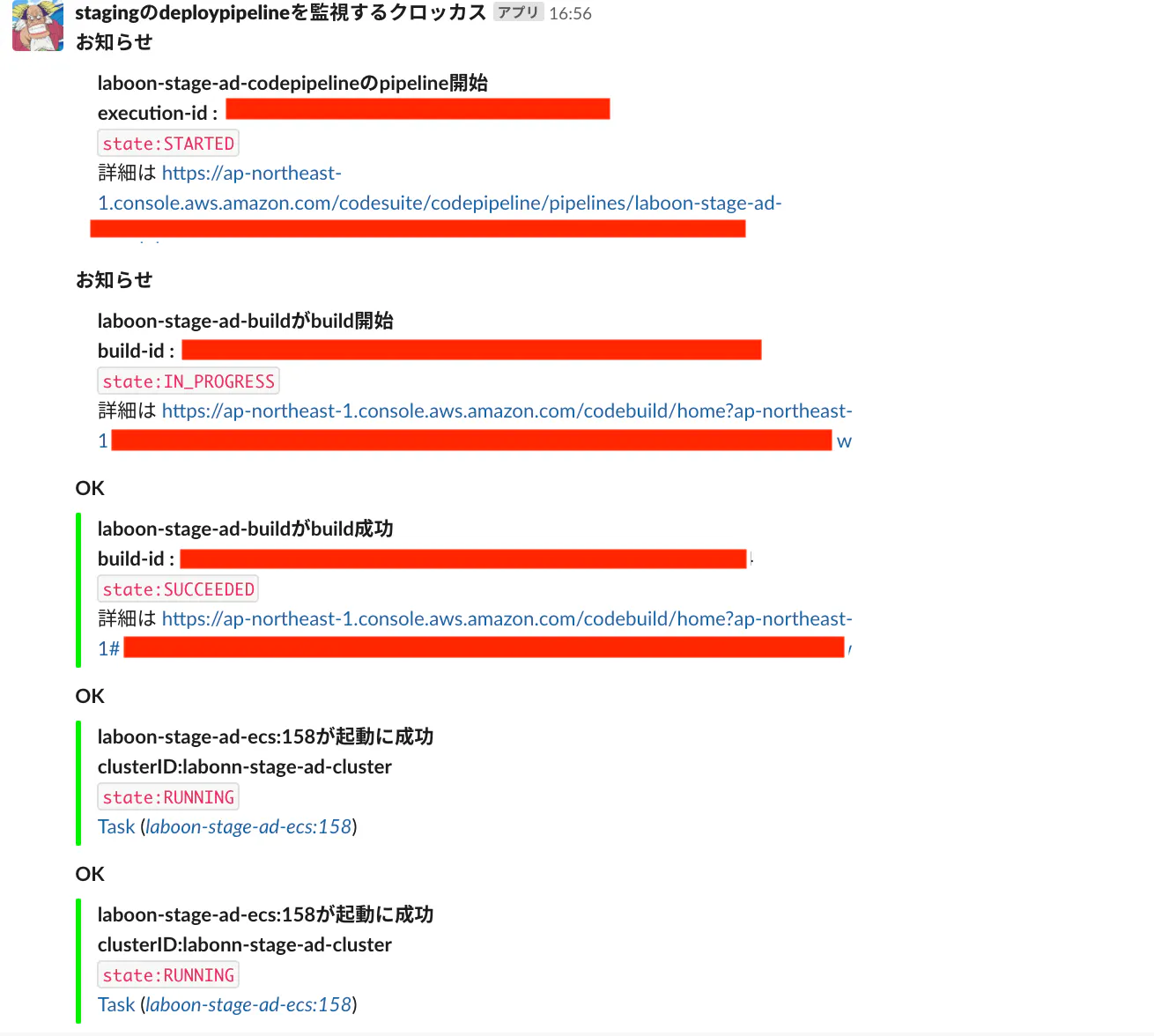
- AWS CodePipeline,ECS,CodeBuildのステータスが変化すると、slackに投げてくれる仕組みをApex、Terraform)GoでIaC化して作った
全体構成
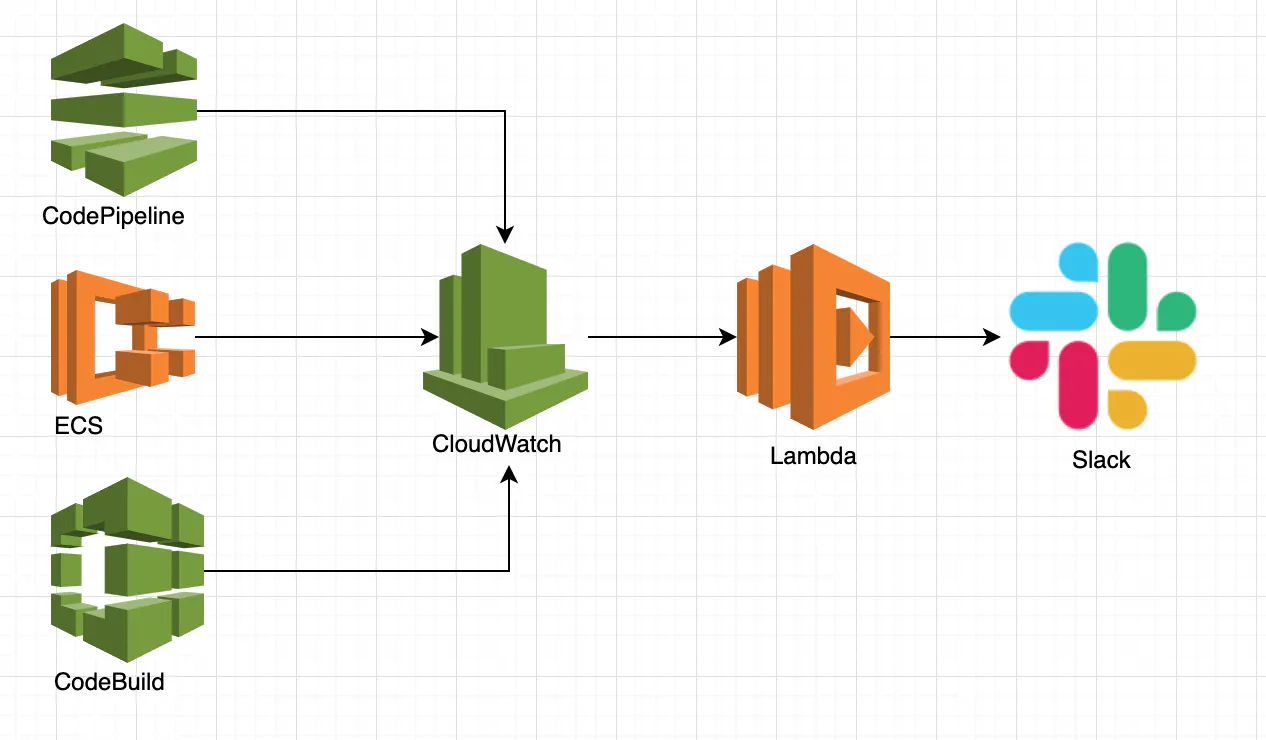
- CodePipeline/Codebuild/ECSのステータスをCloudWatchで監視
- Statusの変更があった場合に、Lambdaを起動
- Lambda関数でステータスを、Slackへ通知
何故作ったか
- Codepipelineの進捗や結果を確認しに行くのにコンソールまで行くのが面倒くさい
- buildやdeploy失敗を見逃さないアラートの仕組みが欲しかった
何故Apexなのか
- モニタリングリソースが増えるたびにCloudWatchEventsを手動で設定するのが面倒くさい
- かといって、lambda関連のリソースをterraformだけで管理するのは辛い(バイナリ化してzip、バージョン管理etc)
- Apexならapex infraというterraformコマンドをラップした便利コマンドを使用できる(関数名などをvariableに設定するだけでよしなに補填してくれる)
開発環境
Apex 1.0.0-rc2
Terraform 0.12.0
Provider(aws) 2.12.0
Go 1.12.4ディレクトリ構成
monitoring/
    ├ functions/
    |    └ pipeline_notice/
    |       ├ function.json
    |       └ main.go
    ├ infrastructure/
    |    ├ main.tf
    |    ├ outputs.tf
    |    ├ variables.tf
    |    └ event_pattern/
    |       ├ codepipeline.json
    |       ├ codebuild.json
    |       └ ecs.json
    └ project.json
それぞれのコードのご紹介
Apex
- project.json にproject全体の設定
project.json{ "name": "hogehoge", "description": "hogehoge", "nameTemplate": "{{.Project.Name}}_{{.Function.Name}}" }
- functions.jsonにそれぞれの関数の設定を
function.json{ "name": "hogehoge", "description": "hogehoge", "runtime": "go1.x", "role": "arn:aws:iam::xxxxxxxxxxxxx:role/xxxxxxxxxxxxxxxxxxxxxxxxxxxxxxx", "environment": { "webHookUrl": "https://hooks.slack.com/services/xxxxxxx/xxxxxxxxx/xxxxxxxxxxxxxxx", "slackChannel": "xxxxxxxxxxxxxxxxx" }, "memory": 1024, "timeout": 120, "handler": "main", "hooks": { "build": "go get -v -t -d ./... && GOOS=linux GOARCH=amd64 go build -o main main.go", "clean": "rm -f main" } }Go(lambda function)
main.gopackage main import ( "context" "encoding/json" "fmt" "github.com/aws/aws-lambda-go/events" "github.com/aws/aws-lambda-go/lambda" "os" "strings" ... ) type CodePipelineStatus struct { Pipeline string `json:"pipeline"` ExecutionID string `json:"execution-id"` State string `json:"state"` Version int `json:"version"` } type CodeBuildStatus struct { BuildStatus string `json:"build-status"` ProjectName string `json:"project-name"` BuildID string `json:"build-id"` } type EcsStatus struct { ClusterArn string `json:"clusterArn"` TaskArn string `json:"taskArn"` TaskDefinitionArn string `json:"taskDefinitionArn"` DesiredStatus string `json:"desiredStatus"` LastStatus string `json:"lastStatus"` } type CODEPIPELINE_STATE string const ( CODEPIPELINE_STARTED_STATE CODEPIPELINE_STATE = "STARTED" CODEPIPELINE_SUCCEEDED_STATE CODEPIPELINE_STATE = "SUCCEEDED" CODEPIPELINE_RESUMED_STATE CODEPIPELINE_STATE = "RESUMED" CODEPIPELINE_FAILED_STATE CODEPIPELINE_STATE = "FAILED" CODEPIPELINE_CANCELED_STATE CODEPIPELINE_STATE = "CANCELED" ) type CODEBUILD_STATE string const ( CODEBUILD_STOPPED_STATE CODEBUILD_STATE = "STOPPED" CODEBUILD_SUCCEEDED_STATE CODEBUILD_STATE = "SUCCEEDED" CODEBUILD_IN_PROGRESS_STATE CODEBUILD_STATE = "IN_PROGRESS" CODEBUILD_FAILED_STATE CODEBUILD_STATE = "FAILED" ) type ECS_STATE string const ( ECS_RUNNING_STATE ECS_STATE = "RUNNING" ECS_STOPPED_STATE ECS_STATE = "STOPPED" ) const ( SLACK_ICON = ":crocus:" SLACK_NAME = "stagingのdeploypipelineを監視するクロッカス" ) func main() { lambda.Start(noticeHandler) } func noticeHandler(context context.Context, event events.CloudWatchEvent) (e error) { webhookURL := os.Getenv("webHookUrl") channel := os.Getenv("slackChannel") switch event.Source { case "aws.codepipeline": if err := notifyCodePipelineStatus(event, webhookURL, channel); err != nil { log.Error(err) return err } return nil case "aws.codebuild": if err := notifyCodeBuildStatus(event, webhookURL, channel); err != nil { log.Error(err) return err } return nil case "aws.ecs": if err := notifyEcsStatus(event, webhookURL, channel); err != nil { log.Error(err) return err } return nil default: log.Info("想定するリソースのイベントではない") return nil } } func notifyCodePipelineStatus(event events.CloudWatchEvent, webhookURL string, channel string) (e error) { status := &CodePipelineStatus{} err := json.Unmarshal([]byte(event.Detail), status) if err != nil { log.Error(err) return err } pipelineURL := fmt.Sprintf("https://%v.console.aws.amazon.com/codesuite/codepipeline/pipelines/%v/executions/%v", event.Region, status.Pipeline, status.ExecutionID) text := fmt.Sprintf("*execution-id : %v*\n `state:%v` \n 詳細は %v", status.ExecutionID, status.State, pipelineURL) var messsageLevel slack_reporter.SLACK_MESSAGE_LEVEL var title string switch CODEPIPELINE_STATE(status.State) { case CODEPIPELINE_STARTED_STATE: title = fmt.Sprintf("*%vのpipeline開始*", status.Pipeline) messsageLevel = slack_reporter.SLACK_MESSAGE_LEVEL_NOTIFY case CODEPIPELINE_CANCELED_STATE, CODEPIPELINE_RESUMED_STATE: title = fmt.Sprintf("*%vが%v*", status.Pipeline, status.State) messsageLevel = slack_reporter.SLACK_MESSAGE_LEVEL_NOTIFY case CODEPIPELINE_FAILED_STATE: title = fmt.Sprintf("*%vのpipeline失敗。。。*", status.Pipeline) messsageLevel = slack_reporter.SLACK_MESSAGE_LEVEL_ALART case CODEPIPELINE_SUCCEEDED_STATE: title = fmt.Sprintf("*%vのpipeline成功!!*", status.Pipeline) messsageLevel = slack_reporter.SLACK_MESSAGE_LEVEL_OK default: messsageLevel = slack_reporter.SLACK_MESSAGE_LEVEL_NOTIFY } err = slack_reporter.ReportToLaboonSlack(webhookURL, channel, SLACK_MONITORING_PIPELINE_NAME, SLACK_MONITORING_PIPELINE_ICON, title, text, messsageLevel) if err != nil { log.Error(err) return err } return nil } func notifyCodeBuildStatus(event events.CloudWatchEvent, webhookURL string, channel string) (e error) { status := &CodeBuildStatus{} err := json.Unmarshal([]byte(event.Detail), status) if err != nil { log.Error(err) return err } buildID := strings.Split(status.BuildID, "/")[1] //test-ciのbuildは無視 if status.ProjectName == "hoge-auto-test" { return nil } codebuildURL := fmt.Sprintf("https://%v.console.aws.amazon.com/codebuild/home?%v#/builds/%v/view/new", event.Region, event.Region, buildID) text := fmt.Sprintf("*build-id : %v*\n `state:%v` \n 詳細は %v", buildID, status.BuildStatus, codebuildURL) var title string var messsageLevel slack_reporter.SLACK_MESSAGE_LEVEL switch CODEBUILD_STATE(status.BuildStatus) { case CODEBUILD_IN_PROGRESS_STATE: title = fmt.Sprintf("*%vがbuild開始*", status.ProjectName) messsageLevel = slack_reporter.SLACK_MESSAGE_LEVEL_NOTIFY case CODEBUILD_FAILED_STATE, CODEBUILD_STOPPED_STATE: title = fmt.Sprintf("*%vがbuild失敗か停止した。。。*", status.ProjectName) messsageLevel = slack_reporter.SLACK_MESSAGE_LEVEL_ALART case CODEBUILD_SUCCEEDED_STATE: title = fmt.Sprintf("*%vがbuild成功*", status.ProjectName) messsageLevel = slack_reporter.SLACK_MESSAGE_LEVEL_OK default: messsageLevel = slack_reporter.SLACK_MESSAGE_LEVEL_NOTIFY } err = slack_reporter.ReportToLaboonSlack(webhookURL, channel, SLACK_MONITORING_PIPELINE_NAME, SLACK_MONITORING_PIPELINE_ICON, title, text, messsageLevel) if err != nil { log.Error(err) return err } return nil } func notifyEcsStatus(event events.CloudWatchEvent, webhookURL string, channel string) (e error) { status := &EcsStatus{} err := json.Unmarshal([]byte(event.Detail), status) if err != nil { log.Error(err) return err } // 期待するステートになるまでの過程は通知しない(予期せぬSTOPPEDを除いて) if status.LastStatus != status.DesiredStatus && status.LastStatus != string(ECS_STOPPED_STATE) { return nil } clusterID := strings.Split(status.ClusterArn, "/")[1] taskID := strings.Split(status.TaskArn, "/")[1] taskDefinitionID := strings.Split(status.TaskDefinitionArn, "/")[1] taskURL := fmt.Sprintf("https://%v.console.aws.amazon.com/ecs/home?region=%v#/clusters/%v/tasks/%v/details", event.Region, event.Region, clusterID, taskID) taskDefinitionURL := fmt.Sprintf("https://%v.console.aws.amazon.com/ecs/home?region=%v#/taskDefinitions/%v", event.Region, event.Region, strings.Replace(taskDefinitionID, ":", "/", 1)) text := fmt.Sprintf("*clusterID:%v* \n `state:%v` \n <%v|Task> (_<%v|%v>_)", clusterID, status.LastStatus, taskURL, taskDefinitionURL, taskDefinitionID) var title string var messsageLevel slack_reporter.SLACK_MESSAGE_LEVEL switch ECS_STATE(status.LastStatus) { case ECS_RUNNING_STATE: title = fmt.Sprintf("*%vが起動に成功*", taskDefinitionID) messsageLevel = slack_reporter.SLACK_MESSAGE_LEVEL_OK case ECS_STOPPED_STATE: //もし期待された停止であるならば、OK if status.DesiredStatus == string(ECS_STOPPED_STATE) { title = fmt.Sprintf("*%vが停止に成功*", taskDefinitionID) messsageLevel = slack_reporter.SLACK_MESSAGE_LEVEL_OK break } //そうでないならアラート title = fmt.Sprintf("*%vが予期せぬ停止*", taskDefinitionID) messsageLevel = slack_reporter.SLACK_MESSAGE_LEVEL_ALART default: messsageLevel = slack_reporter.SLACK_MESSAGE_LEVEL_NOTIFY } err = slack_reporter.ReportToLaboonSlack(webhookURL, channel, SLACK_MONITORING_PIPELINE_NAME, SLACK_MONITORING_PIPELINE_ICON, title, text, messsageLevel) if err != nil { log.Error(err) return err } return nil }ポイント
- event.Sourceで処理を分岐し、events.CloudWatchEvent(json.RawMessage型)をそれぞれのstatusにunmarshalして扱う(そうすることで、監視するリソース毎に関数を分けない)
Terraform
monitoring module(今回のdirectory構成の外部にあります 詳細はこちら
main.tf/* monitoring */ resource "aws_cloudwatch_event_rule" "default" { count = length(var.cloud_watch_event_objs) name = var.cloud_watch_event_objs[count.index]["cloud_watch_event_rule_name"] description = var.cloud_watch_event_objs[count.index]["cloud_watch_event_rule_description"] event_pattern = var.cloud_watch_event_objs[count.index]["event_pattern"] } resource "aws_cloudwatch_event_target" "default" { count = length(aws_cloudwatch_event_rule.default) rule = aws_cloudwatch_event_rule.default[count.index].name target_id = var.cloud_watch_event_objs[count.index]["aws_cloudwatch_event_target_id"] arn = var.cloud_watch_event_objs[count.index]["function_arn"] } resource "aws_lambda_permission" "default" { count = length(aws_cloudwatch_event_target.default) statement_id = var.cloud_watch_event_objs[count.index]["statement_id"] action = "lambda:InvokeFunction" function_name = aws_cloudwatch_event_target.default[count.index].arn principal = "events.amazonaws.com" source_arn = aws_cloudwatch_event_rule.default[count.index].arn }variables.tf/* required */ variable "cloud_watch_event_objs" { //map(string)でもいいんだけどparameterとしてフィールドが見えてる方がわかりやすいかなと type = list(object({ statement_id = string cloud_watch_event_rule_name = string cloud_watch_event_rule_description = string event_pattern = string aws_cloudwatch_event_target_id = string function_arn = string }) ) description = "watchしたいリソースとイベントパターンとlambda関数を打ち込む" }moduleを使う側(main.tf variables.tf)
main.tf... /* monitoring */ module "laboon_monitoring" { source = "../../../../modules/common/monitoring" cloud_watch_event_objs = local.cloud_watch_event_objs } /* locals */ locals { /* monitoring required */ cloud_watch_event_objs = [ //この配列に監視したいリソースとイベントパターンと発火したい関数の入ったobjを追加する //codepipeline { statement_id = "AllowExecutionFromCloudWatchForCodePipeline" cloud_watch_event_rule_name = "ad-pipeline-notice" cloud_watch_event_rule_description = "ad-pipeline-notice" event_pattern = file("./event_pattern/codepipeline.json") aws_cloudwatch_event_target_id = "ad-pipeline-notice" function_arn = var.apex_function_pipeline_notice }, //codebuild { statement_id = "AllowExecutionFromCloudWatchForCodeBuild" cloud_watch_event_rule_name = "ad-codebuild-notice" cloud_watch_event_rule_description = "ad-codebuild-notice" event_pattern = file("./event_pattern/codebuild.json") aws_cloudwatch_event_target_id = "ad-codebuild-notice" function_arn = var.apex_function_pipeline_notice }, //ecs { statement_id = "AllowExecutionFromCloudWatchForECS" cloud_watch_event_rule_name = "ad-ecs-notice" cloud_watch_event_rule_description = "ad-ecs-notice" event_pattern = file("./event_pattern/ecs.json") aws_cloudwatch_event_target_id = "ad-ecs-notice" function_arn = var.apex_function_pipeline_notice } ] }variables.tfvariable "apex_function_pipeline_notice" {} variable "apex_function_pipeline_notice_name" {} variable "apex_function_names" {} variable "apex_function_role" {} variable "aws_region" {} variable "apex_environment" {} variable "apex_function_arns" {}event_pattern/codebuild.json{ "source": [ "aws.codebuild" ], "detail-type": [ "CodeBuild Build State Change" ] }event_pattern/codepipeline.json{ "source": [ "aws.codepipeline" ], "detail-type": [ "CodePipeline Pipeline Execution State Change" ], "detail": { "state": [ "RESUMED", "CANCELED", "STARTED", "FAILED", "SUCCEEDED" ] } }event_pattern/ecs.json{ "source": [ "aws.ecs" ], "detail-type": [ "ECS Task State Change" ] }ポイント
- list(object)型を用いることで、簡単に監視リソースを増やせるモジュールに
参考文献

- 投稿日:2019-08-04T14:40:51+09:00
ApexとTerraformとGoでAWS常に構築したPipelineのステータスをslackに通知
はじめに
こんにちわ。Wano株式会社エンジニアのnariと申します。
Terraform記事第三弾ということで、今回はPipelineのモニタリング機構に関して記事にしたいと思います。何を作ったか
- AWS CodePipeline,ECS,CodeBuildのステータスが変化すると、slackに投げてくれる仕組みを作った
何故Apexなのか
- lambda関連のリソースをterraformだけで管理するのは辛い(バイナリ化してzip、バージョン管理etc)
- Apexならapex infraというterraformコマンドをラップした便利コマンドを使用できる(関数名などをvariableに設定するだけでよしなに補填してくれる)
開発環境
Apex 1.0.0-rc2
Terraform 0.12.0
Provider(aws) 2.12.0
Go 1.12.4ディレクトリ構成
monitoring/
    ├ functions/
    |    └ pipeline_notice/
    |       ├ function.json
    |       └ main.go
    ├ infrastructure/
    |    ├ main.tf
    |    ├ outputs.tf
    |    ├ variables.tf
    |    └ event_pattern/
    |       ├ codepipeline.json
    |       ├ codebuild.json
    |       └ ecs.json
    └ project.json
それぞれのコードのご紹介
Apex
- project.json にproject全体の設定
project.json{ "name": "hogehoge", "description": "hogehoge", "nameTemplate": "{{.Project.Name}}_{{.Function.Name}}" }
- functions.jsonにそれぞれの関数の設定を
function.json{ "name": "hogehoge", "description": "hogehoge", "runtime": "go1.x", "role": "arn:aws:iam::xxxxxxxxxxxxx:role/xxxxxxxxxxxxxxxxxxxxxxxxxxxxxxx", "environment": { "webHookUrl": "https://hooks.slack.com/services/xxxxxxx/xxxxxxxxx/xxxxxxxxxxxxxxx", "slackChannel": "xxxxxxxxxxxxxxxxx" }, "memory": 1024, "timeout": 120, "handler": "main", "hooks": { "build": "go get -v -t -d ./... && GOOS=linux GOARCH=amd64 go build -o main main.go", "clean": "rm -f main" } }Go(lambda function)
main.gopackage main import ( "context" "encoding/json" "fmt" "github.com/aws/aws-lambda-go/events" "github.com/aws/aws-lambda-go/lambda" "os" "strings" ... ) type CodePipelineStatus struct { Pipeline string `json:"pipeline"` ExecutionID string `json:"execution-id"` State string `json:"state"` Version int `json:"version"` } type CodeBuildStatus struct { BuildStatus string `json:"build-status"` ProjectName string `json:"project-name"` BuildID string `json:"build-id"` } type EcsStatus struct { ClusterArn string `json:"clusterArn"` TaskArn string `json:"taskArn"` TaskDefinitionArn string `json:"taskDefinitionArn"` DesiredStatus string `json:"desiredStatus"` LastStatus string `json:"lastStatus"` } type CODEPIPELINE_STATE string const ( CODEPIPELINE_STARTED_STATE CODEPIPELINE_STATE = "STARTED" CODEPIPELINE_SUCCEEDED_STATE CODEPIPELINE_STATE = "SUCCEEDED" CODEPIPELINE_RESUMED_STATE CODEPIPELINE_STATE = "RESUMED" CODEPIPELINE_FAILED_STATE CODEPIPELINE_STATE = "FAILED" CODEPIPELINE_CANCELED_STATE CODEPIPELINE_STATE = "CANCELED" ) type CODEBUILD_STATE string const ( CODEBUILD_STOPPED_STATE CODEBUILD_STATE = "STOPPED" CODEBUILD_SUCCEEDED_STATE CODEBUILD_STATE = "SUCCEEDED" CODEBUILD_IN_PROGRESS_STATE CODEBUILD_STATE = "IN_PROGRESS" CODEBUILD_FAILED_STATE CODEBUILD_STATE = "FAILED" ) type ECS_STATE string const ( ECS_RUNNING_STATE ECS_STATE = "RUNNING" ECS_STOPPED_STATE ECS_STATE = "STOPPED" ) const ( SLACK_ICON = ":crocus:" SLACK_NAME = "stagingのdeploypipelineを監視するクロッカス" ) func main() { lambda.Start(noticeHandler) } func noticeHandler(context context.Context, event events.CloudWatchEvent) (e error) { webhookURL := os.Getenv("webHookUrl") channel := os.Getenv("slackChannel") //event.Sourceで処理を分岐 switch event.Source { case "aws.codepipeline": if err := notifyCodePipelineStatus(event, webhookURL, channel); err != nil { log.Error(err) return err } return nil case "aws.codebuild": if err := notifyCodeBuildStatus(event, webhookURL, channel); err != nil { log.Error(err) return err } return nil case "aws.ecs": if err := notifyEcsStatus(event, webhookURL, channel); err != nil { log.Error(err) return err } return nil default: log.Info("想定するリソースのイベントではない") return nil } } func notifyCodePipelineStatus(event events.CloudWatchEvent, webhookURL string, channel string) (e error) { //eventをCodePipelineStatusにunmarshal status := &CodePipelineStatus{} json.Unmarshal([]byte(event.Detail), status) pipelineURL := fmt.Sprintf("https://%v.console.aws.amazon.com/codesuite/codepipeline/pipelines/%v/executions/%v", event.Region, status.Pipeline, status.ExecutionID) text := fmt.Sprintf("*execution-id : %v*\n `state:%v` \n 詳細は %v", status.ExecutionID, status.State, pipelineURL) var messsageLevel slack_reporter.SLACK_MESSAGE_LEVEL var title string switch CODEPIPELINE_STATE(status.State) { case CODEPIPELINE_STARTED_STATE: title = fmt.Sprintf("*%vのpipeline開始*", status.Pipeline) messsageLevel = slack_reporter.SLACK_MESSAGE_LEVEL_NOTIFY case CODEPIPELINE_CANCELED_STATE, CODEPIPELINE_RESUMED_STATE: title = fmt.Sprintf("*%vが%v*", status.Pipeline, status.State) messsageLevel = slack_reporter.SLACK_MESSAGE_LEVEL_NOTIFY case CODEPIPELINE_FAILED_STATE: title = fmt.Sprintf("*%vのpipeline失敗。。。*", status.Pipeline) messsageLevel = slack_reporter.SLACK_MESSAGE_LEVEL_ALART case CODEPIPELINE_SUCCEEDED_STATE: title = fmt.Sprintf("*%vのpipeline成功!!*", status.Pipeline) messsageLevel = slack_reporter.SLACK_MESSAGE_LEVEL_OK default: messsageLevel = slack_reporter.SLACK_MESSAGE_LEVEL_NOTIFY } err := slack_reporter.ReportToLaboonSlack(webhookURL, channel, SLACK_NAME, SLACK_ICON, title, text, messsageLevel) if err != nil { log.Error(err) return err } return nil } func notifyCodeBuildStatus(event events.CloudWatchEvent, webhookURL string, channel string) (e error) { //eventをCodeBuildStatusにunmarshal status := &CodeBuildStatus{} json.Unmarshal([]byte(event.Detail), status) buildID := strings.Split(status.BuildID, "/")[1] //test-ciのbuildは無視 if status.ProjectName == "laboon-auto-test" { return nil } codebuildURL := fmt.Sprintf("https://%v.console.aws.amazon.com/codebuild/home?%v#/builds/%v/view/new", event.Region, event.Region, buildID) text := fmt.Sprintf("*build-id : %v*\n `state:%v` \n 詳細は %v", buildID, status.BuildStatus, codebuildURL) var title string var messsageLevel slack_reporter.SLACK_MESSAGE_LEVEL switch CODEBUILD_STATE(status.BuildStatus) { case CODEBUILD_IN_PROGRESS_STATE: title = fmt.Sprintf("*%vがbuild開始*", status.ProjectName) messsageLevel = slack_reporter.SLACK_MESSAGE_LEVEL_NOTIFY case CODEBUILD_FAILED_STATE, CODEBUILD_STOPPED_STATE: title = fmt.Sprintf("*%vがbuild失敗か停止した。。。*", status.ProjectName) messsageLevel = slack_reporter.SLACK_MESSAGE_LEVEL_ALART case CODEBUILD_SUCCEEDED_STATE: title = fmt.Sprintf("*%vがbuild成功*", status.ProjectName) messsageLevel = slack_reporter.SLACK_MESSAGE_LEVEL_OK default: messsageLevel = slack_reporter.SLACK_MESSAGE_LEVEL_NOTIFY } err := slack_reporter.ReportToLaboonSlack(webhookURL, channel, SLACK_NAME, SLACK_ICON, title, text, messsageLevel) if err != nil { log.Error(err) return err } return nil } func notifyEcsStatus(event events.CloudWatchEvent, webhookURL string, channel string) (e error) { //eventをEcsStatusにunmarshal status := &EcsStatus{} json.Unmarshal([]byte(event.Detail), status) // 期待するステートになるまでの過程は通知しない(予期せぬSTOPPEDを除いて) if status.LastStatus != status.DesiredStatus && status.LastStatus != string(ECS_STOPPED_STATE) { return nil } clusterID := strings.Split(status.ClusterArn, "/")[1] taskID := strings.Split(status.TaskArn, "/")[1] taskDefinitionID := strings.Split(status.TaskDefinitionArn, "/")[1] taskURL := fmt.Sprintf("https://%v.console.aws.amazon.com/ecs/home?region=%v#/clusters/%v/tasks/%v/details", event.Region, event.Region, clusterID, taskID) taskDefinitionURL := fmt.Sprintf("https://%v.console.aws.amazon.com/ecs/home?region=%v#/taskDefinitions/%v", event.Region, event.Region, strings.Replace(taskDefinitionID, ":", "/", 1)) text := fmt.Sprintf("*clusterID:%v* \n `state:%v` \n <%v|Task> (_<%v|%v>_)", clusterID, status.LastStatus, taskURL, taskDefinitionURL, taskDefinitionID) var title string var messsageLevel slack_reporter.SLACK_MESSAGE_LEVEL switch ECS_STATE(status.LastStatus) { case ECS_RUNNING_STATE: title = fmt.Sprintf("*%vが起動に成功*", taskDefinitionID) messsageLevel = slack_reporter.SLACK_MESSAGE_LEVEL_OK case ECS_STOPPED_STATE: //もし期待された停止であるならば、OK if status.DesiredStatus == string(ECS_STOPPED_STATE) { title = fmt.Sprintf("*%vが停止に成功*", taskDefinitionID) messsageLevel = slack_reporter.SLACK_MESSAGE_LEVEL_OK break } //そうでないならアラート title = fmt.Sprintf("*%vが予期せぬ停止*", taskDefinitionID) messsageLevel = slack_reporter.SLACK_MESSAGE_LEVEL_ALART default: messsageLevel = slack_reporter.SLACK_MESSAGE_LEVEL_NOTIFY } err := slack_reporter.ReportToLaboonSlack(webhookURL, channel, SLACK_NAME, SLACK_ICON, title, text, messsageLevel) if err != nil { log.Error(err) return err } return nil }ポイント
- event.Sourceで処理を分岐し、events.CloudWatchEvent(json.RawMessage型)をそれぞれのstatusにunmarshalして扱う(そうすることで、監視するリソース毎に関数を分けない)
Terraform
monitoring module(今回のdirectory構成の外部にあります 詳細はこちら
main.tf/* monitoring */ resource "aws_cloudwatch_event_rule" "default" { count = length(var.cloud_watch_event_objs) name = var.cloud_watch_event_objs[count.index]["cloud_watch_event_rule_name"] description = var.cloud_watch_event_objs[count.index]["cloud_watch_event_rule_description"] event_pattern = var.cloud_watch_event_objs[count.index]["event_pattern"] } resource "aws_cloudwatch_event_target" "default" { count = length(aws_cloudwatch_event_rule.default) rule = aws_cloudwatch_event_rule.default[count.index].name target_id = var.cloud_watch_event_objs[count.index]["aws_cloudwatch_event_target_id"] arn = var.cloud_watch_event_objs[count.index]["function_arn"] } resource "aws_lambda_permission" "default" { count = length(aws_cloudwatch_event_target.default) statement_id = var.cloud_watch_event_objs[count.index]["statement_id"] action = "lambda:InvokeFunction" function_name = aws_cloudwatch_event_target.default[count.index].arn principal = "events.amazonaws.com" source_arn = aws_cloudwatch_event_rule.default[count.index].arn }variables.tf/* required */ variable "cloud_watch_event_objs" { //map(string)でもいいんだけどparameterとしてフィールドが見えてる方がわかりやすいかなと type = list(object({ statement_id = string cloud_watch_event_rule_name = string cloud_watch_event_rule_description = string event_pattern = string aws_cloudwatch_event_target_id = string function_arn = string }) ) description = "watchしたいリソースとイベントパターンとlambda関数を打ち込む" }moduleを使う側(main.tf variables.tf)
main.tf... /* monitoring */ module "laboon_monitoring" { source = "../../../../modules/common/monitoring" cloud_watch_event_objs = local.cloud_watch_event_objs } /* locals */ locals { /* monitoring required */ cloud_watch_event_objs = [ //この配列に監視したいリソースとイベントパターンと発火したい関数の入ったobjを追加する //codepipeline { statement_id = "AllowExecutionFromCloudWatchForCodePipeline" cloud_watch_event_rule_name = "ad-pipeline-notice" cloud_watch_event_rule_description = "ad-pipeline-notice" event_pattern = file("./event_pattern/codepipeline.json") aws_cloudwatch_event_target_id = "ad-pipeline-notice" function_arn = var.apex_function_pipeline_notice }, //codebuild { statement_id = "AllowExecutionFromCloudWatchForCodeBuild" cloud_watch_event_rule_name = "ad-codebuild-notice" cloud_watch_event_rule_description = "ad-codebuild-notice" event_pattern = file("./event_pattern/codebuild.json") aws_cloudwatch_event_target_id = "ad-codebuild-notice" function_arn = var.apex_function_pipeline_notice }, //ecs { statement_id = "AllowExecutionFromCloudWatchForECS" cloud_watch_event_rule_name = "ad-ecs-notice" cloud_watch_event_rule_description = "ad-ecs-notice" event_pattern = file("./event_pattern/ecs.json") aws_cloudwatch_event_target_id = "ad-ecs-notice" function_arn = var.apex_function_pipeline_notice } ] }variables.tfvariable "apex_function_pipeline_notice" {} variable "apex_function_pipeline_notice_name" {} variable "apex_function_names" {} variable "apex_function_role" {} variable "aws_region" {} variable "apex_environment" {} variable "apex_function_arns" {}event_pattern/codebuild.json{ "source": [ "aws.codebuild" ], "detail-type": [ "CodeBuild Build State Change" ] }event_pattern/codepipeline.json{ "source": [ "aws.codepipeline" ], "detail-type": [ "CodePipeline Pipeline Execution State Change" ], "detail": { "state": [ "RESUMED", "CANCELED", "STARTED", "FAILED", "SUCCEEDED" ] } }event_pattern/ecs.json{ "source": [ "aws.ecs" ], "detail-type": [ "ECS Task State Change" ] }ポイント
- list(object)型を用いることで、簡単に監視リソースを増やせるモジュールに
参考文献
- 投稿日:2019-08-04T14:40:51+09:00
ApexとTerraformとGoでAWS上に構築したPipelineのステータスをslackに通知
はじめに
こんにちわ。Wano株式会社エンジニアのnariと申します。
Terraform記事第三弾ということで、今回はAWS上のPipelineのモニタリング機構に関して記事にしたいと思います。何を作ったか
- AWS CodePipeline,ECS,CodeBuildのステータスが変化すると、slackに投げてくれる仕組みをApex、Terraform)GoでIaC化して作った
全体構成
- CodePipeline/Codebuild/ECSのステータスをCloudWatchで監視
- Statusの変更があった場合に、Lambdaを起動
- Lambda関数でステータスを、Slackへ通知
何故作ったか
- Codepipelineの進捗や結果を確認しに行くのにコンソールまで行くのが面倒くさい
- buildやdeploy失敗を見逃さないアラートの仕組みが欲しかった
何故Apexなのか
- モニタリングリソースが増えるたびにCloudWatchEventsを手動で設定するのが面倒くさい
- かといって、lambda関連のリソースをterraformだけで管理するのは辛い(バイナリ化してzip、バージョン管理etc)
- Apexならapex infraというterraformコマンドをラップした便利コマンドを使用できる(関数名などをvariableに設定するだけでよしなに補填してくれる)
開発環境
Apex 1.0.0-rc2
Terraform 0.12.0
Provider(aws) 2.12.0
Go 1.12.4ディレクトリ構成
monitoring/
    ├ functions/
    |    └ pipeline_notice/
    |       ├ function.json
    |       └ main.go
    ├ infrastructure/
    |    ├ main.tf
    |    ├ outputs.tf
    |    ├ variables.tf
    |    └ event_pattern/
    |       ├ codepipeline.json
    |       ├ codebuild.json
    |       └ ecs.json
    └ project.json
それぞれのコードのご紹介
Apex
- project.json にproject全体の設定
project.json{ "name": "hogehoge", "description": "hogehoge", "nameTemplate": "{{.Project.Name}}_{{.Function.Name}}" }
- functions.jsonにそれぞれの関数の設定を
function.json{ "name": "hogehoge", "description": "hogehoge", "runtime": "go1.x", "role": "arn:aws:iam::xxxxxxxxxxxxx:role/xxxxxxxxxxxxxxxxxxxxxxxxxxxxxxx", "environment": { "webHookUrl": "https://hooks.slack.com/services/xxxxxxx/xxxxxxxxx/xxxxxxxxxxxxxxx", "slackChannel": "xxxxxxxxxxxxxxxxx" }, "memory": 1024, "timeout": 120, "handler": "main", "hooks": { "build": "go get -v -t -d ./... && GOOS=linux GOARCH=amd64 go build -o main main.go", "clean": "rm -f main" } }Go(lambda function)
main.gopackage main import ( "context" "encoding/json" "fmt" "github.com/aws/aws-lambda-go/events" "github.com/aws/aws-lambda-go/lambda" "os" "strings" ... ) type CodePipelineStatus struct { Pipeline string `json:"pipeline"` ExecutionID string `json:"execution-id"` State string `json:"state"` Version int `json:"version"` } type CodeBuildStatus struct { BuildStatus string `json:"build-status"` ProjectName string `json:"project-name"` BuildID string `json:"build-id"` } type EcsStatus struct { ClusterArn string `json:"clusterArn"` TaskArn string `json:"taskArn"` TaskDefinitionArn string `json:"taskDefinitionArn"` DesiredStatus string `json:"desiredStatus"` LastStatus string `json:"lastStatus"` } type CODEPIPELINE_STATE string const ( CODEPIPELINE_STARTED_STATE CODEPIPELINE_STATE = "STARTED" CODEPIPELINE_SUCCEEDED_STATE CODEPIPELINE_STATE = "SUCCEEDED" CODEPIPELINE_RESUMED_STATE CODEPIPELINE_STATE = "RESUMED" CODEPIPELINE_FAILED_STATE CODEPIPELINE_STATE = "FAILED" CODEPIPELINE_CANCELED_STATE CODEPIPELINE_STATE = "CANCELED" ) type CODEBUILD_STATE string const ( CODEBUILD_STOPPED_STATE CODEBUILD_STATE = "STOPPED" CODEBUILD_SUCCEEDED_STATE CODEBUILD_STATE = "SUCCEEDED" CODEBUILD_IN_PROGRESS_STATE CODEBUILD_STATE = "IN_PROGRESS" CODEBUILD_FAILED_STATE CODEBUILD_STATE = "FAILED" ) type ECS_STATE string const ( ECS_RUNNING_STATE ECS_STATE = "RUNNING" ECS_STOPPED_STATE ECS_STATE = "STOPPED" ) const ( SLACK_ICON = ":crocus:" SLACK_NAME = "stagingのdeploypipelineを監視するクロッカス" ) func main() { lambda.Start(noticeHandler) } func noticeHandler(context context.Context, event events.CloudWatchEvent) (e error) { webhookURL := os.Getenv("webHookUrl") channel := os.Getenv("slackChannel") //event.Sourceで処理を分岐 switch event.Source { case "aws.codepipeline": if err := notifyCodePipelineStatus(event, webhookURL, channel); err != nil { log.Error(err) return err } return nil case "aws.codebuild": if err := notifyCodeBuildStatus(event, webhookURL, channel); err != nil { log.Error(err) return err } return nil case "aws.ecs": if err := notifyEcsStatus(event, webhookURL, channel); err != nil { log.Error(err) return err } return nil default: log.Info("想定するリソースのイベントではない") return nil } } func notifyCodePipelineStatus(event events.CloudWatchEvent, webhookURL string, channel string) (e error) { //eventをCodePipelineStatusにunmarshal status := &CodePipelineStatus{} json.Unmarshal([]byte(event.Detail), status) pipelineURL := fmt.Sprintf("https://%v.console.aws.amazon.com/codesuite/codepipeline/pipelines/%v/executions/%v", event.Region, status.Pipeline, status.ExecutionID) text := fmt.Sprintf("*execution-id : %v*\n `state:%v` \n 詳細は %v", status.ExecutionID, status.State, pipelineURL) var messsageLevel slack_reporter.SLACK_MESSAGE_LEVEL var title string switch CODEPIPELINE_STATE(status.State) { case CODEPIPELINE_STARTED_STATE: title = fmt.Sprintf("*%vのpipeline開始*", status.Pipeline) messsageLevel = slack_reporter.SLACK_MESSAGE_LEVEL_NOTIFY case CODEPIPELINE_CANCELED_STATE, CODEPIPELINE_RESUMED_STATE: title = fmt.Sprintf("*%vが%v*", status.Pipeline, status.State) messsageLevel = slack_reporter.SLACK_MESSAGE_LEVEL_NOTIFY case CODEPIPELINE_FAILED_STATE: title = fmt.Sprintf("*%vのpipeline失敗。。。*", status.Pipeline) messsageLevel = slack_reporter.SLACK_MESSAGE_LEVEL_ALART case CODEPIPELINE_SUCCEEDED_STATE: title = fmt.Sprintf("*%vのpipeline成功!!*", status.Pipeline) messsageLevel = slack_reporter.SLACK_MESSAGE_LEVEL_OK default: messsageLevel = slack_reporter.SLACK_MESSAGE_LEVEL_NOTIFY } err := slack_reporter.ReportToLaboonSlack(webhookURL, channel, SLACK_NAME, SLACK_ICON, title, text, messsageLevel) if err != nil { log.Error(err) return err } return nil } func notifyCodeBuildStatus(event events.CloudWatchEvent, webhookURL string, channel string) (e error) { //eventをCodeBuildStatusにunmarshal status := &CodeBuildStatus{} json.Unmarshal([]byte(event.Detail), status) buildID := strings.Split(status.BuildID, "/")[1] //test-ciのbuildは無視 if status.ProjectName == "hoge-auto-test" { return nil } codebuildURL := fmt.Sprintf("https://%v.console.aws.amazon.com/codebuild/home?%v#/builds/%v/view/new", event.Region, event.Region, buildID) text := fmt.Sprintf("*build-id : %v*\n `state:%v` \n 詳細は %v", buildID, status.BuildStatus, codebuildURL) var title string var messsageLevel slack_reporter.SLACK_MESSAGE_LEVEL switch CODEBUILD_STATE(status.BuildStatus) { case CODEBUILD_IN_PROGRESS_STATE: title = fmt.Sprintf("*%vがbuild開始*", status.ProjectName) messsageLevel = slack_reporter.SLACK_MESSAGE_LEVEL_NOTIFY case CODEBUILD_FAILED_STATE, CODEBUILD_STOPPED_STATE: title = fmt.Sprintf("*%vがbuild失敗か停止した。。。*", status.ProjectName) messsageLevel = slack_reporter.SLACK_MESSAGE_LEVEL_ALART case CODEBUILD_SUCCEEDED_STATE: title = fmt.Sprintf("*%vがbuild成功*", status.ProjectName) messsageLevel = slack_reporter.SLACK_MESSAGE_LEVEL_OK default: messsageLevel = slack_reporter.SLACK_MESSAGE_LEVEL_NOTIFY } err := slack_reporter.ReportToLaboonSlack(webhookURL, channel, SLACK_NAME, SLACK_ICON, title, text, messsageLevel) if err != nil { log.Error(err) return err } return nil } func notifyEcsStatus(event events.CloudWatchEvent, webhookURL string, channel string) (e error) { //eventをEcsStatusにunmarshal status := &EcsStatus{} json.Unmarshal([]byte(event.Detail), status) // 期待するステートになるまでの過程は通知しない(予期せぬSTOPPEDを除いて) if status.LastStatus != status.DesiredStatus && status.LastStatus != string(ECS_STOPPED_STATE) { return nil } clusterID := strings.Split(status.ClusterArn, "/")[1] taskID := strings.Split(status.TaskArn, "/")[1] taskDefinitionID := strings.Split(status.TaskDefinitionArn, "/")[1] taskURL := fmt.Sprintf("https://%v.console.aws.amazon.com/ecs/home?region=%v#/clusters/%v/tasks/%v/details", event.Region, event.Region, clusterID, taskID) taskDefinitionURL := fmt.Sprintf("https://%v.console.aws.amazon.com/ecs/home?region=%v#/taskDefinitions/%v", event.Region, event.Region, strings.Replace(taskDefinitionID, ":", "/", 1)) text := fmt.Sprintf("*clusterID:%v* \n `state:%v` \n <%v|Task> (_<%v|%v>_)", clusterID, status.LastStatus, taskURL, taskDefinitionURL, taskDefinitionID) var title string var messsageLevel slack_reporter.SLACK_MESSAGE_LEVEL switch ECS_STATE(status.LastStatus) { case ECS_RUNNING_STATE: title = fmt.Sprintf("*%vが起動に成功*", taskDefinitionID) messsageLevel = slack_reporter.SLACK_MESSAGE_LEVEL_OK case ECS_STOPPED_STATE: //もし期待された停止であるならば、OK if status.DesiredStatus == string(ECS_STOPPED_STATE) { title = fmt.Sprintf("*%vが停止に成功*", taskDefinitionID) messsageLevel = slack_reporter.SLACK_MESSAGE_LEVEL_OK break } //そうでないならアラート title = fmt.Sprintf("*%vが予期せぬ停止*", taskDefinitionID) messsageLevel = slack_reporter.SLACK_MESSAGE_LEVEL_ALART default: messsageLevel = slack_reporter.SLACK_MESSAGE_LEVEL_NOTIFY } err := slack_reporter.ReportToLaboonSlack(webhookURL, channel, SLACK_NAME, SLACK_ICON, title, text, messsageLevel) if err != nil { log.Error(err) return err } return nil }ポイント
- event.Sourceで処理を分岐し、events.CloudWatchEvent(json.RawMessage型)をそれぞれのstatusにunmarshalして扱う(そうすることで、監視するリソース毎に関数を分けない)
Terraform
monitoring module(今回のdirectory構成の外部にあります 詳細はこちら
main.tf/* monitoring */ resource "aws_cloudwatch_event_rule" "default" { count = length(var.cloud_watch_event_objs) name = var.cloud_watch_event_objs[count.index]["cloud_watch_event_rule_name"] description = var.cloud_watch_event_objs[count.index]["cloud_watch_event_rule_description"] event_pattern = var.cloud_watch_event_objs[count.index]["event_pattern"] } resource "aws_cloudwatch_event_target" "default" { count = length(aws_cloudwatch_event_rule.default) rule = aws_cloudwatch_event_rule.default[count.index].name target_id = var.cloud_watch_event_objs[count.index]["aws_cloudwatch_event_target_id"] arn = var.cloud_watch_event_objs[count.index]["function_arn"] } resource "aws_lambda_permission" "default" { count = length(aws_cloudwatch_event_target.default) statement_id = var.cloud_watch_event_objs[count.index]["statement_id"] action = "lambda:InvokeFunction" function_name = aws_cloudwatch_event_target.default[count.index].arn principal = "events.amazonaws.com" source_arn = aws_cloudwatch_event_rule.default[count.index].arn }variables.tf/* required */ variable "cloud_watch_event_objs" { //map(string)でもいいんだけどparameterとしてフィールドが見えてる方がわかりやすいかなと type = list(object({ statement_id = string cloud_watch_event_rule_name = string cloud_watch_event_rule_description = string event_pattern = string aws_cloudwatch_event_target_id = string function_arn = string }) ) description = "watchしたいリソースとイベントパターンとlambda関数を打ち込む" }moduleを使う側(main.tf variables.tf)
main.tf... /* monitoring */ module "laboon_monitoring" { source = "../../../../modules/common/monitoring" cloud_watch_event_objs = local.cloud_watch_event_objs } /* locals */ locals { /* monitoring required */ cloud_watch_event_objs = [ //この配列に監視したいリソースとイベントパターンと発火したい関数の入ったobjを追加する //codepipeline { statement_id = "AllowExecutionFromCloudWatchForCodePipeline" cloud_watch_event_rule_name = "ad-pipeline-notice" cloud_watch_event_rule_description = "ad-pipeline-notice" event_pattern = file("./event_pattern/codepipeline.json") aws_cloudwatch_event_target_id = "ad-pipeline-notice" function_arn = var.apex_function_pipeline_notice }, //codebuild { statement_id = "AllowExecutionFromCloudWatchForCodeBuild" cloud_watch_event_rule_name = "ad-codebuild-notice" cloud_watch_event_rule_description = "ad-codebuild-notice" event_pattern = file("./event_pattern/codebuild.json") aws_cloudwatch_event_target_id = "ad-codebuild-notice" function_arn = var.apex_function_pipeline_notice }, //ecs { statement_id = "AllowExecutionFromCloudWatchForECS" cloud_watch_event_rule_name = "ad-ecs-notice" cloud_watch_event_rule_description = "ad-ecs-notice" event_pattern = file("./event_pattern/ecs.json") aws_cloudwatch_event_target_id = "ad-ecs-notice" function_arn = var.apex_function_pipeline_notice } ] }variables.tfvariable "apex_function_pipeline_notice" {} variable "apex_function_pipeline_notice_name" {} variable "apex_function_names" {} variable "apex_function_role" {} variable "aws_region" {} variable "apex_environment" {} variable "apex_function_arns" {}event_pattern/codebuild.json{ "source": [ "aws.codebuild" ], "detail-type": [ "CodeBuild Build State Change" ] }event_pattern/codepipeline.json{ "source": [ "aws.codepipeline" ], "detail-type": [ "CodePipeline Pipeline Execution State Change" ], "detail": { "state": [ "RESUMED", "CANCELED", "STARTED", "FAILED", "SUCCEEDED" ] } }event_pattern/ecs.json{ "source": [ "aws.ecs" ], "detail-type": [ "ECS Task State Change" ] }ポイント
- list(object)型を用いることで、簡単に監視リソースを増やせるモジュールに
参考文献
- 投稿日:2019-08-04T14:03:42+09:00
可変長引数構文(Go の関数の引数定義)
こんにちは。
Go の関数の引数定義で、可変長引数構文を試してみました。
- 参考にしたのは、"Passing arguments to ... parameters" (The Go Programming Language Specification) です。
- 0個、1個、複数個を与えて試しました(
T{}も与えてみました)。$ go run sum2.go 1 1 3 3sum2.gopackage main import ( "fmt" ) type B struct { b int } func sum2(a int, bs ...B) int { var b B if len(bs) > 0 { b = bs[0] } return a + b.b } func main() { fmt.Println(sum2(1)) // ==> 1 fmt.Println(sum2(1, B{})) // ==> 1 fmt.Println(sum2(1, B{2})) // ==> 3 fmt.Println(sum2(1, B{2}, B{5})) // ==> 3 }
- 投稿日:2019-08-04T14:03:42+09:00
可変長引数構文(Go の関数定義)
こんにちは。
Go の関数定義で、可変長引数構文を試してみました。
- 0個、1個(
T{}なども)、複数個を与える方法の自己習得が目的でもあります。- 参考にしたのは、"Passing arguments to ... parameters" (The Go Programming Language Specification)
$ go run sum2.go 1 1 3 3sum2.gopackage main import ( "fmt" ) type B struct { b int } func sum2(a int, bs ...B) int { var b B if len(bs) > 0 { b = bs[0] } return a + b.b } func main() { fmt.Println(sum2(1)) // ==> 1 fmt.Println(sum2(1, B{})) // ==> 1 fmt.Println(sum2(1, B{2})) // ==> 3 fmt.Println(sum2(1, B{2}, B{5})) // ==> 3 }