- 投稿日:2019-04-11T22:46:44+09:00
Unityのandroidバイナリのgradleビルドで、DexArchiveMergeExceptionが出た時の対処法
はじめに
UnityのAndroid gradleビルドで下画像のようなDexArchiveMergeExceptionが出た時の
対処法を示します。
なぜこのエラーが出るのか
Unityで色々なpluginなどを入れていくと、プラグイン用のgradleのファイルであるmainTemplate.gradleなどに書いてあるダウンロードモジュールと、他のpluginのjarファイルや、たのgradleファイルのテンプレートと衝突してしまうことが起こり、このエラーが起きてしまうようである。
解決方法
- 手順1
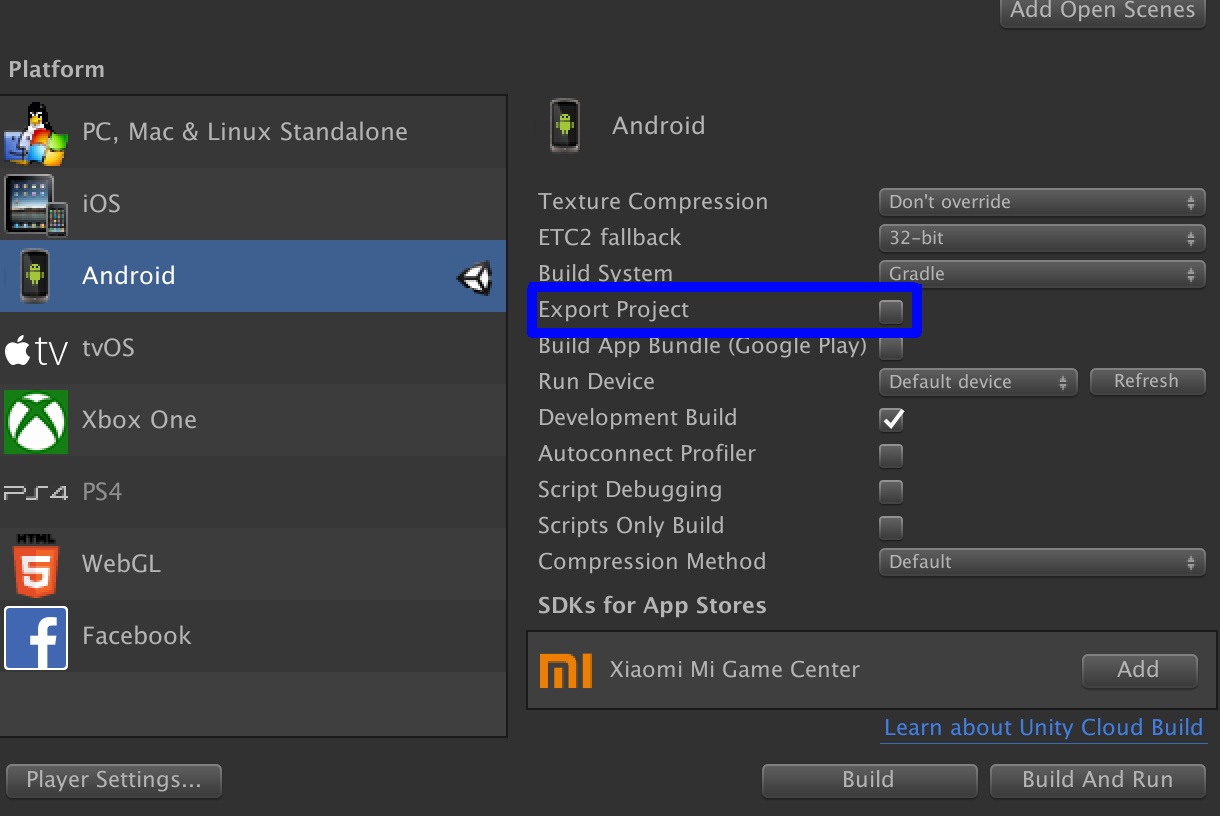
Unityでビルドする際、Build Settingのところで、Export Projectにチェックを入れ Android Studio用のプロジェクトを生成する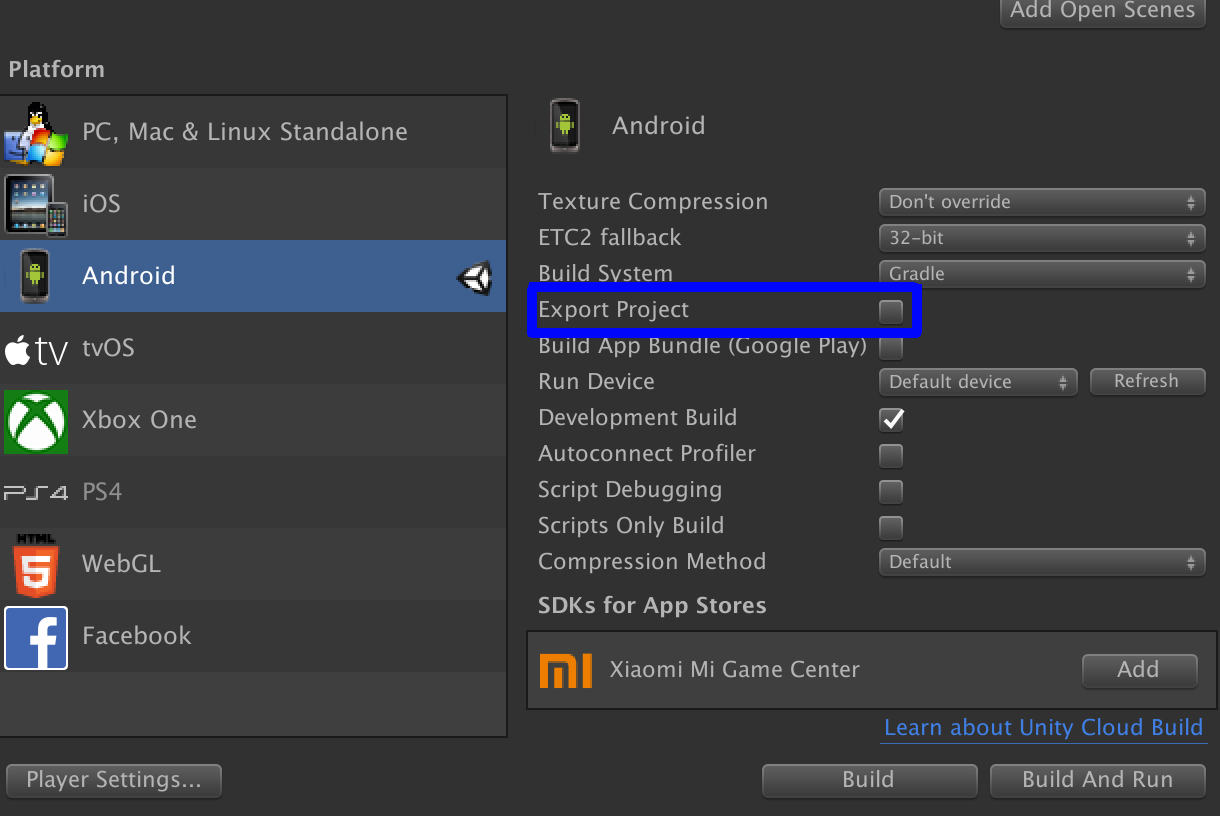
- 手順2
Android Stdudioで先ほど出力したプロジェクトを開いておく、Android StuidoのPreferencesのところでKotlin Compilerの所を選択し 下の画像のように
Additional command line parametersに
--info
-stacktrace
を追加する
- 手順3
手順2で開いていたプロジェクトをMake Projectでビルドすると下の画像のようなエラー(今回の場合は、support.v4ライブラリが原因であったことがわかる)が表示され、モジュールが多重定義されていたことがわかる。
- 手順4
Unityのほうに戻り、mainTemplateを編集するなり、重複しているjarなりaarなりを削除する。終わりに
今回のAndroid Stduioのほうにビルドでしてみてエラーを解決する方法は、他のエラーを除去
するテクニックにも使えるかもしれません。




- 投稿日:2019-04-11T21:38:02+09:00
Unity:ログの出力(GUI編)
はじめに
本記事は、Unity:ログの出力(GUI編) に詳細がありますが便利な機能だったのでQiitaにも記載いたします。
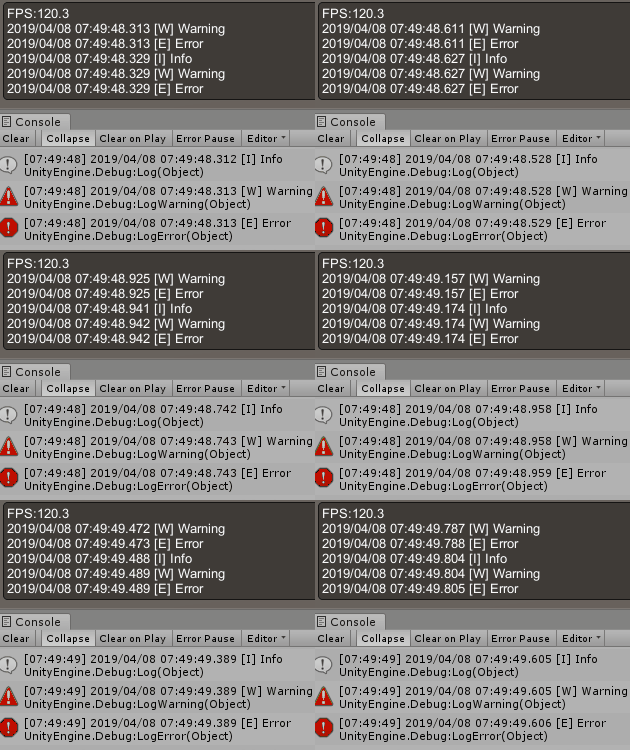
実行結果
ソースコード
using System;
using System.Collections.Generic;
using System.Text;
using UnityEngine;

public class DebugGui : MonoBehaviour
{
    public FpsCounter fpsCounter;

    public LogStorage logStorage;

    public DebugGuiStyle style;

    private GUIStyle textStyle;

    void Awake()
    {
        textStyle = GUIStyle.none;
        textStyle.wordWrap = false;
        textStyle.normal.textColor = Color.white;
        textStyle.margin = new RectOffset();
        textStyle.padding = new RectOffset();
    }

    void OnGUI()
    {
        int areaCount = 0;

        if (fpsCounter.enabled)
        {
            fpsCounter.Update();
            areaCount += 1;
        }
        if (logStorage.enabled)
        {
            logStorage.Update();
            areaCount += logStorage.list.Count;
        }

        if (0 < areaCount)
        {
            float margin = style.margin;
            float padding = style.padding;
            int fontSize = style.fontSize;

            // box area
            float width = Screen.width - (margin * 2);
            float height = (areaCount * Mathf.Ceil(fontSize * 1.1f)) + (padding * 2);
            Rect boxArea = new Rect(Screen.width - width - margin, Screen.height - height - margin, width, height);
            GUI.Box(boxArea, "");

            // draw area
            Rect drawArea = new Rect(boxArea.x + padding, boxArea.y + padding, boxArea.width - padding * 2, boxArea.height - padding * 2);

            GUILayout.BeginArea(drawArea);
            {
                textStyle.fontSize = fontSize;

                if (fpsCounter.enabled)
                    GUILayout.Label("FPS:" + fpsCounter.fps.ToString("0.0"), textStyle);

                if (logStorage.enabled)
                    foreach (string str in logStorage.list)
                        GUILayout.Label(str, textStyle);
            }
            GUILayout.EndArea();
        }
    }

    public void Log(string text)
    {
        if (logStorage.enabled == false) return;

        logStorage.Add("I", text);
    }

    public void Log(string format, params object[] paramList)
    {
        if (logStorage.enabled == false) return;

        logStorage.Add("I", format, paramList);
    }

    public void LogError(string text)
    {
        if (logStorage.enabled == false) return;

        logStorage.Add("E", text);
    }

    public void LogError(string format, params object[] paramList)
    {
        if (logStorage.enabled == false) return;

        logStorage.Add("E", format, paramList);
    }

    public void LogWarning(string text)
    {
        if (logStorage.enabled == false) return;

        logStorage.Add("W", text);
    }

    public void LogWarning(string format, params object[] paramList)
    {
        if (logStorage.enabled == false) return;

        logStorage.Add("W", format, paramList);
    }

    #region Inner Class

    [Serializable]
    public class DebugGuiStyle
    {
        public float margin = 10;
        public float padding = 4;
        public int fontSize = 13;
    }

    [Serializable]
    public class FpsCounter
    {
        public bool enabled = true;
        public float interval = 3.0f;

        internal float fps = 0.0f;

        private int frameCount = 0;
        private float prevTime = 0.0f;

        public void Update()
        {
            ++frameCount;
            float time = Time.realtimeSinceStartup - prevTime;

            if (interval <= time)
            {
                fps = frameCount / time;
                frameCount = 0;
                prevTime = Time.realtimeSinceStartup;
            }
        }
    }

    [Serializable]
    public class LogStorage
    {
        public bool enabled = true;
        public int max = 5;
        public int lengthLimit = 150;
        public bool alsoUnityLog = true;

        internal List<string> list = new List<string>();

        public void Update()
        {
            if (max < list.Count)
                list.RemoveRange(0, list.Count - max);
        }

        public void Add(string level, string text)
        {
            StringBuilder sb = new StringBuilder();
            sb.Append(DateTime.Now.ToString("yyyy/MM/dd HH:mm:ss.fff"));
            sb.Append(" [");
            sb.Append(level);
            sb.Append("] ");
            sb.Append(text.Substring(0, Math.Min(lengthLimit, text.Length)));

            string output = sb.ToString();
            list.Add(output);

            if (alsoUnityLog)
            {
                if (level == "I") Debug.Log(output);
                if (level == "W") Debug.LogWarning(output);
                if (level == "E") Debug.LogError(output);
            }
        }

        public void Add(string level, string format, params object[] paramList)
        {
            string text = string.Format(format, paramList);
            Add(level, text);
        }
    }

    #endregion
}
使い方・パラメータの説明
こちらの記事「Unity:ログの出力(GUI編)」をご参照ください。
その他
その他のログの記事も以下に記載ありますのでご興味あれば見てください!!
- 投稿日:2019-04-11T02:47:03+09:00
【Unity】UnsafeUtility基礎論【入門者向け】
金子みすゞ氏が今日生まれたので初投稿です。
この記事を読む前に @mao_ さんの 【Unity】UnsafeUtilityについて纏めてみるをお読みください。
タイトルに反してUnsafeUtility.Mallocについてのみ解説していますが、良い資料であると思われます。
なぜNativeContainerを自作しなければならないのか
Burst Job内部では参照型をnewすることはできません。故に参照型をフィールドに持つ構造体をnewできません。
Blittableな構造体のみが内部でnewできるのです。
NativeArray<T>はどうでしょうか? これはランタイム実行時には内部的にはポインタと配列長を持っていますのでBlittable型です。
しかし、エディタ上ではメモリリークを監視するためにDisposeSentinelという参照型のフィールドを把持しているため非Blittable型なのです。
故に我々はBurst Job内でNativeArrayをnewできません。
NativeContainerを自作することでのみ我々はBurst Job内でコレクションを扱えるようになります。Unity.Collections.LowLevel.UnsafeUtilityの持つ様々な便利機能を概説していきます。
MallocとFreeは @mao_ さんの記事を読んで、どうぞ。以下の関数毎に性能測定コードを作成しましたが、そのコードはgistを参照してください。
そして関数毎に推奨するか非推奨であるかを記載していますが、これは個人の見解です。
ご意見を歓迎いたします。検証環境
- Unity2019.2.0a9
- Unity Test Runner Editor Mode
- Windows 10 Home(x64)
- Intel Core i7-8750H CPU @2.20GHz
- RAM 16.00GB
void* AddressOf<T>(ref T output) where T : unmanaged
これは与えられた参照を元にしてそのポインタを得るメソッドです。
つまり純C#で記述すると以下のような擬似コードとなります。void* AddressOf<T>(ref T output) where T : unmanaged { fixed(void* ptr = &output) { return ptr; } }結論:不使用を推奨
実際の所void*が返されてもあまり使い途はありません。IntPtrまたはT*型であってほしいものです。
ならばもうfixedステートメントを素直に記述したほうが良いのかもしれませんね。
性能を比較してみましょう。
測定コードを以下に記載します。[Test] public void AddressOfSpeed_OftenFix_Test() { var array = new Guid[1024]; Guid* _0, _256; const int COUNT = 10000000; watch.Reset(); watch.Start(); for (int i = 0; i < COUNT; i++) { fixed (Guid* ptr = array) { _0 = ptr + 0; _256 = ptr + 256; } } watch.Stop(); UnityEngine.Debug.Log(watch.ElapsedMilliseconds); watch.Reset(); watch.Start(); for (int i = 0; i < COUNT; i++) { fixed (Guid* ptr = &array[0]) { _0 = ptr + 0; _256 = ptr + 256; } } watch.Stop(); UnityEngine.Debug.Log(watch.ElapsedMilliseconds); watch.Reset(); watch.Start(); for (int i = 0; i < COUNT; i++) { _0 = (Guid*)UnsafeUtility.AddressOf(ref array[0]); _256 = (Guid*)UnsafeUtility.AddressOf(ref array[256]); } watch.Stop(); UnityEngine.Debug.Log(watch.ElapsedMilliseconds); }結果として
- fixed(Guid* ptr = &array)
- 56ms
- fixed(Guid* ptr = &array[0])
- 45ms
- (Guid*)AddressOf(ref array[0])
- 114ms
となりました。
性能的にあまり推奨できません。int AlignOf<T>()
C++11のalignof演算子相当のAPIです。
メモリアライメントは効率的なメモリアクセスを実現するために知るべき値ですので存在価値はあります。結論:常に4を返す存在、今後に期待
void CopyObjectAddressToPtr(object target, void* dest)
このメソッドはボックス化された構造体またはPin留めされた参照型について、その中身をdestの指す先に書き込みます。
[Test]
public void CopyObjectAddressToPtrTest()
{
    var guid = (object)(Guid.NewGuid());
    Guid* ptr = (Guid*)UnsafeUtility.Malloc(sizeof(Guid), 4, Allocator.Temp);
    UnsafeUtility.CopyObjectAddressToPtr(guid, ptr);
    UnityEngine.Debug.Log(ptr->ToString());
    UnsafeUtility.Free(ptr, Allocator.Temp);
}
結論:不使用を推奨
そもそもボックス化を起こすなという話ではありますが、PUN2など既存のUnityのアロケーションに無頓着なライブラリを使う限りに置いてボックス化は避けられません。
これは必要悪と言えるでしょうが、C#コードベタ書きの方が早いので使わないほうがよろしいでしょうね。
性能測定コードは以下の通りです。[Test] public void CopyObjectAddressToPtrSpeedTest() { const int COUNT = 100000; var array = new object[1024]; var ptr = (Guid*)UnsafeUtility.Malloc(sizeof(Guid), 4, Allocator.Temp); for (int i = 0; i < array.Length; i++) array[i] = Guid.NewGuid(); watch.Reset(); watch.Start(); for (int i = 0; i < COUNT; i++) { for (int j = 0; j < array.Length; j++) { UnsafeUtility.CopyObjectAddressToPtr(array[j], ptr); } } watch.Stop(); UnityEngine.Debug.Log(watch.ElapsedMilliseconds); watch.Reset(); watch.Start(); for (int i = 0; i < COUNT; i++) { for (int j = 0; j < array.Length; j++) { *ptr = (Guid)array[j]; } } watch.Stop(); UnityEngine.Debug.Log(watch.ElapsedMilliseconds); UnsafeUtility.Free(ptr, Allocator.Temp); }
- *ptr = (Guid)array[j];
- 448ms
- UnsafeUtility.CopyObjectAddressToPtr(array[j], ptr);
- 2154ms
void CopyPtrToStructure<T>(void* ptr, out T output) where T : unmanaged
このAPIはポインタの内容を構造体にコピーします。
結論:不使用を推奨
性能比較コード[Test] public void CopyPtrToStructureSpeedTest() { const int COUNT = 100000; Guid* ptr = stackalloc Guid[1024]; Guid id; watch.Reset(); watch.Start(); for (int i = 0; i < COUNT; i++) { for (int j = 0; j < 1024; j++) { id = ptr[j]; } } watch.Stop(); UnityEngine.Debug.Log(watch.ElapsedMilliseconds); watch.Reset(); watch.Start(); for (int i = 0; i < COUNT; i++) { for (int j = 0; j < 1024; j++) { UnsafeUtility.CopyPtrToStructure(ptr + j, out id); } } watch.Stop(); UnityEngine.Debug.Log(watch.ElapsedMilliseconds); }
- id = ptr[j];
- 322ms
- UnsafeUtility.CopyPtrToStructure(ptr + j, out id);
- 717ms
素のC#で書く方が倍以上に早いです。
void CopyStructureToPtr<T>(ref T input, void* ptr) where T : unmanaged
構造体をポインタの指す先にコピーします。
結論:不使用を推奨
性能比較コード[Test] public void CopyStructureToPtrSpeedTest() { const int COUNT = 100000; var id = Guid.NewGuid(); var ptr = stackalloc Guid[1024]; watch.Reset(); watch.Start(); for (int i = 0; i < COUNT; i++) { for (int j = 0; j < 1024; j++) { ptr[j] = id; } } watch.Stop(); UnityEngine.Debug.Log(watch.ElapsedMilliseconds); watch.Reset(); watch.Start(); for (int i = 0; i < COUNT; i++) { for (int j = 0; j < 1024; j++) { UnsafeUtility.CopyStructureToPtr(ref id, ptr + j); } } watch.Stop(); UnityEngine.Debug.Log(watch.ElapsedMilliseconds); }
- ptr[j] = id;
- 390ms
- UnsafeUtility.CopyStructureToPtr(ref id, ptr + j);
- 685ms
int EnumToInt(T enumValue) where T : struct, Enum
このAPIはジェネリクスで表現された列挙型を数値に変換することができます。
結論:絶対使用推奨
性能比較コード[Test] public void EnumToIntSpeedTest() { const int COUNT = 100000; var enums = stackalloc AttributeTargets[] { AttributeTargets.All, AttributeTargets.Assembly, AttributeTargets.Class, AttributeTargets.Constructor, AttributeTargets.Delegate, AttributeTargets.Enum, AttributeTargets.Event, AttributeTargets.Field, AttributeTargets.GenericParameter, AttributeTargets.Interface, AttributeTargets.Method, AttributeTargets.Module, AttributeTargets.Parameter, AttributeTargets.Property, AttributeTargets.ReturnValue, AttributeTargets.Struct, }; var array = stackalloc int[16]; watch.Start(); for (int i = 0; i < COUNT; i++) for (int j = 0; j < 16; j++) array[j] = (int)enums[j]; watch.Stop(); UnityEngine.Debug.Log(watch.ElapsedMilliseconds); watch.Reset(); watch.Start(); for (int i = 0; i < COUNT; i++) for (int j = 0; j < 16; j++) array[j] = Conv0(enums[j]); watch.Stop(); UnityEngine.Debug.Log(watch.ElapsedMilliseconds); watch.Reset(); watch.Start(); for (int i = 0; i < COUNT; i++) for (int j = 0; j < 16; j++) array[j] = Conv1(enums[j]); watch.Stop(); UnityEngine.Debug.Log(watch.ElapsedMilliseconds); watch.Reset(); watch.Start(); for (int i = 0; i < COUNT; i++) for (int j = 0; j < 16; j++) array[j] = Conv2(enums[j]); watch.Stop(); UnityEngine.Debug.Log(watch.ElapsedMilliseconds); watch.Reset(); watch.Start(); for (int i = 0; i < COUNT; i++) for (int j = 0; j < 16; j++) array[j] = UnsafeUtility.EnumToInt(enums[j]); watch.Stop(); UnityEngine.Debug.Log(watch.ElapsedMilliseconds); } private static int Conv0<T>(T val) where T : Enum => (int)(object)val; private static int Conv1<T>(T val) where T : Enum => Convert.ToInt32(val); private static int Conv2<T>(T val) where T : struct, IConvertible => val.ToInt32(null);
- (int)enums[j]
- 4ms
- (int)(object)enums[j]
- 134ms
- Convert.ToInt32(enums[j])
- 373ms
- enums[j].ToInt32(null)
- 349ms
- UnsafeUtility.EnumToInt(enums[j])
- 19ms
元となる列挙型が具象型としてわかっている場合を対照例として記載しました。
具象型に対して直接(int)するのは当たり前ですが最速です。
それに対してジェネリクスに列挙型を数値に変換する手法を比べてみます。
BOX化してからintに変換する手法はボックス化分性能の劣化が激しいですね。
ConvertクラスのToInt32は輪をかけて遅いです。
全ての列挙型が暗黙のうちに実装しているIConvertibleインターフェースのメソッドToInt32(IFormatProvider)もかなり遅いです。
それに対してUnsafeUtility.EnumToIntは流石に直接int型変換に比べると桁一つ遅いですが、他の手法よりは圧倒的に速いです。間違いなくUnity環境ではEnumToIntメソッドを使用するべきです。
int GetFieldOffset(FieldInfo field)
構造体のフィールドについてその先頭からのバイトオフセットを返します。
結論:不使用を推奨
性能比較コード[Test] public void GetFieldOffsetSpeedTest() { var t = typeof(ValueTuple<Guid, Guid, Guid, Guid>); const int COUNT = 1000000; var fieldInfo = t.GetField("Item3"); watch.Reset(); watch.Start(); for (int i = 0; i < COUNT; i++) System.Runtime.InteropServices.Marshal.OffsetOf<ValueTuple<Guid, Guid, Guid, Guid>>("Item3"); watch.Stop(); UnityEngine.Debug.Log(watch.ElapsedMilliseconds); watch.Reset(); watch.Start(); for (int i = 0; i < COUNT; i++) System.Runtime.InteropServices.Marshal.OffsetOf(t, "Item3"); watch.Stop(); UnityEngine.Debug.Log(watch.ElapsedMilliseconds); watch.Reset(); watch.Start(); for (int i = 0; i < COUNT; i++) UnsafeUtility.GetFieldOffset(fieldInfo); watch.Stop(); UnityEngine.Debug.Log(watch.ElapsedMilliseconds); }
- Marshal.OffsetOf>("Item3")
- 230ms
- Marshal.OffsetOf(typeof(ValueTuple), "Item3")
- 227ms
- UnsafeUtility.GetFieldOffset(fieldInfo)
- 593ms
なぜ文字列からリフレクションしているSystem.Runtime.InteropServices.Marshal.OffsetOfに対して既にFieldInfoの段階までリフレクションを済ませているUnsafeUtility.GetFieldOffsetが負けるのでしょうかね?
bool IsBlittable<T>() where T : unmanaged
型引数がBlittable型であるかどうか判別します。
結論:使用推奨
私の知る限りに置いて.NETのAPIでその型がBlittable型であるかどうかを調べる方法はないはずです。
bool IsUnmanaged<T>() where T : unmanaged
型引数がunmanagedな構造体であるかどうか判別します。
結論:使用推奨
.NET Coreと.NET Standard 2.1に存在するSystem.Runtime.CompilerServices.RuntimeHelpers.IsReferenceOrContainsReferencesメソッドを使用すればunmanaged型であるか判別できます。
しかし上記APIはUnity環境では現在使用できません。bool IsValidAllocator(Unity.Collections.Allocator allocator)
NativeArrayをnewするために必要な列挙型Allocatorについて、その種類によっては実際にはメモリアロケーションが行われません。
メモリアロケーションが起きるかどうかを判別するメソッドです。結論:糖衣関数
Allocator.NoneとAllocator.Invalidはfalseを返します。
思いっきり糖衣関数ですね。void* Malloc(long size, int align, Allocator allocator)とvoid Free(void* ptr, Allocator allocator)
C++領域からメモリを切り出してきます。はやいです。
結論:使用推奨
AllocHGlobalとAllocCoTaskMem どちらを使うべきか?を参考にしつつSystem.Runtime.InteropServices.MarshalクラスのAllocHGlobalとAllocCoTaskMemを使用した例も性能比較コードに追加しています。
性能比較コード[Test] public void MallocFreeSpeedTest() { const int COUNT = 160000; const int SIZE = 1 << 14; var ptrs = (void**)UnsafeUtility.Malloc(sizeof(void*) * COUNT, 4, Allocator.Temp); watch.Reset(); watch.Start(); for (int i = 0; i < COUNT; i++) ptrs[i] = UnsafeUtility.Malloc(SIZE, 4, Allocator.Temp); watch.Stop(); UnityEngine.Debug.Log(nameof(Allocator.Temp) + " : " + watch.ElapsedMilliseconds); watch.Reset(); watch.Start(); for (int i = 0; i < COUNT; i++) UnsafeUtility.Free(ptrs[i], Allocator.Temp); watch.Stop(); UnityEngine.Debug.Log(nameof(Allocator.Temp) + " : " + watch.ElapsedMilliseconds); watch.Reset(); watch.Start(); for (int i = 0; i < COUNT; i++) ptrs[i] = UnsafeUtility.Malloc(SIZE, 4, Allocator.TempJob); watch.Stop(); UnityEngine.Debug.Log(nameof(Allocator.TempJob) + " : " + watch.ElapsedMilliseconds); watch.Reset(); watch.Start(); for (int i = 0; i < COUNT; i++) UnsafeUtility.Free(ptrs[i], Allocator.TempJob); watch.Stop(); UnityEngine.Debug.Log(nameof(Allocator.TempJob) + " : " + watch.ElapsedMilliseconds); watch.Reset(); watch.Start(); for (int i = 0; i < COUNT; i++) ptrs[i] = UnsafeUtility.Malloc(SIZE, 4, Allocator.Persistent); watch.Stop(); UnityEngine.Debug.Log(nameof(Allocator.Persistent) + " : " + watch.ElapsedMilliseconds); watch.Reset(); watch.Start(); for (int i = 0; i < COUNT; i++) UnsafeUtility.Free(ptrs[i], Allocator.Persistent); watch.Stop(); UnityEngine.Debug.Log(nameof(Allocator.Persistent) + " : " + watch.ElapsedMilliseconds); UnsafeUtility.Free(ptrs, Allocator.Temp); var ptrs2 = (IntPtr*)UnsafeUtility.Malloc(sizeof(IntPtr) * COUNT, 4, Allocator.Temp); watch.Reset(); watch.Start(); for (int i = 0; i < COUNT; i++) ptrs2[i] = System.Runtime.InteropServices.Marshal.AllocCoTaskMem(SIZE); watch.Stop(); UnityEngine.Debug.Log(nameof(System.Runtime.InteropServices.Marshal.AllocCoTaskMem) + " : " + watch.ElapsedMilliseconds); watch.Reset(); watch.Start(); for (int i = 0; i < COUNT; i++) System.Runtime.InteropServices.Marshal.FreeCoTaskMem(ptrs2[i]); watch.Stop(); UnityEngine.Debug.Log(nameof(System.Runtime.InteropServices.Marshal.FreeCoTaskMem) + " : " + watch.ElapsedMilliseconds); watch.Reset(); watch.Start(); for (int i = 0; i < COUNT; i++) ptrs2[i] = System.Runtime.InteropServices.Marshal.AllocHGlobal(SIZE); watch.Stop(); UnityEngine.Debug.Log(nameof(System.Runtime.InteropServices.Marshal.AllocHGlobal) + " : " + watch.ElapsedMilliseconds); watch.Reset(); watch.Start(); for (int i = 0; i < COUNT; i++) System.Runtime.InteropServices.Marshal.FreeHGlobal(ptrs2[i]); watch.Stop(); UnityEngine.Debug.Log(nameof(System.Runtime.InteropServices.Marshal.FreeHGlobal) + " : " + watch.ElapsedMilliseconds); UnsafeUtility.Free(ptrs2, Allocator.Temp); }Mallocについて
- Temp
- 206ms
- TempJob
- 203ms
- Persistent
- 211ms
- AllocCoTaskMem
- 225ms
- AllocHGlobal
- 252ms
メモリ領域確保についてはAllocator毎の差はあまり見られません。
わずかにAllocHGlobalが遅いですが、大した差はないと言えるでしょう。Freeについて
- Temp
- 2ms
- TempJob
- 108ms
- Persistent
- 134ms
- FreeCoTaskMem
- 150ms
- FreeHGlobal
- 249ms
大きく差が着いたのはメモリ解放に於いてです。この結果は個人的には予想外でした。
Allocator.TempのFreeは爆速です。
2桁速いです。
そしてHGlobalはおよそMallocと同程度の時間を掛けてFreeしています。あまり使わないほうがよろしいでしょう。void MemClear(void* destination, long size)
ポインタの指す先のsize分の領域を0クリアします。
結論:使用推奨
性能比較コード[Test] public void MemClearSpeedTest() { var array = new Guid[1024]; const int COUNT = 1000000; watch.Reset(); watch.Start(); for (int i = 0; i < COUNT; i++) Array.Clear(array, 0, array.Length); watch.Stop(); UnityEngine.Debug.Log(watch.ElapsedMilliseconds); watch.Reset(); fixed (void* ptr = &array[0]) { watch.Start(); for (int i = 0; i < COUNT; i++) for (int j = 0; j < 1024; j++) array[j] = default; watch.Stop(); } UnityEngine.Debug.Log(watch.ElapsedMilliseconds); watch.Reset(); fixed (void* ptr = &array[0]) { watch.Start(); for (int i = 0; i < COUNT; i++) UnsafeUtility.MemClear(ptr, sizeof(Guid) << 10); watch.Stop(); } UnityEngine.Debug.Log(watch.ElapsedMilliseconds); }
- Array.Clear(array, 0, array.Length)
- 554ms
- 1024要素にarray[j] = default
- 2472ms
- UnsafeUtility.MemClear(ptr, sizeof(Guid) << 10)
- 149ms
Array.Clearは型を見て0クリアしているためかそこまで速くありません。
素直にMemClearを使うのが一番でしょう。int MemCmp(void* ptr1, void* ptr2, long size)
メモリ領域のbyte単位での大小比較を行います。
結論:使用推奨
実際は等値性比較で使うことが多いと思います。かなり高速に動作するので役立ちます。
void MemCpy(void* dest, void* src, long size)とvoid MemMove(void* dest, void* src, long size)
コピー元とペースト先の領域に被りが存在しない前提でコピーを行います。
領域が重なる場合はMemMoveを使用してください。結論:絶対使用推奨
C#大統一理論で知られる @neuecc 氏の以前行ったパフォーマンステストをご参考までにどうぞ。
性能比較コード[Test] public void MemCpySpeedTest() { const int COUNT = 1 << 10; const int size = 1 << 18; var ptr = stackalloc byte[size]; var ptr2 = stackalloc byte[size]; var p = (long*)ptr; var p2 = (long*)ptr2; watch.Reset(); watch.Start(); const int V = size >> 3; for (int i = 0; i < COUNT; i++) for (int j = 0; j < V; j++) p[j] = p2[j]; watch.Stop(); UnityEngine.Debug.Log(watch.ElapsedMilliseconds); watch.Reset(); watch.Start(); for (int i = 0; i < COUNT; i++) for (int j = 0; j < size; j++) ptr[j] = ptr2[j]; watch.Stop(); UnityEngine.Debug.Log(watch.ElapsedMilliseconds); watch.Reset(); watch.Start(); for (int i = 0; i < COUNT; i++) Buffer.MemoryCopy(ptr, ptr2, size, size); watch.Stop(); UnityEngine.Debug.Log(watch.ElapsedMilliseconds); watch.Reset(); watch.Start(); for (int i = 0; i < COUNT; i++) UnsafeUtility.MemCpy(ptr2, ptr, size); watch.Stop(); UnityEngine.Debug.Log(watch.ElapsedMilliseconds); }
- long copy
- 86ms
- byte copy
- 608ms
- System.Buffer.MemoryCopy
- 284ms
- UnsafeUtility.MemCpy
- 6ms
256KBを1024回コピーするだけのテストですが、その差は歴然たるものです。
いやはやどうしてここまで差がついたのでしょうね?
やはりC++レイヤでコピペを行うのが最速ということなのでしょうか。
そしてlongコピーがMemoryCopyより速いのにもかなり困惑しています。
なんにせよUnsafeUtility.MemoryCopyが最速ではあります。void MemCpyReplicate(void* destination, void* source, int size, int count)
ポインタの指す先の領域にコピー元からcount回size分コピーを行います。
結論:使用推奨
性能比較コード[Test] public void MemCpyReplicateSpeedTest() { const int LOOP_COUNT = 1 << 10; const int COUNT = 1 << 14; var ptr = stackalloc Guid[COUNT]; var id = Guid.NewGuid(); var idptr = &id; watch.Reset(); watch.Start(); for (int i = 0; i < LOOP_COUNT; i++) for (int j = 0; j < COUNT; j++) ptr[j] = id; watch.Stop(); UnityEngine.Debug.Log(watch.ElapsedMilliseconds); watch.Reset(); watch.Start(); for (int i = 0; i < LOOP_COUNT; i++) for (int j = 0; j < COUNT; j++) UnsafeUtility.MemCpy(ptr + j, idptr, sizeof(Guid)); watch.Stop(); UnityEngine.Debug.Log(watch.ElapsedMilliseconds); watch.Reset(); watch.Start(); for (int i = 0; i < LOOP_COUNT; i++) UnsafeUtility.MemCpyReplicate(ptr, idptr, sizeof(Guid), COUNT); watch.Stop(); UnityEngine.Debug.Log(watch.ElapsedMilliseconds); }
- Guid copy
- 55ms
- MemCpy
- 260ms
- MemCpyReplicate
- 8ms
細かいデータの反復的コピーを行う場合UnsafeUtility.MemCpyだとオーバーヘッドが大きすぎるとわかりました。
void MemCpyStride(void* destination, int destinationStride, void* source, int sourceStride, int elementSize, int count)
現時点でUnity公式リファレンスに堂々と間違いが記載されていますので気を付けましょう!
あとなぜかUnity2018.1とか2で動作しないことがありました。このメソッドは良い感じにスライドしながら要素をコピペしていきます。
具体的には巨大構造体配列の一部のフィールドを別の巨大構造体配列の一部のフィールドにコピペする時に使えるでしょう。結論:使用推奨
これはちょっと対応する.NETのAPIが思い当たりませんでしたので使用例を示します。
サンプルコード[Test] public void MemCpyStrideTest() { const int COUNT = 1 << 16; const int size = 1 << 10; var dest = stackalloc Guid[size]; var src = stackalloc Stride0[size]; watch.Reset(); watch.Start(); for (int i = 0; i < COUNT; i++) for (int j = 0; j < size; j++) dest[j] = src[j].X; watch.Stop(); UnityEngine.Debug.Log(watch.ElapsedMilliseconds); watch.Reset(); watch.Start(); for (int i = 0; i < COUNT; i++) // Stride0のフィールド X を destにコピペする UnsafeUtility.MemCpyStride(dest, sizeof(Guid), src, sizeof(Stride0), sizeof(Guid), size); watch.Stop(); UnityEngine.Debug.Log(watch.ElapsedMilliseconds); } struct Stride0 { public Guid X, Y, Z, W; public long A, B, C, D, E, F, G, H; }
- フィールドべた書きコピペ
- 257ms
- MemCpyStride
- 155ms
void* PinGCArrayAndGetDataAddress(Array target, out ulong gcHandle)とvoid* PinGCObjectAndGetAddress(object target, out ulong gcHandle)とvoid ReleaseGCObject(ulong gcHandle)
PinGCArrayAndGetDataAddressは引数に与えた配列を固定し、その配列の先頭要素のポインタを返り値にします。
PinGCObjectAndGetAddressは引数に与えたオブジェクトを固定し、そのポインタを戻り値にします。
この固定状態を解除するにはgcHandleに対してReleaseGCObjectを行ってください。結論:使用推奨
性能比較コード[Test] public void PinSpeedTest() { const int COUNT = 1 << 20; var array = new Guid[1 << 10]; var intptrs = (System.Runtime.InteropServices.GCHandle*)UnsafeUtility.Malloc(sizeof(System.Runtime.InteropServices.GCHandle) * COUNT, 4, Allocator.Temp); watch.Reset(); watch.Start(); for (int i = 0; i < COUNT; i++) intptrs[i] = System.Runtime.InteropServices.GCHandle.Alloc(array, System.Runtime.InteropServices.GCHandleType.Pinned); watch.Stop(); UnityEngine.Debug.Log("GCHandle.Alloc : " + watch.ElapsedMilliseconds); watch.Reset(); watch.Start(); for (int i = 0; i < COUNT; i++) intptrs[i].Free(); watch.Stop(); UnityEngine.Debug.Log("GCHandle.Free : " + watch.ElapsedMilliseconds); UnsafeUtility.Free(intptrs, Allocator.Temp); var ptrs = (void**)UnsafeUtility.Malloc(sizeof(void*) * COUNT, 4, Allocator.Temp); var handles = (ulong*)UnsafeUtility.Malloc(sizeof(ulong) * COUNT, 4, Allocator.Temp); watch.Reset(); watch.Start(); for (int i = 0; i < COUNT; i++) ptrs[i] = UnsafeUtility.PinGCArrayAndGetDataAddress(array, out handles[i]); watch.Stop(); UnityEngine.Debug.Log("PinGCArrayAndGetDataAddress : " + watch.ElapsedMilliseconds); watch.Reset(); watch.Start(); for (int i = 0; i < COUNT; i++) UnsafeUtility.ReleaseGCObject(handles[i]); watch.Stop(); UnityEngine.Debug.Log("ReleaseGCObject : " + watch.ElapsedMilliseconds); UnsafeUtility.Free(handles, Allocator.Temp); UnsafeUtility.Free(ptrs, Allocator.Temp); }比較対象のAPIとしてSystem.Runtime.InteropServices.GCHandleを使用しました。
配列内部のポインターを今回は利用できるようにするため、GCHandle.Allocの第2引数にGCHandleType.Pinnedを渡すのがミソです。
しかし、Unity環境ではUnsafeUtilityの方が速いのでGCHandleを使う必要は薄いです。Pin留め
- System.Runtime.InteropServices.GCHandle.Alloc
- 88ms
- UnsafeUtility.PinGCArrayAndGetDataAddress
- 63ms
Release
- GCHandle.Free
- 41ms
- UnsafeUtility.ReleaseGCObject
- 37ms
T ReadArrayElement<T>(void* source, int index)とT ReadArrayElementWithStride<T>(void* source, int index, int stride)とvoid WriteArrayElement<T>(void* destination, int index, T value)とvoid WriteArrayElementWithStride<T>(void* destination, int index, int stride, T value)
結論:不使用を推奨
性能比較コード[Test] public void ReadWriteArrayElementSpeedTest() { const int COUNT = 1 << 30; const int size = 1 << 10; var array = stackalloc int[size]; var array2 = stackalloc ReadWrite0[size]; int x = 0; watch.Reset(); watch.Start(); for (int i = 0; i < COUNT; i++) x = array[16]; watch.Stop(); UnityEngine.Debug.Log(watch.ElapsedMilliseconds); watch.Reset(); watch.Start(); for (int i = 0; i < COUNT; i++) x = UnsafeUtility.ReadArrayElement<int>(array, 16); watch.Stop(); UnityEngine.Debug.Log(watch.ElapsedMilliseconds); watch.Reset(); watch.Start(); for (int i = 0; i < COUNT; i++) x = array2[16].a; watch.Stop(); UnityEngine.Debug.Log(watch.ElapsedMilliseconds); watch.Reset(); watch.Start(); for (int i = 0; i < COUNT; i++) x = UnsafeUtility.ReadArrayElementWithStride<int>(array2, 16, sizeof(ReadWrite0)); watch.Stop(); UnityEngine.Debug.Log(watch.ElapsedMilliseconds); watch.Reset(); watch.Start(); for (int i = 0; i < COUNT; i++) array[16] = x; watch.Stop(); UnityEngine.Debug.Log(watch.ElapsedMilliseconds); watch.Reset(); watch.Start(); for (int i = 0; i < COUNT; i++) UnsafeUtility.WriteArrayElement(array, 16, x); watch.Stop(); UnityEngine.Debug.Log(watch.ElapsedMilliseconds); watch.Reset(); watch.Start(); for (int i = 0; i < COUNT; i++) array2[16].a = x; watch.Stop(); UnityEngine.Debug.Log(watch.ElapsedMilliseconds); watch.Reset(); watch.Start(); for (int i = 0; i < COUNT; i++) UnsafeUtility.WriteArrayElementWithStride<int>(array2, 16, sizeof(ReadWrite0), x); watch.Stop(); UnityEngine.Debug.Log(watch.ElapsedMilliseconds); } struct ReadWrite0 { public int a, b, c, d, e, f, g, h; }
- 要素ベタコピペ
- 2438ms
UnsafeUtility.ReadArrayElement
- 6503ms
要素ベタコピペ
- 2751ms
UnsafeUtility.ReadArrayElementWithStride
- 6393ms
要素ベタコピペ
- 2531ms
UnsafeUtility.WriteArrayElement
- 6133ms
要素ベタコピペ
- 2334ms
UnsafeUtility.WriteArrayElementWithStride
- 7109ms
基本的に構造体のフィールドに関して複数の型で共通のフィールドを持つよう言語的に強制することはC#7.3の現時点ではできません。
ゆえに今回のようなフィールドの読み取りは個別的具象型に対して行うと見做して良いでしょう。
その場合べた書きが速いですね。特にUnsafeUtilityを使わずともよいでしょう。int SizeOf<T>()
型引数で指定した型のサイズを返します。
結論:不使用を推奨
unsafeコンテキストではsizeof演算子がジェネリクス型引数に対して使用可能です。
特に使う必要はないでしょう。全体の結論
以上!
全UnsafeUtilityメソッドの解説と性能検証でした!
案外性能出ていないAPIも沢山ありますが、それでも絶対に使うべき有能APIもありましたね。
Unity Technologiesは良い仕事をしたと思います。