- 投稿日:2020-01-10T21:23:16+09:00
#Rails + #MySQL / begin rescue end と Transaction を外側・内側に置いた動作の違いを確認してみたコード断片ですが
- Transactionの中で エラーが発生した場合、後続の処理を続けずに ROLLBACK させ、なおかつエラーをハンドリングして特定の処理をおこないたい
- Transaction で begin rescue end で囲ってしまうと、特定のエラーを rescue するときに、ROLLBACK を発生させるための例外も起こらなくなってしまい、やりたいことが出来ない
- Transaction を内側に、begin rescue end を外側に書いてみる。こうすることで ROLLBACK が起こった後に 例外をキャッチして、特定のエラーハンドリング処理をおこなうということを実現する
class User < ApplicationRecord
  validates_uniqueness_of :unique_id
end
def call_inner_transaction(id: , something_wrong: false) begin ActiveRecord::Base.transaction do StripeWebhookSucceededEvent.create!(unique_id: id) raise 'SOMETHING WRONG' if something_wrong puts '-' * 100 puts 'EXECUTED!' puts '-' * 100 end rescue ActiveRecord::RecordInvalid, ActiveRecord::RecordNotUnique => e puts '*' * 100 puts "RAISED!" puts '*' * 100 puts e.message end enddupulicated_id = rand(999_999_999_999) # EXECUTE # COMMIT SomeClass.new.call_inner_transaction(id: dupulicated_id.to_s) # [88] pry(main)> SomeClass.new.call_inner_transaction(id: dupulicated_id.to_s) # (0.4ms) BEGIN # StripeWebhookSucceededEvent Create (0.7ms) INSERT INTO `users` (`unique_id`, `created_at`) VALUES ('225043383392', '2020-01-09 10:53:13') # ---------------------------------------------------------------------------------------------------- # EXECUTED! # ---------------------------------------------------------------------------------------------------- # (2.5ms) COMMIT # => nil # DUPULICATE and RAISE # NO EXECUTE # ROLLBACK SomeClass.new.call_inner_transaction(id: dupulicated_id.to_s) # [89] pry(main)> SomeClass.new.call_inner_transaction(id: dupulicated_id.to_s) # (0.4ms) BEGIN # StripeWebhookSucceededEvent Create (1.1ms) INSERT INTO `users` (`unique_id`, `created_at`) VALUES ('225043383392', '2020-01-09 10:53:17') # (2.6ms) ROLLBACK # **************************************************************************************************** # RAISED! # **************************************************************************************************** # Mysql2::Error: Duplicate entry '225043383392' for key 'index_users_on_unique_id': INSERT INTO `users` (`unique_id`, `created_at`) VALUES ('225043383392', '2020-01-09 10:53:17') # => nil # DUPULICATE and RAISE before SOMETHING WRONG # NO EXECUTE # ROLLBACK SomeClass.new.call_inner_transaction(id: dupulicated_id.to_s, something_wrong: true) # [90] pry(main)> SomeClass.new.call_inner_transaction(id: dupulicated_id.to_s, something_wrong: true) # (0.4ms) BEGIN # StripeWebhookSucceededEvent Create (2.6ms) INSERT INTO `users` (`unique_id`, `created_at`) VALUES ('225043383392', '2020-01-09 10:53:24') # (3.3ms) ROLLBACK # **************************************************************************************************** # RAISED! # **************************************************************************************************** # Mysql2::Error: Duplicate entry '225043383392' for key 'index_users_on_unique_id': INSERT INTO `users` (`unique_id`, `created_at`) VALUES ('225043383392', '2020-01-09 10:53:24') # => nil # SOMETHING WRONG # NO DUPULICATE # NO EXECUTE # RAISE AND ROLLBACK SomeClass.new.call_inner_transaction(id: rand(999_999_999_999).to_s, something_wrong: true) # [91] pry(main)> SomeClass.new.call_inner_transaction(id: rand(999_999_999_999).to_s, something_wrong: true) # (0.9ms) BEGIN # StripeWebhookSucceededEvent Create (1.0ms) INSERT INTO `users` (`unique_id`, `created_at`) VALUES ('357583484588', '2020-01-09 10:53:28') # (3.0ms) ROLLBACK # RuntimeError: SOMETHING WRONG # from (pry):120:in `block in call_inner_transaction'def call_outer_transaction(id: , something_wrong: false) ActiveRecord::Base.transaction do begin StripeWebhookSucceededEvent.create!(unique_id: id) raise 'SOMETHING WRONG' if something_wrong puts '-' * 100 puts 'EXECUTED!' puts '-' * 100 rescue ActiveRecord::RecordInvalid, ActiveRecord::RecordNotUnique => e puts '*' * 100 puts "RAISED!" puts '*' * 100 puts e.message end end enddupulicated_id = rand(999_999_999_999) # EXECUTE # COMMIT SomeClass.new.call_outer_transaction(id: dupulicated_id.to_s) # [93] pry(main)> SomeClass.new.call_outer_transaction(id: dupulicated_id.to_s) # (0.4ms) BEGIN # StripeWebhookSucceededEvent Create (0.6ms) INSERT INTO `users` (`unique_id`, `created_at`) VALUES ('64910455241', '2020-01-09 10:54:18') # ---------------------------------------------------------------------------------------------------- # EXECUTED! # ---------------------------------------------------------------------------------------------------- # (4.7ms) COMMIT # => nil # DUPLUCATED AND RAISED # NO EXECUTE # BUT COMMIT HAPPENS SomeClass.new.call_outer_transaction(id: dupulicated_id.to_s) # [94] pry(main)> SomeClass.new.call_outer_transaction(id: dupulicated_id.to_s) # (0.5ms) BEGIN # StripeWebhookSucceededEvent Create (6.4ms) INSERT INTO `users` (`unique_id`, `created_at`) VALUES ('64910455241', '2020-01-09 10:54:26') # **************************************************************************************************** # RAISED! # **************************************************************************************************** # Mysql2::Error: Duplicate entry '64910455241' for key 'index_users_on_unique_id': INSERT INTO `users` (`unique_id`, `created_at`) VALUES ('64910455241', '2020-01-09 10:54:26') # (5.4ms) COMMIT # => nil # DUPLUCATED AND RAISED # NO EXECUTE # BUT COMMIT HAPPENS SomeClass.new.call_outer_transaction(id: dupulicated_id.to_s, something_wrong: true) # [95] pry(main)> SomeClass.new.call_outer_transaction(id: dupulicated_id.to_s, something_wrong: true) # (1.0ms) BEGIN # StripeWebhookSucceededEvent Create (1.3ms) INSERT INTO `users` (`unique_id`, `created_at`) VALUES ('64910455241', '2020-01-09 10:54:32') # **************************************************************************************************** # RAISED! # **************************************************************************************************** # Mysql2::Error: Duplicate entry '64910455241' for key 'index_users_on_unique_id': INSERT INTO `users` (`unique_id`, `created_at`) VALUES ('64910455241', '2020-01-09 10:54:32') # (4.3ms) COMMIT # => nil # SOMETHING WRONG # NO DUPULICATE # NO EXECUTE # BUT RAISE AND ROLLBACK SomeClass.new.call_outer_transaction(id: rand(999_999_999_999).to_s, something_wrong: true) # [96] pry(main)> SomeClass.new.call_outer_transaction(id: rand(999_999_999_999).to_s, something_wrong: true) # (0.5ms) BEGIN # StripeWebhookSucceededEvent Create (0.8ms) INSERT INTO `users` (`unique_id`, `created_at`) VALUES ('710309047775', '2020-01-09 10:54:37') # (2.4ms) ROLLBACK # RuntimeError: SOMETHING WRONG # from (pry):137:in `block in call_outer_transaction'Original by Github issue

- 投稿日:2020-01-10T21:23:16+09:00
#Rails + #MySQL / ApplicationRecord.transaction / begin rescue end / COMMIT or ROLLBACK / raise in Inner or outer Transaction / Ruby examples
class User < ApplicationRecord validates_uniqueness_of :unique_id endI HOPE IT
def call_inner_transaction(id: , something_wrong: false)
  begin
    ActiveRecord::Base.transaction do
      StripeWebhookSucceededEvent.create!(unique_id: id)
      raise 'SOMETHING WRONG' if something_wrong
      puts '-' * 100
      puts 'EXECUTED!'
      puts '-' * 100
    end
  rescue ActiveRecord::RecordInvalid, ActiveRecord::RecordNotUnique => e
    puts '*' * 100
    puts "RAISED!"
    puts '*' * 100
    puts e.message
  end
end
dupulicated_id = rand(999_999_999_999) # EXECUTE # COMMIT SomeClass.new.call_inner_transaction(id: dupulicated_id.to_s) # [88] pry(main)> SomeClass.new.call_inner_transaction(id: dupulicated_id.to_s) # (0.4ms) BEGIN # StripeWebhookSucceededEvent Create (0.7ms) INSERT INTO `users` (`unique_id`, `created_at`) VALUES ('225043383392', '2020-01-09 10:53:13') # ---------------------------------------------------------------------------------------------------- # EXECUTED! # ---------------------------------------------------------------------------------------------------- # (2.5ms) COMMIT # => nil # DUPULICATE and RAISE # NO EXECUTE # ROLLBACK SomeClass.new.call_inner_transaction(id: dupulicated_id.to_s) # [89] pry(main)> SomeClass.new.call_inner_transaction(id: dupulicated_id.to_s) # (0.4ms) BEGIN # StripeWebhookSucceededEvent Create (1.1ms) INSERT INTO `users` (`unique_id`, `created_at`) VALUES ('225043383392', '2020-01-09 10:53:17') # (2.6ms) ROLLBACK # **************************************************************************************************** # RAISED! # **************************************************************************************************** # Mysql2::Error: Duplicate entry '225043383392' for key 'index_users_on_unique_id': INSERT INTO `users` (`unique_id`, `created_at`) VALUES ('225043383392', '2020-01-09 10:53:17') # => nil # DUPULICATE and RAISE before SOMETHING WRONG # NO EXECUTE # ROLLBACK SomeClass.new.call_inner_transaction(id: dupulicated_id.to_s, something_wrong: true) # [90] pry(main)> SomeClass.new.call_inner_transaction(id: dupulicated_id.to_s, something_wrong: true) # (0.4ms) BEGIN # StripeWebhookSucceededEvent Create (2.6ms) INSERT INTO `users` (`unique_id`, `created_at`) VALUES ('225043383392', '2020-01-09 10:53:24') # (3.3ms) ROLLBACK # **************************************************************************************************** # RAISED! # **************************************************************************************************** # Mysql2::Error: Duplicate entry '225043383392' for key 'index_users_on_unique_id': INSERT INTO `users` (`unique_id`, `created_at`) VALUES ('225043383392', '2020-01-09 10:53:24') # => nil # SOMETHING WRONG # NO DUPULICATE # NO EXECUTE # RAISE AND ROLLBACK SomeClass.new.call_inner_transaction(id: rand(999_999_999_999).to_s, something_wrong: true) # [91] pry(main)> SomeClass.new.call_inner_transaction(id: rand(999_999_999_999).to_s, something_wrong: true) # (0.9ms) BEGIN # StripeWebhookSucceededEvent Create (1.0ms) INSERT INTO `users` (`unique_id`, `created_at`) VALUES ('357583484588', '2020-01-09 10:53:28') # (3.0ms) ROLLBACK # RuntimeError: SOMETHING WRONG # from (pry):120:in `block in call_inner_transaction'I DO NOT HOPE IT
def call_outer_transaction(id: , something_wrong: false)
  ActiveRecord::Base.transaction do
    begin
      StripeWebhookSucceededEvent.create!(unique_id: id)
      raise 'SOMETHING WRONG' if something_wrong
      puts '-' * 100
      puts 'EXECUTED!'
      puts '-' * 100
    rescue ActiveRecord::RecordInvalid, ActiveRecord::RecordNotUnique => e
      puts '*' * 100
      puts "RAISED!"
      puts '*' * 100
      puts e.message
    end
  end
end
dupulicated_id = rand(999_999_999_999) # EXECUTE # COMMIT SomeClass.new.call_outer_transaction(id: dupulicated_id.to_s) # [93] pry(main)> SomeClass.new.call_outer_transaction(id: dupulicated_id.to_s) # (0.4ms) BEGIN # StripeWebhookSucceededEvent Create (0.6ms) INSERT INTO `users` (`unique_id`, `created_at`) VALUES ('64910455241', '2020-01-09 10:54:18') # ---------------------------------------------------------------------------------------------------- # EXECUTED! # ---------------------------------------------------------------------------------------------------- # (4.7ms) COMMIT # => nil # DUPLUCATED AND RAISED # NO EXECUTE # BUT COMMIT HAPPENS SomeClass.new.call_outer_transaction(id: dupulicated_id.to_s) # [94] pry(main)> SomeClass.new.call_outer_transaction(id: dupulicated_id.to_s) # (0.5ms) BEGIN # StripeWebhookSucceededEvent Create (6.4ms) INSERT INTO `users` (`unique_id`, `created_at`) VALUES ('64910455241', '2020-01-09 10:54:26') # **************************************************************************************************** # RAISED! # **************************************************************************************************** # Mysql2::Error: Duplicate entry '64910455241' for key 'index_users_on_unique_id': INSERT INTO `users` (`unique_id`, `created_at`) VALUES ('64910455241', '2020-01-09 10:54:26') # (5.4ms) COMMIT # => nil # DUPLUCATED AND RAISED # NO EXECUTE # BUT COMMIT HAPPENS SomeClass.new.call_outer_transaction(id: dupulicated_id.to_s, something_wrong: true) # [95] pry(main)> SomeClass.new.call_outer_transaction(id: dupulicated_id.to_s, something_wrong: true) # (1.0ms) BEGIN # StripeWebhookSucceededEvent Create (1.3ms) INSERT INTO `users` (`unique_id`, `created_at`) VALUES ('64910455241', '2020-01-09 10:54:32') # **************************************************************************************************** # RAISED! # **************************************************************************************************** # Mysql2::Error: Duplicate entry '64910455241' for key 'index_users_on_unique_id': INSERT INTO `users` (`unique_id`, `created_at`) VALUES ('64910455241', '2020-01-09 10:54:32') # (4.3ms) COMMIT # => nil # SOMETHING WRONG # NO DUPULICATE # NO EXECUTE # BUT RAISE AND ROLLBACK SomeClass.new.call_outer_transaction(id: rand(999_999_999_999).to_s, something_wrong: true) # [96] pry(main)> SomeClass.new.call_outer_transaction(id: rand(999_999_999_999).to_s, something_wrong: true) # (0.5ms) BEGIN # StripeWebhookSucceededEvent Create (0.8ms) INSERT INTO `users` (`unique_id`, `created_at`) VALUES ('710309047775', '2020-01-09 10:54:37') # (2.4ms) ROLLBACK # RuntimeError: SOMETHING WRONG # from (pry):137:in `block in call_outer_transaction'Original by Github issue
- 投稿日:2020-01-10T19:39:06+09:00
MySQL データベースの負荷対策/パフォーマンスチューニング備忘録 インデックスの基礎〜実践
TL;DR
この記事に書いた事
- 二分探索木のお話(前提知識)
- MySQLのInnoDBで利用されているB+木インデックスの構造と特性 (前提知識)
- MySQLのClusteredIndex,SecondaryIndexについて(前提知識)
- カーディナリティについて(前提知識)
- 実際の負荷対策
- 検出編 スロークエリ
- 検出編 その他のクエリ割り出しいろいろ
- クエリ・インデックスの最適化
- explainの使い方と詳細
- ケース別実践
- 単純にインデックスがあたっていないケース
- カーディナリティが低いインデックスが使われているケース
- 部分的にしかインデックス/複合インデックスがあたっていないケース
- 複合インデックスの順序誤りでインデックスが適用できていないケース
- 複合インデックスの最初がrange検索のケース
- ソートにインデックスが適用できていないケース
- ソートにインデックスが適用できていないケース(複合インデックス編)
- そもそもクエリを置き換えられるケース
- SELECT * ケース
- 使われていないインデックスや冗長なインデックスを掃除したいケース
- インデックスレベルでは改善がつらそうなケース
- アプリケーションレイヤでの負荷対策
- n+1クエリ
- (おまけ)MySQL以外での負荷対策(キャッシュ・NoSQL)
お願い
常時この内容を頭に入れておくのがしんどいので、備忘録用に色々整理するためにサマリー的に書いたものです。
間違ってたり、修正希望される場合、編集リクエストくださると嬉しいです :)前提知識
二分探索木
MySQLで使用されているB+木を理解する前に、もっと単純な木構造である
二分探索木について簡単に。二分探索木は
左の子孫の値 ≤ 親の値 ≤ 右の子孫の値という単純なルールで構成されていて、
お目当の数値にたどり着くまで、どちらの値に属するかの二択の探索を繰り返すためのデータ構造です。例えば1~15の値で構成される二分探索木で3を探索する場合、以下のような図の構成(完全二分木)と探索経路をとります。
計算量はO(log N)で表現される。
(*) 計算量を表現する場合、Nが十分に大きい事が前提にあるので底が省略される。
線形探索における計算量O(N)と比べて、データ量の増加に対する計算量の増加が対数的になるので緩やかになるのが特徴。
例えばデータ数が10,000の場合、線形対策での計算量は10,000となるので、log2(10000) とは
大きな差が出る。MySQLのインデックスのB+木構造について
InnoDBのインデックスはB木の亜種(という言い方がいいのか、改良型というべきなのか)
B+木構造をとります。
後述するSortや速度の面を理解する際にこちらの前提知識がある方がイメージが取りやすいので、
ざっくりとした説明。B+木構造の特徴は以下の通り。
- 平衡木である
- 親から末端(葉)の距離が一定
- m分木(m >= 2)
- 次数がdなら各ノードもつ要素数は d <= m <= 2d
- ノード数はd+1~2d+1
- 探索、挿入、削除の最大操作数がO(logb(N))
- リーフノード同士が接続されている。(範囲検索がしやすい)
- 途中のノードにデータを保持していない。 (1ブロックに詰め込めるkey数を多くできる)
よくB木との違いを忘れるのだけど、4,5の特性から厳密にはB+木として分類されているはず(はず)
B木の利点は、ディスクアクセスとの関係性と合わせて語られる事が多くて
- 平衡二分探索木(AVL木)に比べて一つのノードに格納できる値が多い
- データ容量に対して階数(= 計算量)を小さく保てる = DiskI/Oの発生数を減らせる
- 計算量を式にすると、二分木がlog Nなのに 対して log N / log m となる
- N/m^t → t =logm N → logm N = log2 N/log2 m
- B+木の特徴である途中のノードにデータを保持しない
- 現実のノードのサイズはディスクのブロック単位に収めたいので、できるだけ多くkeyを1ブロックに積める方がデータ量に対して深さを抑える事ができる。
上の特性や範囲検索のしやすさ、どの操作も対数的な計算量になるあたり(平衡を保つには挿入・削除の操作コストも大事だし)とかが、
大容量なデータを扱うデータベース向きなのかなと。(厳密な出典ないので、詳しい方いたらむしろ教えてくだs最後に簡単に探索イメージを図示。
1~15のデータを次数3のB+Treeで構成して、3~6探索する場合のイメージは以下のような図になる。
前述した特徴の通り、リーフノード同士が連結しているため、範囲検索をする際にリーフを辿っていけばよい = O(logbN + 要素数)
である事がわかる。MySQLのインデックスについて
MySQLにおけるB木インデックスの利点は以下の通り。
- 調べるデータ量を減らす事(先の説明)
- インデックスに沿った検索の場合、順序保証がなされているので、ソートリソースが不要になる(後述)
- データが順序によって整列して格納されているので、シーケンシャルI/Oになる
MySQLは一つの検索クエリに対して一つのインデックスしか使用できない。
一応、IndexMergeという2つのインデックススキャンの和集合を利用するような機能もあるけど、
リソース食う事もあるし、想像してるような便利な子ではないような気がするので、今回は割愛。またInnoDBにおけるBTreeIndexには clustered Indexes とSecondary Indexesの
2種類がありますclustered Indexes (PrimaryKey)
要するに主キーの事(厳密には色々あるけど割愛)。
テーブル作成時のPK指定と同時に作成されるので、特定のカラムに能動的に作成するような事はできない。(クラスタ化を選べるDBMSもあるらしいけど)
先に示したB+木構造を取り、葉ノードに全ての行データが収納される。
クラスタ化という名称は、指定されたキーの値で隣接するような順序でデータが格納される事から。本に例えると実際に記事の書かれているページとページNo
secondary Indexes
主キー以外の全てのインデックスはセカンダリインデックスと呼ばれる。
つまり、私たちがALTER TABLE tableName ADD INDEXを用いて生成するインデックスは全てセカンダリインデックス。
セカンダリインデックスはクラスタインデックスと異なり、葉ノードに収納するのはインデックスに指定された値と対応するクラスタインデックスの値のみ実際の検索の流れとしては
- セカンダリインデックスで検索してクラスタインデックスのKeyを得る
- 得られたKeyを使ってクラスタインデックスで探索する
という2段構えになるので、主キーの検索より速度的には劣る事になる。
セカンダリインデックスは本の巻末にある索引のイメージ
- 索引から該当するページ数を見つける
- 実際のページを探してめくる
coveringIndex
coveringIndexは先に挙げたようなIndexの種類ではない。(分類するのならセカンダリインデックスに属する)
必要なデータが全てKeyに含まれているセカンダリインデックスの事をさす。先のセカンダリインデックスの項に記載した通り、セカンダリインデックスにおける検索は、クラスタインデックスのキーを得るために行われる。
セカンダリインデックスはkey値とクラスタインデックスのkeyしか保持していないため、その後クラスタインデックスでの検索で
必要な全てのデータが含まれる行を取得するのだが、セカンダリインデックスが検索に必要な全ての値を網羅している場合は、
クラスタインデックスでの検索が不要になるので高速になる。以下は例
CREATE TABLE `person` (
  `id` int(10) unsigned NOT NULL AUTO_INCREMENT,
  `age` int(10) unsigned NOT NULL,
  `name` varchar(255) NOT NULL,
  PRIMARY KEY (`id`),
  KEY `age_name` (`age`,`name`)
)

mysql> explain select id,name from person where age = 1;
+----+-------------+--------+------------+------+---------------+----------+---------+-------+------+----------+-------------+
| id | select_type | table  | partitions | type | possible_keys | key      | key_len | ref   | rows | filtered | Extra       |
+----+-------------+--------+------------+------+---------------+----------+---------+-------+------+----------+-------------+
|  1 | SIMPLE      | person | NULL       | ref  | age_name      | age_name | 4       | const |    1 |   100.00 | Using index |
+----+-------------+--------+------------+------+---------------+----------+---------+-------+------+----------+-------------+
1 row in set, 1 warning (0.00 sec)
Using indexがextraで確認できます。
age_nameセカンダリインデックスでの検索が完了した時、age,name,clusterIndexであるidがデータとして揃う事になるので
クラスタインデックスでの検索を省略する事ができる。クラスタインデックス・セカンダリインデックスにおける実データ検索の図示
文字だけだとイメージが取りづらいけど、つまり以下のような感じになる
カーディナリティ
カーディナリティはそのカラムにインデックスを作成した際に有効に働くかどうかの判断材料として使えます。
カラムの値の種類の絶対数を示します。
例えば、男女であれば2(LGBTなどを考慮しない場合)。
- カーディナリティが低い
- カラムの値の取りうる種類がテーブルのレコード数に対して少ない
- カーディナリティが高い
- カラムの値の取りうる種類がテーブルのレコード数に対して多い
例えばプライマリーキーのカラムはテーブルでユニークな値を格納することになるので、カーディナリティはもっとも高いと言える。
基本的にカーディナリティが高いカラムほどインデックスの効果は高くなります。
ただ、カーディナリティが低い = インデックスの効果が低いというのは、必ずしもではありません。カーディナリティが高い = レコードが絞り込みやすい からインデックスの効果が高くなるのであって
カーディナリティが低くても、分布が偏っている場合はその限りではないです。例えば以下のような例ではカーディナリティは低くても、インデックスの効果は高くなります。
// ユーザーのリクエストを格納するテーブル
CREATE TABLE `user_request` (
  `id` int(10) unsigned NOT NULL AUTO_INCREMENT,
  `body` TEXT NOT NULL,
  `review_status` tinyint(3) NOT NULL DEFAULT '0', // 0 未承認 1承認
  PRIMARY KEY (`id`),
  KEY `r_status` (`review_status`)
)
// クエリ
SELECT * FROM use_request WHERE review_status = 0

review_statusは0,1のいずれかをとるのでカーディナリティは2ですが、
テーブルのユースケース上、ほとんどのデータは承認済みになっていくので、実際のレコードとしては90%以上が常に
review_status=1 になるので、 review_status = 0の検索において、`r_status`の絞り込み効果は高くなる
show indexで実際の値を確認することができます。
リファンレンスにも記載ありますが
統計情報なので正確な値ではない場合もあります。
あくまで目安とする値でしかないのでそこまで気にしなくてもよいような。mysql> show index from room_reservations; +-------------------+------------+----------+--------------+--------------+-----------+-------------+----------+--------+------+------------+---------+---------------+ | Table | Non_unique | Key_name | Seq_in_index | Column_name | Collation | Cardinality | Sub_part | Packed | Null | Index_type | Comment | Index_comment | +-------------------+------------+----------+--------------+--------------+-----------+-------------+----------+--------+------+------------+---------+---------------+ | room_reservations | 0 | PRIMARY | 1 | id | A | 16897756 | NULL | NULL | | BTREE | | | | room_reservations | 1 | test_idx | 1 | room_id | A | 10682031 | NULL | NULL | | BTREE | | | | room_reservations | 1 | test_idx | 2 | guest_number | A | 12345095 | NULL | NULL | | BTREE | | | | room_reservations | 1 | test_idx | 3 | guest_id | A | 16841736 | NULL | NULL | | BTREE | | | +-------------------+------------+----------+--------------+--------------+-----------+-------------+----------+--------+------+------------+---------+---------------+ 4 rows in set (0.00 sec)実際の負荷対策、パフォーマンス改善の流れ
やっとかよっていう。
前述した前提知識を使って実際にクエリやインデックスを追加してパフォーマンスを改善しましょう
検出:遅いクエリの割り出し (SlowQuery)
一番有名だと思いますが、slowQueryLogを設定しておく事で遅いクエリを抽出してロギングしておく事ができます。
# slow queryを有効化 slow_query_log = 1 # ログ出力先 slow_query_log_file = /var/log/mysql/slow_query.log # 2秒以上の物を全て抽出する long_query_time = 2pt-query-digestとかでの
集計が割とよく見る。その他クエリ割り出しいろいろ
performance_schemaに用意されたステートメントイベントの集計テーブルで
MAX,AVGの差による検出、ROW_EXAMINEDがSENTに対して差がありすぎる、など諸々確認できます。select DIGEST_TEXT,MAX_TIMER_WAIT,AVG_TIMER_WAIT,SUM_ROWS_EXAMINED,SUM_ROWS_SENT from performance_schema.events_statements_summary_by_digest where DIGEST_TEXT like 'SELECT * FROM `room%' limit 1; +----------------------------------------------------------------------------------------------------------------------------------------------------------------------------------------------------------------------------------------+----------------+----------------+-------------------+---------------+ | DIGEST_TEXT | MAX_TIMER_WAIT | AVG_TIMER_WAIT | SUM_ROWS_EXAMINED | SUM_ROWS_SENT | +----------------------------------------------------------------------------------------------------------------------------------------------------------------------------------------------------------------------------------------+----------------+----------------+-------------------+---------------+ | SELECT * FROM `room_reservations` LEFT JOIN `rooms` ON ( `room_reservations` . `room_id` = `rooms` . `id` ) WHERE `rooms` . `name` = ? AND `room_reservations` . `guest_number` = ? ORDER BY `room_reservations` . `reserved_at` DESC | 488900000 | 488900000 | 2 | 0 | +----------------------------------------------------------------------------------------------------------------------------------------------------------------------------------------------------------------------------------------+----------------+----------------+-------------------+---------------+ 1 row in set (0.00 sec)sysスキーマが使えるならsys.statement_analysisでも可
他にクエリ別でイベント別でみたいとかの場合はevents-statements-history-long-table
とかただある特定期間内のクエリのイベント情報のみを切り出す,vizualizeするような便利な子がいないので
その辺は自前でみんな頑張っているのだろうか。(あったら教えてください)AWSのAuroraやRDS MySQLのようなマネージドサービスを使っているのであれば、設定を変更するだけでmysql performance-insightsのようなDB負荷をクエリ別にヴィジュアライズをしてくれる機能もあります。
どのクエリが刺さっているのかというリソースの利用状況や、クエリのどのフェーズで時間を食っているのかなどを可視化してくれるので
非常に便利です。ただデフォルトだと、performance_schema ONが前提=パフォーマンス影響は少なからずあるので、常時オンにするかは
影響を試行してからのが良いかと。reinvent2018のセッション内容も参考になります。
検出:フルテーブルスキャンをしているクエリの抽出
sysスキーマに記録されているので、抽出が可能です。(perfomance_schemaが有効であることが前提)
mysql> select query,exec_count,total_latency from sys.statements_with_full_table_scans limit 10;
+-------------------------------------------------------------------+------------+---------------+
| query                                                             | exec_count | total_latency |
+-------------------------------------------------------------------+------------+---------------+
| SELECT `xxx_id` , `xxx3_id`  ... d` , `xxx2_id` DESC LIMIT ?  |          1 | 909.67 ms     |
MySQLのクエリ実行時のステータス別プロファイリング(ボトルネックを明確にする)
実際のクエリ実行中に処理のどのステータスに時間がかかっているかをみる事は、改善方法を明確にするので
非常に有効です。
SHOW PROFILEで確認する事ができます。mysql> SET profiling = 1; Query OK, 0 rows affected, 1 warning (0.00 sec) mysql> select * from room_reservations where room_id = 95 order by reserved_at desc limit 10; +----------+---------+----------+--------------+---------+----------------------------+-------------+----------------------------+----------------------------+ | id | room_id | guest_id | guest_number | is_paid | reserved_at | canceled_at | start_at | end_at | +----------+---------+----------+--------------+---------+----------------------------+-------------+----------------------------+----------------------------+ | 9321011 | 95 | 4196546 | 3 | 1 | 2038-01-19 03:12:31.000000 | NULL | 2038-01-20 06:10:14.000000 | 2038-01-22 00:00:00.000000 | | 2251144 | 95 | 412790 | 0 | 1 | 2038-01-19 03:07:09.000000 | NULL | 2038-01-20 08:21:59.000000 | 2038-01-27 00:00:00.000000 | | 8617294 | 95 | 4830314 | 6 | 1 | 2038-01-19 03:04:45.000000 | NULL | 2038-01-20 00:59:04.000000 | 2038-01-25 00:00:00.000000 | | 1456679 | 95 | 9950099 | 7 | 1 | 2038-01-19 02:38:57.000000 | NULL | 2038-01-20 13:59:58.000000 | 2038-01-26 00:00:00.000000 | | 14272139 | 95 | 6468050 | 6 | 1 | 2038-01-19 02:22:31.000000 | NULL | 2038-01-19 20:55:38.000000 | 2038-01-24 00:00:00.000000 | | 6195833 | 95 | 4888688 | 1 | 1 | 2038-01-19 01:49:30.000000 | NULL | 2038-01-20 02:15:20.000000 | 2038-01-24 00:00:00.000000 | | 8424906 | 95 | 7237965 | 2 | 1 | 2038-01-19 01:13:03.000000 | NULL | 2038-01-19 04:50:56.000000 | 2038-01-24 00:00:00.000000 | | 4196185 | 95 | 4730268 | 1 | 1 | 2038-01-19 01:03:58.000000 | NULL | 2038-01-19 09:06:02.000000 | 2038-01-20 00:00:00.000000 | | 2189054 | 95 | 5470784 | 6 | 1 | 2038-01-19 01:02:53.000000 | NULL | 2038-01-19 23:50:15.000000 | 2038-01-24 00:00:00.000000 | | 13751962 | 95 | 9521163 | 3 | 1 | 2038-01-19 00:53:48.000000 | NULL | 2038-01-19 05:49:03.000000 | 2038-01-25 00:00:00.000000 | +----------+---------+----------+--------------+---------+----------------------------+-------------+----------------------------+----------------------------+ 10 rows in set (2 min 0.84 sec) mysql> show profile; +----------------------+------------+ | Status | Duration | +----------------------+------------+ | starting | 0.000081 | | checking permissions | 0.000015 | | Opening tables | 0.000030 | | init | 0.000032 | | System lock | 0.000019 | | optimizing | 0.000015 | | statistics | 0.000086 | | preparing | 0.000022 | | Sorting result | 0.000012 | | executing | 0.000008 | | Sending data | 0.000014 | | Creating sort index | 120.839195 | | end | 0.000018 | | query end | 0.000015 | | closing tables | 0.000011 | | freeing items | 0.000118 | | cleaning up | 0.000027 | +----------------------+------------+ 17 rows in set, 1 warning (0.00 sec)各項目別の詳細については公式リファレンスを参照。
ただ、
SHOW PROFILEは5.6時点でdeprecatedが宣言されていますので、将来的にはperformance-schemaを使う事が
推奨されています。explain
explainはクエリの実行計画を提示してくれるステートメントです。
ほぼ、実際のパフォーマンスチューニングを行う場合は
問題あるクエリ → explain,show profile → Indexないしクエリ変更 → explain ...(以下略
を繰り返すことになります。explain SELECT * FROM user WHERE age = 30 AND gender = "female"のようにすると、対象クエリが実際に実行される際にオプティマイザがどのインデックスを使用しようとしているか等の
情報を得ることができます。実際の結果はこんな感じ。
mysql> explain select * from room_reservations where room_id > 100 and guest_number = 1;
+----+-------------+-------------------+------------+------+---------------+------+---------+------+----------+----------+-------------+
| id | select_type | table             | partitions | type | possible_keys | key  | key_len | ref  | rows     | filtered | Extra       |
+----+-------------+-------------------+------------+------+---------------+------+---------+------+----------+----------+-------------+
|  1 | SIMPLE      | room_reservations | NULL       | ALL  | test_idx2     | NULL | NULL    | NULL | 16458590 |     5.00 | Using where |
+----+-------------+-------------------+------------+------+---------------+------+---------+------+----------+----------+-------------+
1 row in set, 1 warning (0.00 sec)
データ量などによって結果が異なります。(オプティマイザの判断が変わるので)
ので、テスト環境などでテストする際は、レコード量などが少ないと本番環境と異なった結果になるので注意してください。explainの項目と意味
各項目については以下の通り
項目 意味 補足 id 識別子。JOINとかだと別れる。 - select_type SELECTの種類 - table テーブル名 - partitions パーティション名。パーティションなければNULL - type レコードアクセスタイプ const: pk or unique (最速)
eq_ref:JOINにおけるconst
ref:not uniqueな等価検索
range:indexでの範囲検索
index:フルインデックススキャン(つらい)
ALL:フルテーブルスキャン(つらい)
possible_keys 利用可能なインデックスの一覧 意図したインデックスが利用可能か key 実際に利用されたインデックス 意図したインデックスをオプティマイザが選択しているか key_len 利用されたキー(インデックス)の長さ 主に複合インデックスなどの場合に意図した長さ(途中で途切れていないか?)などを確認する ref インデックスに対して比較されるカラムまたは定数 const,NULL,funcなど。 rows 検索の実行にあたってスキャンする必要がある行総数 多いほどコストが高い。統計に基づく推測なので実値ではない filttered where句によってフィルタ処理される行数の推定割合 - Extra 付帯情報。とても大事 後述 Extra
Extraは付帯情報といいつつ非常に重要な情報を表示します。
ざっくりソート・テンポラリテーブルの作成・インデックスの部分適用などの情報が得られるので
rowsの数と併せて見る必要があります。
以下は代表的なもの。
- Using FileSort
- orderBy句におけるソート処理にインデックスが適用できず、クイックソートが実行されている場合に表示される
- rowsが大きければ大きいほどパフォーマンス影響が大きくなる。
- Using Temporary
- クエリの解決に一時テーブルの作成が必要な場合
- 例えばJOINにおいて、テーブル結合が終わってからソートをするケース。
- Using Index
- 前述したSecondaryIndexでの検索のみで検索が完了する事を示す。 つまり 良い奴
- Using Where
- IndexのみでWhere句が解決できない場合に表示される
- Using index condition
- 部分的にIndexが適用できている+ICP適用時。
- ICP自体は悪い事ではないのだけど、部分的にしか適用できていないので、改善の余地はある事もある。
全て知りたい場合はリファレンスに。
Explainから分かる不吉(改善チャンス)の兆候
厳密にはちゃんと一つ一つ見ないとなのでやや主観的ですが。
- rows
- 多い。(少ないなら総計算量もしれているので問題にならない)
- type index,Using FileSort,Using Termporaryあたりと組み合わさってると凶悪。
- type
- ALL
- Indexがそもそもクエリにあたってないので、パフォーマンス改善チャンス。
- 件数が少ないテーブル(rowsが小さい)場合は特に問題にならない、そも全件検索前提なら仕方ない。
- index
- フルインデックススキャン
- extra
- Using FileSort,Using Temporary
- rowsが小さいうちはあまり問題にならない(クエリ本数に依存はするが)
indexが検索する量を減らすものである以上、rowsは非常に重要です。
rowsが多い+α(例えばtype ALL,key_len)をヒントにする事でrowsを減らすことが
負荷と速度を改善する事につながります。クエリチューニング実践
長々と書いてしまいましたが、Explainの結果の見方がわかれば、先の事前知識1~5を使って
クエリの悪いところが見えてきますので、よくあるパターンのクエリを例にあげて直していきます。まずはインデックスの存在しない2000万件~ほどのデータが入ったテーブルを作成します。
あとついでにクエリキャッシュを切る。CREATE TABLE `room_reservations` ( `id` int(10) unsigned NOT NULL AUTO_INCREMENT, `room_id` int(10) unsigned NOT NULL, //部屋ID `guest_id` int(10) unsigned NOT NULL, //登録者ID `guest_number` int(10) unsigned NOT NULL, //人数 `is_paid` tinyint(4) DEFAULT '0', //支払済かどうか `reserved_at` datetime(6) NOT NULL, //予約日時 `canceled_at` datetime(6) DEFAULT NULL, //キャンセル日時 `start_at` datetime(6) NOT NULL, //宿泊開始日時 `end_at` datetime(6) NOT NULL, // 宿泊終了日時 PRIMARY KEY (`id`) ) ENGINE=InnoDB DEFAULT CHARSET=utf8mb4 mysql> SET GLOBAL query_cache_size=0; Query OK, 0 rows affected, 1 warning (0.00 sec) mysql> SET GLOBAL query_cache_type=0; Query OK, 0 rows affected, 1 warning (0.00 sec)単純にインデックスがあたっていないケース (type = ALL )
もっとも単純なケース。
この状態で特定のゲストの予約を抽出するクエリを投げてみます。mysql> select * from room_reservations where guest_id = 100; +---------+---------+----------+--------------+---------+----------------------------+-------------+----------------------------+----------------------------+ | id | room_id | guest_id | guest_number | is_paid | reserved_at | canceled_at | start_at | end_at | +---------+---------+----------+--------------+---------+----------------------------+-------------+----------------------------+----------------------------+ | 52551 | 8150415 | 100 | 4 | 0 | 2002-06-21 23:23:38.000000 | NULL | 2002-06-23 12:42:11.000000 | 2002-06-30 00:00:00.000000 | | 1402824 | 4647325 | 100 | 6 | 0 | 1983-11-11 17:38:57.000000 | NULL | 1983-11-13 03:18:56.000000 | 1983-11-19 00:00:00.000000 | | 3922602 | 4905517 | 100 | 3 | 0 | 1991-11-23 23:03:56.000000 | NULL | 1991-11-24 17:21:12.000000 | 1991-12-01 00:00:00.000000 | +---------+---------+----------+--------------+---------+----------------------------+-------------+----------------------------+----------------------------+ 3 rows in set (2.12 sec) mysql> alter table room_reservations add index `idx_guest_id`(`guest_id`) -> ; Query OK, 0 rows affected (8.72 sec) Records: 0 Duplicates: 0 Warnings: 0 mysql> explain select * from room_reservations where guest_id = 6359446; +----+-------------+-------------------+------------+------+---------------+--------------+---------+-------+------+----------+-------+ | id | select_type | table | partitions | type | possible_keys | key | key_len | ref | rows | filtered | Extra | +----+-------------+-------------------+------------+------+---------------+--------------+---------+-------+------+----------+-------+ | 1 | SIMPLE | room_reservations | NULL | ref | idx_guest_id | idx_guest_id | 4 | const | 1 | 100.00 | NULL | +----+-------------+-------------------+------------+------+---------------+--------------+---------+-------+------+----------+-------+ 1 row in set, 1 warning (0.00 sec) mysql> select * from room_reservations where guest_id = 6359446; +----+---------+----------+--------------+---------+----------------------------+-------------+----------------------------+----------------------------+ | id | room_id | guest_id | guest_number | is_paid | reserved_at | canceled_at | start_at | end_at | +----+---------+----------+--------------+---------+----------------------------+-------------+----------------------------+----------------------------+ | 1 | 2721565 | 6359446 | 4 | 0 | 1976-02-04 17:03:45.000000 | NULL | 1976-02-05 06:26:29.000000 | 1976-02-07 00:00:00.000000 | +----+---------+----------+--------------+---------+----------------------------+-------------+----------------------------+----------------------------+ 1 row in set (0.00 sec)
possible_keysから意図した通りidx_guest_idが検索に利用されている事がわかります。
無事Indexが使用されて、速度改善されました (当たり前)一旦後始末
mysql> alter table room_reservations drop index idx_guest_id;
Query OK, 0 rows affected (0.03 sec)
Records: 0  Duplicates: 0  Warnings: 0
カーディナリティの低いインデックス (rows大量)
先に事前知識に書いたカーディナリティの低いインデックスの効果を実践してみます。
予約テーブルなのでis_paidは基本的に減っていくと考えて、以下のような分布になっているとします。mysql> select count(*),is_paid from room_reservations group by is_paid; +----------+---------+ | count(*) | is_paid | +----------+---------+ | 99 | 0 | | 16864524 | 1 | +----------+---------+ 2 rows in set (8.88 sec) mysql> alter table room_reservations add index test_idx3(is_paid); Query OK, 0 rows affected (20.20 sec) Records: 0 Duplicates: 0 Warnings: 0is_paidの1,0を切り替えて速度を比較してみる。
mysql>  select * from room_reservations where is_paid = 0 and guest_id =100 limit 10;
Empty set (0.01 sec)

mysql> explain  select * from room_reservations where is_paid = 0 and guest_id =100 limit 10;
+----+-------------+-------------------+------------+------+---------------+-----------+---------+-------+------+----------+-------------+
| id | select_type | table             | partitions | type | possible_keys | key       | key_len | ref   | rows | filtered | Extra       |
+----+-------------+-------------------+------------+------+---------------+-----------+---------+-------+------+----------+-------------+
|  1 | SIMPLE      | room_reservations | NULL       | ref  | test_idx3     | test_idx3 | 2       | const |   99 |    10.00 | Using where |
+----+-------------+-------------------+------------+------+---------------+-----------+---------+-------+------+----------+-------------+
1 row in set, 1 warning (0.00 sec)


select * from room_reservations where is_paid = 1 and guest_id = 100 limit 10;
+---------+---------+----------+--------------+---------+----------------------------+-------------+----------------------------+----------------------------+
| id      | room_id | guest_id | guest_number | is_paid | reserved_at                | canceled_at | start_at                   | end_at                     |
+---------+---------+----------+--------------+---------+----------------------------+-------------+----------------------------+----------------------------+
|   52551 | 8150415 |      100 |            7 |       1 | 2002-06-21 23:23:38.000000 | NULL        | 2002-06-23 12:42:11.000000 | 2002-06-30 00:00:00.000000 |
| 1402824 | 4647325 |      100 |            0 |       1 | 1983-11-11 17:38:57.000000 | NULL        | 1983-11-13 03:18:56.000000 | 1983-11-19 00:00:00.000000 |
| 3922602 | 4905517 |      100 |            2 |       1 | 1991-11-23 23:03:56.000000 | NULL        | 1991-11-24 17:21:12.000000 | 1991-12-01 00:00:00.000000 |
| 4860624 | 8483034 |      100 |            0 |       1 | 2036-01-03 13:01:00.000000 | NULL        | 2036-01-05 11:05:13.000000 | 2036-01-09 00:00:00.000000 |
+---------+---------+----------+--------------+---------+----------------------------+-------------+----------------------------+----------------------------+
4 rows in set (4 min 35.86 sec)

mysql> explain select * from room_reservations where is_paid = 1 and guest_id = 100 limit 10;
+----+-------------+-------------------+------------+------+---------------+-----------+---------+-------+---------+----------+-------------+
| id | select_type | table             | partitions | type | possible_keys | key       | key_len | ref   | rows    | filtered | Extra       |
+----+-------------+-------------------+------------+------+---------------+-----------+---------+-------+---------+----------+-------------+
|  1 | SIMPLE      | room_reservations | NULL       | ref  | test_idx3     | test_idx3 | 2       | const | 8448878 |    10.00 | Using where |
+----+-------------+-------------------+------------+------+---------------+-----------+---------+-------+---------+----------+-------------+
1 row in set, 1 warning (0.01 sec)
is_paidの分布に応じた速度になっている事がわかります。
このテーブルにおけるis_paidの分布が上記のような偏った状態 かつis_paid = 0を前提としたクエリしか扱わないのであれば
このインデックスは価値を産みますが、そうでない場合はあまり意味をなさないという事がわかります。
(意図的にカバリングインデックスにしたい場合などを除き部分的にしかインデックスがあたっていないケース (Using Where & rows大量)
特定の部屋に特定日付に発生した予約を取得したいユースケースを考えてみます。
テーブルにはすでに以下のインデックスがはられているとします。
mysql> alter table room_reservations add index test_idx(room_id);
Query OK, 0 rows affected (23.62 sec)
Records: 0  Duplicates: 0  Warnings: 0
クエリを投げてみる。
mysql> select * from room_reservations where room_id = 95 and reserved_at = "2013-10-18" limit 10;
Empty set (2 min 2.65 sec)

mysql> explain select * from room_reservations where room_id = 95 and reserved_at = "2013-10-18" limit 10;
+----+-------------+-------------------+------------+------+---------------+----------+---------+-------+---------+----------+-------------+
| id | select_type | table             | partitions | type | possible_keys | key      | key_len | ref   | rows    | filtered | Extra       |
+----+-------------+-------------------+------------+------+---------------+----------+---------+-------+---------+----------+-------------+
|  1 | SIMPLE      | room_reservations | NULL       | ref  | test_idx      | test_idx | 4       | const | 4770728 |    10.00 | Using where |
+----+-------------+-------------------+------------+------+---------------+----------+---------+-------+---------+----------+-------------+
1 row in set, 1 warning (0.00 sec)
非常に人気のある部屋のようで、上記のようにrowsが大量になっており、クエリも低速です。
reserved_atにインデックスが貼られていないので、rowsの数、reserved_atの比較が走る事が原因だと考えられますので、
reserved_atにインデックスを追加します。mysql> alter table room_reservations add index test_idx2(room_id,reserved_at); Query OK, 0 rows affected (31.01 sec) Records: 0 Duplicates: 0 Warnings: 0 mysql> select * from room_reservations where room_id = 95 and reserved_at = "2014-10-18" limit 10; Empty set (0.00 sec) mysql> explain select * from room_reservations where room_id = 95 and reserved_at = "2014-10-18" limit 10; +----+-------------+-------------------+------------+------+--------------------+-----------+---------+-------------+------+----------+-------+ | id | select_type | table | partitions | type | possible_keys | key | key_len | ref | rows | filtered | Extra | +----+-------------+-------------------+------------+------+--------------------+-----------+---------+-------------+------+----------+-------+ | 1 | SIMPLE | room_reservations | NULL | ref | test_idx,test_idx2 | test_idx2 | 12 | const,const | 1 | 100.00 | NULL | +----+-------------+-------------------+------------+------+--------------------+-----------+---------+-------------+------+----------+-------+ 1 row in set, 1 warning (0.00 sec)無事、reserved_atにもindexが適用され、速度が改善されました。平和。
複合インデックスシリーズ 順序誤りでインデックスが適用できていない、効率が悪いケース (type = ALL)
現実にインデックスを作成する時は、複合インデックスを利用する事が多いと思いますが、
複合インデックスによって生成されるデータ構造を意識していないと、効率が悪い/もしくはそもそもインデックスが適用されない
事になりがちです。まずは複合インデックスを使ってみたけど順序が間違えていてフルスキャンになっているケース
mysql> alter table room_reservations add index idx_room_guest(`room_id`,`guest_id`);
Query OK, 0 rows affected (7.05 sec)
Records: 0  Duplicates: 0  Warnings: 0

mysql> select * from room_reservations where guest_id = 6359445;
Empty set (2.60 sec)

mysql> explain select * from room_reservations where guest_id = 6359445;
+----+-------------+-------------------+------------+------+---------------+------+---------+------+---------+----------+-------------+
| id | select_type | table             | partitions | type | possible_keys | key  | key_len | ref  | rows    | filtered | Extra       |
+----+-------------+-------------------+------------+------+---------------+------+---------+------+---------+----------+-------------+
|  1 | SIMPLE      | room_reservations | NULL       | ALL  | NULL          | NULL | NULL    | NULL | 4581096 |    10.00 | Using where |
+----+-------------+-------------------+------------+------+---------------+------+---------+------+---------+----------+-------------+
1 row in set, 1 warning (0.00 sec)
複合インデックスのデータ作成イメージは以下の通りなので、WHERE旬に一番最初に指定されたカラムが存在しない場合は
そもそも使用ができません。
ので、複合インデックスの順序を変更して再実行
mysql> alter table room_reservations add index idx_guest_room(`guest_id`,`room_id`);
Query OK, 0 rows affected (10.45 sec)
Records: 0  Duplicates: 0  Warnings: 0

mysql> select * from room_reservations where guest_id = 6359445;
Empty set (0.00 sec)

mysql> explain select * from room_reservations where guest_id = 6359445;
+----+-------------+-------------------+------------+------+----------------+----------------+---------+-------+------+----------+-------+
| id | select_type | table             | partitions | type | possible_keys  | key            | key_len | ref   | rows | filtered | Extra |
+----+-------------+-------------------+------------+------+----------------+----------------+---------+-------+------+----------+-------+
|  1 | SIMPLE      | room_reservations | NULL       | ref  | idx_guest_room | idx_guest_room | 4       | const |    1 |   100.00 | NULL  |
+----+-------------+-------------------+------------+------+----------------+----------------+---------+-------+------+----------+-------+
1 row in set, 1 warning (0.00 sec)

後始末

mysql> alter table room_reservations drop index idx_room_guest;
Query OK, 0 rows affected (0.02 sec)
Records: 0  Duplicates: 0  Warnings: 0

mysql> alter table room_reservations drop index idx_guest_room;
Query OK, 0 rows affected (0.02 sec)
Records: 0  Duplicates: 0  Warnings: 0
無事適用されました。
複合インデックスの順序は選択性が高い順序にする事が原則とされている。
IMOですが後述するソート処理やレンジ,ORなどの検索とのバランスでもあるので、あくまで原則って感じで良いのかなと思っています。
(ソートにインデックス適用できない方が実害大きいケースも多々なような..複合インデックスシリーズ 複合インデックスが部分的にしか適用されていないケース (Using Where & rows大量)
複合インデックスのデータ構造上、途中でwhere句に存在しないカラムが発生してしまうと、部分的にしか利用できなくなりますので
順序に注意する必要があります。
例えば以下のようなインデックスを貼ります。mysql> alter table room_reservations add index test_idx(room_id,guest_number,guest_id); Query OK, 0 rows affected (33.28 sec) Records: 0 Duplicates: 0 Warnings: 0guest_numberを含まない検索クエリを投げます。
mysql> explain select * from room_reservations where room_id = 95 and guest_id = 89 limit 10;
+----+-------------+-------------------+------------+------+---------------+----------+---------+-------+---------+----------+-----------------------+
| id | select_type | table             | partitions | type | possible_keys | key      | key_len | ref   | rows    | filtered | Extra                 |
+----+-------------+-------------------+------------+------+---------------+----------+---------+-------+---------+----------+-----------------------+
|  1 | SIMPLE      | room_reservations | NULL       | ref  | test_idx      | test_idx | 4       | const | 4401856 |    10.00 | Using index condition |
+----+-------------+-------------------+------------+------+---------------+----------+---------+-------+---------+----------+-----------------------+
1 row in set, 1 warning (0.00 sec)

mysql> select * from room_reservations where room_id = 95 and guest_id = 89 limit 10;
+---------+---------+----------+--------------+---------+----------------------------+-------------+----------------------------+----------------------------+
| id      | room_id | guest_id | guest_number | is_paid | reserved_at                | canceled_at | start_at                   | end_at                     |
+---------+---------+----------+--------------+---------+----------------------------+-------------+----------------------------+----------------------------+
| 7513336 |      95 |       89 |            0 |       1 | 2020-05-13 15:09:37.000000 | NULL        | 2020-05-13 18:29:02.000000 | 2020-05-17 00:00:00.000000 |
+---------+---------+----------+--------------+---------+----------------------------+-------------+----------------------------+----------------------------+
1 row in set (1.53 sec)
refが
const,key_lenが4である事からこのインデックスは部分的にしか使われていない事がわかります。
これはguest_numberが検索条件に存在しない為、guest_idをインデックス検索に活用できない為です。guest_numberを追加したクエリを発行してみます。
mysql> explain select * from room_reservations where room_id = 95 and guest_number = 2 and guest_id = 89 limit 10;
+----+-------------+-------------------+------------+------+---------------+----------+---------+-------------------+------+----------+-------+
| id | select_type | table             | partitions | type | possible_keys | key      | key_len | ref               | rows | filtered | Extra |
+----+-------------+-------------------+------------+------+---------------+----------+---------+-------------------+------+----------+-------+
|  1 | SIMPLE      | room_reservations | NULL       | ref  | test_idx      | test_idx | 12      | const,const,const |    1 |   100.00 | NULL  |
+----+-------------+-------------------+------------+------+---------------+----------+---------+-------------------+------+----------+-------+
1 row in set, 1 warning (0.00 sec)


mysql> select * from room_reservations where room_id = 95 and guest_number = 0 and guest_id = 89 limit 10;
+---------+---------+----------+--------------+---------+----------------------------+-------------+----------------------------+----------------------------+
| id      | room_id | guest_id | guest_number | is_paid | reserved_at                | canceled_at | start_at                   | end_at                     |
+---------+---------+----------+--------------+---------+----------------------------+-------------+----------------------------+----------------------------+
| 7513336 |      95 |       89 |            0 |       1 | 2020-05-13 15:09:37.000000 | NULL        | 2020-05-13 18:29:02.000000 | 2020-05-17 00:00:00.000000 |
+---------+---------+----------+--------------+---------+----------------------------+-------------+----------------------------+----------------------------+
1 row in set (0.00 sec)
速度が改善されている事、refが
const,const,constになっている、key_lenが12である事から3つのインデックスが正しく適用されました :waai:複合インデックスシリーズ 複合インデックスにrangeが含まれる検索のケース (type = range & rows大量)
複合インデックスの順序 = 絞り込みの順序になりますので、複合インデックスの最初でrangeが指定されるような
検索ケースでrowsが大きい場合は、絞り込み効率が悪くなります。例えば、特定の部屋IDの部屋の、特定の日付以降の予約を抽出したい場合の検索を例にしてみます。
mysql> alter table room_reservations add index test_idx(reserved_at,room_id,guest_id);

mysql> select * from room_reservations where reserved_at > "2018-09-01" and room_id = 100 limit 10;
+---------+---------+----------+--------------+---------+----------------------------+-------------+----------------------------+----------------------------+
| id      | room_id | guest_id | guest_number | is_paid | reserved_at                | canceled_at | start_at                   | end_at                     |
+---------+---------+----------+--------------+---------+----------------------------+-------------+----------------------------+----------------------------+
|  316303 |     100 |  5255142 |            7 |       0 | 2026-06-25 05:38:25.000000 | NULL        | 2026-06-26 17:01:33.000000 | 2026-06-28 00:00:00.000000 |
| 3344530 |     100 |  7204920 |            2 |       0 | 2037-12-10 20:37:54.000000 | NULL        | 2037-12-12 00:39:40.000000 | 2037-12-14 00:00:00.000000 |
| 5220588 |     100 |  8127839 |            4 |       0 | 2025-09-03 11:34:54.000000 | NULL        | 2025-09-04 08:55:13.000000 | 2025-09-06 00:00:00.000000 |
| 5220604 |     100 |  7527381 |            4 |       0 | 2029-10-15 00:30:15.000000 | NULL        | 2029-10-15 16:35:17.000000 | 2029-10-18 00:00:00.000000 |
| 5220694 |     100 |  4060251 |            6 |       0 | 2032-01-22 10:54:31.000000 | NULL        | 2032-01-23 20:55:05.000000 | 2032-01-30 00:00:00.000000 |
| 5221315 |     100 |  8670273 |            3 |       0 | 2020-06-24 03:34:31.000000 | NULL        | 2020-06-24 06:21:14.000000 | 2020-06-25 00:00:00.000000 |
| 5222214 |     100 |  7170005 |            6 |       0 | 2029-08-16 06:37:41.000000 | NULL        | 2029-08-16 16:11:08.000000 | 2029-08-18 00:00:00.000000 |
| 5222506 |     100 |  3716199 |            2 |       0 | 2024-08-30 17:11:29.000000 | NULL        | 2024-08-30 18:33:21.000000 | 2024-09-05 00:00:00.000000 |
| 5222812 |     100 |  6412461 |            4 |       0 | 2024-02-13 09:28:07.000000 | NULL        | 2024-02-13 13:10:37.000000 | 2024-02-15 00:00:00.000000 |
| 5223583 |     100 |  3886631 |            7 |       0 | 2032-10-07 06:08:00.000000 | NULL        | 2032-10-08 02:35:33.000000 | 2032-10-09 00:00:00.000000 |
+---------+---------+----------+--------------+---------+----------------------------+-------------+----------------------------+----------------------------+
10 rows in set (0.72 sec)


mysql> explain select * from room_reservations where reserved_at > "2018-09-01" and room_id = 100 limit 10;
+----+-------------+-------------------+------------+-------+---------------+----------+---------+------+---------+----------+----------------------------------+
| id | select_type | table             | partitions | type  | possible_keys | key      | key_len | ref  | rows    | filtered | Extra                            |
+----+-------------+-------------------+------------+-------+---------------+----------+---------+------+---------+----------+----------------------------------+
|  1 | SIMPLE      | room_reservations | NULL       | range | test_idx      | test_idx | 8       | NULL | 8241101 |    10.00 | Using index condition; Using MRR |
+----+-------------+-------------------+------------+-------+---------------+----------+---------+------+---------+----------+----------------------------------+
1 row in set, 1 warning (0.00 sec)
explainにおけるrowsが非常に多くなっている = インデックスにおける絞り込みの恩恵の受けていない事がわかります。
これを図にするとこのような検索になっている。
こうした方が早そうです。
range検索を行わないroom_idを先にしたindexを作成します。
mysql> alter table room_reservations add index test_idx2(room_id,reserved_at) ;

mysql> explain select * from room_reservations where reserved_at > "2018-09-01" and room_id = 100 limit 10;
+----+-------------+-------------------+------------+-------+--------------------+-----------+---------+------+-------+----------+-----------------------+
| id | select_type | table             | partitions | type  | possible_keys      | key       | key_len | ref  | rows  | filtered | Extra                 |
+----+-------------+-------------------+------------+-------+--------------------+-----------+---------+------+-------+----------+-----------------------+
|  1 | SIMPLE      | room_reservations | NULL       | range | test_idx,test_idx2 | test_idx2 | 12      | NULL | 22610 |   100.00 | Using index condition |
+----+-------------+-------------------+------------+-------+--------------------+-----------+---------+------+-------+----------+-----------------------+
1 row in set, 1 warning (0.01 sec)


 select * from room_reservations where reserved_at > "2018-09-01" and room_id = 100 limit 10;
+---------+---------+----------+--------------+---------+----------------------------+-------------+----------------------------+----------------------------+
| id      | room_id | guest_id | guest_number | is_paid | reserved_at                | canceled_at | start_at                   | end_at                     |
+---------+---------+----------+--------------+---------+----------------------------+-------------+----------------------------+----------------------------+
| 5930342 |     100 |  7719150 |            6 |       0 | 2018-09-01 23:03:00.000000 | NULL        | 2018-09-03 03:00:34.000000 | 2018-09-08 00:00:00.000000 |
| 7086803 |     100 |  4045357 |            3 |       0 | 2018-09-02 04:30:51.000000 | NULL        | 2018-09-03 02:20:49.000000 | 2018-09-05 00:00:00.000000 |
| 8308878 |     100 |  3267271 |            6 |       0 | 2018-09-02 12:17:21.000000 | NULL        | 2018-09-04 09:17:42.000000 | 2018-09-11 00:00:00.000000 |
| 6479810 |     100 |  6014172 |            2 |       0 | 2018-09-03 00:42:03.000000 | NULL        | 2018-09-04 00:07:56.000000 | 2018-09-09 00:00:00.000000 |
| 5699800 |     100 |  8237603 |            0 |       0 | 2018-09-05 22:47:52.000000 | NULL        | 2018-09-07 21:14:37.000000 | 2018-09-12 00:00:00.000000 |
| 8346479 |     100 |  9544852 |            7 |       0 | 2018-09-06 01:40:39.000000 | NULL        | 2018-09-07 22:51:26.000000 | 2018-09-11 00:00:00.000000 |
| 8523113 |     100 |  9329208 |            1 |       0 | 2018-09-06 06:56:44.000000 | NULL        | 2018-09-06 18:25:28.000000 | 2018-09-07 00:00:00.000000 |
| 6996056 |     100 |   556779 |            0 |       0 | 2018-09-06 12:09:36.000000 | NULL        | 2018-09-08 11:41:21.000000 | 2018-09-10 00:00:00.000000 |
| 8222382 |     100 |  2462774 |            6 |       0 | 2018-09-06 13:00:57.000000 | NULL        | 2018-09-08 11:23:23.000000 | 2018-09-10 00:00:00.000000 |
| 8549697 |     100 |  8799296 |            1 |       0 | 2018-09-08 11:57:50.000000 | NULL        | 2018-09-10 04:30:04.000000 | 2018-09-16 00:00:00.000000 |
+---------+---------+----------+--------------+---------+----------------------------+-------------+----------------------------+----------------------------+
10 rows in set (0.01 sec)

//後始末
mysql> alter table room_reservations drop index test_idx;
mysql> alter table room_reservations drop index test_idx2;
速度,rowsともに改善がされました。楽しいですね :waai:
また複合インデックスはrange検索が行われたカラム以降(インデックス指定時の順序)のカラムにおいてはインデックスの使用ができません。
以下を見るとkey_lenから、reserved_atの検索にインデックスが使われていない事がわかります。mysql> alter table room_reservations add index test_idx2(room_id,guest_number,reserved_at); Query OK, 0 rows affected (35.58 sec) Records: 0 Duplicates: 0 Warnings: 0 mysql> explain select * from room_reservations where room_id = 100 and guest_number < 2 and reserved_at = "2018-09-10" limit 10; +----+-------------+-------------------+------------+-------+---------------+-----------+---------+------+-------+----------+-----------------------+ | id | select_type | table | partitions | type | possible_keys | key | key_len | ref | rows | filtered | Extra | +----+-------------+-------------------+------------+-------+---------------+-----------+---------+------+-------+----------+-----------------------+ | 1 | SIMPLE | room_reservations | NULL | range | test_idx2 | test_idx2 | 8 | NULL | 44076 | 10.00 | Using index condition | +----+-------------+-------------------+------------+-------+---------------+-----------+---------+------+-------+----------+-----------------------+ 1 row in set, 1 warning (0.00 sec)RangeをINによる等価比較処理に変更する事でIndexを有効にするようなハックもあります。
(レンジが大きすぎると別の問題に発展するとは思いますが。explain select * from room_reservations where room_id = 100 and guest_number IN (0,1,2) and reserved_at = "2018-09-10" limit 10; +----+-------------+-------------------+------------+-------+---------------+-----------+---------+------+------+----------+-----------------------+ | id | select_type | table | partitions | type | possible_keys | key | key_len | ref | rows | filtered | Extra | +----+-------------+-------------------+------------+-------+---------------+-----------+---------+------+------+----------+-----------------------+ | 1 | SIMPLE | room_reservations | NULL | range | test_idx2 | test_idx2 | 16 | NULL | 3 | 100.00 | Using index condition | +----+-------------+-------------------+------------+-------+---------------+-----------+---------+------+------+----------+-----------------------+ 1 row in set, 1 warning (0.00 sec)OR句についても同様。
mysql> explain select * from room_reservations where room_id = 100 and (guest_number = 2 or reserved_at = "2018-09-10") order by guest_number desc limit 10;
+----+-------------+-------------------+------------+------+---------------+-----------+---------+-------+-------+----------+-------------+
| id | select_type | table             | partitions | type | possible_keys | key       | key_len | ref   | rows  | filtered | Extra       |
+----+-------------+-------------------+------------+------+---------------+-----------+---------+-------+-------+----------+-------------+
|  1 | SIMPLE      | room_reservations | NULL       | ref  | test_idx2     | test_idx2 | 4       | const | 72006 |    19.00 | Using where |
+----+-------------+-------------------+------------+------+---------------+-----------+---------+-------+-------+----------+-------------+
1 row in set, 1 warning (0.00 sec)
WHERE句における各条件の絞り込める量にも依存すると思いますが、
range検索,OR句での絞り込みが十分ではない場合は複合インデックスの後ろ側に持ってくる等の考慮が必要。ソートにインデックスが適用できていないケース (Using FileSort,Using Temporary)
特定の部屋の予約を予約日時で降順ソートした上位10件を返したいようなユースケースを考えてみます。
mysql > alter table room_reservations add index test_idx(room_id);

mysql> show index from room_reservations;
+-------------------+------------+----------+--------------+-------------+-----------+-------------+----------+--------+------+------------+---------+---------------+
| Table             | Non_unique | Key_name | Seq_in_index | Column_name | Collation | Cardinality | Sub_part | Packed | Null | Index_type | Comment | Index_comment |
+-------------------+------------+----------+--------------+-------------+-----------+-------------+----------+--------+------+------------+---------+---------------+
| room_reservations |          0 | PRIMARY  |            1 | id          | A         |    16904512 |     NULL | NULL   |      | BTREE      |         |               |
| room_reservations |          1 | test_idx |            1 | room_id     | A         |     9741216 |     NULL | NULL   |      | BTREE      |         |               |
+-------------------+------------+----------+--------------+-------------+-----------+-------------+----------+--------+------+------------+---------+---------------+
2 rows in set (0.00 sec)
クエリを投げます。
mysql> explain select * from room_reservations where room_id = 95 order by reserved_at desc limit 10;
+----+-------------+-------------------+------------+------+---------------+----------+---------+-------+---------+----------+---------------------------------------+
| id | select_type | table             | partitions | type | possible_keys | key      | key_len | ref   | rows    | filtered | Extra                                 |
+----+-------------+-------------------+------------+------+---------------+----------+---------+-------+---------+----------+---------------------------------------+
|  1 | SIMPLE      | room_reservations | NULL       | ref  | test_idx      | test_idx | 4       | const | 4770728 |   100.00 | Using index condition; Using filesort |
+----+-------------+-------------------+------------+------+---------------+----------+---------+-------+---------+----------+---------------------------------------+
1 row in set, 1 warning (0.00 sec)

mysql> SET profiling = 1;
Query OK, 0 rows affected, 1 warning (0.00 sec)

mysql> select * from room_reservations where room_id = 95 order by reserved_at desc limit 10;
+----------+---------+----------+--------------+---------+----------------------------+-------------+----------------------------+----------------------------+
| id       | room_id | guest_id | guest_number | is_paid | reserved_at                | canceled_at | start_at                   | end_at                     |
+----------+---------+----------+--------------+---------+----------------------------+-------------+----------------------------+----------------------------+
|  9321011 |      95 |  4196546 |            3 |       1 | 2038-01-19 03:12:31.000000 | NULL        | 2038-01-20 06:10:14.000000 | 2038-01-22 00:00:00.000000 |
|  2251144 |      95 |   412790 |            0 |       1 | 2038-01-19 03:07:09.000000 | NULL        | 2038-01-20 08:21:59.000000 | 2038-01-27 00:00:00.000000 |
|  8617294 |      95 |  4830314 |            6 |       1 | 2038-01-19 03:04:45.000000 | NULL        | 2038-01-20 00:59:04.000000 | 2038-01-25 00:00:00.000000 |
|  1456679 |      95 |  9950099 |            7 |       1 | 2038-01-19 02:38:57.000000 | NULL        | 2038-01-20 13:59:58.000000 | 2038-01-26 00:00:00.000000 |
| 14272139 |      95 |  6468050 |            6 |       1 | 2038-01-19 02:22:31.000000 | NULL        | 2038-01-19 20:55:38.000000 | 2038-01-24 00:00:00.000000 |
|  6195833 |      95 |  4888688 |            1 |       1 | 2038-01-19 01:49:30.000000 | NULL        | 2038-01-20 02:15:20.000000 | 2038-01-24 00:00:00.000000 |
|  8424906 |      95 |  7237965 |            2 |       1 | 2038-01-19 01:13:03.000000 | NULL        | 2038-01-19 04:50:56.000000 | 2038-01-24 00:00:00.000000 |
|  4196185 |      95 |  4730268 |            1 |       1 | 2038-01-19 01:03:58.000000 | NULL        | 2038-01-19 09:06:02.000000 | 2038-01-20 00:00:00.000000 |
|  2189054 |      95 |  5470784 |            6 |       1 | 2038-01-19 01:02:53.000000 | NULL        | 2038-01-19 23:50:15.000000 | 2038-01-24 00:00:00.000000 |
| 13751962 |      95 |  9521163 |            3 |       1 | 2038-01-19 00:53:48.000000 | NULL        | 2038-01-19 05:49:03.000000 | 2038-01-25 00:00:00.000000 |
+----------+---------+----------+--------------+---------+----------------------------+-------------+----------------------------+----------------------------+
10 rows in set (2 min 0.84 sec)

mysql> show profile;
+----------------------+------------+
| Status               | Duration   |
+----------------------+------------+
| starting             |   0.000081 |
| checking permissions |   0.000015 |
| Opening tables       |   0.000030 |
| init                 |   0.000032 |
| System lock          |   0.000019 |
| optimizing           |   0.000015 |
| statistics           |   0.000086 |
| preparing            |   0.000022 |
| Sorting result       |   0.000012 |
| executing            |   0.000008 |
| Sending data         |   0.000014 |
| Creating sort index  | 120.839195 |
| end                  |   0.000018 |
| query end            |   0.000015 |
| closing tables       |   0.000011 |
| freeing items        |   0.000118 |
| cleaning up          |   0.000027 |
+----------------------+------------+
17 rows in set, 1 warning (0.00 sec)
10件しか取得しないのに?遅い?と思うでしょうが、LIMIT句が働くのはソート処理が完了した後となりますので、
rowsに表示された件数相当のデータ量に対してクイックソートを行なっている事がわかります。show profileでもcreate sort indexで死んでる事がわかります。そこでreserved_atを含む複合indexをあてます。
mysql> alter table room_reservations add index test_idx2(room_id,reserved_at);再度クエリ & explain
mysql> explain select * from room_reservations where room_id = 95 order by reserved_at desc limit 10;
+----+-------------+-------------------+------------+------+--------------------+-----------+---------+-------+---------+----------+-------------+
| id | select_type | table             | partitions | type | possible_keys      | key       | key_len | ref   | rows    | filtered | Extra       |
+----+-------------+-------------------+------------+------+--------------------+-----------+---------+-------+---------+----------+-------------+
|  1 | SIMPLE      | room_reservations | NULL       | ref  | test_idx,test_idx2 | test_idx2 | 4       | const | 4770728 |   100.00 | Using where |
+----+-------------+-------------------+------------+------+--------------------+-----------+---------+-------+---------+----------+-------------+
1 row in set, 1 warning (0.01 sec)

mysql> select * from room_reservations where room_id = 95 order by reserved_at desc limit 10;
+----------+---------+----------+--------------+---------+----------------------------+-------------+----------------------------+----------------------------+
| id       | room_id | guest_id | guest_number | is_paid | reserved_at                | canceled_at | start_at                   | end_at                     |
+----------+---------+----------+--------------+---------+----------------------------+-------------+----------------------------+----------------------------+
|  9321011 |      95 |  4196546 |            3 |       1 | 2038-01-19 03:12:31.000000 | NULL        | 2038-01-20 06:10:14.000000 | 2038-01-22 00:00:00.000000 |
|  2251144 |      95 |   412790 |            0 |       1 | 2038-01-19 03:07:09.000000 | NULL        | 2038-01-20 08:21:59.000000 | 2038-01-27 00:00:00.000000 |
|  8617294 |      95 |  4830314 |            6 |       1 | 2038-01-19 03:04:45.000000 | NULL        | 2038-01-20 00:59:04.000000 | 2038-01-25 00:00:00.000000 |
|  1456679 |      95 |  9950099 |            7 |       1 | 2038-01-19 02:38:57.000000 | NULL        | 2038-01-20 13:59:58.000000 | 2038-01-26 00:00:00.000000 |
| 14272139 |      95 |  6468050 |            6 |       1 | 2038-01-19 02:22:31.000000 | NULL        | 2038-01-19 20:55:38.000000 | 2038-01-24 00:00:00.000000 |
|  6195833 |      95 |  4888688 |            1 |       1 | 2038-01-19 01:49:30.000000 | NULL        | 2038-01-20 02:15:20.000000 | 2038-01-24 00:00:00.000000 |
|  8424906 |      95 |  7237965 |            2 |       1 | 2038-01-19 01:13:03.000000 | NULL        | 2038-01-19 04:50:56.000000 | 2038-01-24 00:00:00.000000 |
|  4196185 |      95 |  4730268 |            1 |       1 | 2038-01-19 01:03:58.000000 | NULL        | 2038-01-19 09:06:02.000000 | 2038-01-20 00:00:00.000000 |
|  2189054 |      95 |  5470784 |            6 |       1 | 2038-01-19 01:02:53.000000 | NULL        | 2038-01-19 23:50:15.000000 | 2038-01-24 00:00:00.000000 |
| 13751962 |      95 |  9521163 |            3 |       1 | 2038-01-19 00:53:48.000000 | NULL        | 2038-01-19 05:49:03.000000 | 2038-01-25 00:00:00.000000 |
+----------+---------+----------+--------------+---------+----------------------------+-------------+----------------------------+----------------------------+
10 rows in set (0.01 sec)
速度が改善されました。
クエリのプロファイリングをしてみます。mysql> SET profiling = 1; Query OK, 0 rows affected, 1 warning (0.01 sec) mysql> select * from room_reservations where room_id = 95 order by reserved_at desc limit 10; .... mysql> show profile; +----------------------+----------+ | Status | Duration | +----------------------+----------+ | starting | 0.007892 | | checking permissions | 0.000013 | | Opening tables | 0.000026 | | init | 0.000028 | | System lock | 0.000016 | | optimizing | 0.000012 | | statistics | 0.000098 | | preparing | 0.000019 | | Sorting result | 0.000008 | | executing | 0.000007 | | Sending data | 0.000122 | | end | 0.000009 | | query end | 0.000011 | | closing tables | 0.000010 | | freeing items | 0.000108 | | cleaning up | 0.000026 | +----------------------+----------+ 16 rows in set, 1 warning (0.00 sec)ソートコストがバッチリ下がりました。平和...。
ソートにインデックスが適用できていないケース (複合インデックスの場合)
複合インデックスが順序・レンジ検索などにまつわる制約・注意事項が多いのは先に記載した内容の通りですが
ソートにインデックスに利かせたい場合ももちろん考慮が必要。
ソートはrowsが大きい場合に性能影響が大きいので、無視できないものになりがち。mysql> alter table room_reservations add index test_idx2(room_id,guest_number,reserved_at); Query OK, 0 rows affected (34.37 sec)GOOD:順序が正しい (where句で指定されたカラム -> orderByの指定カラムの順序が複合インデックスの順序通り)
mysql> explain select * from room_reservations where room_id = 100 and guest_number = 1 and reserved_at > "2018-10-23" order by reserved_at desc limit 10;
+----+-------------+-------------------+------------+-------+---------------+-----------+---------+------+------+----------+-----------------------+
| id | select_type | table             | partitions | type  | possible_keys | key       | key_len | ref  | rows | filtered | Extra                 |
+----+-------------+-------------------+------------+-------+---------------+-----------+---------+------+------+----------+-----------------------+
|  1 | SIMPLE      | room_reservations | NULL       | range | test_idx2     | test_idx2 | 16      | NULL | 1289 |   100.00 | Using index condition |
+----+-------------+-------------------+------------+-------+---------------+-----------+---------+------+------+----------+-----------------------+
1 row in set, 1 warning (0.01 sec)

mysql> explain select * from room_reservations where room_id = 100 and guest_number = 10 order by reserved_at desc limit 10;
+----+-------------+-------------------+------------+------+---------------+-----------+---------+-------------+------+----------+-------------+
| id | select_type | table             | partitions | type | possible_keys | key       | key_len | ref         | rows | filtered | Extra       |
+----+-------------+-------------------+------------+------+---------------+-----------+---------+-------------+------+----------+-------------+
|  1 | SIMPLE      | room_reservations | NULL       | ref  | test_idx2     | test_idx2 | 8       | const,const |    1 |   100.00 | Using where |
+----+-------------+-------------------+------------+------+---------------+-----------+---------+-------------+------+----------+-------------+
1 row in set, 1 warning (0.01 sec)
room_id,guest_numberの絞り込みが終わった状態において、reserved_atは順序が保証されている。
BAD:複合インデックスの順序が誤っている場合 (インデックスが適用できないから当たり前)
mysql> explain select * from room_reservations where guest_number = 1 order by reserved_at desc limit 10;
+----+-------------+-------------------+------------+------+---------------+------+---------+------+----------+----------+-----------------------------+
| id | select_type | table             | partitions | type | possible_keys | key  | key_len | ref  | rows     | filtered | Extra                       |
+----+-------------+-------------------+------------+------+---------------+------+---------+------+----------+----------+-----------------------------+
|  1 | SIMPLE      | room_reservations | NULL       | ALL  | NULL          | NULL | NULL    | NULL | 16904512 |    10.00 | Using where; Using filesort |
+----+-------------+-------------------+------------+------+---------------+------+---------+------+----------+----------+-----------------------------+
1 row in set, 1 warning (0.00 sec)
対策としては別インデックスを貼る。
BAD:複合インデックスの適用がソート対象カラムの前に途切れているケース
mysql> explain select * from room_reservations where room_id = 100 order by reserved_at desc limit 10;
+----+-------------+-------------------+------------+------+---------------+-----------+---------+-------+-------+----------+---------------------------------------+
| id | select_type | table             | partitions | type | possible_keys | key       | key_len | ref   | rows  | filtered | Extra                                 |
+----+-------------+-------------------+------------+------+---------------+-----------+---------+-------+-------+----------+---------------------------------------+
|  1 | SIMPLE      | room_reservations | NULL       | ref  | test_idx2     | test_idx2 | 4       | const | 72006 |   100.00 | Using index condition; Using filesort |
+----+-------------+-------------------+------------+------+---------------+-----------+---------+-------+-------+----------+---------------------------------------+
1 row in set, 1 warning (0.00 sec)
guest_numberがないので順序保証ができない。
room_idによる絞り込み時点で、guest_numberの順序は保証がされているので、以下はOKmysql> explain select * from room_reservations where room_id = 100 order by guest_number desc limit 10; +----+-------------+-------------------+------------+------+---------------+-----------+---------+-------+-------+----------+-------------+ | id | select_type | table | partitions | type | possible_keys | key | key_len | ref | rows | filtered | Extra | +----+-------------+-------------------+------------+------+---------------+-----------+---------+-------+-------+----------+-------------+ | 1 | SIMPLE | room_reservations | NULL | ref | test_idx2 | test_idx2 | 4 | const | 72006 | 100.00 | Using where | +----+-------------+-------------------+------------+------+---------------+-----------+---------+-------+-------+----------+-------------+ 1 row in set, 1 warning (0.00 sec)BAD:ソート対象のカラムに至る前に複合インデックスの順序の途中でレンジ検索,OR句,IN句が挟まるケース
mysql> explain select * from room_reservations where room_id = 100 and guest_number > 1 order by reserved_at desc limit 10;
+----+-------------+-------------------+------------+-------+---------------+-----------+---------+------+-------+----------+--------------------------------------------------+
| id | select_type | table             | partitions | type  | possible_keys | key       | key_len | ref  | rows  | filtered | Extra                                            |
+----+-------------+-------------------+------------+-------+---------------+-----------+---------+------+-------+----------+--------------------------------------------------+
|  1 | SIMPLE      | room_reservations | NULL       | range | test_idx2     | test_idx2 | 8       | NULL | 52504 |   100.00 | Using index condition; Using MRR; Using filesort |
+----+-------------+-------------------+------------+-------+---------------+-----------+---------+------+-------+----------+--------------------------------------------------+
1 row in set, 1 warning (0.01 sec)

mysql> explain select * from room_reservations where room_id = 100 and guest_number IN (0,1,2) and reserved_at > "2018-09-10" order by reserved_at desc limit 10;
+----+-------------+-------------------+------------+-------+---------------+-----------+---------+------+------+----------+---------------------------------------+
| id | select_type | table             | partitions | type  | possible_keys | key       | key_len | ref  | rows | filtered | Extra                                 |
+----+-------------+-------------------+------------+-------+---------------+-----------+---------+------+------+----------+---------------------------------------+
|  1 | SIMPLE      | room_reservations | NULL       | range | test_idx2     | test_idx2 | 16      | NULL | 3885 |   100.00 | Using index condition; Using filesort |
+----+-------------+-------------------+------------+-------+---------------+-----------+---------+------+------+----------+---------------------------------------+
1 row in set, 1 warning (0.00 sec)

mysql> explain select * from room_reservations where room_id = 100 and (guest_number = 2 or reserved_at > "2018-09-10") order by reserved_at desc limit 10;
+----+-------------+-------------------+------------+------+---------------+-----------+---------+-------+-------+----------+---------------------------------------+
| id | select_type | table             | partitions | type | possible_keys | key       | key_len | ref   | rows  | filtered | Extra                                 |
+----+-------------+-------------------+------------+------+---------------+-----------+---------+-------+-------+----------+---------------------------------------+
|  1 | SIMPLE      | room_reservations | NULL       | ref  | test_idx2     | test_idx2 | 4       | const | 72006 |    40.00 | Using index condition; Using filesort |
+----+-------------+-------------------+------------+------+---------------+-----------+---------+-------+-------+----------+---------------------------------------+
1 row in set, 1 warning (0.00 sec)
以下の例は、order対象であるreserved_atまでは等価検索なので問題ない。
mysql> explain select * from room_reservations where room_id = 100 and guest_number = 1 and reserved_at > "2018-10-23" order by reserved_at desc limit 10;
+----+-------------+-------------------+------------+-------+---------------+-----------+---------+------+------+----------+-----------------------+
| id | select_type | table             | partitions | type  | possible_keys | key       | key_len | ref  | rows | filtered | Extra                 |
+----+-------------+-------------------+------------+-------+---------------+-----------+---------+------+------+----------+-----------------------+
|  1 | SIMPLE      | room_reservations | NULL       | range | test_idx2     | test_idx2 | 16      | NULL | 1289 |   100.00 | Using index condition |
+----+-------------+-------------------+------------+-------+---------------+-----------+---------+------+------+----------+-----------------------+
1 row in set, 1 warning (0.00 sec)
そもそもクエリを置き換えられるケース
インデックスの最適化は勿論効果的ですが、アプリケーションが期待する論理的な結果が
別のコストの低いクエリで得られるなら、そもそもクエリを書き換える方が平和。例えば特定のID以上の部屋に泊まった事があるかどうか、にcountを使うより1行だけ取得する,Exist使う方が早い、とか。
(行数にもよるだろうけど)mysql> select count(*) from room_reservations where room_id > 100; +----------+ | count(*) | +----------+ | 10894825 | +----------+ 1 row in set (6.16 sec) mysql> select * from room_reservations where room_id > 100 LIMIT 1; +-----+---------+----------+--------------+---------+----------------------------+-------------+----------------------------+----------------------------+ | id | room_id | guest_id | guest_number | is_paid | reserved_at | canceled_at | start_at | end_at | +-----+---------+----------+--------------+---------+----------------------------+-------------+----------------------------+----------------------------+ | 297 | 125226 | 4681268 | 1 | 1 | 1971-10-22 18:08:09.000000 | NULL | 1971-10-24 09:50:45.000000 | 1971-10-26 00:00:00.000000 | +-----+---------+----------+--------------+---------+----------------------------+-------------+----------------------------+----------------------------+ 1 row in set (0.05 sec)SELECT *
本当に必要なカラムだけを取得するように変更する事で以下のような改善を期待する事ができます。
- MySQLサーバーとアプリケーションサーバーのデータ転送量の削減
- カバリングインデックス
後者は検索速度その物の向上が見込めるので、例えばプライマリキーのみ必要になるようなケースの場合は
使えるとベター。
(ORM系の処理とはトレードオフなところもあると思うので、その辺は速度/負荷と相談しつつ...使われていないインデックスや冗長なインデックスの検出
作ったけど、想定された使い方と変わって今は使われてないインデックスはWrite性能を落とすだけなので
消した方が良い。(USE INDEXとかで強制してるけど、適用できてないだけ、とかの場合は爆死の恐れあり)こちらはsysスキーマから検出可能
select * from sys.schema_unused_indexes;またよくある話ですが、後から複合インデックスが作られた結果、重複して冗長になっているインデックスの検出も可能。
(例えば複合インデックスを後から作成したので、個別のインデックスが不要になった、とか)select * from sys.schema_redundant_indexesたまにお掃除すると良いかも
インデックスレベルでは改善がつらそうなパターン
一概にいうのは難しいなーと思いましたが、思いつく範囲で。
- クエリ自体が巨大(cf. IN句が非常に大量にある)
- 部分一致(
LIKE "%test%")が機能要件から外せない- Indexで絞り込んでも結局rowsが大きい
- Indexは絞り込みの効率を向上する事が目的なので限界はある
- 検索のための別表の作成
- 水平分割
- JOIN
- 非正規化(整合性とのトレードオフ)
パッと思いつくものだけ。
MySQL外での負荷対策の選択肢
DB負荷というとインデックスやテーブル設計・クエリの最適化のイメージが強いが、
実際にはアプリケーションレイヤの調整も大きく効く。アプリケーションレイヤーにおける最適化 N+1クエリの排除
例えば以下のようなパターン
var userInfo []userInfo
for _,user := range users {
    user.Info = UserInfoRepository.FindByUserID(user.ID)
}
親配列の長さによってクエリの発行回数が線形増加するので、リスト処理などでよく見られる。
JOINを使うのがもっともRDBMSっぽい解法だけど、シャーディングしているとかパフォーマンス上JOINを使わない方が
望ましい環境の場合もある。その場合はバルクで取得して、アプリケーションレイヤーで結合すれば、クエリの発行回数はデータ量に対して
1回で済む事になる。// userIDのINで一括で取得する userInfos := UserStatusRepository.FindByUserIDs(userIDs) // アプリケーションサイドで結合する for _,user := range users { user.Info = userInfos[user.ID] }検出の助けになる指標としては、クエリのQPSや1リクエストの完了までにおけるSQL数のモニタリングなど。
コードの静的解析(フルスタックフレームワークならプラグインなどで用意されている)による予防や
リポジトリ層のモジュールに1回のリクエストで呼ばれた回数を収集して分布の範囲が大きい場合は
処理を見直すみたいな監視運用。(おまけ) キャッシュ、NoSQLの活用
身も蓋もない感じもするけど、個人的にはなんでもRDBMSで頑張る必要はないと思うので、一応書いておく。
更新性の低いデータは都度検索する必要があまりないし
適切なレイヤーでキャッシュしてしまうのは負荷対策の面では簡単に効果が出る。
キャッシュを軽々に使うな、とかは別次元の議論として存在するが、負荷対策のアプローチとしては
別に悪いものではないと思う。(IMO)また単純な書き込み物量や読み込み量が多い割に難しい検索が必要とされないのであれば
個人的にはDynamoDBのようなマネージドNoSQLも手だったり。
(違う考慮が必要になることもあるけどまとめ
ある程度かいつまんだのですが、てんでまとまらず。
本来、分厚い本が一冊できるくらいMySQLは知るべき事が多いので、無理もある...とはいえ、データ構造のイメージとexplainのコツがわかるだけでもだいぶ改善できるのかなと思いますので、
何かの参考になれば
optimizerの挙動とか、JOIN関係,サブクエリとかbuffer_sizeの話とか書き足りないところとかもあるので、
またちょこちょこ書いていきたいと思います。参考
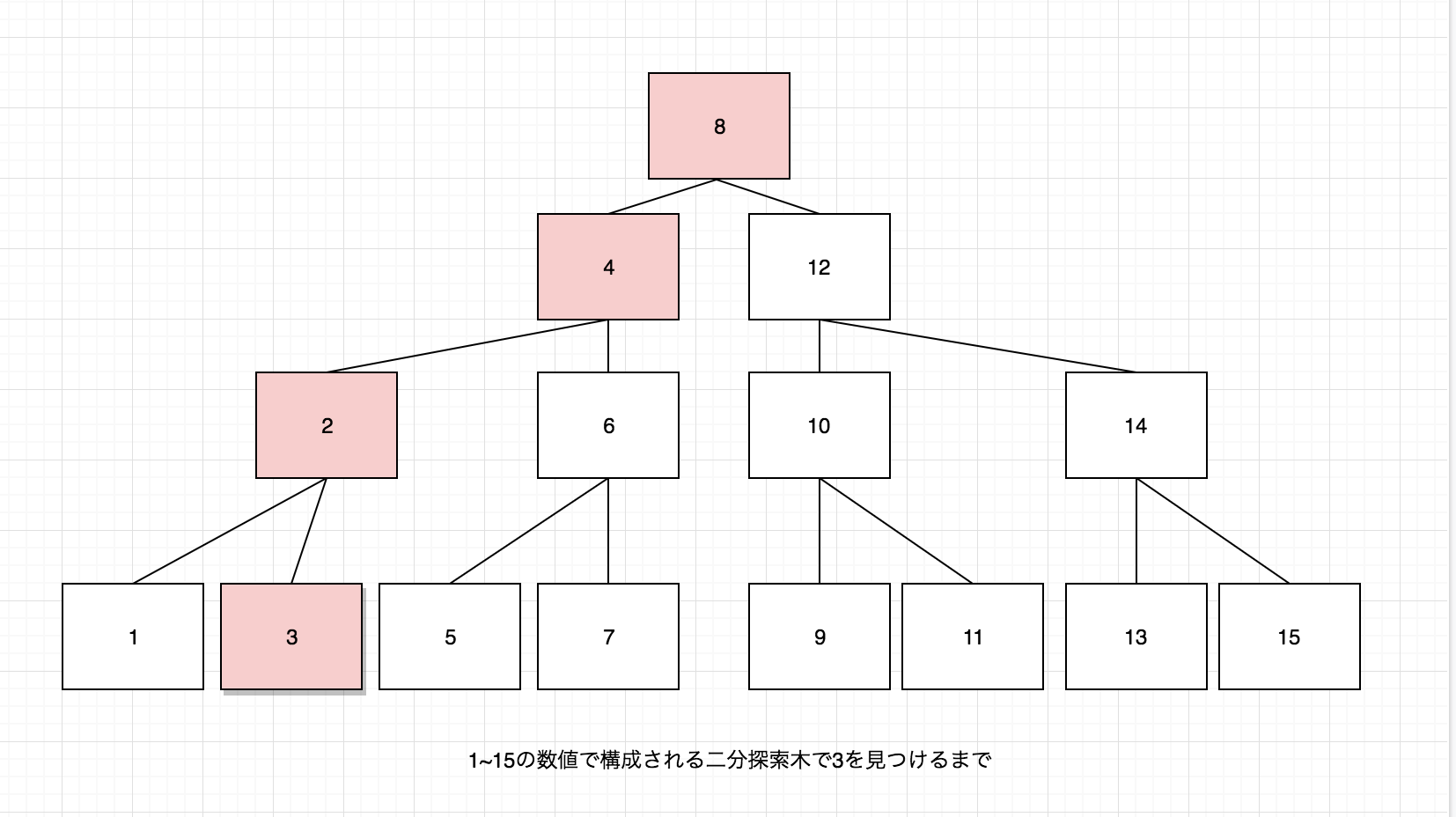
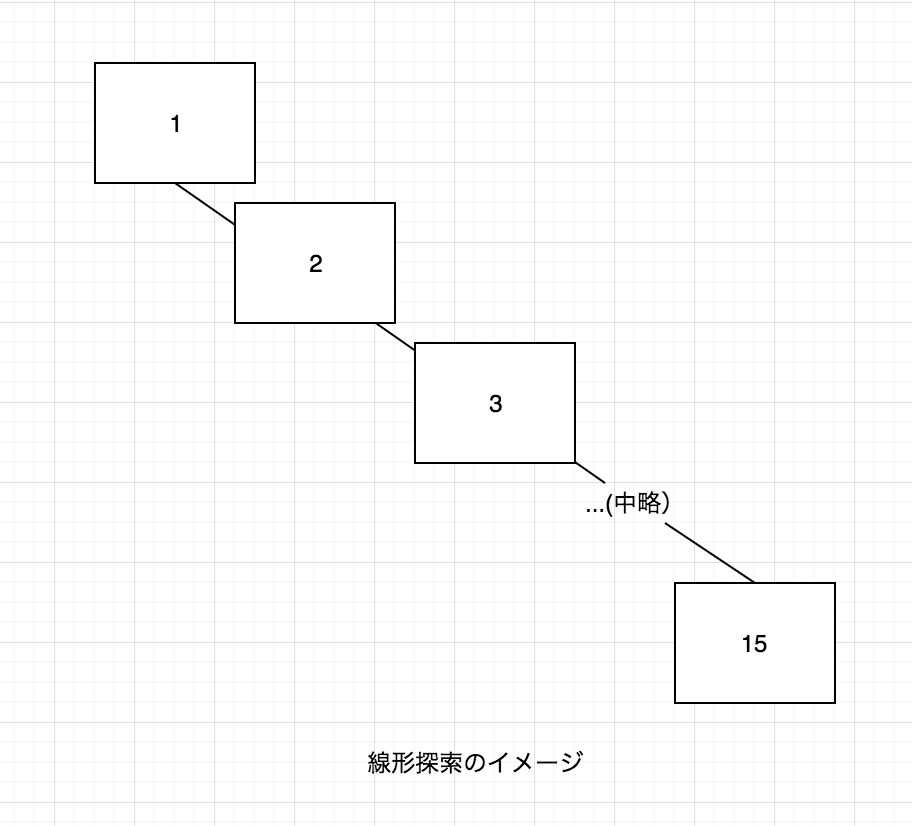
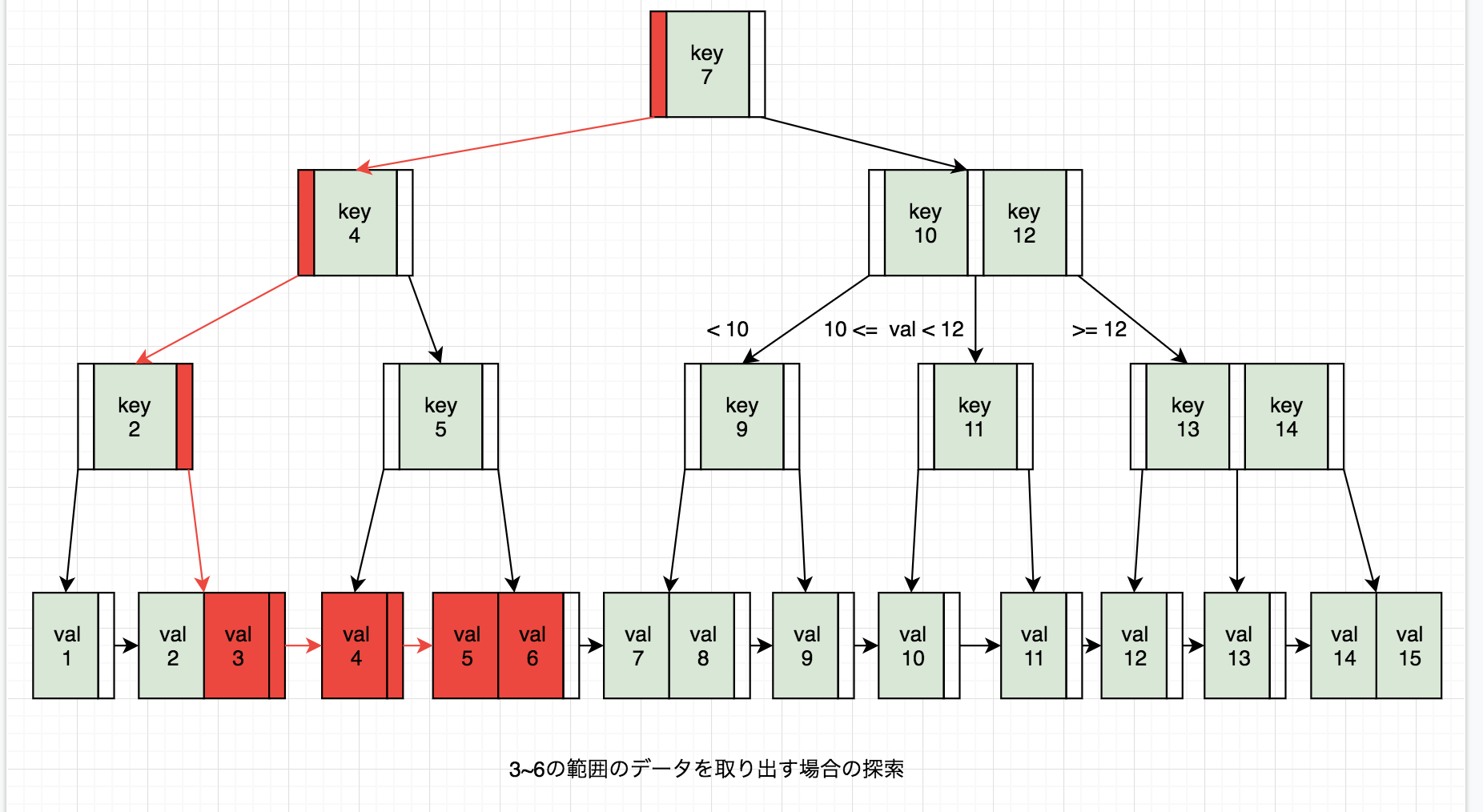
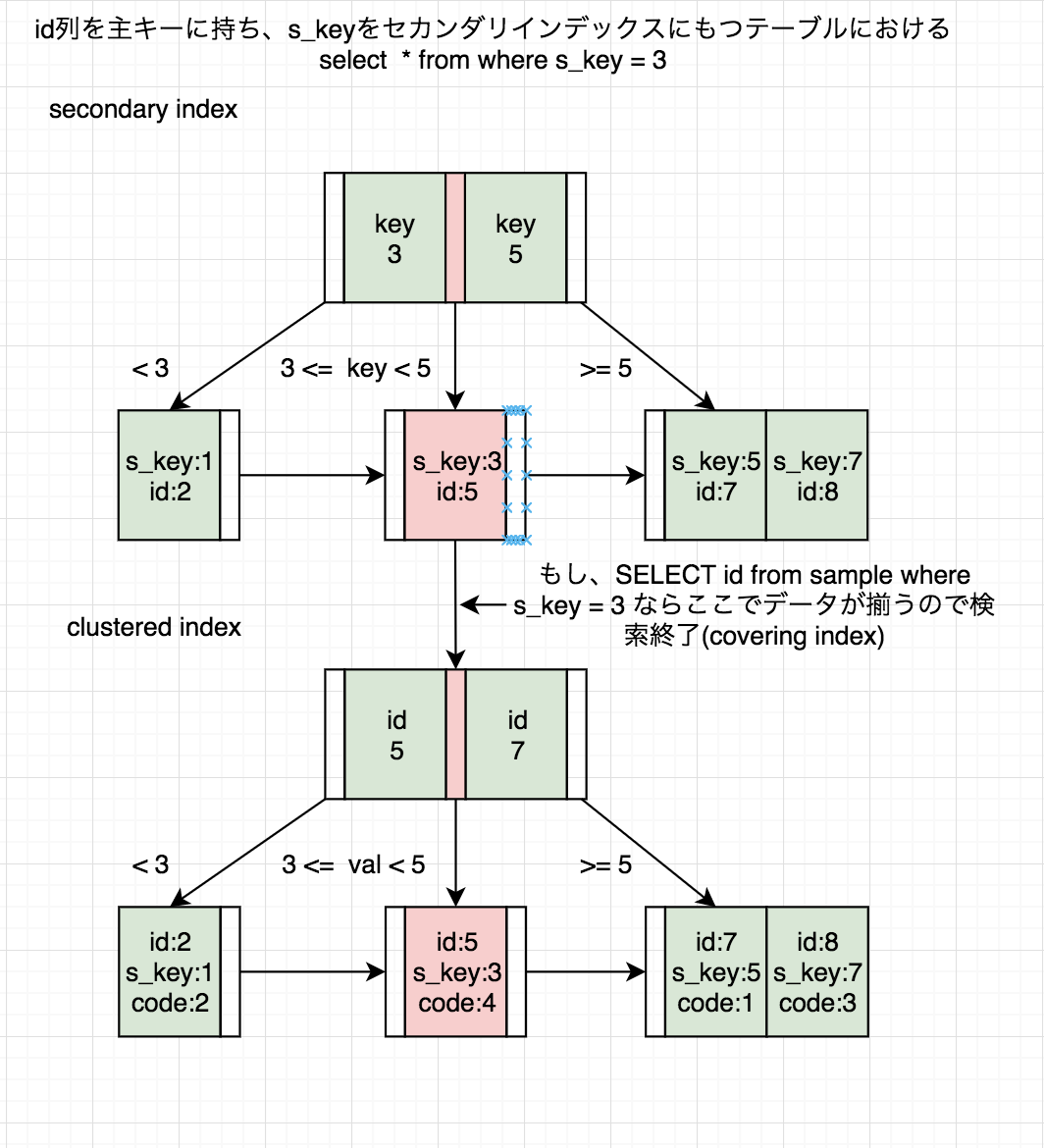
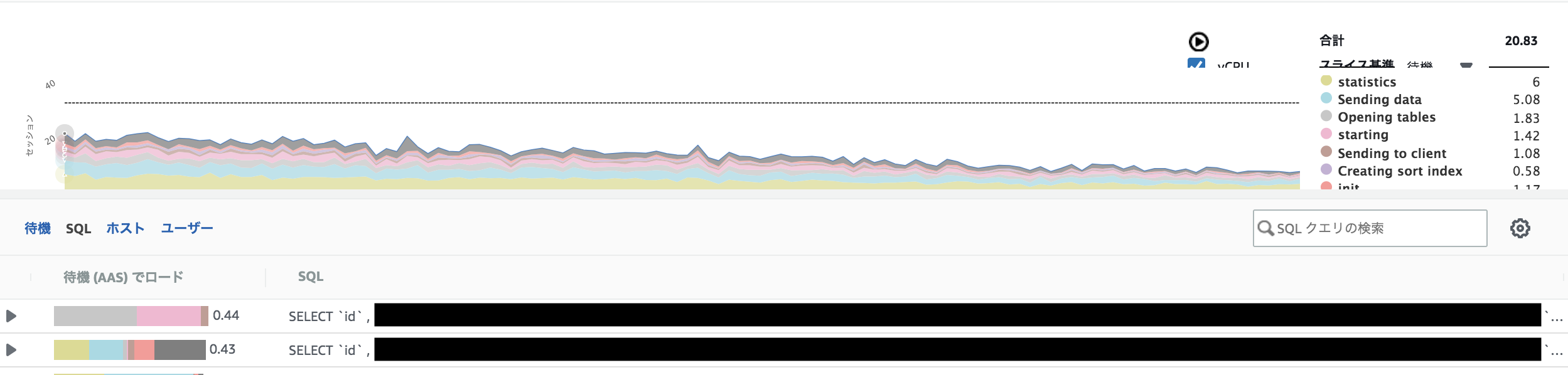

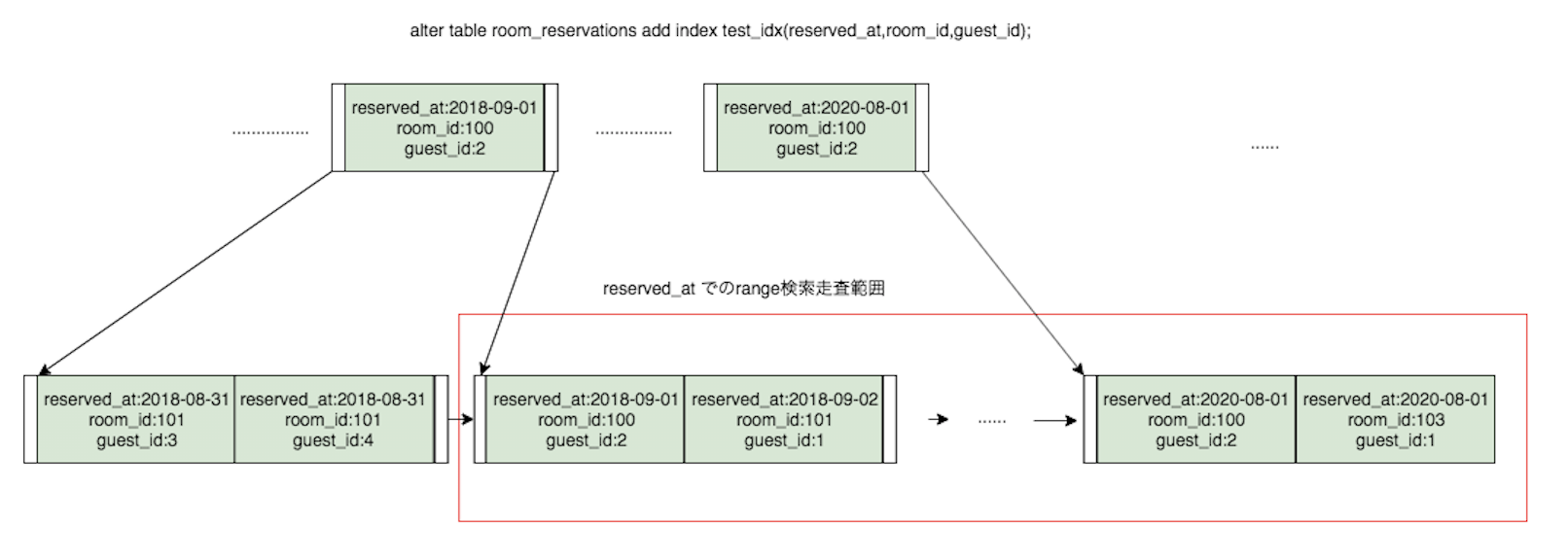
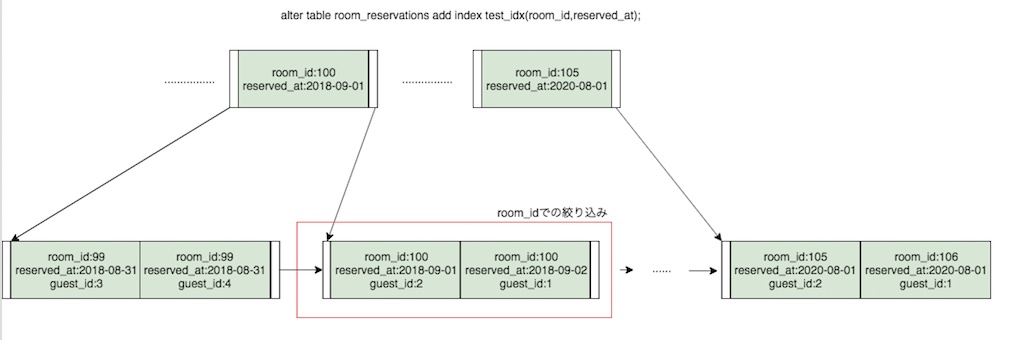
- 投稿日:2020-01-10T19:06:18+09:00
#Rails + #MySQL / Transaction と INSERT RECORD と ROLLBACK で排他制御の実験
パターン1 - プロセスA
INSERTのあと、しばらく後続の処理が続くが、最後には失敗するケース
Transaction内の処理が失敗してロールバックするActiveRecord::Base.transaction { User.create!(unique_id: 'X1'); sleep 15; raise; } # (0.7ms) BEGIN # User Create (0.9ms) INSERT INTO `users` (`unique_id`, `created_at`) VALUES ('X1', '2020-01-09 08:18:34') # # ... wait ... # # (10.4ms) ROLLBACK # from (pry):14:in `block in <main>'パターン1 - プロセスB
プロセスAのTransaction内での処理と重複するレコードをINSERTする
プロセスAの処理が失敗するのを待ってからコミットされ、さらに後続の処理が開始・成功するActiveRecord::Base.transaction { User.create!(unique_id: 'X1'); puts 'OK!'; } # # (0.5ms) BEGIN # # ... wait ... # # User Create (2573.1ms) INSERT INTO `users` (`unique_id`, `created_at`) VALUES ('X1', '2020-01-09 08:18:41') # OK! # (9.4ms) COMMIT # => nilパターン2 - プロセスA
INSERTのあと、しばらく後続の処理が続いて、最後に成功するケース
ActiveRecord::Base.transaction { User.create!(unique_id: 'X2'); sleep 15; puts 'OK!'; } # (1.0ms) BEGIN # User Create (2.2ms) INSERT INTO `users` (`unique_id`, `created_at`) VALUES ('X2', '2020-01-09 08:22:14') # # ... wait ... # # OK! # (19.2ms) COMMIT # => nilパターン2 - プロセスB
プロセスAの処理が成功するまで INSERT は待ち受け状態になる
プロセスAの処理が成功してTransactionが終了すると、こちらのINSERTはユニーク制限に反することが確定するため、そのタイミングで処理が失敗する
INSERT より後続の処理は実行されないActiveRecord::Base.transaction { User.create!(unique_id: 'X2'); puts 'OK!'; } # # ... wait ... # # (0.6ms) BEGIN # User Create (6831.2ms) INSERT INTO `users` (`unique_id`, `created_at`) VALUES ('X2', '2020-01-09 08:22:22') # (5.2ms) ROLLBACK # ActiveRecord::RecordNotUnique: Mysql2::Error: Duplicate entry 'X2' for key 'index_users_on_unique_id': INSERT INTO `users` (`unique_id`, `created_at`) VALUES ('X2', '2020-01-09 08:22:22')パターン3 - プロセスA
他のパターンと同じく、INSERTの後にしばらくTransaction内の処理が続く
ActiveRecord::Base.transaction { User.create!(unique_id: 'X3'); sleep 15; puts 'OK!'; }パターン3 - プロセスB
プロセスAのTransaction内での処理とは重複しないレコードをINSERTする
ユニーク制限に弾かれない登録なので、すぐコミットされるActiveRecord::Base.transaction { User.create!(unique_id: 'Y1'); puts 'OK!'; } # (0.8ms) BEGIN # User Create (0.9ms) INSERT INTO `users` (`unique_id`, `created_at`) VALUES ('Y1', '2020-01-09 08:18:38') # OK! # (2.9ms) COMMIT # => nilOriginal by Github issue
- 投稿日:2020-01-10T19:06:16+09:00
#Rails + #MySQL / Transaction & INSERT RECORD & ROLLBACK / Lock and wait example
Pattern1 - ProcessA
ActiveRecord::Base.transaction { User.create!(unique_id: 'X1'); sleep 15; raise; } # (0.7ms) BEGIN # User Create (0.9ms) INSERT INTO `users` (`unique_id`, `created_at`) VALUES ('X1', '2020-01-09 08:18:34') # # ... wait ... # # (10.4ms) ROLLBACK # from (pry):14:in `block in <main>'Pattern1 - ProcessB
ActiveRecord::Base.transaction { User.create!(unique_id: 'X1'); puts 'OK!'; } # # (0.5ms) BEGIN # # ... wait ... # # User Create (2573.1ms) INSERT INTO `users` (`unique_id`, `created_at`) VALUES ('X1', '2020-01-09 08:18:41') # OK! # (9.4ms) COMMIT # => nilPattern2 - ProcessA
ActiveRecord::Base.transaction { User.create!(unique_id: 'X2'); sleep 15; puts 'OK!'; } # (1.0ms) BEGIN # User Create (2.2ms) INSERT INTO `users` (`unique_id`, `created_at`) VALUES ('X2', '2020-01-09 08:22:14') # # ... wait ... # # OK! # (19.2ms) COMMIT # => nilPattern2 - ProcessB
ActiveRecord::Base.transaction { User.create!(unique_id: 'X2'); puts 'OK!'; } # # ... wait ... # # (0.6ms) BEGIN # User Create (6831.2ms) INSERT INTO `users` (`unique_id`, `created_at`) VALUES ('X2', '2020-01-09 08:22:22') # (5.2ms) ROLLBACK # ActiveRecord::RecordNotUnique: Mysql2::Error: Duplicate entry 'X2' for key 'index_users_on_unique_id': INSERT INTO `users` (`unique_id`, `created_at`) VALUES ('X2', '2020-01-09 08:22:22')Pattern3 - ProcessA
ActiveRecord::Base.transaction { User.create!(unique_id: 'X3'); sleep 15; puts 'OK!'; }Pattern3 - ProcessB
ActiveRecord::Base.transaction { User.create!(unique_id: 'Y1'); puts 'OK!'; }
# (0.8ms)  BEGIN
# User Create (0.9ms)  INSERT INTO `users` (`unique_id`, `created_at`) VALUES ('Y1', '2020-01-09 08:18:38')
# OK!
#  (2.9ms)  COMMIT
# => nil
Original by Github issue
- 投稿日:2020-01-10T16:36:43+09:00
HomebrewでMySQL8を入れたが、node.jsから接続できない(認証方式変更)
エラー内容
Client does not support authentication protocol requested by server; consider upgrading MySQL client原因
MySQL8から認証方式が変わった(caching_sha2_password)ようで、
Homebrewからインストールできるmysqlはその認証方式に対応していないのが原因っぽい。やったこと
パスワードのポリシーを確認
SHOW VARIABLES LIKE 'validate_password%';認証方式の変更
ALTER USER 'root'@'localhost' IDENTIFIED WITH mysql_native_password BY 'password';反映
flush privileges;確認
SELECT user, host, plugin FROM mysql.user;
参考
https://stackoverflow.com/questions/50093144/mysql-8-0-client-does-not-support-authentication-protocol-requested-by-server
https://its-office.jp/blog/web/2019/02/13/mysql8.html
https://qiita.com/ucan-lab/items/3ae911b7e13287a5b917

- 投稿日:2020-01-10T09:50:56+09:00
絵文字が文字化け(MySQL)
- 投稿日:2020-01-10T00:17:21+09:00
テーブルの結合ができない。。Mysql2::Error: Column 'updated_at' in order clause is ambiguous
はじめに
Railsでeager_loadしようとしたときに、下記のようなエラーが出て解消に時間がかかったのでまとめました。
Mysql2::Error: Column 'updated_at' in order clause is ambiguousやりたいこと
user の updated_at を指定した期間のものだけ抽出するために、テーブルの結合をしたい。
なぜeager_loadできないのか
これを実行すると、
user.rbUser.where("updated_at >= '2020/01/01' and updated_at <= '2020/01/31'").eager_load(:post)MySQLのエラーが出る。
Mysql2::Error: Column 'updated_at' in order clause is ambiguousなぜか。
updated_at は User にも Post にも存在しているため、どちらの updated_at なのか判別がつかない。
そこで、incidents.updated_at とすることで、User の updated_at なのか Post の updated_at なのかを明確化する。
下のように書き換えることで、エラーを解消することができました。
user.rb# incidents.updated_at とすることで、user User.where("incidents.updated_at >= '2020/01/01' and incidents.updated_at <= '2020/01/31'").eager_load(:post)まとめ
updated_at は、どのテーブルでも持っている値となるので、こういう値でjoinするときは気をつけるようにします。
裏話としては、railsでデバックをしていていたのですが、eager_loadを実行したらSQL文しか表示されずエラーが表示されていませんでした。
.to_sで文字列化することで、上記のMysql2::Errorが出てなんとかデバックすることができました。
エラーが隠れてる??自分の確認方法が悪かっただけかもしれませんが、、
時間はかかりましたが、解決できてよかったです。参考
- includes,joins,eager_load,preloadの違いを噛み砕いて説明する
- Mysql2::Error: Column 'created_at' in order clause is ambiguousの対策