- 投稿日:2019-08-28T22:35:49+09:00
C#で実行時に得たCOMオブジェクトのインタフェース名を取得する
下記サイトが参考になりそう。
http://eternalwindows.jp/com/auto/auto02.html
以下は何も知らずに思考錯誤した内容なので読む価値なしです。
時間ができたら見直します。
インスタンス化したComObject(※)の型情報を調べる方法を探した結果、特定のインタフェース(IDispatchとか)を実装している場合に型名(というかインタフェース名)が取得できることが判った。
※:.GetType().ToString()が"System.__ComObject"になるやつ
using System;
using System.Collections;
using System.Collections.Generic;
using System.ComponentModel;
using System.Data;
using System.Diagnostics;
using System.Drawing;
using System.Drawing.Drawing2D;
using System.IO;
using System.Reflection;
using System.Runtime.InteropServices;
using System.Runtime.InteropServices.ComTypes;
using System.Text;
using System.Text.RegularExpressions;
using System.Threading;

class Test
{
    [ComImport, InterfaceType(ComInterfaceType.InterfaceIsIUnknown), Guid("B196B283-BAB4-101A-B69C-00AA00341D07")]
    public interface IProvideClassInfo
    {
        [return: MarshalAs(UnmanagedType.Interface)]
        System.Runtime.InteropServices.ComTypes.ITypeInfo GetClassInfo();
    }

    [ComImport, InterfaceType(ComInterfaceType.InterfaceIsIUnknown), Guid("00020400-0000-0000-c000-000000000046")]
    public interface IDispatch
    {
        [PreserveSig]
        int GetTypeInfoCount(out int count);
        [PreserveSig]
        int GetTypeInfo([In] int itinfo, [In] int lcid, out IntPtr typeinfo);
        [PreserveSig]
        int GetIDsOfNames();//dummy. don't call this method
        [PreserveSig]
        int Invoke();//dummy. don't call this method
    }

    // rcw must be System.__ComObject type.
    static void ShowTypeInfoOfComObject(object rcw)
    {
        IntPtr _typeinfo = IntPtr.Zero;
        System.Runtime.InteropServices.ComTypes.ITypeInfo typeInfo = null;

        try {
            if ( rcw is IProvideClassInfo ) { // ※IProvideClassInfoのほうは未動確
                Console.WriteLine("IProvideClassInfo");
                typeInfo = ((IProvideClassInfo)rcw).GetClassInfo();
            }
            else if ( rcw is IDispatch ) {
                Console.WriteLine("IDispatch");

                var idisp = (IDispatch)rcw;
                int count;
                int hresult;
                hresult = idisp.GetTypeInfoCount(out count);
                Console.WriteLine("HRESULT 0x" + hresult.ToString("X8"));
                Console.WriteLine("TypeInfoCount "+count.ToString());
                if ( count < 1 ) {
                    Console.WriteLine("No type info");
                    return;
                }
                idisp.GetTypeInfo(0, 0, out _typeinfo);
                if ( _typeinfo == IntPtr.Zero ) {
                    Console.WriteLine("No ITypeInfo");
                    return;
                }

                typeInfo = (System.Runtime.InteropServices.ComTypes.ITypeInfo)
                          (Marshal.GetTypedObjectForIUnknown(_typeinfo, typeof(System.Runtime.InteropServices.ComTypes.ITypeInfo)));
            }
            else {
                Console.WriteLine("unknown type");
            }

            if (typeInfo != null) {
                string strName=null;
                string strDocString=null;
                int dwHelpContext=0;
                string strHelpFile=null;
                typeInfo.GetDocumentation(-1, out strName, out strDocString, out dwHelpContext, out strHelpFile);
                Console.WriteLine("name: " + strName??"<null>" );
                Console.WriteLine("doc: " + strDocString??"<null>" );
                Console.WriteLine("helpContext: " + dwHelpContext.ToString() );
                Console.WriteLine("help: " + strHelpFile??"<null>" );
            }
        }
        finally {
            if ( _typeinfo != IntPtr.Zero ) {
                Marshal.Release(_typeinfo);
            }
        }
    }

    [STAThread]
    static void Main()
    {
        Type comType = Type.GetTypeFromProgID("InternetExplorer.Application");
        Console.WriteLine("Creating IE instance...");
        dynamic ie = Activator.CreateInstance(comType); // Note: IEが起動していないと例外発生する環境があるよう
        Console.WriteLine("created.");

        if (ie != null) {
            try {
                ShowTypeInfoOfComObject(ie);
            }
            finally {
                // リソースの解放
                Marshal.ReleaseComObject(ie);
            }
        }
    }
}
実行結果
IWebBrowser2インタフェースが得られた。おそらく環境に依存するかと。
ちなみにレジストリのHKEY_CLASSES_ROOT\Interface\{XXXX...XXXX} のキーの規定値として存在します。インタフェース名は取得できたが、そのインタフェースの持っているメソッド名とかの取得方法は分からず。
Creating IE instance...
created.
IDispatch
HRESULT 0x00000000
TypeInfoCount 1
name: IWebBrowser2
doc: Web Browser Interface for IE4.
helpContext: 0
help:
参考サイト
- http://goungoun.dip.jp/app/fswiki/wiki.cgi/devnotebook?page=Visual+Studio+%2ENET+2003+C%23%A1%A2COM%A5%AA%A5%D6%A5%B8%A5%A7%A5%AF%A5%C8%A4%CE%BC%EF%CE%E0%A4%F2%C6%C0%A4%EB%A1%A3
- https://msdn.microsoft.com/ja-jp/magazine/dd347981.aspx
続き
下記情報(GUIDとか関数名・引数名らしきもの)が拾えるようになった。。サンプルが落ちてなくて思考錯誤の末、結局よくわからず。
⇒IWebBrowser2については、.Netでinterface定義されているのでILSpy.exeでメンバ確認できる。以下はGUIDとるとこ以外使い道がない・・
Creating IE instance...
created.
IDispatch
TypeInfoCount 1
[GUID]
d30c1661-cdaf-11d0-8a3e-00c04fc9e26e
[TypeInfo info]
<-1><><IWebBrowser2><Web Browser Interface for IE4.>
[FuncDesc info]
0<500><Navigate2,URL,Flags,TargetFrameName,PostData,Headers><Navigate2><Navigates to a URL or file or pidl.>
1<501><QueryStatusWB,cmdID,pcmdf><QueryStatusWB><IOleCommandTarget::QueryStatus>
2<502><ExecWB,cmdID,cmdexecopt,pvaIn,pvaOut><ExecWB><IOleCommandTarget::Exec>
3<503><ShowBrowserBar,pvaClsid,pvarShow,pvarSize><ShowBrowserBar><Set BrowserBar to Clsid>
4<-525><ReadyState,plReadyState><ReadyState><>
5<550><Offline,pbOffline><Offline><Controls if the frame is offline (read from cache)>
6<550><Offline,pbOffline><Offline><Controls if the frame is offline (read from cache)>
7<551><Silent,pbSilent><Silent><Controls if any dialog boxes can be shown>
8<551><Silent,pbSilent><Silent><Controls if any dialog boxes can be shown>
9<552><RegisterAsBrowser,pbRegister><RegisterAsBrowser><Registers OC as a top-level browser (for target name resolution)>
10<552><RegisterAsBrowser,pbRegister><RegisterAsBrowser><Registers OC as a top-level browser (for target name resolution)>
11<553><RegisterAsDropTarget,pbRegister><RegisterAsDropTarget><Registers OC as a drop target for navigation>
12<553><RegisterAsDropTarget,pbRegister><RegisterAsDropTarget><Registers OC as a drop target for navigation>
13<554><TheaterMode,pbRegister><TheaterMode><Controls if the browser is in theater mode>
14<554><TheaterMode,pbRegister><TheaterMode><Controls if the browser is in theater mode>
15<555><AddressBar,Value><AddressBar><Controls whether address bar is shown>
16<555><AddressBar,Value><AddressBar><Controls whether address bar is shown>
17<556><Resizable,Value><Resizable><Controls whether the window is resizable>
18<556><Resizable,Value><Resizable><Controls whether the window is resizable>
[ITypeLib info]
4
-1<SHDocVw><Microsoft Internet Controls>
0<IWebBrowser><Web Browser interface>
1<DWebBrowserEvents><Web Browser Control Events (old)>
2<CommandStateChangeConstants><Constants for WebBrowser CommandStateChange>
3<IWebBrowserApp><Web Browser Application Interface.>
4<IWebBrowser2><Web Browser Interface for IE4.>
5<OLECMDID><>
6<OLECMDF><>
7<OLECMDEXECOPT><>
8<tagREADYSTATE><>
9<SecureLockIconConstants><Constants for WebBrowser security icon notification>
10<NewProcessCauseConstants><Constants for WebBrowser NewProcess notification>
11<DWebBrowserEvents2><Web Browser Control events interface>
12<WebBrowser_V1><WebBrowser Control>
13<WebBrowser><WebBrowser Control>
14<InternetExplorer><Internet Explorer Application.>
15<InternetExplorerMedium><Internet Explorer Application with default integrity of Medium>
16<ShellBrowserWindow><Shell Browser Window.>
17<ShellWindowTypeConstants><Constants for ShellWindows registration>
18<ShellWindowFindWindowOptions><Options for ShellWindows FindWindow>
19<DShellWindowsEvents><Event interface for IShellWindows>
20<IShellWindows><Definition of interface IShellWindows>
21<ShellWindows><ShellDispatch Load in Shell Context>
22<IShellUIHelper><Shell UI Helper Control Interface>
23<IShellUIHelper2><Shell UI Helper Control Interface 2>
24<IShellUIHelper3><Shell UI Helper Control Interface 3>
25<IShellUIHelper4><Shell UI Helper Control Interface 4>
26<IShellUIHelper5><Shell UI Helper Control Interface 5>
27<IShellUIHelper6><Shell UI Helper Control Interface 6>
28<IShellUIHelper7><Shell UI Helper Control Interface 7>
29<IShellUIHelper8><Shell UI Helper Control Interface 8>
30<ShellUIHelper><>
31<DShellNameSpaceEvents><>
32<IShellFavoritesNameSpace><IShellFavoritesNameSpace Interface>
33<IShellNameSpace><IShellNameSpace Interface>
34<ShellNameSpace><>
35<IScriptErrorList><Script Error List Interface>
36<CScriptErrorList><>
using System; using System.Collections; using System.Collections.Generic; using System.ComponentModel; using System.Data; using System.Diagnostics; using System.Drawing; using System.Drawing.Drawing2D; using System.IO; using System.Reflection; using System.Runtime.InteropServices; using System.Runtime.InteropServices.ComTypes; using System.Text; using System.Text.RegularExpressions; using System.Threading; class Test { [ComImport, InterfaceType(ComInterfaceType.InterfaceIsIUnknown), Guid("B196B283-BAB4-101A-B69C-00AA00341D07")] public interface IProvideClassInfo { [return: MarshalAs(UnmanagedType.Interface)] System.Runtime.InteropServices.ComTypes.ITypeInfo GetClassInfo(); } [ComImport, InterfaceType(ComInterfaceType.InterfaceIsIUnknown), Guid("00020400-0000-0000-c000-000000000046")] public interface IDispatch { [PreserveSig] int GetTypeInfoCount(out int count); [PreserveSig] int GetTypeInfo([In] int itinfo, [In] int lcid, out IntPtr typeinfo); [PreserveSig] int GetIDsOfNames();//dummy. don't call this method [PreserveSig] int Invoke();//dummy. don't call this method } // rcw must be System.__ComObject type. static void ShowTypeInfoOfComObject(object rcw) { IntPtr _typeinfo = IntPtr.Zero; ITypeInfo typeInfo = null; try { if ( rcw is IProvideClassInfo ) { // ※IProvideClassInfoのほうは未動確 Console.WriteLine("IProvideClassInfo"); typeInfo = ((IProvideClassInfo)rcw).GetClassInfo(); } else if ( rcw is IDispatch ) { Console.WriteLine("IDispatch"); var idisp = (IDispatch)rcw; int count; int hresult = idisp.GetTypeInfoCount(out count); if (hresult>=0) { // 最上位bitが 1でない(bit 0x80000000が立っていない) Console.WriteLine("TypeInfoCount "+count.ToString()); if ( count < 1 ) { Console.WriteLine("No type info"); return; } idisp.GetTypeInfo(0, 0, out _typeinfo); if ( _typeinfo == IntPtr.Zero ) { Console.WriteLine("No ITypeInfo"); return; } typeInfo = (System.Runtime.InteropServices.ComTypes.ITypeInfo) (Marshal.GetTypedObjectForIUnknown(_typeinfo, typeof(System.Runtime.InteropServices.ComTypes.ITypeInfo))); } } else { Console.WriteLine("unknown type"); } if (typeInfo != null) { Console.WriteLine("[GUID]"); do { IntPtr typeAttrPtr = IntPtr.Zero; try { typeInfo.GetTypeAttr(out typeAttrPtr); } catch (COMException ) { break; } if (typeAttrPtr == IntPtr.Zero) { break; } try{ var typeAttr = Marshal.PtrToStructure<System.Runtime.InteropServices.ComTypes.TYPEATTR>(typeAttrPtr); Console.WriteLine(typeAttr.guid); } finally { typeInfo.ReleaseTypeAttr(typeAttrPtr); } } while(false); Console.WriteLine("[TypeInfo info]"); DumpTypeInfoOfMemId(typeInfo, -1, false); Console.WriteLine("[FuncDesc info]"); for (int fid=0;fid<1000;fid++) { IntPtr funcDescPtr = IntPtr.Zero; try { typeInfo.GetFuncDesc(fid, out funcDescPtr); } catch (COMException ) { break; } if (funcDescPtr == IntPtr.Zero) { break; } Console.Write(fid.ToString()); try{ var funcDesc = Marshal.PtrToStructure<System.Runtime.InteropServices.ComTypes.FUNCDESC>(funcDescPtr); DumpTypeInfoOfMemId(typeInfo, funcDesc.memid, true); } finally { typeInfo.ReleaseFuncDesc(funcDescPtr); } } Console.WriteLine("[ITypeLib info]"); ITypeLib libInfo; int index; typeInfo.GetContainingTypeLib(out libInfo, out index); Console.WriteLine(index); DumpTypeLib(libInfo); } } finally { if ( _typeinfo != IntPtr.Zero ) { Marshal.Release(_typeinfo); } } } static void DumpTypeLib( ITypeLib libInfo) { if (libInfo!=null) { int n = libInfo.GetTypeInfoCount(); for(int i=-1;i<n;i++) { string strName=null; string strDocString=null; int dwHelpContext=0; string strHelpFile=null; libInfo.GetDocumentation(i, out strName, out strDocString, out dwHelpContext, out strHelpFile); Console.Write(i); Console.Write("<"+strName+">" ); Console.Write("<" + strDocString+">" ); // Console.Write("<" + dwHelpContext.ToString()+">" ); // Console.Write("<" + strHelpFile+">" ); Console.WriteLine(); // if (i==-1){Console.WriteLine();continue;} // // ITypeInfo typinf=null; // try{ // libInfo.GetTypeInfo(i, out typinf); // } // catch(COMException){Console.WriteLine("COMError");} // // if(typinf != null) { // libInfo.GetDocumentation(-1, out strName, out strDocString, out dwHelpContext, out strHelpFile); // Console.Write("<"+strName+">" ); // Console.WriteLine("<" + strDocString+">" ); // } } } } static void DumpTypeInfoOfMemId( ITypeInfo typeInfo, int memid, bool doGetNames) { string[] buf = new string[100]; int nbuf; try{ Console.Write("<"+memid.ToString()+">"); Console.Write("<"); if (doGetNames) { typeInfo.GetNames(memid, buf, buf.Length, out nbuf); for ( int i=0;i<nbuf;i++ ) { if(i>0){Console.Write(",");} Console.Write(buf[i]); } } Console.Write(">"); string strName=null; string strDocString=null; int dwHelpContext=0; string strHelpFile=null; typeInfo.GetDocumentation(memid, out strName, out strDocString, out dwHelpContext, out strHelpFile); Console.Write("<"+strName+">" ); Console.WriteLine("<" + strDocString+">" ); // Console.WriteLine("<" + dwHelpContext.ToString() +">"); // Console.WriteLine("<" + strHelpFile+">" ); // Console.WriteLine(); } catch(COMException){ Console.WriteLine(" COMError"); } } [STAThread] static void Main() { Type comType = Type.GetTypeFromProgID("InternetExplorer.Application"); Console.WriteLine("Creating IE instance..."); dynamic ie = Activator.CreateInstance(comType); // Note: IEが起動していないと例外発生する環境があるよう Console.WriteLine("created."); if (ie != null) { try { ShowTypeInfoOfComObject(ie); } finally { // リソースの解放 Marshal.ReleaseComObject(ie); ie = null; GC.Collect(); GC.WaitForPendingFinalizers(); GC.Collect(); } } } }

- 投稿日:2019-08-28T15:20:36+09:00
【Unity】子の要素をFindを使わずにFor文で取得する。
はじめに(追記)
追記 : コメントでさらにスマートな処理を書いていただいたので、そちらも併せて紹介しておきます。
GameObjectをFindで取得するには、当然Findするオブジェクトを指定しなければいけないため、
取得したいオブジェクトの数だけ分が増えます。これが数が増えてくると面倒くさい...。気付けばこんな事に...
これをなんとか解消したいと思い、色々試した結果For文を使って短く、それでいて管理が楽にできたので
記事としてまとめようと思った次第です。Script(追記)
追記 :追記のスクリプト
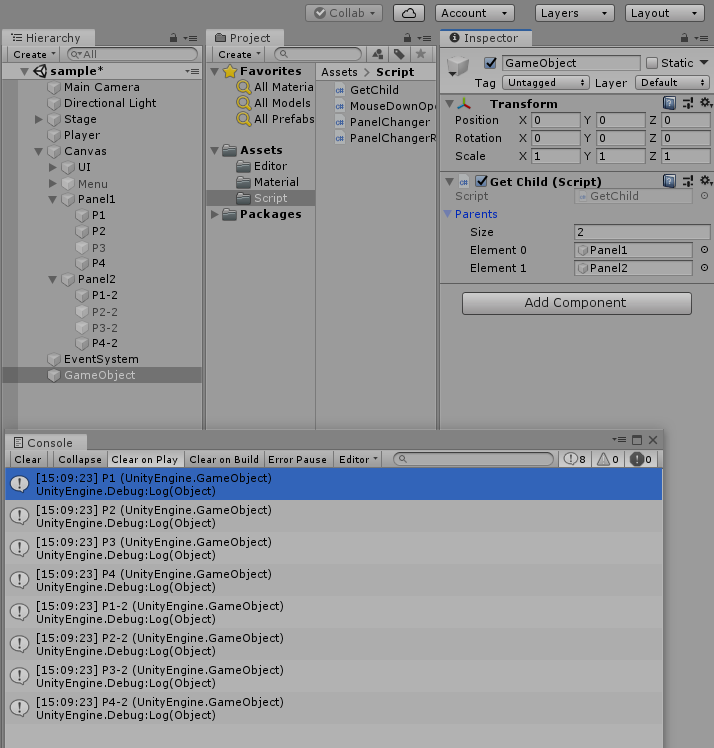
GetChildNext.csusing System.Collections; using System.Collections.Generic; using UnityEngine; public class GetChild : MonoBehaviour { public GameObject[] Parents; List<GameObject> Paneles; void Start() { Paneles = new List<GameObject>(); foreach(GameObject p in Parents) { foreach(Transform child in p.transform) { Paneles.Add(child.gameObject); } } for(int i = 0; i < Paneles.Count; i++) { Debug.Log(Paneles[i]); } } }この処理では親を1、子を2、子の子を3としたとき、Parentsにセットしている子を取得するので、
1をセットしている場合、2のオブジェクトは取得されるが、3は取得されません。
(下のGetChild.csでも同じです)3を取得したい場合は2をセットすれば取得できます。
GetChild.csusing System.Collections; using System.Collections.Generic; using UnityEngine; public class GetChild : MonoBehaviour { public GameObject[] Parents; GameObject Panel; List<GameObject> Paneles; void Start() { Paneles = new List<GameObject>(); for(int v = 0; v < Parents.Length; v++) { for(int i = 0; i < Parents[v].transform.childCount; i++ ) { Panel = Parents[v].transform.GetChild(i).gameObject; Paneles.Add(Panel); } } for(int i = 0; i < Paneles.Count; i++) //確認用の表記 { Debug.Log(Paneles[i]); } } }たったこれだけです。
使い方は以下の通りです。
1、何らかのオブジェクトにアタッチする
2、子を取得したい親オブジェクトをParentsインスペクターにセット
(Sizeを変更すればセットできる数も増えます)
さいごに
この方法を考え付いたのは、インターフェースの記事を見ていて、こういう感じにうまく
まとめられないかなぁ~という漠然とした思い付きで試してみた結果、
「なんかできたわ」という感じでした。自分の知識量が以前に比べて増えているんだなぁという実感を得られたので良かったです。
この方法が誰かの役に立ちますように。
- 投稿日:2019-08-28T10:16:11+09:00
【XamarinForms】 XAML上で親ビューのコードビハインドのプロパティを参照する方法
カスタムコントロールの作成時など、XAML上でコードビハインドのプロパティを参照したい場面に使えます。
完成品
・親=ContentPage
・子=Label
・表現:「親」の機嫌が良いと察知したら、即座におこづかいをねだる世渡り上手な「子」MainPage.xaml
<?xml version="1.0" encoding="utf-8"?>
<ContentPage
    xmlns="http://xamarin.com/schemas/2014/forms"
    xmlns:x="http://schemas.microsoft.com/winfx/2009/xaml"
    xmlns:d="http://xamarin.com/schemas/2014/forms/design"
    xmlns:mc="http://schemas.openxmlformats.org/markup-compatibility/2006"
    mc:Ignorable="d"
    x:Name="Oya"
    x:Class="DemoApp.MainPage">
    <Grid VerticalOptions="Center" HorizontalOptions="Center">
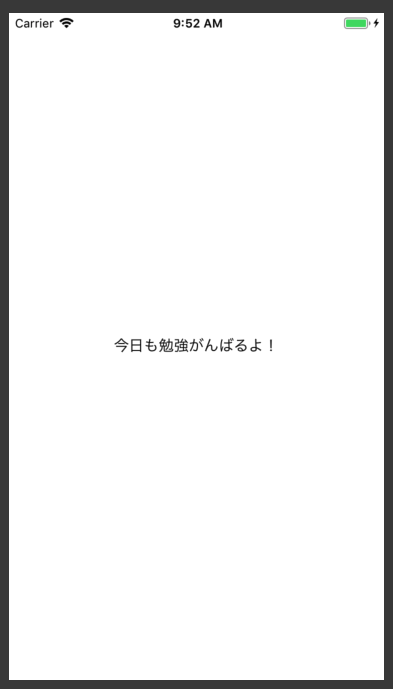
        <Label x:Name="Kodomo" Text="今日も勉強がんばるよ!" >
            <Label.Triggers>
                <DataTrigger TargetType="Label" Binding="{Binding Source={x:Reference Oya},Path=IsHappy}" Value="true">
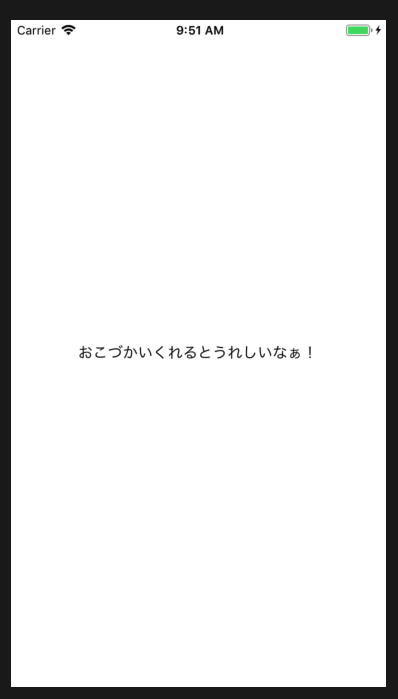
                    <Setter Property="Text" Value="おこづかいくれるとうれしいなぁ!" />
                </DataTrigger>
            </Label.Triggers>
        </Label>
    </Grid>
</ContentPage>
MainPage.xaml.cs
※例として「IsHappy」プロパティを定義
using System.ComponentModel;
using Xamarin.Forms;

namespace DemoApp
{
    public partial class MainPage : ContentPage
    {
        public MainPage()
        {
            InitializeComponent();
            IsHappy = false;
        }

        public bool _isHappy;
        public bool IsHappy
        {
            get
            {
                return _isHappy;
            }
            set
            {
                _isHappy = value;
                OnPropertyChanged();
            }
        }
    }
}
親のIsHappy=falseの場合
親のIsHappy=trueの場合
実現する手順
手順 1/2
XAML上: 親Viewに名前をつける
x:Name="Oya"手順 2/2
XAML上: 子から親Viewのプロパティを参照
Binding="{Binding Source={x:Reference Oya},Path=IsHappy}"以上です
メモ:環境 .NET Standard 2.0 Xamarin.Forms 4.2 IDE: VisualStudio For Mac 8.2.4
- 投稿日:2019-08-28T08:49:34+09:00
[C#] 2つのIDisposableをusingしたときのコード分析の指摘CA2202の対応
もくじ
→https://qiita.com/tera1707/items/4fda73d86eded283ec4fやりたいこと
ファイルの読み書きをするときによく書いている下記のようなコードで、コード分析をかけたときにいつも
CA2202という警告が出てきてたが、「実績あるコード」ということで修正せずに今まで来ていた。
が、新規ソフトでも同じ警告が出たので、この際直し方をはっきりさせておきたい。CA2202でるコード.csbyte[] data = { 0, 1, 2, 3 }; using (var fs = new FileStream(@"C:\work\file1.data", FileMode.Create)) using (var bw = new BinaryWriter(fs)) { bw.Write(data); }出る警告
なおしかた
下記のようなコードに直す。
CA2202でないコード.csbyte[] data = { 0, 1, 2, 3 }; FileStream fs = null; try { fs = new FileStream(@"C:\work\file1.data", FileMode.Create); using (var bw = new BinaryWriter(fs)) { fs = null; bw.Write(data); } } finally { fs?.Dispose(); }ポイント
using (var bw = new BinaryWriter(fs))の中で、使い終わったfsを、冒頭でfs = null;すること。
この一文を書かないと、やはりCA2202が出てしまう。備考
usingで、使い終わったFileStreamのオブジェクトfsが、
- BinaryWriterのオブジェクトbwが破棄Dispose)されるとき
- 自分のusingで、自動でDisposeされるとき
の2回、破棄される可能性がある、作りによっては二回目の破棄の際にアプリ落ちますよ、という警告。実際はこのコードではアプリが落ちたりはしない(おそらく、FileStreamとかBinaryWriterが、すでに破棄済みのものは二重に破棄しないようにつくってくれてるから)が、IDisposableを実装したなにかのライブラリとか、自前のクラスを使うときにusingでこういうことを書くと、Disposeの実装の仕方によっては落ちてしまうものと思われる。
参考
CA2202: Do not dispose objects multiple times
公式の?対処方法がここに書かれている。
https://docs.microsoft.com/ja-jp/visualstudio/code-quality/ca2202-do-not-dispose-objects-multiple-times?view=vs-2019入れ子の using に対する CA2202 違反の解決策について
https://social.msdn.microsoft.com/Forums/vstudio/ja-JP/eb99475a-e97c-48f5-90fc-029331025e6f/20837124282337612398-using-12395235501237712427-ca2202?forum=netfxgeneralja

- 投稿日:2019-08-28T01:17:52+09:00
XFREEのサーバ(Mysql)にVisualStusioから接続したい。(失敗) [メモ]
XFREEのサーバ(Mysql)にVisualStusioから接続したい。 [メモ]自分メモです。
まえおき。
講義内でローカルのmysqlに接続する方法は習っていたが外部サーバに接続する方法が全く分からなかった。卒業研究でも必要なためメモ用にまとめる。
開発環境
Visualstudio2017
参考サイト
wp-config.phpに指定する「MySQL のホスト名」とは
https://www.nishi2002.com/4123.html
(ホスト名といいう単語がわからなかった。)実践
今回は接続の確認のみなのでopen,closeできることを確認する。
form1.csusing System; using System.Collections.Generic; using System.ComponentModel; using System.Data; using System.Drawing; using System.Linq; using System.Text; using System.Threading.Tasks; using System.Windows.Forms; using MySql.Data.MySqlClient; using System.Diagnostics; using System.IO; namespace ConnectionTest { public partial class Form1 : Form { MySqlConnection connection = new MySqlConnection(); MySqlCommand command = new MySqlCommand(); public Form1() { InitializeComponent(); connection.ConnectionString = "server = *********; user id = *************; password = ********; persistsecurityinfo = True; database = ********"; } private void button1_Click(object sender, EventArgs e) { connection.Open(); Console.WriteLine("Open"); } private void button2_Click(object sender, EventArgs e) { connection.Close(); Console.WriteLine("Close"); } } }結果
無理だった。タイムアウトで弾かれ調べた結果以下のものを見つけました。
[レンタルサーバーのデータベースに外部から接続できません。]https://teratail.com/questions/152035
知識不足でした。
VPS借りてやってみます。
- 投稿日:2019-08-28T01:17:52+09:00
XFREEのサーバ(Mysql)にVisualStudioから接続したい。(失敗) [メモ]
XFREEのサーバ(Mysql)にVisualStudioから接続したい。 [メモ]自分メモです。
まえおき。
講義内でローカルのmysqlに接続する方法は習っていたが外部サーバに接続する方法が全く分からなかった。卒業研究でも必要なためメモ用にまとめる。
開発環境
Visualstudio2017
参考サイト
wp-config.phpに指定する「MySQL のホスト名」とは
https://www.nishi2002.com/4123.html
(ホスト名といいう単語がわからなかった。)実践
今回は接続の確認のみなのでopen,closeできることを確認する。
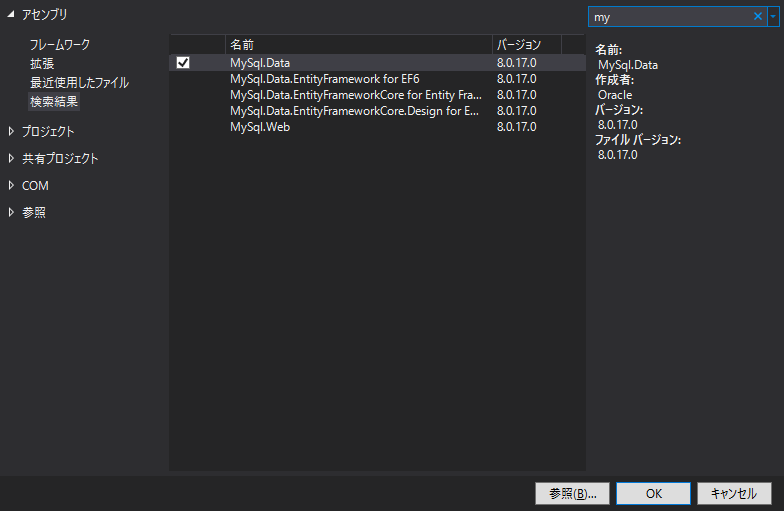
接続にはMySQL Connector/NETを使用する。
form1.csusing System; using System.Collections.Generic; using System.ComponentModel; using System.Data; using System.Drawing; using System.Linq; using System.Text; using System.Threading.Tasks; using System.Windows.Forms; using MySql.Data.MySqlClient; using System.Diagnostics; using System.IO; namespace ConnectionTest { public partial class Form1 : Form { MySqlConnection connection = new MySqlConnection(); MySqlCommand command = new MySqlCommand(); public Form1() { InitializeComponent(); connection.ConnectionString = "server = *********; user id = *************; password = ********; persistsecurityinfo = True; database = ********"; } private void button1_Click(object sender, EventArgs e) { connection.Open(); Console.WriteLine("Open"); } private void button2_Click(object sender, EventArgs e) { connection.Close(); Console.WriteLine("Close"); } } }結果
無理だった。タイムアウトで弾かれ調べた結果以下のものを見つけました。
[レンタルサーバーのデータベースに外部から接続できません。]https://teratail.com/questions/152035
知識不足でした。
VPS借りてやってみます。