- 投稿日:2019-07-07T18:28:49+09:00
<Go言語>マップの値を標準入力する方法
本記事の内容
Go言語のマップ、(他言語でいう連想配列)の値を標準入力する方法を紹介します。(備忘録)
コードの解説
例として、キーに「長所(advantage)」「短所(disadvantage
)」、値にその具体的な文章を入力するようなマップを作ります。
マップ名は仮に「review」とでもしておきましょう。map.gopackage main import "fmt" func main(){ //fmt.Scanで入力した文字を代入するための変数定義 var advantage,disadvantage string //fmt.Scanで長所、短所の入力 fmt.Println("あなたの長所は?") fmt.Scan(&advantage) fmt.Println("あなたの短所は?") fmt.Scan(&disadvantage) //mapの作成 review :=map[string]string{ "advantage":advantage, "disadvantage":disadvantage, } //入力した値の表示 fmt.Println("あなたの長所:"+advantage) fmt.Println("あなたの短所:"+disadvantage) //ここで正しく表示されているかチェック(なくても良い) fmt.Println(review["advantage"]) fmt.Println(review["disadvantage"]) }このように書けばマップの値をターミナルからの入力で指定することができます。
良いGoLifeを!

- 投稿日:2019-07-07T17:20:29+09:00
データの保存(GAE/Go/Gin)
はじめに
GAEをGinを利用して構築していきます。
HTML フォームデータの処理(GAE/Go/Gin)の続きです。流れは、公式サイトのデータの保存と同じです。
ソース
今回のフォルダ構成は、以下の通りです。
├── template │ └── index.html ├── static │ ├── style.css │ └── gcp-gopher.svg ├── app.yaml └── main.goapp.yamlruntime: go111 handlers: - url: /static static_dir: static - url: /.* script: autostyle.cssbody { font-family: Arial, sans-serif; color: blue; }Ginを利用しており、GETメソッドと POSTメソッドで呼び出すハンドラーを分けています。
main.gopackage main import ( "fmt" "net/http" "time" "github.com/gin-gonic/gin" "google.golang.org/appengine" "google.golang.org/appengine/datastore" "google.golang.org/appengine/log" ) type Post struct { Author string Message string Posted time.Time } type templateParams struct { Notice string Name string Message string Posts []Post } func main() { router := gin.Default() router.LoadHTMLGlob("template/*") // 事前にテンプレートをロード(相対パス) router.GET("/", indexGetHandle) router.POST("/", indexPostHandle) http.Handle("/", router) // router.Run(":8080")の代わり appengine.Main() // これがないと動かない } func indexGetHandle(c *gin.Context) { ctx := appengine.NewContext(c.Request) params := templateParams{} q := datastore.NewQuery("Post").Order("-Posted").Limit(20) if _, err := q.GetAll(ctx, ¶ms.Posts); err != nil { log.Errorf(ctx, "Getting posts: %v", err) params.Notice = "Couldn't get latest posts. Refresh?" c.HTML(http.StatusInternalServerError, "top/index", gin.H{ "params": params, }) return } c.HTML(http.StatusOK, "top/index", gin.H{ "params": params, }) } func indexPostHandle(c *gin.Context) { ctx := appengine.NewContext(c.Request) params := templateParams{} post := Post{ Author: c.PostForm("name"), Message: c.PostForm("message"), Posted: time.Now(), } if post.Author == "" { post.Author = "Anonymous Gopher" } params.Name = post.Author if post.Message == "" { params.Notice = "No message provided" c.HTML(http.StatusBadRequest, "top/index", gin.H{ "params": params, }) return } key := datastore.NewIncompleteKey(ctx, "Post", nil) if _, err := datastore.Put(ctx, key, &post); err != nil { log.Errorf(ctx, "datastore.Put: %v", err) params.Notice = "Couldn't add new post. Try again?" params.Message = post.Message // Preserve their message so they can try again. c.HTML(http.StatusInternalServerError, "top/index", gin.H{ "params": params, }) return } params.Posts = append([]Post{post}, params.Posts...) params.Notice = fmt.Sprintf("Thank you for your submission, %s!", post.Author) c.HTML(http.StatusOK, "top/index", gin.H{ "params": params, }) }変数指定で、「.params」がないと動作しませんでした。
template/index.html{{ define "top/index" }} <!doctype html> <html> <head> <title>The Gopher Network</title> <link rel="stylesheet" type="text/css" href="/static/style.css"> </head> <body> <h1>The Gopher Network</h1> <img id="logo" src="/static/gcp-gopher.svg" width="100"> {{with .params.Notice}}<div id="notice">{{.}}</div>{{end}} <form action="/" method="post"> <div>Name: <input name="name" value="{{.params.Name}}"></div> <div>Message: <input name="message"></div> <input type="submit"> </form> {{with .params.Posts}} <ol> {{range . }} <li><cite>{{.Author}}</cite><p>{{.Message}}</p></li> {{end}} </ol> {{end}} </body> </html> {{ end }}ローカルで実行
dev_appserver.py app.yaml
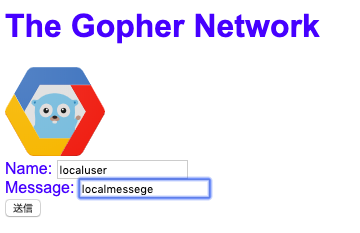
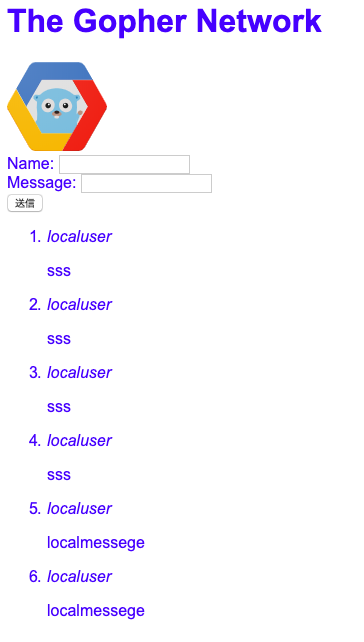
localhost:8080にアクセスすると以下の画面が表示されます。
データは、どこに登録されれいるのだろう??
アプリケーションをデプロイする
gcloud app deployアプリケーションを表示する
gcloud app browseその後、
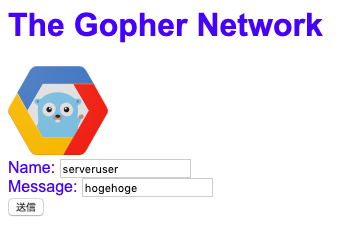
http://[YOUR_PROJECT_ID].appspot.comで、画面が表示されるかを確認します。
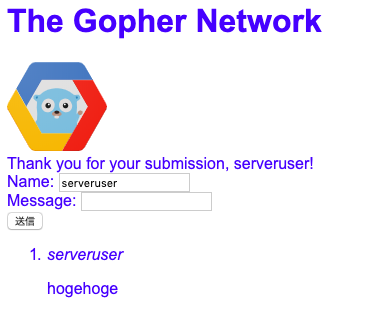
メッセージ送付後
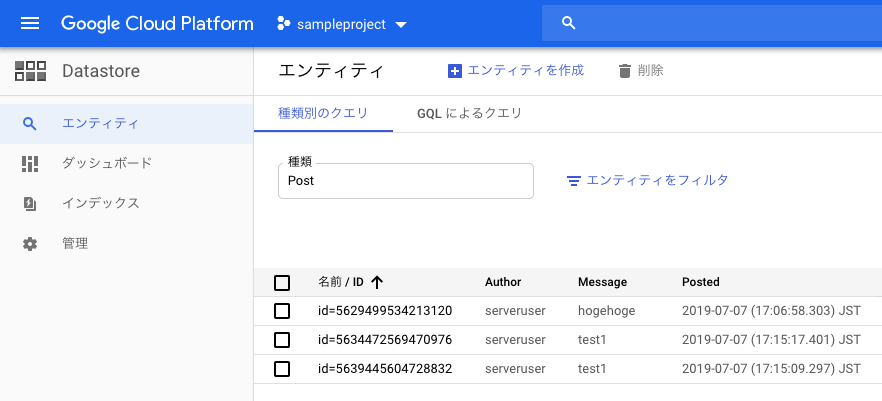
データは、Datastoreに保存されてました。
ローカル起動時のデータが何処に保存されているのか不明
参考
- 投稿日:2019-07-07T17:20:29+09:00
データの保存(GAE/Go)
はじめに
GAEをGinを利用して構築していきます。
HTML フォームデータの処理(GAE/Go)の続きです。流れは、公式サイトのデータの保存と同じです。
ソース
今回のフォルダ構成は、以下の通りです。
├── template │ └── index.html ├── static │ ├── style.css │ └── gcp-gopher.svg ├── app.yaml └── main.goapp.yamlruntime: go111 handlers: - url: /static static_dir: static - url: /.* script: autostyle.cssbody { font-family: Arial, sans-serif; color: blue; }Ginを利用しており、GETメソッドと POSTメソッドで呼び出すハンドラーを分けています。
main.gopackage main import ( "fmt" "net/http" "time" "github.com/gin-gonic/gin" "google.golang.org/appengine" "google.golang.org/appengine/datastore" "google.golang.org/appengine/log" ) type Post struct { Author string Message string Posted time.Time } type templateParams struct { Notice string Name string Message string Posts []Post } func main() { router := gin.Default() router.LoadHTMLGlob("template/*") // 事前にテンプレートをロード(相対パス) router.GET("/", indexGetHandle) router.POST("/", indexPostHandle) http.Handle("/", router) // router.Run(":8080")の代わり appengine.Main() // これがないと動かない } func indexGetHandle(c *gin.Context) { ctx := appengine.NewContext(c.Request) params := templateParams{} q := datastore.NewQuery("Post").Order("-Posted").Limit(20) if _, err := q.GetAll(ctx, ¶ms.Posts); err != nil { log.Errorf(ctx, "Getting posts: %v", err) params.Notice = "Couldn't get latest posts. Refresh?" c.HTML(http.StatusInternalServerError, "top/index", gin.H{ "params": params, }) return } c.HTML(http.StatusOK, "top/index", gin.H{ "params": params, }) } func indexPostHandle(c *gin.Context) { ctx := appengine.NewContext(c.Request) params := templateParams{} post := Post{ Author: c.PostForm("name"), Message: c.PostForm("message"), Posted: time.Now(), } if post.Author == "" { post.Author = "Anonymous Gopher" } params.Name = post.Author if post.Message == "" { params.Notice = "No message provided" c.HTML(http.StatusBadRequest, "top/index", gin.H{ "params": params, }) return } key := datastore.NewIncompleteKey(ctx, "Post", nil) if _, err := datastore.Put(ctx, key, &post); err != nil { log.Errorf(ctx, "datastore.Put: %v", err) params.Notice = "Couldn't add new post. Try again?" params.Message = post.Message // Preserve their message so they can try again. c.HTML(http.StatusInternalServerError, "top/index", gin.H{ "params": params, }) return } params.Posts = append([]Post{post}, params.Posts...) params.Notice = fmt.Sprintf("Thank you for your submission, %s!", post.Author) c.HTML(http.StatusOK, "top/index", gin.H{ "params": params, }) }変数指定で、「.params」がないと動作しませんでした。
template/index.html{{ define "top/index" }} {{ define "top/index" }} <!doctype html> <html> <head> <title>The Gopher Network</title> <link rel="stylesheet" type="text/css" href="/static/style.css"> </head> <body> <h1>The Gopher Network</h1> <img id="logo" src="/static/gcp-gopher.svg" width="100"> {{with .params.Notice}}<div id="notice">{{.}}</div>{{end}} <form action="/" method="post"> <div>Name: <input name="name" value="{{.params.Name}}"></div> <div>Message: <input name="message"></div> <input type="submit"> </form> {{with .params.Posts}} <ol> {{range . }} <li><cite>{{.Author}}</cite><p>{{.Message}}</p></li> {{end}} </ol> {{end}} </body> </html> {{ end }}ローカルで実行
dev_appserver.py app.yaml
localhost:8080にアクセスすると以下の画面が表示されます。
データは、どこに登録されれいるのだろう??
アプリケーションをデプロイする
gcloud app deployアプリケーションを表示する
gcloud app browseその後、
http://[YOUR_PROJECT_ID].appspot.comで、画面が表示されるかを確認します。
メッセージ送付後
データは、Datastoreに保存されてました。
ローカル起動時のデータが何処に保存されているのか不明
参考
- 投稿日:2019-07-07T16:04:21+09:00
HTML フォームデータの処理(GAE/Go/Gin)
はじめに
GAEをGinを利用して構築していきます。
静的コンテンツの配信(GAE/Go/Gin)の続きです。流れは、公式サイトのHTML フォームデータの処理と同じです。
ソース
今回のフォルダ構成は、以下の通りです。
├── template │ └── index.html ├── static │ ├── style.css │ └── gcp-gopher.svg ├── app.yaml └── main.goapp.yamlruntime: go111 handlers: - url: /static static_dir: static - url: /.* script: autostyle.cssbody { font-family: Arial, sans-serif; color: blue; }Ginを利用しており、GETメソッドと POSTメソッドで呼び出すハンドラーを分けています。
main.gopackage main import ( "fmt" "net/http" "github.com/gin-gonic/gin" "google.golang.org/appengine" ) type templateParams struct { Notice string Name string } func main() { router := gin.Default() router.LoadHTMLGlob("template/*") // 事前にテンプレートをロード(相対パス) router.GET("/", indexGetHandle) router.POST("/", indexPostHandle) http.Handle("/", router) // router.Run(":8080")の代わり appengine.Main() // これがないと動かない } func indexGetHandle(c *gin.Context) { params := templateParams{} c.HTML(http.StatusOK, "top/index", gin.H{ "params": params, }) } func indexPostHandle(c *gin.Context) { params := templateParams{} name := c.PostForm("name") params.Name = name // Preserve the name field. if name == "" { name = "Anonymous Gopher" } if c.PostForm("message") == "" { params.Notice = "No message provided" c.HTML(http.StatusBadRequest, "top/index", gin.H{"params": params}) return } params.Notice = fmt.Sprintf("Thank you for your submission, %s!", name) c.HTML(http.StatusOK, "top/index", gin.H{ "params": params, }) }変数指定で、「.params」がないと動作しませんでした。
template/index.html{{ define "top/index" }} <!doctype html> <html> <head> <title>The Gopher Network</title> <link rel="stylesheet" type="text/css" href="/static/style.css"> </head> <body> <h1>The Gopher Network</h1> <img id="logo" src="/static/gcp-gopher.svg" width="100"> <!-- [START html_template] --> {{with .params.Notice}}<div id="notice">{{.}}</div>{{end}} <form action="/" method="post"> <div>Name: <input name="name" value="{{.params.Name}}"></div> <div>Message: <input name="message"></div> <input type="submit"> </form> <!-- [END html_template] --> </body> </html> {{ end }}ローカルで実行
dev_appserver.py app.yaml
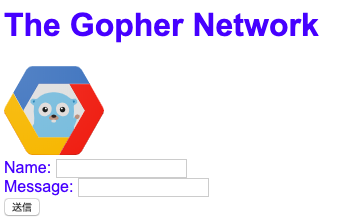
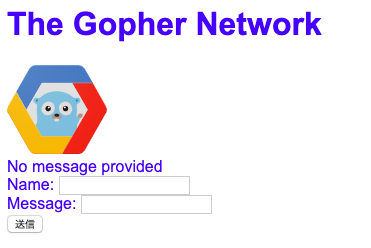
localhost:8080にアクセスすると以下の画面が表示されます。
アプリケーションをデプロイする
gcloud app deployアプリケーションを表示する
gcloud app browseその後、
http://[YOUR_PROJECT_ID].appspot.comで、画面が表示されるかを確認します。
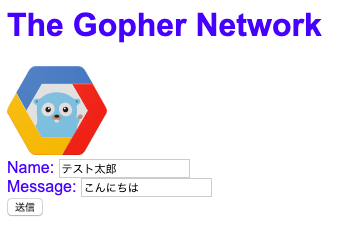
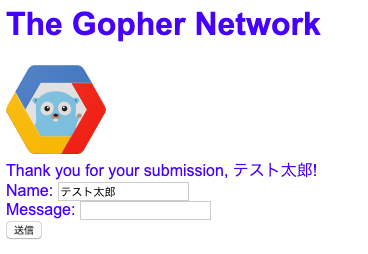
メッセージ送付後
メッセージ未入力で送付後
参考
- 投稿日:2019-07-07T16:04:21+09:00
HTML フォームデータの処理(GAE/Go)
はじめに
GAEをGinを利用して構築していきます。
静的コンテンツの配信(GAE/Go)の続きです。流れは、公式サイトのHTML フォームデータの処理と同じです。
ソース
今回のフォルダ構成は、以下の通りです。
├── template │ └── index.html ├── static │ ├── style.css │ └── gcp-gopher.svg ├── app.yaml └── main.goapp.yamlruntime: go111 handlers: - url: /static static_dir: static - url: /.* script: autostyle.cssbody { font-family: Arial, sans-serif; color: blue; }Ginを利用しており、GETメソッドと POSTメソッドで呼び出すハンドラーを分けています。
main.gopackage main import ( "fmt" "net/http" "github.com/gin-gonic/gin" "google.golang.org/appengine" ) type templateParams struct { Notice string Name string } func main() { router := gin.Default() router.LoadHTMLGlob("template/*") // 事前にテンプレートをロード(相対パス) router.GET("/", indexGetHandle) router.POST("/", indexPostHandle) http.Handle("/", router) // router.Run(":8080")の代わり appengine.Main() // これがないと動かない } func indexGetHandle(c *gin.Context) { params := templateParams{} c.HTML(http.StatusOK, "top/index", gin.H{ "params": params, }) } func indexPostHandle(c *gin.Context) { params := templateParams{} name := c.PostForm("name") params.Name = name // Preserve the name field. if name == "" { name = "Anonymous Gopher" } if c.PostForm("message") == "" { params.Notice = "No message provided" c.HTML(http.StatusBadRequest, "top/index", gin.H{"params": params}) return } params.Notice = fmt.Sprintf("Thank you for your submission, %s!", name) c.HTML(http.StatusOK, "top/index", gin.H{ "params": params, }) }変数指定で、「.params」がないと動作しませんでした。
template/index.html{{ define "top/index" }} <!doctype html> <html> <head> <title>The Gopher Network</title> <link rel="stylesheet" type="text/css" href="/static/style.css"> </head> <body> <h1>The Gopher Network</h1> <img id="logo" src="/static/gcp-gopher.svg" width="100"> <!-- [START html_template] --> {{with .params.Notice}}<div id="notice">{{.}}</div>{{end}} <form action="/" method="post"> <div>Name: <input name="name" value="{{.params.Name}}"></div> <div>Message: <input name="message"></div> <input type="submit"> </form> <!-- [END html_template] --> </body> </html> {{ end }}ローカルで実行
dev_appserver.py app.yaml
localhost:8080にアクセスすると以下の画面が表示されます。
アプリケーションをデプロイする
gcloud app deployアプリケーションを表示する
gcloud app browseその後、
http://[YOUR_PROJECT_ID].appspot.comで、画面が表示されるかを確認します。
メッセージ送付後
メッセージ未入力で送付後
参考
- 投稿日:2019-07-07T15:12:54+09:00
静的コンテンツの配信(GAE/Go/Gin)
はじめに
GAEをGinを利用して構築していきます。
プロジェクトとアプリケーションの設定 (GAE/Go/Gin)の続きです。流れは、公式サイトの静的コンテンツの配信と同じです。
ソース
今回のフォルダ構成は、以下の通りです。
svgファイルは、公式サイトからダウンロードしてください。├── template │ └── index.html ├── static │ ├── style.css │ └── gcp-gopher.svg ├── app.yaml └── main.goapp.yamlruntime: go111 handlers: - url: /static static_dir: static - url: /.* script: autostyle.cssbody { font-family: Arial, sans-serif; color: blue; }main.gopackage main import ( "net/http" "github.com/gin-gonic/gin" "google.golang.org/appengine" ) func main() { router := gin.Default() router.LoadHTMLGlob("template/*") // 事前にテンプレートをロード(相対パス) router.GET("/", HelloWorld) http.Handle("/", router) // router.Run(":8080")の代わり appengine.Main() // これがないと動かない } func HelloWorld(c *gin.Context) { c.HTML(http.StatusOK, "top/hello", gin.H{ "hello": "hello, World!!", }) }template/index.html{{ define "top/hello" }} <!DOCTYPE html> <html> <head> <link rel="stylesheet" type="text/css" href="/static/style.css"> </head> <body> test <img id="logo" src="/static/gcp-gopher.svg" width="100"> <h1>{{ .hello }}</h1> </body> </html> {{ end }}ローカルで実行
dev_appserver.py app.yaml
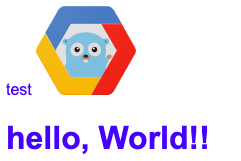
localhost:8080にアクセスすると以下の画面が表示されます。
アプリケーションをデプロイする
gcloud app deployアプリケーションを表示する
gcloud app browseその後、
http://[YOUR_PROJECT_ID].appspot.comで、画面が表示されるかを確認します。参考
- 投稿日:2019-07-07T15:12:54+09:00
静的コンテンツの配信(GAE/Go)
はじめに
GAEをGinを利用して構築していきます。
プロジェクトとアプリケーションの設定 (GAE/Gin)の続きです。流れは、公式サイトの静的コンテンツの配信と同じです。
ソース
今回のフォルダ構成は、以下の通りです。
svgファイルは、公式サイトからダウンロードしてください。├── template │ └── index.html ├── static │ ├── style.css │ └── gcp-gopher.svg ├── app.yaml └── main.goapp.yamlruntime: go111 handlers: - url: /static static_dir: static - url: /.* script: autostyle.cssbody { font-family: Arial, sans-serif; color: blue; }main.gopackage main import ( "net/http" "github.com/gin-gonic/gin" "google.golang.org/appengine" ) func main() { router := gin.Default() router.LoadHTMLGlob("template/*") // 事前にテンプレートをロード(相対パス) router.GET("/", HelloWorld) http.Handle("/", router) // router.Run(":8080")の代わり appengine.Main() // これがないと動かない } func HelloWorld(c *gin.Context) { c.HTML(http.StatusOK, "top/hello", gin.H{ "hello": "hello, World!!", }) }template/index.html{{ define "top/hello" }} <!DOCTYPE html> <html> <head> <link rel="stylesheet" type="text/css" href="/static/style.css"> </head> <body> test <img id="logo" src="/static/gcp-gopher.svg" width="100"> <h1>{{ .hello }}</h1> </body> </html> {{ end }}ローカルで実行
dev_appserver.py app.yaml
localhost:8080にアクセスすると以下の画面が表示されます。
アプリケーションをデプロイする
gcloud app deployアプリケーションを表示する
gcloud app browseその後、
http://[YOUR_PROJECT_ID].appspot.comで、画面が表示されるかを確認します。参考
- 投稿日:2019-07-07T14:04:35+09:00
プロジェクトとアプリケーションの設定 (GAE/Gin)
はじめに
GAEをGinを利用して構築していきます。
流れは、公式サイトのプロジェクトとアプリケーションの設定と同じです。環境設定(SDKのインストール)
前提
GCPのアカウント登録、GAEのプロジェクト作成、Goのインストールをしておいてください。
Goのバージョンは、1.11を利用しています。SDKのインストールは、公式サイトの支持にしたがって行います。
Google Cloud SDK のドキュメントソース
今回のフォルダ構成は、以下の通りです。
├── template │ └── index.html ├── app.yaml └── main.goapp.yamlruntime: go111 handlers: - url: /.* script: automain.gopackage main import ( "net/http" "github.com/gin-gonic/gin" "google.golang.org/appengine" ) // init は古い func main() { router := gin.Default() router.LoadHTMLGlob("template/*") // 事前にテンプレートをロード(相対パス) router.GET("/", HelloWorld) http.Handle("/", router) // router.Run(":8080")の代わり appengine.Main() // これがないと動かない } func HelloWorld(c *gin.Context) { c.HTML(http.StatusOK, "top/hello", gin.H{ "hello": "hello, World!!", }) }template/index.html{{ define "top/hello" }} <!DOCTYPE html> <html> <head> </head> <body> test <h1>{{ .hello }}</h1> </body> </html> {{ end }}ローカルで実行
dev_appserver.py app.yamlこの時、pythonが2系以外だと、以下のエラーが発生します。
ERROR: Python 3 and later is not compatible with the Google Cloud SDK. Please use Python version 2.7.x.

If you have a compatible Python interpreter installed, you can use it by setting
the CLOUDSDK_PYTHON environment variable to point to it.
2系と3系の共存は、以下のサイトを参考にしました。
Python 2系と3系の共存
localhost:8080にアクセスすると以下の画面が表示されます。
アプリケーションをデプロイする
gcloud app deploy以下のエラーが発生した場合、SDKの初期化がされていませんので、初期化を行います。
ERROR: (gcloud.app.deploy) INTERNAL: Internal error encountered.SDKの初期化
gcloud init3回ほど質問されるが、基本的に「1」を選択して問題ないと思います。
アプリケーションを表示する
gcloud app browse起動確認が入るので、[Y]を選択します。
その後、
http://[YOUR_PROJECT_ID].appspot.comで、画面が表示されるかを確認します。参考

- 投稿日:2019-07-07T14:04:35+09:00
プロジェクトとアプリケーションの設定 (GAE/Go/Gin)
はじめに
GAEをGinを利用して構築していきます。
流れは、公式サイトのプロジェクトとアプリケーションの設定と同じです。環境設定(SDKのインストール)
前提
GCPのアカウント登録、GAEのプロジェクト作成、Goのインストールをしておいてください。
Goのバージョンは、1.11を利用しています。SDKのインストールは、公式サイトの通りに行います。
Google Cloud SDK のドキュメントソース
今回のフォルダ構成は、以下の通りです。
├── template │ └── index.html ├── app.yaml └── main.goapp.yamlruntime: go111 handlers: - url: /.* script: automain.gopackage main import ( "net/http" "github.com/gin-gonic/gin" "google.golang.org/appengine" ) // init は古い func main() { router := gin.Default() router.LoadHTMLGlob("template/*") // 事前にテンプレートをロード(相対パス) router.GET("/", HelloWorld) http.Handle("/", router) // router.Run(":8080")の代わり appengine.Main() // これがないと動かない } func HelloWorld(c *gin.Context) { c.HTML(http.StatusOK, "top/hello", gin.H{ "hello": "hello, World!!", }) }template/index.html{{ define "top/hello" }} <!DOCTYPE html> <html> <head> </head> <body> test <h1>{{ .hello }}</h1> </body> </html> {{ end }}ローカルで実行
dev_appserver.py app.yamlこの時、pythonが2系以外だと、以下のエラーが発生します。
ERROR: Python 3 and later is not compatible with the Google Cloud SDK. Please use Python version 2.7.x.

If you have a compatible Python interpreter installed, you can use it by setting
the CLOUDSDK_PYTHON environment variable to point to it.
2系と3系の共存は、以下のサイトを参考にしました。
Python 2系と3系の共存
localhost:8080にアクセスすると以下の画面が表示されます。
アプリケーションをデプロイする
gcloud app deploy以下のエラーが発生した場合、SDKの初期化がされていませんので、初期化を行います。
ERROR: (gcloud.app.deploy) INTERNAL: Internal error encountered.SDKの初期化
gcloud init3回ほど質問されるが、基本的に「1」を選択して問題ないと思います。
アプリケーションを表示する
gcloud app browse起動確認が入るので、[Y]を選択します。
その後、
http://[YOUR_PROJECT_ID].appspot.comで、画面が表示されるかを確認します。参考
- 投稿日:2019-07-07T10:21:31+09:00
Go言語とRubyの比較【入門】①
はじめに
記念すべき初めての投稿です。初心者エンジニアです。
仕事でどちらも使用するので
Go言語とRubyの基本的なところをまとめてみようと思います。Hello World!
Rubyの場合
helloworld.rbputs "Hello World!" #=> "Hello World!"Goの場合
helloworld.gopackage main import "fmt" func main() { fmt.Println("Hello World!") } //=> "Hello World!"変数宣言
Rubyの場合
variable.rbnum = 1 name = "test" pi = 3.14 t = true f = false puts num, name, pi, t, fRuby実行結果
1
test
3.14
true
false
Goの場合
variable.gopackage main import "fmt" //基本 var ( i int = 1 s string = "test" f64 float64 = 3.14 t, f bool = true, false ) //省略型 func test() { xi := 1 xs := "test" xf64 := 3.14 xt, xf := true, false fmt.Println(xi, xs, xf64, xt, xf) } func main() { fmt.Println(i, s, f64, t, f) test() }Go実行結果
1 test 3.14 true false
1 test 3.14 true false
定数
Rubyの場合
一度定義した定数に再代入を行うと警告は出るが値は変わる。※要注意
変更を防ぐためにfreezeメソッドを使う方法はまたの機会に。const.rb# 定数は必ず大文字で始める必要あり COUNTRY = "JAPAN" # 破壊的変更 COUNTRY.downcase! # 変更されてしまう COUNTRY #=> "japan" # 再代入 COUNTRY = "SPAIN" # 警告発生するが値は変更されてしまう warning: already initialized constant COUNTRY warning: previous definition of COUNTRY was here COUNTRY #=> "SPAIN"Goの場合
Rubyと違い、定数の定義後に値を代入することはできません。
const.gopackage main import "fmt" //constキーワードを使用して定数を定義 const Pi = 3.14 //まとめて定義 const A, B, C int = 0, 1, 2 const ( Username = "test_user" Password = "test_pass" ) func main() { fmt.Println(Pi) fmt.Println(A, B, C) fmt.Println(Username, Password) fmt.Printf("%T %T %T %T %T %T", Pi, A, B, C, Username, Password) //型確認 }Go実行結果
3.14
0 1 2
test_user test_pass
float64 int int int string string
- 投稿日:2019-07-07T08:33:20+09:00
GO LIVE?► UFC 239 live
JonJones vs Santoslivestream, time
GO LIVE?► UFC 239 live
?►CLICK HERE?►
?► UFC 239 Live ?►
GO LIVE?►Jon Jones vs Thiago Santos live
Thiago Santos vs Dos Santos: There's that scoring touch. For a team with Thiago Santos vs Dos Santos vs Dos Santos fight live here america 2019 and Thiago Santos vs Dos Santos vs Dos Santos, you would expect at times the club to score more, and lately the team has. Over the last five fight live here america 2019s, four of which have been victories with one draw, Barca has averaged three goals per fight live here america 2019, boosted by the 5-0 win over Thiago Santos vs Dos Santos on june. 15. Thiago Santos vs Dos Santos vs Dos Santos has six goals in his last three Thiago Santos vs Dos Santos vs Dos Santos matches.
Thiago Santos: This club hasn't been dominant in attack at all. In fact, out of the other 19 fight live here america 2019 teams, only six teams have scored fewer, yet the club is in seventh. That's because of the defense, with Dos Santos surrendering 15 goals in 19 fight live here america 2019s, the second best mark in the league. Goalkeeper David Soria has been the main. After not playing much at Dos Santos, he made the move to Dos Santos last year and has proven to be an important piece for one of the surprises of the season.
Thiago Santos vs Thiago Santos livestream, time


